

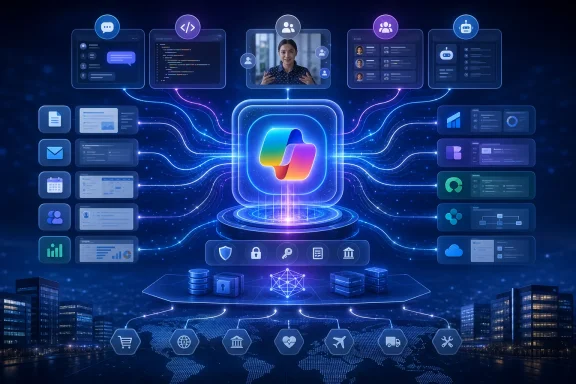
The immediate practical point for Windows and Microsoft 365 administrators is restraint: there is still no announced launch date, supported-platform list, tenant rollout plan, or definitive licensing model for the Super App. Microsoft CEO Satya Nadella said at Build on June 2 that Chat, Cowork, and Code would come together “this summer,” while GeekWire now reports the launch is expected in the coming weeks. On August 6, that leaves the product in the awkward gap between a public strategy and a deployable service.
Lamanna’s account makes clear why Microsoft thinks it needs the app. The company’s Copilot portfolio has accumulated consumer Copilot, Microsoft 365 Copilot, GitHub Copilot, Copilot Studio, Security Copilot, agents, and the newly launched Cowork service. Each has different entry points, data boundaries, purchasing paths, and administrative controls. Microsoft’s answer is to make a single Copilot surface the place users start, then route their request to the appropriate back-end service.
That is a major architectural ambition. It is also an admission that Microsoft’s earlier Copilot rollout produced a product map that customers—and often Microsoft’s own branding—struggled to explain.
Lamanna owns the platform half of the consolidation
GeekWire reports that Lamanna calls the internal sprawl “Copilot Palooza,” saying Microsoft fragmented its Copilot efforts among consumer, commercial, coding, and other products. His remedy is the Super App: one home containing Chat, Code, Cowork, and “Autopilots,” Microsoft’s term for always-on agents.
But Lamanna is not the sole executive charged with making Copilot coherent. Microsoft’s March 17 leadership announcement assigned Jacob Andreou, EVP of Copilot, responsibility for the unified consumer and commercial Copilot experience, including design, product, growth, and engineering. Lamanna, alongside Ryan Roslansky and Perry Clarke, was assigned to Microsoft 365 apps and the Copilot platform.
That division matters. Andreou’s team is responsible for whether people understand and use the front end. Lamanna’s teams have to make it capable of reaching Microsoft 365 data, Dynamics 365 records, Power Platform workflows, SharePoint sites, OneDrive files, agent tools, and external systems without turning every interaction into a permissions, cost, or latency problem.
Microsoft’s current biography for Lamanna confirms that his remit includes Copilot, Agent 365, Copilot Studio, Power Platform, Dynamics 365, SharePoint, and OneDrive. GeekWire’s description of him as part of the Copilot Leadership Team is therefore consistent with Microsoft’s organizational record, but it should not be read as a transfer of consumer-Copilot ownership away from Andreou. The Super App is being built across a deliberately split experience-and-platform structure.
Microsoft is trying to organize its management model around the product architecture it wants: a common Copilot shell above distinct context, productivity, business-data, agent, and model layers. Whether that makes the product simpler for customers is still unproven.
Work IQ is the dependency, not a cosmetic Copilot feature
The important technical element in Lamanna’s profile is Work IQ. Microsoft describes Work IQ as its workplace intelligence layer, built to supply agents with context from people, emails, documents, meetings, organizational relationships, and connected external sources. At Build, Microsoft said Work IQ APIs became generally available on June 16.
Lamanna’s description goes further: he characterizes Work IQ as a background, application-independent way to reach Microsoft 365. In that model, a user would not need to open Outlook to ask about email, SharePoint to find a document, or Dynamics 365 to retrieve customer information. Copilot would determine which intelligence layer, connector, or Model Context Protocol server to use and return the result inside its own interface.
This is the real change embedded in the Super App strategy. Office applications are not disappearing; Microsoft’s existing documentation still positions Copilot inside Word, Excel, PowerPoint, Outlook, Teams, Edge, and the Microsoft 365 Copilot app. But Microsoft is trying to make the application boundary less important for routine retrieval and delegated work.
For users, that could reduce app-switching. For administrators, it raises a less glamorous but more consequential issue: a centralized conversational interface makes existing permissions, oversharing, retention, sensitivity labels, and data-governance mistakes easier to expose at scale. Copilot can only retrieve what the signed-in identity can access, but that is not a complete safeguard when years of loosely governed SharePoint sites, mailbox permissions, and Dynamics records are suddenly queryable through a single prompt box.
Microsoft has already incorporated this concept into the existing Microsoft 365 Copilot app. Its updated chat-centered interface is rolling out broadly, with a Work IQ control that determines whether Copilot uses enterprise context. The redesigned app also adds a Tasks view for long-running agent activity and lets people pin agents, Microsoft 365 apps, and Copilot experiences in the navigation pane.
That means the Super App is unlikely to arrive as a clean break from today’s Microsoft 365 Copilot app. The current redesign looks more like its operational precursor: an app shell that combines chat, work context, agents, task tracking, and links out to familiar Office applications.
Cowork proves the business model is moving beyond per-seat licenses
Lamanna told GeekWire that the Super App itself will probably be free, while the services it exposes will not be. Microsoft has not published pricing for the Super App, so that remains an executive characterization rather than a commercial commitment. However, Microsoft’s June general-availability launch for Copilot Cowork demonstrates the pricing direction Lamanna described.
Cowork requires a Microsoft 365 Copilot User Subscription License, but its long-running tasks are billed on top through usage-based Copilot Credits. Microsoft says task costs reflect model use, context retrieval, tool calls, and runtime. Administrators can set tenant, group, and user spending limits, and Cowork access requires usage-based billing to be enabled.
The result is that the AI assistant’s visible entry point may be free or broadly available while meaningful agent work becomes metered infrastructure consumption. That is a material shift from traditional Office economics, where cost was principally tied to a named user’s subscription.
In the ordinary Microsoft 365 model, an employee opening Outlook 100 times does not create a separate compute bill. In the agent model, a Copilot that repeatedly reads mail, retrieves records, calls tools, browses, generates files, and keeps working after the user leaves may generate consumption that varies by task and by model. Lamanna’s warning of a large back-end demand surge is therefore not merely a capacity concern; it helps explain the pricing model.
Admins should treat the Super App as a potential consolidation of consumption surfaces, not as a simple new chat client. If Microsoft succeeds in placing Cowork, code execution, agent actions, and business-data access behind one interface, finance and IT teams will need cost controls that span more than one Copilot SKU.
Dynamics and Dataverse are the commercial test
The strongest incentive for Microsoft to pull users into a Copilot front door is not consumer chat. It is business data.
GeekWire reports that Lamanna expects Dynamics 365 to evolve into agents connected to Dynamics Model Context Protocol servers, and that Microsoft is testing tighter Dataverse integration with Copilot. Dataverse is the data platform underneath much of Power Platform and Dynamics 365. Bringing it directly into Copilot would let users query CRM and ERP information from the same place they ask about email, meetings, documents, and work tasks.
Microsoft has already signaled the underlying direction. Its Work IQ material says it is selecting among MCP server tools, agent flows, APIs, and plugins to let Copilot observe, retrieve, reason, and execute. The company also says broad Dataverse access through Work IQ across Microsoft 365 Copilot experiences is planned for summer 2026.
The difference between a connector and Microsoft’s proposed Super App model is control of the user journey. A connector lets Copilot retrieve data. A central Copilot surface can keep the user inside Microsoft’s AI interface while it reaches the data, invokes agents, and possibly triggers actions in Dynamics, Power Platform, Salesforce, ServiceNow, or another connected system.
That makes the Super App a strategic bid to own the working session, not merely the chat interaction. If it becomes the place where users discover data, ask for analysis, approve actions, and inspect agent work, traditional business applications risk becoming systems of record that users visit mainly for exceptions and detailed editing.
What Microsoft still has not said
Microsoft has supplied the concept and enough component parts to make the Super App believable. It has not yet supplied the operational facts that enterprise customers need before treating it as a deployment target.
The unanswered questions include whether the Super App will be a new Windows application, a replacement for or evolution of the Microsoft 365 Copilot app, a web-first experience, or a combination of all three. Microsoft has not said which functions will be available to consumer accounts versus Microsoft Entra work accounts, whether GitHub Copilot functionality will require separate entitlements, or how cross-product data boundaries will appear in the interface.
Nor has Microsoft announced the Super App’s support status for government clouds, its accessibility and device-management requirements, or whether it will create new telemetry, audit, retention, or eDiscovery considerations beyond those already attached to Copilot and Cowork. Those omissions are normal for a product that has not launched, but they are why organizations should avoid rewriting user guidance around an app that remains unnamed in official product documentation.
For now, the tangible deployment work is in the services Lamanna wants to unify: clean up Microsoft 365 permissions, decide who may use Work IQ-grounded experiences, establish Copilot Credit budgets, and identify which agents can access sensitive business systems. The Super App may eventually become the visible symbol of Microsoft’s “Copilot company” ambition. The administrative consequences are already arriving through the products underneath it.
Update: Nadella says Copilot experiences are being brought together this quarter (August 14, 2026)
According to Cloud Wars’ report on Microsoft’s Q4 2026 earnings call, CEO Satya Nadella has now described the consolidation in more explicit terms: Microsoft is bringing Chat, Cowork, Autopilot, and Code into a single flagship Copilot “super app” spanning both consumer and commercial use.
That is stronger than earlier launch-window speculation, although Microsoft still has not published a product name, availability date, licensing plan, supported platforms, or tenant-management documentation. Nadella’s wording also indicates that Code is part of the unified experience, raising additional entitlement and governance questions for organizations that use Microsoft 365 Copilot and GitHub Copilot under separate purchasing and administrative models.
For IT teams, the announcement reinforces that the coming change is intended to be a common Copilot entry point rather than merely another specialized agent interface. The deployment details that matter—identity boundaries, data access, auditability, usage-based charges, and administrative controls—remain unannounced.