
 Overview
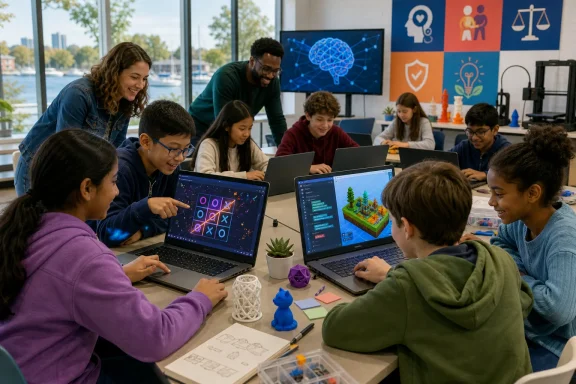
The fully booked Youth AI & 3D Tech Expo took place at Trafalgar Park Community Centre in Oakville, Ontario, bringing together young learners for an introduction to AI-assisted game creation, coding concepts, and 3D prototyping. The event was hosted by Wize Computing Academy of Oakville and supported through the Town of Oakville’s 2026 Community Activation Grant.
Ward 2 Councillor Cathy Duddeck attended to see the projects and recognize the participants. That public-facing element matters. Technology education is often discussed in abstract terms—future skills, digital transformation, workforce readiness—but the expo placed it in a community setting where students could directly test ideas rather than merely hear about them.
For Windows users, educators, and parents, the event also illustrates how quickly the personal-computing experience is changing. Tools such as Microsoft Copilot have moved artificial intelligence from specialist developer environments into everyday web browsers, apps, and Windows-connected workflows. The important question is no longer whether children will encounter generative AI. They already are. The question is whether they will learn to use it critically.
From Passive Users to Digital Creators
A major strength of the Oakville workshop was its focus on making rather than consuming. Students were not simply shown an AI chatbot or given a presentation about machine learning. They created projects, experimented with prompts, and worked with 3D concepts.
That distinction is essential. A child who only uses an AI assistant to generate an answer may come away with the mistaken impression that the system is an authority. A child who asks the same assistant to build a game, sees the result fail, adjusts the request, and tests it again gains a more realistic understanding of software: useful, flexible, imperfect, and dependent on human judgment.
The expo’s activities reportedly included:
- Building AI-assisted mini games with Microsoft Copilot
- Creating 3D prototypes
- Exploring coding and design through project-based tasks
- Learning how AI systems respond differently to changes in a prompt
- Testing a tic-tac-toe game against an AI-controlled opponent
- Receiving recognition for completing the hands-on technology activities
This is a far more productive model than treating AI literacy as a vocabulary lesson. Students learn what a prompt is by watching a result change. They learn that instructions need detail when vague wording produces vague software. They learn that a computer-generated answer can be wrong when they beat an allegedly unbeatable opponent.
Those are foundational habits for a generation that will increasingly encounter AI in school software, productivity apps, search tools, creative suites, and Windows-based development environments.
The Real Lesson Behind an “Unbeatable” Tic-Tac-Toe Game
The tic-tac-toe exercise was the clearest example of why prompt literacy must be paired with technical reasoning. Students were asked to use AI to create a version of the familiar game in which the computer could not be beaten. Some participants nevertheless managed to win.
At first glance, that could look like a simple failure by the AI tool. In reality, it is a valuable teaching moment with several layers.
Tic-Tac-Toe Is a Solved Game
Standard 3×3 tic-tac-toe is not difficult for a conventional program to play perfectly. A properly implemented game engine can evaluate the board, select optimal moves, and ensure that it either wins or draws. It does not need a large language model to do this.
That is precisely why the exercise is so useful. If students can defeat a supposedly perfect opponent, they have evidence that the final application is not necessarily using a reliable game-solving algorithm—or that its implementation is incomplete, buggy, or being overridden by other design decisions.
A robust tic-tac-toe program would normally use a deterministic method such as:
- Checking whether it can win immediately.
- Blocking an immediate winning move by the human player.
- Choosing optimal positions, such as the centre or corners.
- Evaluating all possible future moves using a technique such as minimax.
- Enforcing the game’s rules in code rather than relying on natural-language instructions.
In other words, “make the computer unbeatable” is a product requirement, not a guarantee that an AI-generated prototype has met that requirement.
Prompting Shapes the Output, but It Is Not the Whole System
The event’s lesson about prompt wording is valid: specificity can significantly affect how a generative AI system responds. Microsoft’s own guidance for Copilot emphasizes that prompts work better when they clearly state the goal, relevant context, expectations, and source material.
However, the claim that an AI bot simply behaves “exactly” according to the prompt needs qualification. That is too absolute, especially in a software-development setting.
A generative AI tool may produce code that appears plausible but contains logical mistakes. It may misunderstand how a game state is represented, omit edge cases, make inconsistent updates to the board, or create an interface that does not correctly connect to the game logic. It may also revise its own previous output in ways that introduce regressions.
For young learners, the better message is this:
Prompts influence an AI system’s response, but prompts do not eliminate the need to test, inspect, and improve the result.
That is a stronger and more durable form of AI education. It avoids the risk of suggesting that wording alone can transform a general-purpose chatbot into a mathematically verified game engine.
Why a Win Against the Computer Is Educational
The students who beat the tic-tac-toe program did not undermine the activity. They improved it.
Their victories created an immediate reason to investigate:
- Did the prompt clearly require optimal moves?
- Did the tool produce a genuine game algorithm or a simplified decision tree?
- Were there bugs in the generated JavaScript or other code?
- Did the game validate player turns correctly?
- Did the AI opponent fail to evaluate a winning threat?
- Was the project using randomness for some moves?
- Could a different prompt produce a better implementation?
- Would a conventional algorithm be more appropriate than generative AI for the core game logic?
These are not merely coding questions. They are the beginnings of AI evaluation, debugging, and computational thinking.
AI Literacy Must Mean More Than Prompting
Rimi Das, director of Wize Computing Academy of Oakville, framed the event around “learnability”—the ability to adapt as technology changes—rather than treating a narrow set of current coding skills as permanent.
That idea has real merit. The software landscape of 2026 differs dramatically from the one students encountered even a few years ago, and it will change again. Children entering technology education today may eventually work with tools, languages, interfaces, and job categories that do not yet exist.
But learnability should not become shorthand for abandoning fundamentals. The most resilient learners will combine adaptability with a working understanding of how digital systems function.
The Skills That Still Matter
Even as AI accelerates prototyping and code generation, students benefit from learning the principles beneath the tools:
- Logic: Understanding conditions, rules, loops, and outcomes
- Problem decomposition: Breaking a large task into smaller, testable parts
- Debugging: Finding why software behaves differently from the intended design
- Data awareness: Knowing what information a system uses and what it may retain
- Design thinking: Considering users, accessibility, clarity, and purpose
- Verification: Checking whether an answer, model, or program is actually correct
- Ethics: Recognizing privacy, bias, attribution, and misuse risks
- Communication: Writing precise instructions and explaining technical decisions
Prompt writing belongs on that list, but it should not replace the rest of it. The ability to ask AI for a prototype is useful. The ability to determine whether the prototype works is indispensable.
Coding Is Not Obsolete
Describing coding as a tool of a previous generation may capture the speed of change, but it risks overstating the case. Coding remains central to software development, automation, websites, games, data analysis, hardware interfaces, and enterprise systems.
What has changed is the workflow. A student can now use AI to turn an idea into a rough starting point far more quickly than before. That can lower barriers to entry and make technology feel creative rather than intimidating.
Yet the generated output still has to run, perform safely, handle unusual inputs, respect privacy, and meet a real user need. Those requirements are fulfilled through engineering judgment, not by a prompt alone.
The ideal future-facing curriculum does not force a choice between programming and AI. It teaches students to use AI as a collaborator while preserving their ability to reason independently.
Why 3D Design Belongs in an AI Workshop
The 3D component of the Oakville expo is equally significant. Artificial intelligence is often discussed as a text-based experience because chat interfaces are the most visible entry point. But the technology economy is increasingly visual, spatial, and interactive.
Students who experiment with 3D prototypes encounter concepts that have direct connections to game design, animation, product visualization, engineering, architecture, augmented reality, and digital fabrication.
More Than Making Objects Look Good
A 3D prototype requires students to think about form, scale, perspective, and usability. Even a simple object can encourage questions that connect art and engineering:
- How will a user interact with this design?
- Does the object need to be stable, symmetrical, or easy to manufacture?
- Which shapes make the design clearer or more efficient?
- How does a 2D sketch become a 3D model?
- What happens when a prototype moves from a screen into a physical object?
These are practical problem-solving habits. They also help counter a common misconception about AI and computing: that technology is solely for people who enjoy mathematics or writing code in isolation.
The combination of game creation and 3D design makes the field more inclusive because it offers multiple paths into technical work. One student may be drawn to game rules. Another may enjoy visual design. Another may focus on storytelling, sound, interfaces, or testing. A strong youth technology program provides room for all of them.
A Community Model for Technology Access
The event’s use of a municipal community grant is notable because it positions AI and digital-creation education as part of civic participation, not simply a private enrichment product.
Oakville’s Community Activation Grant program supports small-scale initiatives intended to build community connection and improve access. A youth technology expo fits that goal when it brings students together, makes emerging tools less intimidating, and creates an environment where participation is not limited to those already confident in STEM.
The fact that the expo was fully booked is also a sign of public interest. Families understand that artificial intelligence is no longer a distant issue reserved for technology companies. It appears in office software, search, photo tools, schoolwork, games, customer service, and creative platforms.
The Inclusion Challenge
Demand alone does not guarantee equitable access. Programs involving AI, laptops, design software, and 3D tools can unintentionally favour families who already have reliable devices, subscriptions, fast internet, and adults comfortable with technology.
Community-based programming can help reduce those barriers, but the design of the program matters. The strongest initiatives should provide:
- No-cost or low-cost participation where possible
- Access to required hardware and software during sessions
- Clear support for beginners
- Activities that do not assume prior coding experience
- Inclusive examples that appeal to varied interests
- Accessible materials for students with different learning needs
- Guidance for parents on safe and responsible AI use at home
The presence of a female STEM educator leading the workshop also carries value. Young people notice who is positioned as an expert. Visible role models can help challenge the lingering idea that computing belongs to a narrow demographic.
Windows, Copilot, and the New Classroom Workflow
Microsoft Copilot’s role in the workshop makes the story especially relevant to the Windows ecosystem. AI features are now woven into many Microsoft experiences, from web-based Copilot interactions to Microsoft 365 productivity workflows and Windows-adjacent creative tasks.
For students, this can make creation feel immediate. Instead of beginning with a blank page or empty code editor, they can ask for a game concept, a visual theme, a project plan, or starter code. That immediate feedback can be motivating, particularly for beginners who might otherwise be overwhelmed by syntax errors or unfamiliar tools.
The Strengths of AI-Assisted Creation
Used carefully, AI can support a youth technology workshop in several practical ways:
- It can help students turn ideas into early prototypes quickly.
- It can explain technical concepts in simpler language.
- It can offer starter code that students modify and test.
- It can suggest game mechanics, characters, themes, and design alternatives.
- It can encourage iteration by making revisions feel less intimidating.
- It can give students a way to compare vague and detailed instructions.
- It can support creativity across coding, design, writing, and presentation work.
That speed is powerful. A student who makes a playable prototype in an afternoon may become more interested in learning the underlying skills needed to improve it.
The Risks of Treating Copilot as an Oracle
The same convenience creates risks. Generative AI can make errors with confidence. It can provide code that looks polished but fails in practice. It can generate content that is inaccurate, stereotyped, copied too closely from training patterns, or inappropriate for a young audience.
For Windows and Microsoft 365 users, the broader lesson is that Copilot should be approached as a productivity aid—not as an unquestionable source of truth.
A responsible classroom or youth-program workflow should require students to:
- State the goal clearly. Define what the game or prototype should do.
- Ask for a small first version. Avoid generating an entire complex project at once.
- Run and test the result. Check that it works rather than trusting the explanation.
- Identify one problem at a time. Use errors as a starting point for investigation.
- Revise the prompt or code deliberately. Record what changed and why.
- Review privacy implications. Never enter personal, school, or family-sensitive information into public AI tools.
- Explain the finished work. Students should be able to describe their choices in their own words.
This process preserves authorship. The AI may assist, but the student remains responsible for the project.
The Privacy and Safety Requirements Cannot Be an Afterthought
Youth-focused AI events need clear guardrails, especially when participants are as young as eight. The excitement of a first AI-generated game can quickly eclipse questions about accounts, personal information, generated content, and platform policies.
Teachers, organizers, and parents should ensure that the tools selected for a workshop are suitable for the age group and are used under appropriate supervision. That means paying attention to sign-in requirements, parental-consent rules, chat history, data collection, file uploads, and the way prompts may be stored or reviewed.
Practical Safeguards for Youth AI Activities
A safe, effective workshop should make a few rules explicit from the start:
- Do not enter a student’s full name, address, school schedule, phone number, or passwords.
- Do not upload personal photos or documents unless the activity has clear authorization and safeguards.
- Treat generated images, code, and answers as drafts that require review.
- Report content that is upsetting, unsafe, discriminatory, or clearly inappropriate.
- Avoid using AI-generated content to impersonate real people.
- Keep adult supervision present when students use open-ended public AI systems.
- Discuss when a conventional tool or human expertise is the better choice.
These practices do not diminish creativity. They make creativity sustainable.
What Oakville’s Students Actually Learned
The most important outcome from the Youth AI & 3D Tech Expo may not be a particular game or prototype. It may be the realization that technology is something students can shape.
That shift is especially important in the era of generative AI. Children will often encounter polished outputs that appear effortless: an essay, image, game, animation, or answer produced in seconds. Without critical instruction, it is easy to mistake speed for understanding.
The Oakville participants were given a better model. They saw that AI responds to requests, that outputs can vary, and that a result needs to be tested. They were encouraged to build, not merely browse.
A failed “unbeatable” tic-tac-toe opponent may have taught more than a flawless demo would have. It exposed the gap between a requirement and an implementation. It showed that language matters, but also that software must be evaluated. It created a tangible reminder that the person at the keyboard still needs to think.
Conclusion
Oakville’s Youth AI & 3D Tech Expo offered a timely example of what modern technology education can look like: hands-on, creative, community-oriented, and willing to expose AI’s limitations as well as its possibilities.
The workshop’s strongest contribution was not presenting artificial intelligence as magic. It gave students a chance to see AI-assisted creation as an iterative process involving prompts, prototypes, mistakes, testing, and improvement. That is the right foundation for young people growing up with Microsoft Copilot, Windows AI features, 3D tools, and increasingly capable generative software.
The next challenge is to build on that start with sustained opportunities that teach coding fundamentals, design, privacy, verification, and responsible use alongside prompt skills. Students do not need to become passive users of AI-generated output. With the right guidance, they can become the critical, creative, and technically capable people who decide what these tools should do next.
