
The central operational lesson is sharper than the usual “enable MFA” response: an endpoint-management tenant is a high-impact recovery dependency, not merely an administration console. If a single identity can approve and execute destructive actions across the fleet, the organization has placed an unusually large share of its operational resilience behind that identity and its connected automation.
The Communications of the ACM report correctly identifies the danger of privileged automation tools being turned inward. But its claim that modern MDM platforms lack independent, action-specific human approval is already out of date for Microsoft Intune. Microsoft’s Multi Admin Approval can require a second administrator to approve device wipes, retire actions, scripts, RBAC changes, and other protected operations before Intune executes them. The problem is less that the control does not exist than that it is optional, requires careful setup, and can be undermined by exclusions or poorly designed privileged-access paths.
 Stryker’s public record leaves key technical questions unanswered
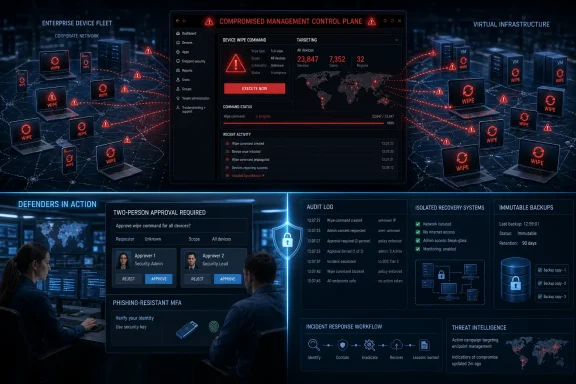
Stryker’s first SEC filing described a “global disruption” to its Microsoft environment, said the company had no indication of ransomware or malware at that stage, and warned that the full scope and business impact were unknown. A March 16 customer certification letter made the core mechanism more explicit: the threat actor used the legitimate MDM platform Microsoft Intune to wipe internal virtual infrastructure, laptops, and mobile devices.
The company later amended its disclosure on April 9. It said its initial conclusion that no malware was involved had changed in one important respect: investigators found that the attacker had used a malicious file to run commands and hide activity in Stryker’s environment, though the file was not capable of spreading inside or outside the company. That does not overturn the broader point that native management capabilities did the destructive work, but it does mean the common shorthand of “no malware” is incomplete.
There is also a significant discrepancy in the public accounting of the incident. Handala claimed more than 200,000 wiped systems and 50 TB of stolen data. Reporting by BleepingComputer and others, based on sources familiar with the attack, put the wiped-device figure nearer 80,000. Stryker has confirmed neither figure, has not publicly described the identity-compromise path, and has not stated how many Windows endpoints, servers, personal devices, or other enrolled assets were affected.
That missing detail matters. Microsoft’s current Intune documentation says an administrator using the standard bulk-device-action interface can select up to 100 devices at a time. A destructive event reportedly measured in tens of thousands of systems therefore appears likely to have involved automation, repeated actions, a separate management workflow, or capabilities not reflected in the ordinary portal workflow. Stryker has not published enough technical detail to establish which of those possibilities occurred.
Intune already has a two-person control for wipes
Microsoft’s Multi Admin Approval, or MAA, is the direct answer to a compromised Intune administrator initiating a mass wipe. An organization can create an access policy for Device actions, assign a separate approval group, and require a second authorized administrator to approve the request. The administrator who submits the request cannot approve it themselves; even requests submitted by Global Administrators or Intune Administrators require another administrator’s approval.
This is not a vague “four-eyes” policy written into an incident-response plan. It is an enforcement feature within Intune that can cover remote wipe, retire, and delete actions. After an approver accepts a request, the original requester must still select Complete to initiate the change. That gives defenders two distinct audit points: the initial request and the final execution.
Microsoft had already introduced Multi Admin Approval before the Stryker incident. Its February 2026 Intune update described MAA requests as one of the core workflows brought into the centralized Admin Tasks experience, while later service releases expanded the kinds of policies protected by the feature. The capability was therefore not a post-incident invention; it was a control tenants had to consciously configure around their most dangerous permissions.
The ACM article’s recommendation for M-of-N authorization remains sound, but Windows administrators should not wait for a new MDM design to begin applying it. The immediate task is to confirm that Intune’s existing MAA protection covers device actions in the tenant, rather than assuming a second administrator would be asked by default. It is not.
Multi Admin Approval is valuable, but it is not a magic interlock
MAA can reduce the chance that one hijacked account turns into an enterprise-wide wipe, yet implementation details can create holes large enough to matter. Microsoft permits organizations to exclude enterprise applications from MAA enforcement for application-authenticated calls. Microsoft’s documentation explicitly warns that an excluded app can modify the protected resource type without using the approval workflow.
That makes every exclusion a privileged exception that needs the same review as a break-glass account. Intune’s own warning is unambiguous: if an excluded application is compromised, the exclusion creates an exploitable gap in the approval process. A tenant using automation for asset lifecycle, provisioning, or offboarding should inventory service principals and app registrations that can call Microsoft Graph or other management APIs, determine what device actions they can perform, and keep their permissions narrowly bounded.
MAA also carries operational friction that organizations should plan for rather than discover during an emergency. Intune does not send automatic notifications when a new approval request arrives or its status changes. Microsoft advises administrators to contact known approvers for urgent requests, and unprocessed requests expire after three days. That makes MAA a good preventive control, but not a substitute for a staffed approval rotation, tested emergency procedures, and separate break-glass access that cannot casually bypass the policy.
The practical design is to split normal response actions from irreversible destructive actions. A suspicious endpoint can be isolated through Microsoft Defender, have access revoked through Conditional Access, or be removed from sensitive network segments without immediately factory-resetting it. A global wipe should be rare enough that a second independent administrator, a written justification, and a review of scope are acceptable costs.
Detection has to move up to the control plane
The report is also right that endpoint detection and response will often see little of the decisive action. If an attacker signs in using a valid administrative account and Intune issues a legitimate wipe command, the signal originates in the management plane. The endpoint may simply receive an authorized instruction and comply.
For Windows environments, that means security operations teams need to treat Intune audit logs, Microsoft Entra sign-in logs, privileged-role changes, app-consent events, and Microsoft Graph activity as frontline detection sources. A burst of remote wipe requests, creation of a privileged approval group, changes to an MAA policy, creation of a new enterprise app exclusion, or a newly authorized application with device-management permissions should trigger an investigation before endpoint telemetry becomes relevant.
CISA’s post-Stryker warning focused on hardening endpoint-management systems: applying least privilege through Intune RBAC, using phishing-resistant multifactor authentication for privileged operations, monitoring administrative activity, and requiring multi-admin approval for sensitive changes. The agency’s intervention is consequential because it frames the problem as more than a single company’s breach. Endpoint-management systems are now being targeted as centralized command channels.
Organizations should also separate Intune administration from everyday Microsoft 365 work. Privileged Intune roles should be assigned through just-in-time access where possible, protected by phishing-resistant authentication, limited to hardened administrative workstations, and restricted to approved locations or network paths. Global Administrator should not be the routine role used to manage devices; Intune’s own RBAC model exists so that device operators do not need tenant-wide authority.
Recovery planning must assume the management plane is unavailable
A remote wipe attack turns endpoint recovery into a capacity problem. The technical ability to rebuild a Windows device is not the same as the ability to rebuild 5,000 devices across multiple countries while the identity system, software distribution channels, help desk, VPN, and internal applications are under stress.
Autopilot, configuration baselines, application packaging, Windows deployment images, certificates, and device inventory should be recoverable from an administrative boundary separate from the primary management tenant. If the only copy of deployment logic, BitLocker recovery information, app packages, and endpoint inventory is reachable through the compromised control plane, rebuilding the fleet becomes dependent on restoring the same system that issued the destructive command.
Backups need the same scrutiny. Immutable storage protects backup data from routine deletion, but it does not guarantee a quick restoration when the organization has lost identity services, network connectivity, or large portions of its endpoint estate. Test how long it takes to restore a representative Windows device, re-enroll it, apply security controls, install line-of-business software, and return it to a working user. Then multiply that workflow by the number of devices that could be affected by a privileged Intune role.
Stryker’s incident has made the management plane part of the threat model in a way many Windows teams can no longer treat as theoretical. The concrete next step is to open Intune, review every role capable of device actions, enable Multi Admin Approval for wipes and role changes, audit application exclusions, and verify that recovery can proceed even when the primary tenant is the thing that has been compromised.