
The conventional Photos viewer has shed prominent shortcuts for Designer, Clipchamp, OneDrive, and Bing visual search. For anyone who uses Photos chiefly to open an image, make a quick crop, print it, or copy a file path, that change is more significant than the restrained release notes make it sound. It restores a measure of focus to an app that had increasingly become an entry point for adjacent Microsoft services.
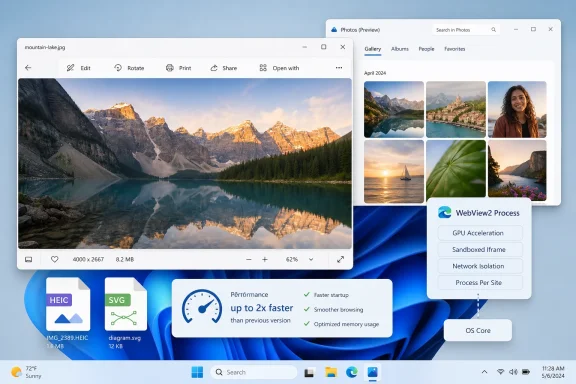
Microsoft’s own Insider release notes confirm the broader picture: version 2026.11070.23001.0 brings a refreshed photo-viewer design, richer file information, native-format HEIC saving after edits, SVG viewing support, and faster opening and viewing. The separate Photos (Preview) app is also officially listed as a new gallery experience in the app list, with Microsoft asking Insiders to submit feedback directly inside it.
The tension is obvious. One part of the update removes distractions from the established app; another adds another photo library surface to Windows 11.
 The Viewer Finally Puts the Picture First
The most immediately visible change is the toolbar cleanup. Previous Photos builds placed extra destinations alongside core actions: Microsoft Designer for AI-assisted edits, Clipchamp for video work, and OneDrive-related shortcuts all competed with basic commands such as Edit, Print, Share, Rotate, and Delete.
In the revised viewer, that visual noise is gone. The remaining buttons are closer to what a photo viewer needs: edit, rotate, delete, print, share, an overflow menu, and Open with. Designer has not disappeared from Microsoft Photos altogether, but moving AI editing deeper into the workflow is a more defensible design than reserving permanent space for an optional service.
The right-click menu has undergone a similar cleanup. “Edit with Designer,” “Create a video with Microsoft Clipchamp,” and Bing visual search were previously intermingled with routine file operations. The revised menu focuses on commands administrators and power users are more likely to expect: Save as, Open with, Copy as path, Resize image, Set as, Show filmstrip, and Start slideshow.
That is not merely cosmetic. Context menus are high-frequency interaction points. Each unrelated action increases scanning time, and any shell-adjacent menu that hesitates before appearing feels broken no matter how capable the underlying app may be. The shorter menu appears noticeably faster in testing, though Microsoft’s public release note stops short of making a specific claim about context-menu responsiveness.
The cleanup also fits Microsoft’s public quality messaging from earlier this year. Windows chief Pavan Davuluri said in March that the company intended to reduce unnecessary Copilot entry points across Windows experiences. Photos had already lost its dedicated Ask Copilot button; this build carries that philosophy further by making promotional and companion-service hooks less dominant in a basic viewer.
Performance Gains Have a Real Architectural Backstory
Microsoft says Photos now opens and displays images faster. The app’s in-product notes attribute roughly a 2.1-times improvement in viewer load time to a Windows App SDK multi-process architecture. That particular figure should be treated as an app-team measurement rather than a broadly reproducible promise, since photo size, storage speed, codecs, system memory, and collection size all influence perceived launch speed.
Still, the direction is credible. Microsoft moved Photos from UWP to Windows App SDK in 2024, specifically to use more capable Win32 file APIs while retaining a WinUI-based interface. The company said the old UWP architecture could be far slower when traversing very large libraries, while the newer platform reduced complexity around the service process previously needed for some operations.
That history matters because “multi-process” is not automatically synonymous with “heavy.” Native Windows applications can divide tasks across processes for reliability, isolation, or responsive UI behavior. Microsoft had already described plans to use separate processes per Photos window, borrowing a resilience pattern familiar to Chromium browsers. A process boundary can protect one problematic window or task from taking down the whole application.
For Photos users, the practical test is straightforward: the app should display a local JPEG, HEIC, PNG, or SVG promptly without becoming a launcher for other products. If the new architecture delivers faster image opening and smoother zooming while preserving that simplicity, it is the sort of under-the-hood work Windows 11 needs more of.
The file-handling additions also have value beyond casual viewing. HEIC editing that preserves the original HEIC format avoids an unnecessary format conversion for photos captured on newer phones. SVG support eliminates another needless trip to a browser or specialist editor for basic viewing. The refreshed info pane, meanwhile, exposes more useful metadata and quick actions such as Resize Image, Copy Path, Visual Search, and Open Location.
For IT staff, Copy Path and Open Location are particularly sensible additions. They make it easier to identify a file’s source and jump back into File Explorer without treating the gallery as an opaque destination. New controls for importing media from connected devices should likewise give users more say over when a phone, camera, or removable device starts feeding material into Photos.
Photos (Preview) Risks Recreating the Problem Elsewhere
The complication is Photos (Preview), a new separate app that appears in Start’s app list with Gallery, People, Albums, and Favorites sections. Microsoft describes it only as a new photo gallery experience and explicitly labels it a preview. That framing leaves important questions unanswered: whether it is intended to become the eventual main gallery, a OneDrive companion, a testbed for a future Photos redesign, or simply a parallel experiment.
The preview app is being installed alongside the primary Photos app and resembles the previously covered OneDrive Photos experience. In its hands-on testing, the publication found Photos (Preview) running through Microsoft Edge WebView2 processes in Task Manager, with navigation that includes Moments, Gallery, People, Albums, Favorites, and This PC.
That observation does not mean WebView2 is inherently inappropriate inside Windows software. Microsoft itself has documented that the primary Photos app uses WebView2 for parts of its cross-platform image editor, including features that benefit from WebGL rendering and the sharing of image data between native and web layers. WebView2 is a component model, not a verdict on an entire application.
But the distinction is central here. Using a web-based component for a specialised editor is different from shipping a separate, web-backed gallery shell that duplicates core browsing functions. The former can be an engineering tradeoff made for shared tooling. The latter risks becoming a second app to maintain, another process group to troubleshoot, and another unclear destination for users who simply want to find their pictures.
For Windows enthusiasts, that duplication is a familiar pain point. Windows 11 already has File Explorer Gallery, the Photos library, OneDrive’s photo views, the Windows Media Player library model, and third-party cloud clients that all surface media in different ways. A new gallery should therefore have a sharply defined benefit, not merely a slightly different sidebar.
The preview app’s presence is also awkward because Microsoft’s design work in the main viewer demonstrates that the company understands the complaint. Users do not want every image open action to be a funnel toward creative subscriptions, cloud storage, AI services, or a competing media hub. They want a fast local viewer that respects file associations and stays out of the way.
WebView2 Is Not the Core Objection; Duplication Is
It would be simplistic to argue that every WebView2 process is wasted overhead. Modern Windows software often uses web technologies where they make development, service integration, rendering, or cross-platform feature delivery practical. The real question is whether the resulting experience earns its resource use and complexity.
A preview gallery could earn that place if it solves problems the current Photos app does not: better handling for enormous libraries, substantially stronger offline indexing, clearer separation of local and OneDrive content, reliable people recognition with transparent privacy controls, or a more manageable import and backup workflow. It could also serve as a safe experimental branch before changes reach the inbox app used by millions of Windows customers.
At the moment, however, Microsoft has not publicly explained that product boundary. The official release notes say only that Photos (Preview) is available and that feedback is wanted. A near-duplicate gallery appears to be built atop WebView2 and overlaps heavily with the OneDrive photo experience. Until Microsoft describes a clearer destination, skepticism is reasonable.
That ambiguity carries operational consequences. Help desks may receive tickets from users wondering why they have two photo apps, which one owns default file associations, why their album view does not match another view, or why a newly installed gallery appears after an Insider update. Administrators testing Experimental builds should inventory the package behavior before assuming Photos (Preview) is a replacement for the existing Microsoft Photos app.
The good news is that the product remains experimental. Microsoft is explicitly soliciting feedback, and there is still time to fold the useful pieces into the established Photos app, clarify its relationship with OneDrive, or discontinue the experiment if it proves redundant. The main Photos update shows that reducing clutter and prioritizing common actions can make an inbox app feel better without inventing a new category.
Microsoft’s next decision should be simple: keep the lean viewer lean, and make Photos (Preview) justify its place before a temporary experiment turns into another permanent layer of Windows 11 photo management.
