
The practical effect is narrower than the wording may initially suggest: this is an interface and workflow-consistency update, not a new room resource system, new licensing entitlement, or replacement for Exchange Online room mailboxes. Organizations that already use Microsoft Places should expect users to encounter a more consistent process when moving between reserving a meeting room and reserving a desk.
Microsoft lists general availability as June 2026, even though the roadmap item was last updated on August 19, 2026. That dates discrepancy is worth noting for administrators tracking rollout status: the August update appears to be a refreshed roadmap record for a feature Microsoft considers already delivered, rather than notice of a new August deployment.
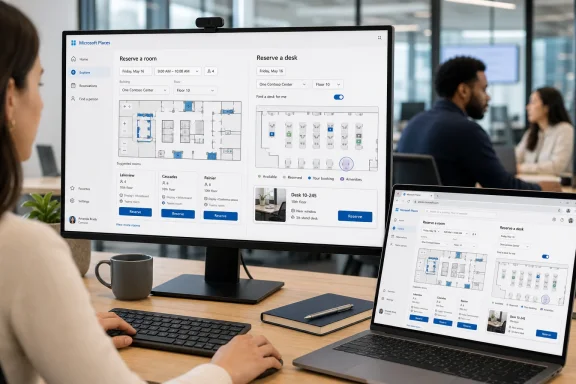 The room and desk experiences are converging
Microsoft Places is the company’s hybrid-workplace layer for finding rooms, workspaces, and individual desks across Outlook, Teams, and the Places app. Microsoft’s Places documentation describes room and workspace booking as core capabilities, while individual desk booking is treated differently because it depends on how desks are configured and, in many cases, licensed.
The new roadmap entry says the room experience is being aligned with the desk-booking flow and visuals. Microsoft has not published a detailed changelog, screenshots, or a list of altered controls with the entry, so IT teams should not infer changes to booking policy, capacity enforcement, resource permissions, or Exchange calendar processing from the UI refresh alone.
That distinction matters in environments where room and desk booking are managed by different teams. Facilities may own floor plans and desk inventory, while Exchange administrators manage room mailboxes, booking delegates, scheduling limits, and resource policies. A unified front end can make those systems feel like one product to users, but it does not erase the separate configuration work underneath.
Places depends on location data that many tenants still lack
Microsoft’s own deployment documentation makes clear that Places works best when buildings, floors, rooms, workspaces, and desks are represented in a usable hierarchy. Places finder can use Exchange Online room and workspace data, but its richer experience relies on building and floor information as well as metadata such as capacity, accessibility, video, audio, displays, and Teams Rooms support.
For established tenants, the new room-booking visuals will therefore be most useful where the underlying data is complete. A newly standardized reservation screen cannot compensate for rooms that have incomplete capacity values, stale equipment attributes, duplicated locations, or missing building associations. If users cannot find the right room, the issue is likely to remain resource data and Places configuration rather than the redesigned booking flow.
Microsoft has recently made Places finder more prominent. Its documentation says that tenants onboarded on or after August 1, 2026 have Places finder enabled by default, while earlier tenants that already use Room Lists generally remain on an opt-in model. Microsoft is also evaluating retirement of the older Room finder experience and recommends adoption of Places finder to reduce later migration work.
That puts Roadmap ID 547829 in a broader transition: Microsoft is standardizing how users discover and reserve physical workplace resources while gradually moving tenants away from the Room List-centric model historically used by Outlook. The revised room-booking experience is a small part of that direction, but it is also a signal that Places—not classic Room finder—is where Microsoft is concentrating feature work.
No evidence of a policy or license change
Administrators do not need to revise room mailbox settings solely because this roadmap item has launched. Microsoft’s Places overview continues to say that users can book rooms and workspaces without an additional space license. Space licensing is relevant for features such as room or desk autorelease and occupancy reporting, and for individual desk booking under Microsoft’s newer per-space model.
The distinction is important because Microsoft changed its Places licensing rules earlier in 2026. Individual desk booking shifted away from a straightforward Teams Premium user entitlement toward Microsoft Teams Shared Space licensing for the reservable desk itself, subject to a transition period for some existing Teams Premium customers. That licensing transition is separate from the redesigned room-booking experience.
Likewise, this announcement does not say that Copilot room booking has become available to more users. Microsoft documents Copilot room-booking capabilities separately and ties them to Microsoft 365 Copilot licensing. A consistent Places interface should not be mistaken for AI-assisted recommendations, automatic room rebooking, or a change to how Copilot handles meeting-room selection.
The roadmap entry is also limited to the Worldwide standard multi-tenant cloud. It does not list government clouds or sovereign environments. Organizations operating in GCC, GCC High, DoD, or other specialized Microsoft 365 environments should not assume matching availability based on this public-roadmap status.
What administrators should validate
The update itself should require no deployment project, but it gives workplace-services and messaging teams a sensible reason to test the end-user path rather than merely confirm that a room can be booked.
- Confirm that a room selected through Places shows the expected location, capacity, equipment, and accessibility details before users rely on the new interface for daily bookings.
- Review whether buildings and floors are properly configured, especially if the organization plans to enable Places finder for users still relying on Outlook Room Lists.
- Check whether booking behavior remains correct for rooms with delegates, approval requirements, restricted booking windows, capacity limits, or custom Exchange calendar-processing rules.
- Separate room-booking expectations from desk-booking expectations when communicating with staff, because individual desks can carry different configuration and licensing prerequisites.
- Pilot Places finder with a defined user group if the tenant predates August 1, 2026 and has not yet enabled it broadly.
Microsoft’s announcement leaves out one operationally useful detail: it does not identify the specific client versions or Places app builds that received the revised room flow. Since the roadmap record is already marked launched, organizations should treat the change as a service-side experience update and verify it in their own desktop and web clients rather than wait for a conventional Windows update, Teams build, or Outlook build number.
For users, the immediate consequence is simple: room selection in Places should look and behave more like desk selection. For administrators, the larger consequence is that Microsoft continues to make the Places data model, Places finder, and the transition away from classic Room finder more consequential than the interface update itself.