
That distinction is buried beneath a broad support page that tells Windows 10 and Windows 11 users they can view and clear Bing searches, Edge browsing, location, media, app and service activity, and voice data. Microsoft’s more specific documentation on voice data makes the limitation plain: recordings associated with an account before October 30, 2020 can remain visible for as long as Microsoft retains them; later contributed clips cannot be retrieved through the account dashboard because they are no longer linked to that account.
The practical result is straightforward. Clearing the Privacy Dashboard can remove activity Microsoft has tied to a Microsoft account, but a clean voice-data page is not evidence that no audio has reached Microsoft’s cloud speech services.
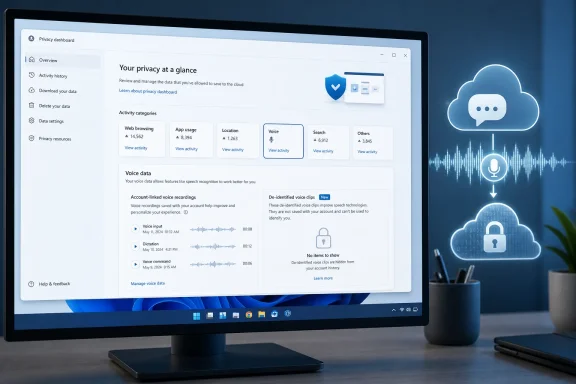 The “new” voice-data notice describes a 2020 policy change
Microsoft’s Privacy Dashboard support page carries a notice that it is “updating” how it asks permission to use voice data for speech-recognition improvements. Its companion voice-privacy page supplies the key date: Microsoft says it stopped logging voice data for human sampling and product improvement on October 30, 2020, until a user gave specific permission to contribute voice clips.
Microsoft News described the same policy rollout in late 2020. The company said it would introduce product-by-product consent controls for services including Windows, Microsoft Translator, SwiftKey, Cortana, HoloLens, Mixed Reality, and Skype voice translation. The point of the change was not to end cloud speech recognition. It was to separate ordinary service operation from a separate decision to let Microsoft use clips to train and improve speech-recognition models.
The support article’s present-tense wording therefore risks making a six-year-old operational change sound like a newly introduced dashboard feature. Microsoft’s current documentation does not identify a new rollout date, a new Windows build, or a newly affected set of customers. What it does provide is an important explanation for a common dashboard surprise: recent voice clips are expected to be absent.
Voice recognition, voice activation, and model training are different controls
Windows users should not treat the Speech settings page as one all-purpose microphone switch. Microsoft separates at least three different functions that can involve spoken input.
First, an app needs microphone permission to access the audio device. Second, Windows can permit or block voice activation, which lets supported apps listen for a keyword and, depending on the setting, may work while the PC is locked. Third, Online speech recognition allows Windows and compatible apps to use Microsoft’s cloud-based speech services.
Microsoft’s current Windows privacy guidance says device-based speech recognition runs locally and does not send voice data to Microsoft. Online speech recognition uses cloud services to produce text transcriptions; disabling it leaves only device-based features, such as Narrator, available where applicable.
A fourth choice is narrower: contributing clips so Microsoft can sample them for human review and speech-model improvement. Microsoft says a person will not listen to recordings for improvement without that explicit permission. Users can continue using voice-enabled products without agreeing to donate clips for that purpose.
Those distinctions matter when auditing a PC. Turning off a microphone permission can block a particular app. Disabling voice activation changes wake-word behavior. Turning off Online speech recognition stops cloud recognition. Opting out of voice-clip contribution addresses whether Microsoft may retain and sample contributed recordings to improve the underlying service. They are related settings, but they do not do the same job.
What the dashboard can actually clear
The Privacy Dashboard remains the account-level place to review and clear several categories of Microsoft-held activity. Microsoft says this can include Bing and Cortana searches, Edge browsing activity, location, media, and app and service activity, provided the relevant product, account, and collection settings support it.
For voice data, the dashboard can still show recordings collected before October 30, 2020 that Microsoft linked to a signed-in Microsoft account. Clearing that entry removes the audio recordings shown there, according to Microsoft. The company also warns that deleting voice activity may not erase all information associated with voice activity; users should separately review activity history such as browsing and search data.
Microsoft’s general dashboard guidance also says that after a user clears data, it deletes the data from the dashboard and begins removing it from its systems. That wording is materially different from an immediate, externally verifiable deletion guarantee. It does not state a specific back-end deletion deadline on the dashboard page, and it does not turn dashboard deletion into a universal purge of data that was never account-linked in the first place.
For users who want to reduce account-linked records, the sensible sequence is:
- Review the Privacy Dashboard’s activity categories rather than deleting only the voice entry.
- Clear browser cookies separately if the goal includes browser-stored activity, since Microsoft says dashboard deletion does not replace clearing cookies in Edge or another browser.
- Check Windows Speech settings separately from the dashboard to decide whether cloud speech recognition should be available on that device.
- Review microphone and voice-activation permissions app by app, especially on shared or portable PCs.
The dashboard also cannot explain every missing record
Microsoft lists several reasons expected activity may not appear: the user may not have signed in with a Microsoft account, may have cleared data and disabled collection, may be using an unsupported service or region, or the data may simply not be available for dashboard display. Some categories are also withheld because disclosure could affect other people’s rights and freedoms, or because laws restrict their release.
The voice-data design adds another reason: nonappearance can be intentional. A recording contributed after the 2020 consent redesign may have been de-identified before storage, leaving it outside an account dashboard designed around account-associated records.
Microsoft says de-identified contributed clips are stored on encrypted servers for up to two years. If a clip is selected for human review, the company says it may keep the clip longer for continued model training. Microsoft also says employees and vendors working on its behalf can review opted-in clips, subject to de-identification measures, nondisclosure obligations, and internal privacy requirements.
That is a privacy control, but it has a trade-off: removing the account identifier prevents the customer dashboard from functioning as a searchable, item-by-item deletion interface for newer clips. The account holder can control future contribution through product settings, while the dashboard remains mainly a tool for older account-linked recordings and adjacent activity.
Windows administrators should separate account privacy from device policy
For managed Windows fleets, the Privacy Dashboard is primarily a consumer account tool, not a compliance console. It does not show whether an employee used local or cloud recognition on a given PC, whether an app received microphone access, or whether a voice-activation capability is permitted by device policy.
Microsoft’s Windows policy documentation provides separate management controls for online speech recognition and app voice activation. Organizations that need a restrictive posture should configure the applicable Windows privacy policies and app permissions rather than assuming a user’s dashboard review represents a device-wide control.
The current support pages also preserve an older mix of instructions, including references to legacy Edge and Internet Explorer on the general dashboard article. Windows 11 users should follow the newer path in Microsoft’s speech guidance: Settings > Privacy & security > Speech. The specific voice-data page, rather than the general dashboard overview, is the more reliable guide to why modern voice clips may be invisible.
The key consequence is that the Privacy Dashboard should be treated as an account-history and deletion tool with defined blind spots. It can help clean up legacy recordings and linked activity, but users who want to control future voice processing need to make that decision in Windows and product-level speech settings—not by waiting for a new clip to appear on the dashboard.
