
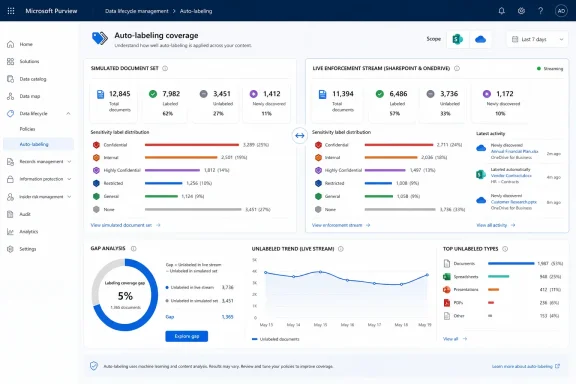
According to Microsoft’s roadmap entry published on August 7, the report will show volumes of files labeled or still unlabeled during enforcement, then separate them by whether they were present in the latest simulation snapshot. That comparison is more useful than a plain labeled-item count because it identifies the delta between what was tested and what the production policy actually encountered.
The feature is listed as in development for Microsoft Purview on the web, with both Preview and General Availability dates currently set to September 2026 for worldwide standard multi-tenant tenants. Microsoft’s roadmap dates are estimates rather than release commitments, and the company has not yet published a technical rollout note describing the report’s interface, data-retention period, licensing requirements, or whether the preview and GA entries will reach the same tenants simultaneously.
 The report closes a gap between simulation and enforcement
Purview auto-labeling policies are designed to be simulated before they are turned on. Microsoft’s documentation describes simulation as a WhatIf-style evaluation of a particular data state: admins run the policy, inspect matched items, tune rules to reduce false positives, and then deploy the policy to production.
That workflow sounds orderly until the policy crosses into enforcement. Documents can be created, edited, moved, deleted, newly discovered, or placed in scope after the simulation completed. A file that was absent from the snapshot may be correctly labeled in production; conversely, a simulated match may no longer qualify once the policy runs for real.
Microsoft already warns that simulation results can differ from enforced results. Multiple active auto-labeling policies can resolve conflicts differently when running together than a single-policy simulation predicts. Microsoft also notes that auto-labeling evaluates certain sensitive information types only for content created or modified after those types were created or changed. Exchange results are even less stable as a simulation baseline because the service evaluates mail sent and received during the simulation window rather than the mailbox at rest.
The planned coverage report appears intended to make those differences measurable instead of leaving admins to infer them from disconnected screens. It should let a policy owner distinguish three materially different outcomes:
- Files found in the simulation and subsequently labeled during enforcement, showing the policy is acting on the expected simulated population.
- Files found in the simulation but still unlabeled, which could point to an ongoing backlog, a labeling failure, a scope change, or a conflict with another policy.
- Files processed during enforcement that were absent from the simulation snapshot, revealing how much of the policy’s real workload comes from content that changed or entered scope after testing.
That is a useful reconciliation report. It is not an accuracy score. A policy can show strong coverage against its simulation snapshot and still apply the wrong label to content if the detection rules are too broad, the sensitive information type is poorly tuned, or a competing policy changes the final outcome.
Existing Purview views show activity, but not this comparison
Microsoft Learn already documents several Purview reporting surfaces that partly overlap with Roadmap ID 568935. The Purview Reports tool includes an “Auto-labeling policy coverage” posture report in preview, while the Auto-labeling policy pages expose policy-level labeling activity for enforced SharePoint and OneDrive policies.
Those existing policy pages show labeled and failed file counts, activity trends, frequently applied labels, top sites, and a sample of successful or failed items. Microsoft says most data on the review pages reflects the previous 30 days. The service also exposes labeling-progress information, including files awaiting labeling and recent affected-file counts, although the aggregate progress data refreshes every 48 hours and Microsoft directs administrators to Activity Explorer for the most current file and email activity.
The roadmap language signals a narrower but more diagnostic addition: a per-policy view specifically correlating enforcement results to the latest simulation snapshot. Existing activity monitoring answers, “What did this policy do recently?” The new report is intended to answer, “How much of recent enforcement matches the content population on which we decided this policy was safe to enable?”
The distinction is important for change control. Security teams commonly use simulation evidence to approve enforcement, especially when labels trigger encryption, access restrictions, or downstream DLP rules. Without a way to compare that evidence to enforcement, a team may notice a large number of newly labeled files but struggle to tell whether the increase came from expected simulation matches, new data arriving after the test, altered policy conditions, or missed content that was never represented in the simulation.
Microsoft’s own documentation provides one example of why this happens: if files expected in simulation do not appear, they may have been updated after the simulation ran. The same timing issue runs in reverse during enforcement. Files modified after a simulation may become newly eligible for labeling even if they had not been represented in the original result set.
“Unlabeled” will require investigation, not assumption
The report’s “not yet labeled” figure may be the most operationally valuable number, but admins should resist treating it as a simple failure count. Microsoft documents several reasons an eligible SharePoint or OneDrive file might not receive its label: unsupported file formats, pre-existing protection, a label configuration problem, or transient service conditions.
The distinction affects remediation. SharePoint and OneDrive infrastructure errors may be retried automatically; file-format limitations and incorrect label configuration generally require an administrator to act. A failed labeling operation leaves the file with its prior label, or with no label if it was previously unlabeled. A growing set of unlabeled simulation matches therefore needs to be checked against Purview’s failure details before it is reported as policy noncompliance.
There is also a throughput context that the coverage report does not erase. Microsoft documents a maximum of 100,000 automatically labeled files per tenant per day for SharePoint and OneDrive. Large tenants enabling several broad policies can therefore see a lag between identification and completed labeling, particularly when historical content is being processed. The planned report should make such gaps more visible, but Microsoft has not said whether it will identify tenant-wide throughput contention, display expected completion dates, or distinguish a queued item from one that cannot be labeled.
Nor will the report settle policy-conflict questions by itself. Microsoft states that when multiple auto-labeling policies apply to the same content, the result of enforcement can differ from any individual policy’s simulation. For policies that apply or remove labels, the enforced result depends on the complete set of active policies and label-priority rules. A coverage discrepancy may therefore be a legitimate result of policy interaction rather than a service defect.
The first use case is post-enforcement validation
For Purview administrators, the practical use is to treat this report as a post-deployment validation checkpoint rather than a dashboard to inspect after something goes wrong. Before enabling an auto-labeling policy, retain the simulation’s date, scoped locations, match volume, policy conditions, target label, and expected exclusions. Once the policy is enforced, compare the new report’s snapshot-correlated figures against that record.
Large volumes of enforcement-only files can be normal in an active tenant, particularly if the policy targets busy SharePoint sites or OneDrive libraries. But a sudden, unexplained enforcement-only population after a rules change should prompt a review of what content changed, whether scope was expanded, and whether custom sensitive information types were modified. In those cases, a new simulation is more defensible than assuming the original approval remains valid.
Likewise, a material group of files present in simulation but still unlabeled deserves a triage path: inspect failure reasons, check for competing policies, confirm whether the content remains in scope, and determine whether it was modified or deleted since the simulation. The report can prioritize that work, but it cannot prove the underlying cause.
September’s release leaves key implementation details unanswered
Microsoft has given the feature a September 2026 target but has not yet said where the coverage report will appear in the Purview portal, whether it will cover Exchange as well as SharePoint and OneDrive, or how long the simulation-to-enforcement correlation will remain available. The roadmap text refers to “files,” which suggests the initial focus may be SharePoint and OneDrive rather than Exchange messages, but Microsoft has not made that limitation explicit.
The company also has not said whether the report will be exportable, whether it will show site-level breakdowns, or whether it will include item-level records for the enforcement-only population. Those details will determine whether the capability is mainly a management dashboard or evidence that compliance teams can use in rollout reviews and incident investigations.
The concrete benefit, if Microsoft delivers the report as described, is straightforward: Purview admins will finally be able to measure the gap between an auto-labeling policy’s approved simulation and its production behavior without manually stitching together simulation samples, activity data, labeling progress, and failure reports. For organizations applying sensitivity labels at scale, that is the difference between trusting enforcement because a test once looked clean and verifying what the policy actually did to the files now in scope.
