
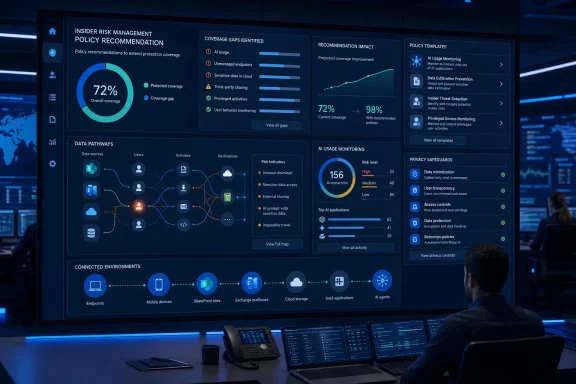
The roadmap entry describes the panel as a way to identify missing protections and policy configurations that offer the greatest incremental value. That is an important shift in emphasis. Rather than merely reporting alerts produced by existing rules, Microsoft Purview Insider Risk Management is set to offer guidance about coverage gaps—the blind spots created when an organization has not enabled the right policy template, indicator, scope, trigger, or supporting integration. Microsoft’s Insider Risk Management documentation already positions the service around policy-driven identification, investigation, and response to risky internal activity; the forthcoming panel appears designed to make the policy-design phase more continuous and evidence-led.
For Microsoft 365 administrators, compliance teams, and security operations staff, the value proposition is straightforward: a mature insider-risk deployment should not be judged simply by the number of policies it contains. It should be judged by whether the organization’s policies meaningfully cover its sensitive data, high-risk users, relevant workloads, AI usage, and plausible data-exfiltration paths. The planned Policy Recommendation Panel could make that assessment more accessible inside the product itself.
 Overview: From Policy Creation to Coverage Optimization
Microsoft Purview Insider Risk Management is built to correlate signals that may indicate malicious or inadvertent activity, including intellectual-property theft, data leakage, and security-policy violations. Administrators use templates, triggers, indicators, user scopes, thresholds, and timeframes to create policies that generate risk scores and alerts when configured conditions are met. Microsoft’s overview of the service lists policy templates spanning data theft by departing users, data leaks, risky AI usage, risky agents, security-policy violations, risky browser usage, and specialized scenarios such as patient-data misuse.
That flexibility is useful, but it creates an unavoidable configuration burden. A tenant can have a technically functioning insider-risk policy and still leave significant risk unaddressed. A policy may cover SharePoint and Exchange activity but ignore endpoint behavior. It may focus on departing employees while overlooking priority users with broad access. It may be scoped correctly but lack the policy indicators needed to identify a meaningful behavioral sequence.
The Policy Recommendation Panel is therefore best understood as an optimization layer, not a replacement for IRM’s existing policy engine. The roadmap’s wording suggests that the panel will help customers determine which safeguards are absent and which configuration changes are likely to provide the most additional protection. Roadmap ID 560600 explicitly frames the capability around expanding coverage for latent insider risk rather than replacing the policy model that organizations already use.
This distinction matters. An insider-risk platform cannot responsibly reduce policy creation to a single universal preset because acceptable monitoring, risk tolerance, labor obligations, data classification practices, and investigative procedures vary widely by organization. A recommendation system can be valuable precisely because it helps teams spot omissions while preserving their authority to decide whether a proposed control fits their legal, ethical, and operational context.
Why “latent” risk is the key word
The most dangerous coverage gaps are often invisible because they do not generate an error. A policy that does not include particular users, activities, workloads, or indicators may look healthy in the administration portal. It may simply fail to observe the behavior that would have mattered during an investigation.
Microsoft’s existing policy health capability already surfaces implementation and operating issues, such as missing triggers, absent indicators, unconfigured priority-user groups, unavailable endpoint signals, connector problems, and policies that have not produced alerts. The current policy-management guidance also advises administrators to examine scope, selected indicators, thresholds, triggers, and supporting services when policies are not assigning risk scores or yielding expected alerts.
The planned panel could extend that philosophy from “Is this policy technically working?” to “What meaningful protection is this tenant still missing?” That is a more strategic question, and it is the one many organizations struggle to answer when their compliance and security tools grow more capable than their available administrative time.
The Existing IRM Policy Model—and Why It Is Easy to Underuse
Microsoft Purview IRM policies are not simple on/off switches. A policy starts with a template, but its eventual behavior depends on several layers of configuration. Microsoft’s policy-indicator documentation distinguishes between triggering events, global settings indicators, and policy indicators, each of which plays a different role in determining whether user activity is collected, evaluated, scored, or turned into an alert.
At a high level, the model includes:
- Policy templates, which define the scenario and risk-scoring model.
- User and group scope, which decides whose activity the policy evaluates.
- Triggering events, which determine when a user becomes active in a policy.
- Global indicators, which make certain types of activity available to the solution.
- Policy indicators, which contribute to risk scores for in-scope users.
- Thresholds and sequences, which tune sensitivity and alerting behavior.
- Service integrations, including data-loss prevention, endpoint security, HR data, and third-party or custom signals where applicable.
A configuration error at any one level can produce a deceptively incomplete deployment. Microsoft notes, for example, that a user in a policy without a triggering event is not evaluated as a potential risk. The documentation gives examples such as a departing-user policy waiting for an HR-provided termination date or a data-leak policy waiting for a high-severity Data Loss Prevention alert. Microsoft’s explanation of triggers and indicators makes clear that a policy may exist and include users, yet never meaningfully score their activity until its trigger conditions are satisfied.
That complexity is not a defect. It reflects the reality that insider-risk detection must connect behavioral context with organizational policy. But it does mean that organizations need more than policy templates. They need guidance on whether their choices make sense together.
Templates provide a starting point, not comprehensive protection
Microsoft provides numerous templates to accelerate implementation, including data leaks, data theft by departing users, security-policy violations, risky AI usage, and risky agents. The service overview makes clear that these templates are built around different kinds of risk signals and use cases.
However, a tenant that enables one template should not assume it has addressed neighboring risks. A data-loss policy scoped to departing users does not necessarily address accidental oversharing by active employees. A priority-user policy does not necessarily cover a high-volume data transfer involving a worker outside that predefined group. A policy tuned for classic Microsoft 365 content might not address exposure through connected cloud-storage services, browser activity, or newly adopted AI workflows.
Microsoft also supports custom indicators through its Insider Risk Indicators connector, allowing organizations to bring non-Microsoft detections into IRM alongside the built-in workload signals. Microsoft’s policy-indicator guidance cites examples involving services such as Salesforce and Dropbox. This extensibility adds useful reach, but it also adds another potential blind spot: a customer may have relevant external telemetry available elsewhere without bringing it into the insider-risk workflow.
A well-designed recommendation panel could help administrators recognize that distinction. It could point to a missing scenario, an unused integration, an unprotected high-value workload, or an opportunity to extend an existing policy with the additional indicators required to make it more relevant.
What the Policy Recommendation Panel Is Likely to Change
Microsoft has not publicly detailed every screen, recommendation type, ranking method, or administrative control planned for the Policy Recommendation Panel. The roadmap entry should therefore be read as a release plan rather than a full technical specification. Still, its stated purpose is substantial enough to outline what the feature is likely to change in daily IRM operations.
The central change is that Purview will move closer to offering proactive policy posture guidance within Insider Risk Management. Instead of relying entirely on an administrator’s prior knowledge of templates and indicators, the service is expected to identify where coverage can be improved and which changes offer the highest incremental benefit.
That could make a particular difference for organizations that deployed IRM through an initial project but have not revisited their policies as their workforce, data estate, and use of AI tools changed. Security products are often implemented as snapshots: a team configures controls for the risks it knows at launch time, then shifts attention elsewhere. The most useful recommendation engines make that deployment posture dynamic by continuously surfacing the gap between current configuration and current risk exposure.
A complement to policy health, not a duplicate
The existing policy health experience is largely diagnostic. It indicates when a policy may not operate as expected and gives administrators warnings and recommendations to correct the configuration. Microsoft’s policy-health documentation lists concrete examples, including missing device onboarding, missing indicators, missing triggering events, overly narrow scope, connector problems, unavailable Defender for Endpoint data, and policy-template capacity concerns.
Those are essential operational checks. But they are not the same as a coverage recommendation.
Consider the difference:
- Policy health might report that a data-leak policy has no selected indicators.
- A policy recommendation might identify that an organization has high-value sensitive data and relevant user activity but lacks an appropriate data-leak policy or has not enabled the indicators that would detect the most relevant exfiltration routes.
- Policy health might report that a configured policy has no alerts.
- A policy recommendation might suggest reviewing whether the policy scope, trigger conditions, or threshold design leaves the organization with insufficient coverage.
The new panel could bring that second kind of reasoning into a more visible and actionable administration workflow. It may reduce the chance that a team treats technical health as strategic completeness.
Incremental value is a more useful metric than policy count
The phrase “most incremental value” in the roadmap is especially notable. A large number of overlapping policies does not automatically improve detection. In some cases, it can increase noise, complicate investigation, fragment ownership, and make it harder to explain why a user was evaluated.
A strong recommendation experience should prioritize changes based on what they add—not merely encourage administrators to activate every possible template. That could mean highlighting areas where no equivalent policy exists, where a relevant signal source is unused, or where a particular configuration change would materially expand the protected population or monitored activity.
This is also where the feature’s quality will be tested. Recommendations that are generic, repetitive, or insensitive to tenant context may become another alert stream that administrators learn to ignore. Recommendations grounded in actual configuration, available telemetry, data priorities, and observed gaps would be much more valuable.
AI Usage Raises the Stakes for Insider-Risk Coverage
The Policy Recommendation Panel arrives as Microsoft Purview IRM increasingly incorporates AI-related risk scenarios. Microsoft currently lists Risky AI usage among its policy templates, alongside established scenarios for data leaks, departing users, risky browser use, and security violations. Microsoft’s Insider Risk Management overview also lists a Risky Agents template, reflecting the fact that insider-risk controls now need to account for both human activity and agent-mediated access to organizational information.
This shift is important for Windows and Microsoft 365 administrators because AI risk is rarely isolated from existing data-governance concerns. The same sensitive information that requires protection in SharePoint, Teams, Exchange, OneDrive, endpoints, and cloud applications may now be surfaced, summarized, transformed, or moved through AI-enabled workflows. Policy design needs to adapt to that reality without equating ordinary AI use with misconduct.
Microsoft’s IRM investigation experience already provides alert summaries and risk-factor views that can consolidate information across alerts and in-scope policies. The activity-investigation documentation describes risk factors such as cumulative exfiltration activity, priority content, unusual activity for the user, risky browser usage, unallowed domains, and detected sequences of activity. The underlying concept is valuable: single events often lack enough context, while combined patterns can justify closer review.
A recommendation panel could make that context more useful before an alert is ever generated. If a tenant has adopted AI capabilities but has not created a corresponding risk policy, scoped relevant users, or reviewed AI-related indicators, Purview could flag the coverage deficit before it turns into an investigative gap.
The risk of treating AI as a separate compliance island
Organizations should avoid responding to this development by creating a disconnected “AI policy” that ignores their broader information-protection architecture. AI-related insider risk should be connected to sensitivity labels, DLP strategy, priority-content definitions, user populations, incident response procedures, and legal or HR governance.
The recommended path is not necessarily to deploy every available template. It is to map each recommendation to a defined business risk:
- Sensitive content copied or transmitted outside approved channels.
- High-impact users accessing or moving priority content.
- Departing personnel downloading or transferring business information.
- Risky behavior detected across managed endpoints.
- AI or agent activity that creates a new pathway for exposing organizational data.
- Relevant signals in third-party cloud services or custom business platforms.
That risk-led method gives the forthcoming panel a sensible role. It can surface possible gaps, but organizations still need governance owners capable of deciding whether a recommendation is proportionate, lawful, and aligned with their policies.
Privacy-by-Design Must Remain Central
The addition of smarter recommendations could strengthen security posture, but it also increases the need for disciplined privacy governance. Insider-risk tooling is inherently sensitive because it evaluates activity associated with employees, contractors, and other users. More recommendations may encourage organizations to enable additional indicators or expand policy scope, decisions that should never be made casually.
Microsoft’s design includes several privacy controls. Users with policy matches can be pseudonymized, role-based access control separates administrative and investigative responsibilities, and audit logging records administrative actions. Microsoft’s privacy guide for Insider Risk Management states that pseudonymization is intended to remove identifiable details such as names and email addresses, while least-privilege role design is recommended to limit who can configure policies or investigate alerts.
Importantly, Microsoft also says that relevant policy indicators are disabled by default and require explicit administrative opt-in before policies can detect the associated activities. The same privacy guidance identifies examples such as downloading OneDrive content, sharing SharePoint files outside the organization, and sending sensitive information. This explicit opt-in model is a meaningful safeguard: the platform does not silently transform every available telemetry source into employee monitoring.
Pseudonymization helps, but it is not absolute anonymity
Administrators should understand the boundaries of pseudonymization. Microsoft’s privacy settings can present users as randomized identifiers in much of the IRM interface, helping reduce bias during initial assessment. Microsoft’s username-privacy guidance explains that the setting applies to current and historical policy matches and can conceal names from administrators, analysts, and reviewers.
Yet pseudonymization has practical limitations. Microsoft notes that certain names can still appear in activity or file metadata, names are visible while assigning users to policies, and alert exports through the API or to Purview eDiscovery can reveal usernames to preserve referential integrity. Microsoft’s privacy documentation also notes that anonymized usernames are not preserved in every export route.
That means an organization cannot treat a pseudonymized dashboard as a complete privacy solution. It still needs a carefully defined access model, retention approach, escalation process, and documented rules for when identities may be revealed during an investigation.
A recommendation panel should ideally reinforce this discipline. If it recommends expanding an indicator or adding a policy, the surrounding experience should make clear what telemetry will be evaluated, which users will be included, which roles can access the results, and what prerequisites or privacy effects accompany the change.
Practical Preparation Before the Preview
The feature is not planned for Preview until November 2026, so organizations have time to prepare their current IRM environment. The best preparation is not to wait for the panel; it is to ensure the deployment has enough high-quality configuration and telemetry for any recommendation engine to evaluate meaningfully.
Review policy inventory by risk scenario
Start by documenting the organization’s current policies and the risk scenario each policy is meant to address. Avoid inventorying only by policy name. A meaningful review records the targeted users, data types, services, indicators, triggers, thresholds, owners, and escalation paths.
A concise risk-coverage matrix should include:
- Risk scenario: data leakage, departing-user theft, risky AI usage, endpoint-policy violations, priority-user activity, or another defined scenario.
- Policy coverage: which IRM policy and template address the scenario.
- Population: all users, selected groups, priority users, departing users, or another controlled scope.
- Data and workloads: Microsoft 365, endpoint, cloud-storage, HR, communications, or custom-data sources.
- Signals and triggers: enabled indicators, DLP events, HR events, Defender alerts, or other prerequisites.
- Response path: analyst triage, investigation, case management, HR or legal escalation, and evidence preservation.
This exercise gives teams a baseline for judging the quality of future recommendations rather than accepting them as automatic instructions.
Eliminate known policy-health issues
The existing policy health controls should be part of routine administration now. Microsoft identifies conditions that can prevent policies from functioning properly, including missing indicators, absent triggers, lack of onboarded devices, missing priority-user groups, malfunctioning HR connectors, insufficient Defender integration, and policy scopes that are too narrow. Microsoft’s policy-management guidance provides remediation guidance for these scenarios.
A recommendation panel may correctly identify an opportunity, but its value will be limited if foundational policies cannot collect the activity they were configured to assess. Resolve health warnings first, then use recommendations to make broader coverage decisions.
Validate data classification and DLP dependencies
Insider-risk signals are most useful when the organization understands what data is sensitive and where it resides. For data-leak scenarios, policy quality depends heavily on the DLP policies, sensitivity definitions, priority-content configuration, and workloads that feed the broader Purview ecosystem.
Microsoft’s indicator model explicitly uses high-severity DLP alerts as a triggering example for data-leak policies. Microsoft’s technical guidance also explains that indicators become available through global settings and that policy indicators contribute to risk scoring only after the relevant triggering event occurs.
In practical terms, organizations should ensure that their DLP and information-protection strategies are not merely present but meaningful. If sensitive information types are poorly defined or important repositories are omitted, an IRM recommendation may expose the policy gap—but cannot solve the classification problem underneath it.
Establish a governance review board
Recommendations concerning insider risk should be reviewed by more than one technical administrator. A workable governance group commonly includes security, compliance, privacy, legal, HR, and employee-relations stakeholders, with clear division of responsibilities.
This is particularly important when the recommendation involves:
- Enabling a new behavior indicator.
- Broadening a user population.
- Integrating HR events or communications-based signals.
- Adding monitoring for AI or agents.
- Connecting third-party cloud applications.
- Modifying thresholds that may increase alert volume.
- Changing a process that can lead to employee identity disclosure or case escalation.
The objective is not bureaucratic delay. It is to make policy changes deliberate, defensible, and consistent with the organization’s own governance commitments.
Benefits and Risks of Microsoft’s New Direction
The Policy Recommendation Panel has the potential to improve the usability of a sophisticated compliance product. Microsoft Purview IRM already includes a broad set of templates, telemetry sources, investigation tools, and privacy controls. The challenge has been translating those options into a deployment that is complete enough to matter but narrow enough to remain manageable.
The strongest potential benefits are clear:
- Reduced configuration blind spots by drawing attention to protections an organization has not yet deployed.
- Faster time to value for teams that understand insider-risk goals but lack deep familiarity with every template and indicator.
- More adaptive posture management as organizations add AI, agents, cloud services, new data stores, or changed user populations.
- Better prioritization if recommendations truly emphasize incremental coverage rather than raw policy volume.
- Improved operational alignment between existing policy health warnings and higher-level risk-coverage planning.
There are also real risks. Recommendations can be interpreted as commands, especially in overstretched security teams. If the experience is not transparent, organizations may enable monitoring capabilities without fully understanding data sources, user scope, workflow dependencies, or privacy implications.
The other risk is signal inflation. More policies and indicators can create more alerts, but not necessarily better outcomes. Microsoft’s own guidance advises teams to review indicators, thresholds, users, and trigger configurations when policies fail to generate appropriate alerts or assign risk scores. The policy-health documentation makes clear that configuration requires tuning, not mere activation.
A useful recommendation panel should therefore explain why a recommendation exists, what coverage it adds, what prerequisites it needs, which users and activities it would affect, and what trade-offs it introduces. Recommendations that expose their rationale will help customers build trust and make better governance decisions. Recommendations that operate as opaque prompts could encourage checkbox compliance.
A More Mature Model for Insider-Risk Operations
Microsoft’s planned Policy Recommendation Panel represents an important evolution for Microsoft Purview Insider Risk Management: from a product that helps customers construct and operate policies to one that may also help them recognize where their controls are incomplete. Roadmap ID 560600 places the feature in development, with Preview targeted for November 2026 and general availability targeted for December 2026.
For Windows and Microsoft 365 administrators, the opportunity is not simply to add another panel to the Purview portal. It is to use that panel as part of a more disciplined insider-risk lifecycle: define business risks, validate data and telemetry, build appropriately scoped policies, monitor policy health, assess coverage gaps, tune configurations, and preserve privacy and due process throughout.
The most successful deployments will treat recommendations as informed decision support rather than automatic policy prescriptions. If Microsoft delivers clear, context-aware, explainable guidance, the Policy Recommendation Panel could help organizations discover the protections they need before an unmonitored activity becomes an incident.
