
But the new support is narrower than the release framing suggests. Microsoft Sentinel Repositories already supported analytics rules, automation rules, hunting queries, parsers, playbooks, and workbooks; the July addition is specifically custom detections, which live in the Microsoft Defender XDR detection model and require a distinct Bicep extension and resource provider. Microsoft’s own documentation labels the feature Preview, requires a Microsoft 365 E5 license or an equivalent Defender XDR-entitled license, and requires Sentinel workspaces to be onboarded to the Microsoft Defender portal.
Petri first reported the July additions as a combined push around detections-as-code, Table Insights, and connectors. Microsoft’s documentation confirms each component, while also filling in operational restrictions that matter more than the announcement language: Table Insights cannot alert on its own, its anomaly logic has a limited lookback, and several of the newly listed connectors bring deployment and retention requirements of their own.
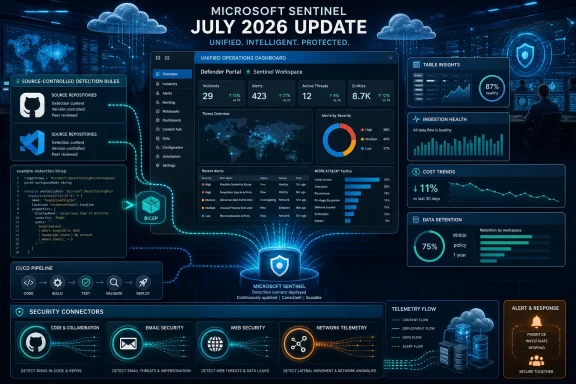 Custom detections now fit the repository model
Microsoft Sentinel Repositories reached general availability in March 2026, giving teams a source-control-based path for deploying selected Sentinel content. Until now, that workflow did not include custom detection rules. July’s preview closes that gap for security operations teams that use Defender XDR custom detections and want them treated as deployable infrastructure rather than tenant-local portal objects.
The implementation is Bicep-based. A repository needs a bicepconfig.json file that references Microsoft’s Security Bicep extension, and each rule is defined through the Microsoft.Security/detectionRules resource type using the 2026-06-01-preview API. Teams can have Sentinel synchronize the repository automatically after commits, or deploy the same Bicep template themselves through Azure CLI and an existing CI/CD pipeline.
That is a meaningful distinction from the ordinary Sentinel analytics-rule workflow. A custom detection is based on Defender XDR advanced-hunting data and runs under the Defender detection service; it is not simply another scheduled KQL analytics rule in a Log Analytics workspace. Microsoft’s sample template uses DeviceProcessEvents, a Defender endpoint table, and maps entities such as device IDs into the resulting alert.
For organizations already using pull-request reviews, this improves change accountability. A repository record can show the rule query, its schedule, severity, tactic mappings, entity mappings, and who approved a change. It also provides a less fragile way to promote the same detection logic between development and production tenants, provided teams handle environment-specific identifiers and permissions correctly.
The caveat is that this is not a blanket “all detections as code” answer. Microsoft lists two preview limitations: custom frequency for Microsoft Sentinel data is unsupported, and custom details are unsupported. The prerequisites also exclude a potentially large portion of Sentinel-only deployments: a customer needs the appropriate Microsoft 365 E5 or equivalent licensing and must run Sentinel through the Defender portal.
That means security teams should inventory their current rule estate before assuming it can be moved wholesale. Sentinel analytics rules may already be manageable through the repository feature, but Defender custom detections have separate deployment mechanics, permissions, data dependencies, and preview limits. Mixing those categories in a single release announcement risks making the change sound more universal than it is.
Table Insights surfaces a telemetry problem before it becomes an investigation failure
The more immediately useful addition for day-to-day Sentinel administration is Table Insights in the Microsoft Defender portal. It gives teams a workspace-level view of ingestion volume, day-to-week fluctuations, recently received data, top tables by daily ingestion, estimated daily ingestion cost, retention, and table tier without first writing KQL.
Its real value is operational: an analyst can spot that a connector has stopped sending data before concluding that an attacker has simply gone quiet. Ingestion outages can silently invalidate analytics rules, hunting queries, workbooks, and incident expectations. A detection rule that stops firing because its source table went empty is operationally indistinguishable from a quiet environment unless someone checks the data pipeline.
Microsoft’s documentation specifically calls out the intended uses: investigate cost spikes, validate new connector onboarding, find a connector that has gone silent, and identify tables that may fit the lower-cost Data Lake tier or a shorter retention setting. For teams operating many third-party feeds, consolidating those checks on the Tables page is a useful reduction in administrative friction.
The critical limitation is that Table Insights is an investigation view, not an alerting system. Microsoft says teams that need an alert when data stops flowing must build a scheduled analytics rule using SentinelHealth, Usage, or a relevant table’s schema. The portal cards may reveal an ingestion failure, but they do not page the on-call analyst by themselves.
The anomaly controls deserve similarly careful reading. The default fluctuation threshold requires both a 10 percent change and at least 1 MB of absolute change. Tables ingesting less than 1 MB per day are not evaluated for those cards, even if they drop completely to zero. The fluctuation calculation compares the most recent 24 hours with the corresponding period a week earlier, which can produce misleading signals for month-end jobs, weekly batch processes, maintenance windows, and other longer cycles.
The estimated cost number should also be treated as a planning signal rather than a billing figure. Microsoft calculates it from public list pricing for the table’s current tier and region; it does not reflect commitment tiers, reservations, negotiated enterprise pricing, or private discounts. Administrators responsible for chargeback should validate any apparent saving against Azure billing data before moving tables or shortening retention.
Table Insights is also scoped to the currently selected workspace. A company running separate production, regional, subsidiary, or managed-service-provider workspaces does not receive a consolidated fleet view from this feature. Operators will still need to change workspaces or maintain their own cross-workspace reporting.
The connector additions extend coverage, but each has a different operating model
Microsoft’s connector catalog now lists GitHub Enterprise Audit Log ingestion through Azure Blob Storage, Fortra Agari, Airlock Digital, and Gigamon AMX coverage. These are not equivalent integrations, and the details determine whether they are practical additions or another feed that requires more administration than it returns.
The GitHub Enterprise Audit Log connector can bring GitHub Enterprise audit data from Azure Blob Storage into the GitHubAuditLogsV2_CL table. Microsoft describes the path as near-real-time, but the connector polls the Azure Storage Queue every five minutes by default. It is therefore not a direct streaming feed in the sense of an event arriving instantly in Sentinel.
It also has a nontrivial Azure dependency chain. The storage account must use Azure Data Lake Storage Gen2 with hierarchical namespace enabled; a standard storage account is not supported. The setup requires Event Grid, storage queues, a data collection rule, specific Azure RBAC assignments for Microsoft’s service principal, and administrative consent in Microsoft Entra ID. Microsoft recommends a blob lifecycle policy because Sentinel has no need to retain source blobs indefinitely after ingestion; without one, the storage account can become a second, unmanaged retention bill.
The GitHub connector supports workspace transformation data collection rules and lake-only ingestion, which gives teams flexibility around cost and schema processing. That is useful for high-volume audit data, but it also means detection engineers must ensure the data tier they choose aligns with the rules and queries they expect to run. Data Lake is designed for economical retention and is slower than the Analytics tier; it is not a drop-in choice for every real-time detection scenario.
Fortra Agari’s connector brings telemetry from Agari Brand Protection, Phishing Defense, and Phishing Response APIs into Sentinel. The documented table is AgariBPAlertsLog_CL. It can help email-security teams correlate brand impersonation and phishing intelligence with identity, mailbox, and endpoint activity already in Sentinel, but it relies on product-specific API credentials and the customer’s Agari subscriptions. Microsoft lists no data collection rule support and no lake-only ingestion for the connector, limiting the storage-control options available with the GitHub path.
Airlock Digital’s connector takes a similar API-driven approach, collecting application-control and execution records into AirlockDigitalExecutionHistories. Microsoft says it pulls execution histories, server activities, and file activity summaries every five minutes, with data normally appearing five to 10 minutes after connection. The feed can add useful context around blocked, audited, and trusted file execution, including hashes, publishers, and user details.
However, the Airlock server must be reachable from Azure, and the connector requires an API key with logging-read access. That network exposure and credential design should be reviewed alongside the value of the feed. The connector also does not currently support data collection rules or lake-only ingestion, so teams cannot assume the same transformation and low-cost storage options that are available for every newer connector.
Gigamon AMX adds raw network-derived event data through the GigamonV2_CL table. The value proposition is correlation: network observations can reinforce or contradict what identity, endpoint, and cloud logs show during an incident. But Microsoft’s catalog identifies Gigamon as the supporting vendor and lists no data collection rule support or lake-only ingestion. As with other partner-provided connectors, support ownership and schema quality should be tested before teams base production detections on it.
The Defender portal is now the control point
All three parts of this update reinforce Microsoft’s move to make the Defender portal the operational center for Sentinel. Custom-detection repository deployment requires Defender portal onboarding, and Table Insights resides there. The connector catalog likewise directs customers to the Sentinel Data connectors experience in Defender.
Microsoft’s current connector documentation says Sentinel will cease to be supported in the Azure portal after March 31, 2027. That date is later than earlier transition messaging that described July 2026 redirection for Azure portal users. For administrators, the immediate result is straightforward: use the Defender portal for the capabilities in this update and treat Azure portal workflows as legacy, even though the formal end-of-support date now documented is March 31, 2027.
The July release does not eliminate the need for KQL, health monitoring, or connector-specific validation. It changes where some of that work begins. Detection teams gain a reviewable deployment path for Defender custom detections; platform teams gain a better first screen for missing or unexpectedly expensive telemetry; and organizations adding new feeds get more choices, along with more storage, identity, networking, and retention decisions to own.
