
The strongest AI meeting note taker for a Microsoft Teams-heavy organization is not necessarily the one with the longest feature list. It is the one whose bot, calendar access, transcript storage, search scope, retention controls, and export workflow match the organization’s policy. Microsoft has now made that operational distinction more visible: Teams administrators can require approval before detected external bots enter meetings, which means an employee’s favorite note-taking service can fail at the lobby before it ever produces a summary.
MSPoweruser’s roundup names HappyScribe, Fireflies.ai, Fathom, Notta, and Otter.ai as its five leading choices, with HappyScribe as the overall pick. The core assessment is broadly sound: all five can capture meetings on the major platforms, generate transcripts and produce AI summaries. But the published comparison flattens differences that matter more than a marketing claim of “AI meeting notes,” particularly for Windows and Microsoft 365 shops.
The practical choice comes down to three questions: Can the service enter the meetings your tenant hosts? Where does the full recording and transcript reside after the call? And can users reliably distinguish an AI-generated recap from the approved record of a decision?
Microsoft’s Teams documentation now explicitly addresses external meeting-assistant bots, including transcription and note-taking services. The default policy detects those bots and holds them in the lobby until someone explicitly admits them. Teams administrators can instead allow bots through without detection, but Microsoft’s own guidance is to retain the approval requirement and monitor audit logs.
That affects Fireflies, Fathom, HappyScribe, Notta and Otter whenever they join a Teams meeting as an attendee. Their calendar integrations and auto-join features are convenient for recurring internal calls, but they are also a governance problem if employees enable them before IT has reviewed the service. A bot may receive meeting audio, participant names, calendar information and the final transcript even when the meeting organizer did not invite it.
For admins, the decision is not simply whether to allow an app from the Teams store. Microsoft distinguishes between allowing the app, granting its requested Microsoft Entra permissions, and admitting an external bot into an individual meeting. Tenant-wide administrator consent can expose organizational information according to the permissions an app requests; Teams administrators should review those permissions in the Teams admin center rather than treating a note-taking bot as a harmless add-on.
This is the material omission in consumer-style rankings. A product can support Microsoft Teams and still be unusable in a locked-down tenant. Conversely, organizations that approve one service can reduce the shadow-IT problem created when every salesperson, consultant, or project manager connects a different recorder to Outlook.
The catch is the headline accuracy number. MSPoweruser presents 95% accuracy as a firm product attribute; HappyScribe’s own language documentation describes AI Note Taker accuracy as up to roughly 95% “under good conditions.” That is a vendor performance claim, not an independently standardized benchmark against Fireflies, Fathom, Notta, or Otter.
Audio conditions are not an edge case in meeting work. Cross-talk, headset changes, poor room microphones, abbreviations, customer names, product codenames, and multiple accents are precisely where transcription quality and speaker attribution matter. HappyScribe’s custom glossaries can help with vocabulary, but they do not turn an automated transcript into a reliable legal, HR, engineering-change, or incident-management record.
HappyScribe’s pricing also separates live meeting capture from uploaded-file transcription more clearly than the roundup does. Its free plan permits unlimited meeting recordings but limits each recording to 45 minutes and keeps recording history limited; the paid Basic tier raises the per-recording limit to 90 minutes, while Pro removes the duration limit. Included AI-transcription minutes apply to uploaded material, with additional credits charged by the minute. Teams deciding between live notes and a large archive migration should model both workloads rather than assume “unlimited recordings” means unlimited processing.
Fireflies calls its assistant AskFred. Its current documentation says AskFred can analyze a specific meeting, query multiple meetings, and use connected applications and web search through its Global AskFred feature. That is useful for sales, customer-success, support, and project teams that need to answer “when did the customer approve this?” or “which meetings mentioned the deployment issue?” without manually opening dozens of transcripts.
However, connected-app search broadens the data boundary. Fireflies’ value proposition includes integrations with collaboration, CRM, and productivity services, but each connection turns meeting content into another source that may be searched, summarized, or synchronized. IT should establish whether meeting notes are allowed to flow into systems such as Salesforce, HubSpot, Slack, Notion, or an automation platform before users enable those connections individually.
Otter offers a similar knowledge-retrieval pitch through AI Chat and its meeting workflows. Its current pricing page lists a free Basic tier with 300 monthly transcription minutes, three lifetime audio or video file imports, and AI Chat across meetings; its annual Pro pricing is shown at $8.49 per user per month, while Business is listed at $24 per user per month under a temporary promotion. That is materially different from the roundup’s simplified statement that paid Otter plans begin at $20 per user monthly.
The difference is more than a bargain-hunting detail. Otter’s free plan can be enough for occasional meeting capture, but it is not a substitute for a centrally managed archive. The Business tier adds unlimited meetings and in-app recordings, longer meeting durations, multiple concurrent meeting joins, stronger administrative features and support. Those are the controls a company needs when the product is being used as shared operational memory rather than a personal assistant.
But “free” does not mean every AI function is unlimited. Fathom’s current plan documentation says free users receive advanced summaries for their first five calls each month; after that, they receive the more basic General or Enhanced summary. Its Premium plan unlocks unlimited advanced summaries, AI action items, automated follow-up emails, custom summaries, and Ask Fathom.
The current handling of cross-meeting search is especially worth watching. Fathom says account-wide Ask Fathom access is presently available as a free preview, but it has announced limits beginning September 1, 2026. Under that schedule, free users will only be able to search the prior two weeks of their calls, while Premium users retain access to their full personal meeting history. A recommendation based on today’s free capability may therefore become misleading within a month.
For an individual Windows user who needs a simple recorder and transcript archive, Fathom remains compelling. For a team purchasing it specifically to make years of meeting content searchable, the upcoming access limits need to be evaluated as part of the price, not treated as a footnote.
The important qualification is that these are not simply free extensions of transcription. Notta says its Brain features consume AI credits, and its standard transcription subscriptions do not automatically add more Notta Brain credits. A PowerPoint generation uses 1,000 credits under the company’s documented scheme, while knowledge-base questions, image generation, and document generation have their own credit costs.
That makes Notta less of a pure meeting-note service and more of a metered content-production tool. Teams should test whether its output helps create a usable first draft or merely creates an extra review task. A slide deck produced from a meeting transcript can save time, but it can also turn an unverified interpretation of a conversation into a presentation-ready artifact that appears more authoritative than it is.
Before approving any of them, Teams administrators should require a short pilot using real meeting types: internal stand-ups, external customer calls, multi-speaker project reviews, and sessions with shared slides. Test bot admission, calendar permissions, speaker labeling, transcript correction, export, deletion, and whether the product writes information into other systems. Most importantly, decide who may turn on recording and how external participants will be notified.
An AI summary is useful as a recall aid. It should not become the organization’s authoritative account of a commitment, incident, personnel matter, or customer approval unless a responsible attendee reviews it. The transcript is the raw capture; the summary is an interpretation. Treating those as the same thing is where meeting-note automation creates its most expensive mistakes.
The practical choice comes down to three questions: Can the service enter the meetings your tenant hosts? Where does the full recording and transcript reside after the call? And can users reliably distinguish an AI-generated recap from the approved record of a decision?
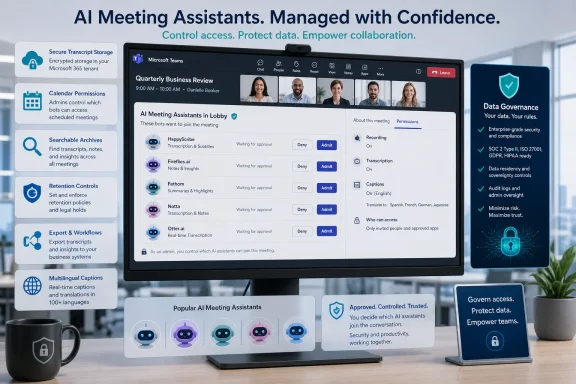 Teams bot approval changes the deployment calculation
Microsoft’s Teams documentation now explicitly addresses external meeting-assistant bots, including transcription and note-taking services. The default policy detects those bots and holds them in the lobby until someone explicitly admits them. Teams administrators can instead allow bots through without detection, but Microsoft’s own guidance is to retain the approval requirement and monitor audit logs.That affects Fireflies, Fathom, HappyScribe, Notta and Otter whenever they join a Teams meeting as an attendee. Their calendar integrations and auto-join features are convenient for recurring internal calls, but they are also a governance problem if employees enable them before IT has reviewed the service. A bot may receive meeting audio, participant names, calendar information and the final transcript even when the meeting organizer did not invite it.
For admins, the decision is not simply whether to allow an app from the Teams store. Microsoft distinguishes between allowing the app, granting its requested Microsoft Entra permissions, and admitting an external bot into an individual meeting. Tenant-wide administrator consent can expose organizational information according to the permissions an app requests; Teams administrators should review those permissions in the Teams admin center rather than treating a note-taking bot as a harmless add-on.
This is the material omission in consumer-style rankings. A product can support Microsoft Teams and still be unusable in a locked-down tenant. Conversely, organizations that approve one service can reduce the shadow-IT problem created when every salesperson, consultant, or project manager connects a different recorder to Outlook.
HappyScribe’s language lead is real, but its accuracy figure is conditional
HappyScribe is a credible overall choice for organizations that routinely work across languages. Its official product material says its AI Note Taker joins Zoom, Google Meet and Microsoft Teams calls, connects to Google or Outlook calendars, identifies speakers, and supports more than 150 languages and dialects. It also offers a browser recorder and accepts uploaded media, which makes it more flexible than a tool designed solely around bots entering scheduled calls.The catch is the headline accuracy number. MSPoweruser presents 95% accuracy as a firm product attribute; HappyScribe’s own language documentation describes AI Note Taker accuracy as up to roughly 95% “under good conditions.” That is a vendor performance claim, not an independently standardized benchmark against Fireflies, Fathom, Notta, or Otter.
Audio conditions are not an edge case in meeting work. Cross-talk, headset changes, poor room microphones, abbreviations, customer names, product codenames, and multiple accents are precisely where transcription quality and speaker attribution matter. HappyScribe’s custom glossaries can help with vocabulary, but they do not turn an automated transcript into a reliable legal, HR, engineering-change, or incident-management record.
HappyScribe’s pricing also separates live meeting capture from uploaded-file transcription more clearly than the roundup does. Its free plan permits unlimited meeting recordings but limits each recording to 45 minutes and keeps recording history limited; the paid Basic tier raises the per-recording limit to 90 minutes, while Pro removes the duration limit. Included AI-transcription minutes apply to uploaded material, with additional credits charged by the minute. Teams deciding between live notes and a large archive migration should model both workloads rather than assume “unlimited recordings” means unlimited processing.
Fireflies and Otter sell searchable archives, not just transcripts
Fireflies and Otter are strongest when meeting notes are meant to become a queryable work archive. Their distinguishing value is not the initial summary, which every service now produces, but the ability to ask questions across a history of calls and locate the underlying conversation.Fireflies calls its assistant AskFred. Its current documentation says AskFred can analyze a specific meeting, query multiple meetings, and use connected applications and web search through its Global AskFred feature. That is useful for sales, customer-success, support, and project teams that need to answer “when did the customer approve this?” or “which meetings mentioned the deployment issue?” without manually opening dozens of transcripts.
However, connected-app search broadens the data boundary. Fireflies’ value proposition includes integrations with collaboration, CRM, and productivity services, but each connection turns meeting content into another source that may be searched, summarized, or synchronized. IT should establish whether meeting notes are allowed to flow into systems such as Salesforce, HubSpot, Slack, Notion, or an automation platform before users enable those connections individually.
Otter offers a similar knowledge-retrieval pitch through AI Chat and its meeting workflows. Its current pricing page lists a free Basic tier with 300 monthly transcription minutes, three lifetime audio or video file imports, and AI Chat across meetings; its annual Pro pricing is shown at $8.49 per user per month, while Business is listed at $24 per user per month under a temporary promotion. That is materially different from the roundup’s simplified statement that paid Otter plans begin at $20 per user monthly.
The difference is more than a bargain-hunting detail. Otter’s free plan can be enough for occasional meeting capture, but it is not a substitute for a centrally managed archive. The Business tier adds unlimited meetings and in-app recordings, longer meeting durations, multiple concurrent meeting joins, stronger administrative features and support. Those are the controls a company needs when the product is being used as shared operational memory rather than a personal assistant.
Fathom’s free plan has more limits than the headline suggests
Fathom deserves its reputation as a generous option for individuals. Its own documentation says the free plan includes unlimited recordings, storage, and transcriptions, and its desktop app supports Windows alongside macOS. It works with Zoom, Google Meet, and Teams, and it can produce clips that are useful for handing off a customer call or sharing a decision without sending a colleague through an entire recording.But “free” does not mean every AI function is unlimited. Fathom’s current plan documentation says free users receive advanced summaries for their first five calls each month; after that, they receive the more basic General or Enhanced summary. Its Premium plan unlocks unlimited advanced summaries, AI action items, automated follow-up emails, custom summaries, and Ask Fathom.
The current handling of cross-meeting search is especially worth watching. Fathom says account-wide Ask Fathom access is presently available as a free preview, but it has announced limits beginning September 1, 2026. Under that schedule, free users will only be able to search the prior two weeks of their calls, while Premium users retain access to their full personal meeting history. A recommendation based on today’s free capability may therefore become misleading within a month.
For an individual Windows user who needs a simple recorder and transcript archive, Fathom remains compelling. For a team purchasing it specifically to make years of meeting content searchable, the upcoming access limits need to be evaluated as part of the price, not treated as a footnote.
Notta’s deliverables are metered AI output
Notta stands apart because Notta Brain can generate reports, executive summaries, follow-up drafts, infographics, and slide decks from meeting material and uploaded documents. Its official documentation confirms that it can analyze multiple meetings and files together, and generated slide decks can be exported as PowerPoint or PDF files. That is a useful handoff for consultants, program managers, and client-facing teams that need a first draft of a deliverable immediately after a call.The important qualification is that these are not simply free extensions of transcription. Notta says its Brain features consume AI credits, and its standard transcription subscriptions do not automatically add more Notta Brain credits. A PowerPoint generation uses 1,000 credits under the company’s documented scheme, while knowledge-base questions, image generation, and document generation have their own credit costs.
That makes Notta less of a pure meeting-note service and more of a metered content-production tool. Teams should test whether its output helps create a usable first draft or merely creates an extra review task. A slide deck produced from a meeting transcript can save time, but it can also turn an unverified interpretation of a conversation into a presentation-ready artifact that appears more authoritative than it is.
The responsible rollout starts with policy, not a free trial
The best choice among these five is therefore narrower than a universal ranking suggests. HappyScribe is the sensible multilingual option, provided its claimed accuracy is validated against a company’s real terminology and audio. Fireflies and Otter make the most sense where finding prior decisions across a large corpus is the primary need. Fathom is the low-friction individual option, although buyers should account for its changing free AI-search rules. Notta is for teams that genuinely need content deliverables after calls and can manage its credit model.Before approving any of them, Teams administrators should require a short pilot using real meeting types: internal stand-ups, external customer calls, multi-speaker project reviews, and sessions with shared slides. Test bot admission, calendar permissions, speaker labeling, transcript correction, export, deletion, and whether the product writes information into other systems. Most importantly, decide who may turn on recording and how external participants will be notified.
An AI summary is useful as a recall aid. It should not become the organization’s authoritative account of a commitment, incident, personnel matter, or customer approval unless a responsible attendee reviews it. The transcript is the raw capture; the summary is an interpretation. Treating those as the same thing is where meeting-note automation creates its most expensive mistakes.
References
- Primary source: MSPoweruser
Published: 2026-08-04T15:54:51+00:00
Loading…
mspoweruser.com - Related coverage: happyscribe.com
Loading…
www.happyscribe.com - Related coverage: pickgeniuslab.com
Loading…
pickgeniuslab.com - Related coverage: cyberunit.com
Loading…
cyberunit.com - Related coverage: crossing.one
Loading…
crossing.one - Related coverage: honestaiguide.com
Loading…
www.honestaiguide.com - Related coverage: recordinglaw.com
Loading…
www.recordinglaw.com - Related coverage: public.otter.ai
Loading…
public.otter.ai - Related coverage: guide.fireflies.ai
Loading…
guide.fireflies.ai - Related coverage: guide.fireflies.ai
Loading…
guide.fireflies.ai - Related coverage: ftc.gov
Loading…
www.ftc.gov - Related coverage: cppa.ca.gov
Loading…
cppa.ca.gov - Related coverage: congress.gov
Loading…
www.congress.gov - Related coverage: techradar.com
I tried 70+ best AI tools in 2026 | TechRadar
The tools, the guides, the insights. If it’s AI, it’s herewww.techradar.com - Related coverage: learn.microsoft.com
Manage external bots and their access to meetings hosted in your organization - Microsoft Teams | Microsoft Learn
Learn how to configure the access that external bots get to Teams meetings hosted in your organizationlearn.microsoft.com - Related coverage: learn.microsoft.com
Loading…
learn.microsoft.com