
Microsoft had already described the change in its June 2026 What’s New in Microsoft Teams roundup, where it presented the manager as a small workflow fix: users can monitor downloads while continuing to read, reply to, or work within chats and channels. The roadmap record was modified on August 19 and now carries a June 2026 general-availability date across standard commercial tenants, GCC, GCC High, and DoD.
For users moving large meeting recordings, exported files, presentations, or channel documents, the improvement is straightforward: downloading a file no longer has to become a context switch. But the update is a client interface improvement, not a new file-governance feature, and Microsoft’s own documentation makes that boundary clear.
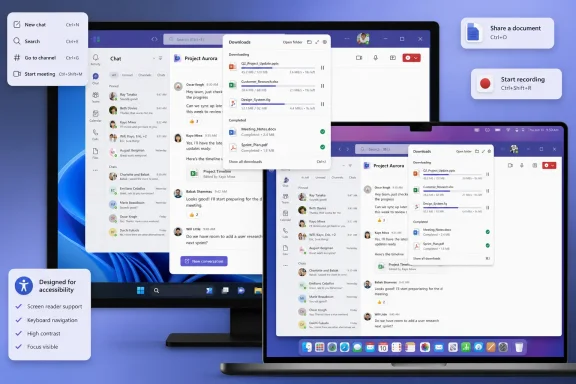 A download queue that stays out of the way
Teams has long allowed desktop users to download files from chats, channels, and the OneDrive area, but the actual download experience has been comparatively easy to lose among open windows and changing conversations. Microsoft’s revised manager adds a visible point of return in the application title bar, plus a keyboard-driven entry point, so users can check transfer progress without navigating away from the place where the file was shared.
The company’s June Teams blog described a pop-up status view rather than a replacement Files or OneDrive experience. In practical terms, this is a queue and progress surface: it helps a user see whether a requested file is still transferring and, according to Microsoft, prevents that visibility from blocking chat and channel actions.
That distinction is important for users expecting a full download library. Microsoft has not said that Roadmap 560815 adds centralized download history, tenant-wide reporting, download auditing, malware scanning controls, or a new retention mechanism. It also has not published the exact default shortcut in the roadmap entry or in the current public Teams keyboard-shortcut reference. The feature is real and broadly released; the most useful operational detail—what key combination opens it—still has to be checked in the version of Teams deployed to the user.
The rollout reached government clouds, but version targeting is absent
The Roadmap lists the feature for Teams on Desktop and Mac, including worldwide multitenant tenants and the GCC, GCC High, and DoD environments. That inclusion matters because Teams interface changes often appear first in commercial tenants and arrive later, or with narrower functionality, in regulated cloud environments.
Microsoft’s public timeline is also more revealing than the terse new status suggests. An archived version of Roadmap 560815 showed the item as Rolling out on June 12, with the same June general-availability target. The current item calls it Launched. That points to a completed rollout rather than a newly announced August release; the August 19 modification should not be read as the date every organization first received the feature.
What Microsoft does not provide is the information administrators usually need for a fast rollout check: no Teams client version, build number, minimum macOS or Windows version, or tenant control accompanies the Roadmap item. The Teams release-notes page likewise does not identify a client build for the download-manager update. If the title-bar control is absent in a managed deployment, administrators should first confirm that the user is on the current Teams desktop client and that the organization is not holding an older client package through its endpoint-management process.
There is also no indication that Targeted Release is a prerequisite now that the item is marked Launched. Microsoft lists both General Availability and Targeted Release, which is consistent with the feature having been available to early-release tenants during rollout and then reaching the broader supported cloud instances.
File permissions have not changed
The new manager does not override the access rules around the file being downloaded. Microsoft’s Teams support guidance still states that users can download files they can access from a channel, a message, or a OneDrive folder in Teams, while noting that some download options may be unavailable based on permissions established by the file owner.
That is the practical security line for IT teams. A more discoverable download panel may make transfers easier to track locally, but it does not give a user new authority to retrieve a restricted document. It also does not turn Teams into the system of record for every file setting: documents shared in channels are typically backed by SharePoint, while files shared in chats are commonly handled through the sender’s OneDrive arrangement. The permissions, sharing policies, sensitivity labels, conditional-access rules, and data-loss-prevention configuration around those services remain the controls that determine whether a download is allowed.
Administrators should therefore avoid treating this as a policy rollout. There is no new Teams admin center switch cited by Microsoft for Roadmap 560815, and no documented deployment action is required. The appropriate response is modest: update internal Teams training and support documentation that tells users to wait, retry, or hunt for a downloaded file when a transfer is slow.
Accessibility value depends on the unfinished documentation
Microsoft explicitly frames the revision as an accessibility improvement as well as a visibility and control change. A keyboard route to the download manager can reduce reliance on pointer navigation, while a non-blocking manager should make it easier to keep the message context visible when a file is being retrieved.
However, the current Microsoft Support page covering Teams keyboard shortcuts does not list an action for opening the download manager. It does document how users can open the shortcut reference itself—Ctrl+Period on Windows desktop or Command+Period on Mac—and says shortcuts can be customized in the desktop app. That leaves a gap between the feature announcement and the support material that users, service desks, and accessibility teams normally consult.
Until Microsoft publishes the default command, the practical approach is to have users open Teams’ built-in keyboard-shortcuts window and search or browse for the Downloads command. If the command is present but conflicts with an established workflow, Teams’ shortcut customization controls may offer a local remedy. If it is absent, the installation may simply not have received the UI update despite the roadmap’s overall Launched state.
The meaningful change here is limited but useful: Teams downloads now have a dedicated, non-modal status surface on Windows and Mac rather than a workflow that competes with the chat or channel where the file originated. Organizations do not need to reconfigure file controls, but they should not promise users a new download policy or audit capability that Microsoft has not announced.
