
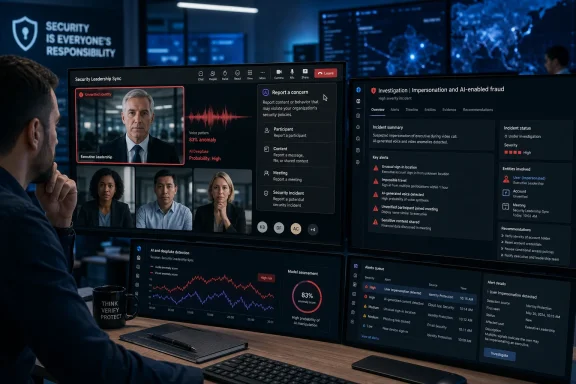
Microsoft Teams is expected to add a “Report a concern” control for meetings during August 2026, giving participants a direct way to flag suspected phishing, impersonation, scams, social engineering, and other suspicious conduct while a meeting is still in progress. The feature is consequential for IT teams because the report is meant to enter the organization’s Teams and Defender investigation workflow, rather than disappear into a generic product-feedback channel.
Windows Latest first reported the rollout on August 4, citing an enterprise-only Microsoft notice. Microsoft’s public Teams documentation confirms that the company is building out a broader security-control layer around meetings, including external AI-bot detection, lobby enforcement, protection reports, and human-verification checks. But the public record does not yet contain a corresponding Microsoft Learn page or public roadmap entry that defines the meeting-report feature’s precise data fields, licensing requirements, retention, regional availability, or response workflow.
That missing documentation changes how administrators should read this announcement. Teams is gaining a useful incident-intake button; it is not gaining an automated deepfake detector that identifies a fraudulent face or cloned voice and ejects the participant in real time.
According to Windows Latest, a participant will be able to submit a security report during a meeting or from its meeting chat. The stated categories include phishing, impersonation, scams, social engineering, and other security concerns. Teams will capture meeting metadata and “limited contextual information” so that a security or IT team can investigate through the Teams admin center, with richer submissions reportedly available in the Microsoft Defender portal for eligible organizations.
That is a sensible addition to Teams’ existing reporting model. Microsoft already lets users report suspicious Teams chat and channel messages as security concerns, while the Teams admin center has been expanding its Protection reports. Separately, Microsoft rolled out reporting for suspicious one-to-one calls earlier in 2026, directing reports to the same general administrative surfaces.
The practical limitation is timing. A user who sees a fake executive on camera, hears what sounds like a cloned voice, or receives an in-meeting instruction to change bank details still has to make the immediate security decision: leave, refuse the request, alert the organizer, and use an out-of-band channel to verify the instruction. The report can preserve a trail and trigger review, but neither Microsoft’s current documentation nor the Windows Latest report describes a mechanism that automatically pauses the meeting, blocks a participant, quarantines a recording, or alerts a security operations center with guaranteed urgency.
Organizations should therefore avoid presenting the feature to staff as a panic button that “handles” a suspected deepfake. It is an escalation route. Whether it produces a rapid response depends on who receives the submission, what permissions they hold, how often reports are reviewed, and whether the organization has written procedures for a live impersonation incident.
The policy, labeled “Manage external bots and their access to meetings,” attempts to identify external transcription, note-taking, and meeting-assistant bots as they join. Teams says it uses infrastructure and behavioral signals gathered during the join process. When a bot is detected, Teams can mark it as a bot, place it in the lobby regardless of the meeting’s normal lobby configuration, and require an organizer or authorized presenter to admit it explicitly.
For a typical enterprise tenant, the default is “Require approval when detected.” The alternative is effectively to disable bot detection and let bots appear like ordinary external participants. Microsoft’s recommendation is to leave the approval requirement in place.
This is a more direct defense against a common 2026 problem: a third-party AI meeting assistant being invited by one employee and continuing to join future meetings, potentially recording or transcribing sensitive conversations outside the organization’s intended compliance boundary. Microsoft says detected bots require approval even when the meeting is configured to let participants bypass the lobby.
The catch is important. Microsoft explicitly acknowledges that some external bots will not be detected, and that people can occasionally be misclassified as bots. The product is a risk-reduction control, not a reliable way to distinguish every human from every automated participant. A sophisticated adversary presenting as a normal external user, particularly one using a real compromised account, may never trigger the bot workflow at all.
That makes the new reporting capability complementary to the bot policy rather than redundant with it. The policy tries to stop identifiable automated attendees at the door; reporting gives humans a way to flag behavior that the platform did not catch.
They are not, at least in the public documentation available on August 4, described as a live biometric or media-authentication system. There is no public claim that Teams can determine whether an on-camera participant is a generated video feed, whether a voice has been cloned, or whether a participant is manipulating video in real time.
The distinction matters for security planning. A report reason labeled “impersonation” can collect an employee’s observation that something is wrong. It cannot by itself establish that a participant was synthetic, nor can it replace transaction-verification controls. Finance and procurement teams still need independent confirmation for payment changes, new banking instructions, release of credentials, or urgent requests from senior leadership.
A well-run organization should treat a deepfake suspicion much like a suspected business-email-compromise event: preserve the evidence, identify the accounts and attendees involved, check sign-in and audit records, alert the affected executive or vendor through a trusted contact route, and contain any transaction before it completes. Teams reporting can become the opening record in that process, but it cannot be the process.
Before the feature appears, IT and security teams should do four things:
Those are different workflows, so administrators should not assume the call-report data path applies to meeting reports. But they should not assume the opposite, either. Microsoft has not publicly documented the meeting feature’s exact submission destination, whether an organization can keep reports entirely within its tenant, what contextual material is captured, or how long it is retained.
The same uncertainty applies to licensing. Microsoft’s established call-reporting documentation ties detailed Defender-portal visibility to Microsoft Defender for Office 365 Plan 1 or Plan 2, or Defender XDR, while basic information is available through Teams administration. Windows Latest says the forthcoming meeting reports will appear in both Teams administration and Defender experiences, but Microsoft has not publicly spelled out whether the meeting workflow follows the same licensing boundary.
For now, the defensible expectation is straightforward: Teams users will receive a new way to send a suspicious-meeting signal to their organization during August 2026. The control will be most valuable in tenants that pair it with bot-lobby enforcement, restricted admission rights, a monitored investigation queue, and a standing rule that no high-value request is approved solely because the person making it looks and sounds familiar.
That missing documentation changes how administrators should read this announcement. Teams is gaining a useful incident-intake button; it is not gaining an automated deepfake detector that identifies a fraudulent face or cloned voice and ejects the participant in real time.
 A report creates evidence; it does not stop the meeting
According to Windows Latest, a participant will be able to submit a security report during a meeting or from its meeting chat. The stated categories include phishing, impersonation, scams, social engineering, and other security concerns. Teams will capture meeting metadata and “limited contextual information” so that a security or IT team can investigate through the Teams admin center, with richer submissions reportedly available in the Microsoft Defender portal for eligible organizations.That is a sensible addition to Teams’ existing reporting model. Microsoft already lets users report suspicious Teams chat and channel messages as security concerns, while the Teams admin center has been expanding its Protection reports. Separately, Microsoft rolled out reporting for suspicious one-to-one calls earlier in 2026, directing reports to the same general administrative surfaces.
The practical limitation is timing. A user who sees a fake executive on camera, hears what sounds like a cloned voice, or receives an in-meeting instruction to change bank details still has to make the immediate security decision: leave, refuse the request, alert the organizer, and use an out-of-band channel to verify the instruction. The report can preserve a trail and trigger review, but neither Microsoft’s current documentation nor the Windows Latest report describes a mechanism that automatically pauses the meeting, blocks a participant, quarantines a recording, or alerts a security operations center with guaranteed urgency.
Organizations should therefore avoid presenting the feature to staff as a panic button that “handles” a suspected deepfake. It is an escalation route. Whether it produces a rapid response depends on who receives the submission, what permissions they hold, how often reports are reviewed, and whether the organization has written procedures for a live impersonation incident.
Teams already has a preventative control for AI meeting bots
Microsoft’s clearest public meeting-security feature is not the new reporting button. It is the external-bot policy that began appearing in Teams documentation in June 2026 and was announced by the Microsoft Teams Blog on June 29.The policy, labeled “Manage external bots and their access to meetings,” attempts to identify external transcription, note-taking, and meeting-assistant bots as they join. Teams says it uses infrastructure and behavioral signals gathered during the join process. When a bot is detected, Teams can mark it as a bot, place it in the lobby regardless of the meeting’s normal lobby configuration, and require an organizer or authorized presenter to admit it explicitly.
For a typical enterprise tenant, the default is “Require approval when detected.” The alternative is effectively to disable bot detection and let bots appear like ordinary external participants. Microsoft’s recommendation is to leave the approval requirement in place.
This is a more direct defense against a common 2026 problem: a third-party AI meeting assistant being invited by one employee and continuing to join future meetings, potentially recording or transcribing sensitive conversations outside the organization’s intended compliance boundary. Microsoft says detected bots require approval even when the meeting is configured to let participants bypass the lobby.
The catch is important. Microsoft explicitly acknowledges that some external bots will not be detected, and that people can occasionally be misclassified as bots. The product is a risk-reduction control, not a reliable way to distinguish every human from every automated participant. A sophisticated adversary presenting as a normal external user, particularly one using a real compromised account, may never trigger the bot workflow at all.
That makes the new reporting capability complementary to the bot policy rather than redundant with it. The policy tries to stop identifiable automated attendees at the door; reporting gives humans a way to flag behavior that the platform did not catch.
The deepfake framing is broader than Microsoft’s published controls
Windows Latest frames the feature as a response to AI deepfake meetings, and the risk is real: fraudsters can combine publicly available employee information with synthetic audio and video to impersonate executives, vendors, or finance staff. Yet Microsoft’s published Teams controls are largely focused on join identity, bot behavior, suspicious messages, calls, links, files, and administrative review.They are not, at least in the public documentation available on August 4, described as a live biometric or media-authentication system. There is no public claim that Teams can determine whether an on-camera participant is a generated video feed, whether a voice has been cloned, or whether a participant is manipulating video in real time.
The distinction matters for security planning. A report reason labeled “impersonation” can collect an employee’s observation that something is wrong. It cannot by itself establish that a participant was synthetic, nor can it replace transaction-verification controls. Finance and procurement teams still need independent confirmation for payment changes, new banking instructions, release of credentials, or urgent requests from senior leadership.
A well-run organization should treat a deepfake suspicion much like a suspected business-email-compromise event: preserve the evidence, identify the accounts and attendees involved, check sign-in and audit records, alert the affected executive or vendor through a trusted contact route, and contain any transaction before it completes. Teams reporting can become the opening record in that process, but it cannot be the process.
Admins should prepare the people and the queue before rollout
The reported August timeline gives Teams administrators a short window to decide where submissions should go and who owns them. This is especially relevant because Teams reporting has now spread across messages, calls, meetings, and protection reporting. A user-facing button only improves security if the reports reach a staffed queue with clear triage criteria.Before the feature appears, IT and security teams should do four things:
- Confirm who can view and investigate user-reported security submissions in the Teams admin center and Microsoft Defender portal, then ensure that responsibility is assigned to an actual monitored team rather than an unowned administrative report.
- Test the external-bot meeting policy with approved transcription and note-taking services before applying stricter settings tenant-wide, because an undetected bot is a risk but a false-positive block can also disrupt executive, legal, accessibility, and customer meetings.
- Tell organizers to restrict lobby admission to organizers and co-organizers for sensitive meetings, which Microsoft specifically recommends to prevent presenters from admitting people without the organizer’s scrutiny.
- Train employees to report suspicious meetings while also directing them to verify sensitive requests through a known phone number, authenticated chat, or established vendor contact. A convincing face and familiar voice are no longer adequate proof of identity.
The privacy and licensing details remain unresolved
Windows Latest reports that the new meeting-report feature stores meeting metadata and limited context, and says the available support material does not state that reports are automatically sent to Microsoft. That would be materially different from Microsoft’s published documentation for suspicious Teams call reports, which says relevant metadata and limited context are shared with both the organization and Microsoft.Those are different workflows, so administrators should not assume the call-report data path applies to meeting reports. But they should not assume the opposite, either. Microsoft has not publicly documented the meeting feature’s exact submission destination, whether an organization can keep reports entirely within its tenant, what contextual material is captured, or how long it is retained.
The same uncertainty applies to licensing. Microsoft’s established call-reporting documentation ties detailed Defender-portal visibility to Microsoft Defender for Office 365 Plan 1 or Plan 2, or Defender XDR, while basic information is available through Teams administration. Windows Latest says the forthcoming meeting reports will appear in both Teams administration and Defender experiences, but Microsoft has not publicly spelled out whether the meeting workflow follows the same licensing boundary.
For now, the defensible expectation is straightforward: Teams users will receive a new way to send a suspicious-meeting signal to their organization during August 2026. The control will be most valuable in tenants that pair it with bot-lobby enforcement, restricted admission rights, a monitored investigation queue, and a standing rule that no high-value request is approved solely because the person making it looks and sounds familiar.
References
- Related coverage: learn.microsoft.com
Manage external bots and their access to meetings hosted in your organization - Microsoft Teams | Microsoft Learn
Learn how to configure the access that external bots get to Teams meetings hosted in your organizationlearn.microsoft.com - Related coverage: learn.microsoft.com
Loading…
learn.microsoft.com - Related coverage: support.microsoft.com
Loading…
support.microsoft.com - Related coverage: techcommunity.microsoft.com
Loading…
techcommunity.microsoft.com - Related coverage: support.microsoft.com
Loading…
support.microsoft.com - Related coverage: techcommunity.microsoft.com
Loading…
techcommunity.microsoft.com - Related coverage: teams.handsontek.net
Loading…
teams.handsontek.net - Related coverage: blog.cloudcapsule.io
Loading…
blog.cloudcapsule.io - Related coverage: scribd.com
Loading…
www.scribd.com - Related coverage: app.cloudscout.one
Loading…
app.cloudscout.one - Related coverage: m365visualroadmap.net
Loading…
m365visualroadmap.net - Related coverage: microsoft.com
Loading…
www.microsoft.com - Related coverage: microsoft.com
Loading…
www.microsoft.com - Related coverage: meetings.cotswold.gov.uk
Loading…
meetings.cotswold.gov.uk - Related coverage: blog.cloudcapsule.io
Loading…
blog.cloudcapsule.io - Related coverage: blog.admindroid.com
Loading…
blog.admindroid.com - Related coverage: coloradomesa.edu
Loading…
www.coloradomesa.edu - Related coverage: explore.microsoft.com
Loading…
explore.microsoft.com - Related coverage: firstinspires.org
Loading…
www.firstinspires.org - Related coverage: insider.teams.com
Loading…
insider.teams.com - Related coverage: teams.handsontek.net
Loading…
teams.handsontek.net