
The useful takeaway is not that an RX 7800M can run demanding games—it plainly can—but that the X1 Lite’s expansion path works as a compact living-room or desk system under SteamOS. There is also an important correction to the reporting: Minisforum specifies the X1 Lite with user-replaceable DDR5-5600 SO-DIMM memory, not LPDDR5. That matters to buyers because RAM can be upgraded up to the vendor’s stated 128GB maximum, whereas LPDDR5 would normally be soldered to the motherboard.
The setup is capable, but it is not the straightforward small-box bargain the benchmark numbers may suggest. Minisforum’s OCuLink implementation uses one of the machine’s M.2 slots through a bundled adapter, which means the external-GPU connection consumes part of the X1 Lite’s otherwise useful internal storage expansion.
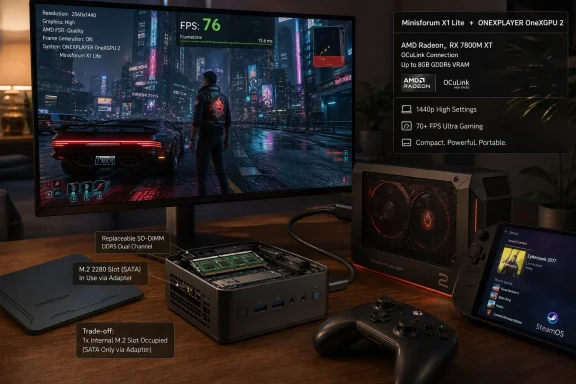 The X1 Lite’s OCuLink port is an adapter, not a rear-panel connector
Minisforum markets the Ryzen 7 255 version of the X1 Lite as an OCuLink-ready mini PC, but its own product documentation adds a qualification that should be in every buying guide: OCuLink is supplied “via an M.2 slot” using the included adapter. The machine has two PCIe 4.0 x4 M.2 2280 slots, and attaching the adapter gives the OneXGPU 2 a direct PCIe-based link rather than routing graphics through USB4.
That connection method is the technical reason this arrangement can outperform many ordinary Thunderbolt and USB4 eGPU combinations. OCuLink exposes PCIe lanes directly and generally avoids part of the protocol overhead associated with USB-based external graphics. In practical terms, a powerful mobile GPU in an external enclosure has more room to deliver the frame rates seen in ETA Prime’s testing, particularly at 1440p and 4K where the GPU—not the Ryzen 7 255’s integrated Radeon 780M—is doing the bulk of the work.
But “ready” does not mean effortless. Users need to open the X1 Lite, install the M.2-to-OCuLink adapter, route the cable outside the case, and give up one SSD position. A fully configured system can still retain one internal M.2 drive, yet anyone planning a two-drive setup for a large Steam library needs to account for that limitation before buying.
This is also a less portable arrangement than the word mini PC implies. The X1 Lite itself measures 130 × 126 × 47.2 mm, but the OneXGPU 2 is a separate external graphics dock with its own power requirements, display outputs, Ethernet, USB ports, and M.2 SSD slot. It is compact compared with a conventional desktop tower, not a throw-it-in-a-bag alternative to a handheld.
RX 7800M performance is doing the heavy lifting
According to Notebookcheck’s account of ETA Prime’s testing, the Radeon RX 7800M is responsible for the system’s transformation from a capable Radeon 780M mini PC into a high-resolution gaming machine. ONEXPLAYER specifies that the OneXGPU 2 includes the RDNA 3-based RX 7800M with 12GB of GDDR6 memory, a meaningful amount of dedicated VRAM for modern games running at 1440p with high texture settings.
The reported Cyberpunk 2077 result deserves careful reading. More than 70 fps at 1440p Ultra with FSR 2.1 set to Quality is a good result, but it is not a native-resolution Ultra benchmark. FSR Quality renders internally below the output resolution and reconstructs the image, which is a sensible compromise in a game as demanding as Cyberpunk 2077. It also illustrates the larger point: a mobile Radeon GPU dock can deliver strong high-resolution gaming, but modern rendering features remain part of the performance equation.
The Ratchet & Clank: Rift Apart number is more revealing because Notebookcheck says ETA Prime reached above 100 fps at 1440p Very High without FSR. That suggests the OCuLink link is not imposing an obvious ceiling in every game, at least in the tested configuration. A desktop replacement claim would still be premature without broader testing across PCIe-sensitive titles, productivity workloads, and multiple displays, but the result confirms that the X1 Lite is not strangling the external GPU by default.
The Crimson Desert result requires a similar distinction. Notebookcheck says the setup exceeded 100 fps at 1440p Ultra with FSR Frame Generation enabled. Frame generation can make motion look smoother and raise the displayed frame-rate counter substantially, but generated frames are not the same as having the equivalent amount of native rendered performance. For a single-player game, that can be an entirely reasonable choice. It should not be compared directly with an unassisted 100-fps result in a latency-sensitive competitive game.
SteamOS is promising here, but the configuration is still underspecified
ETA Prime’s reported use of SteamOS is arguably the most interesting part of the experiment. A compact AMD APU connected to an AMD external GPU is an attractive fit for a console-style Linux setup, particularly for users who want Steam Big Picture mode, controller-first navigation, and a dedicated gaming box rather than another Windows desktop at the television.
Yet Notebookcheck’s report does not identify the exact SteamOS build, kernel version, display configuration, driver stack, or installation method. Those omissions matter more than they would on a standard Windows gaming PC. Minisforum officially lists Windows 11 as the X1 Lite operating system, and its product page does not promise SteamOS support for this model or certify a OneXGPU 2 configuration.
That does not invalidate the test. It means readers should treat it as a successful hands-on configuration, not as a vendor-supported compatibility guarantee. A reproducible SteamOS guide would need to cover whether the OneXGPU 2 must be powered and connected before boot, how the system selects the external Radeon GPU, whether HDMI and DisplayPort behave identically, and whether sleep and resume work reliably. Those are the details that separate an impressive benchmark video from a machine a household can use every evening without troubleshooting.
The all-AMD hardware does remove one common complication: there is no mixed AMD CPU-and-Nvidia external GPU driver arrangement to manage. Still, a clean hardware pairing does not automatically answer the firmware, boot-order, display-handshake, suspend, or game-specific anti-cheat questions that Linux gaming users encounter.
The price turns this into a design choice, not a cheap upgrade
The X1 Lite and OneXGPU 2 also need to be judged as a combined purchase. Minisforum’s U.S. store currently lists the Ryzen 7 255 X1 Lite barebone at $311, while ONEXPLAYER’s store lists the OneXGPU 2 at $960. Before adding memory, storage, an operating-system plan, peripherals, and possibly a display, that puts the core hardware at roughly $1,271.
That total changes the proposition. The appeal is not maximum frames per dollar; a conventional desktop built around a replaceable desktop graphics card is likely to offer more upgrade flexibility for the money. The X1 Lite and OneXGPU 2 make sense for someone who values a small primary computer, needs a dock with its own I/O, or wants the ability to detach the GPU and return the mini PC to quiet low-power work, streaming, or home-lab duty.
The eGPU dock itself is also not a normal graphics-card upgrade. Its RX 7800M is integrated into the OneXGPU 2 rather than installed in a standard PCIe slot, so future GPU upgrades mean replacing the whole dock. ONEXPLAYER includes useful connectivity around it, but the convenience comes with a more closed upgrade path than an ordinary mini PC plus a desktop OCuLink enclosure and separately purchased GPU.
For buyers considering this exact combination, the strongest conclusion from ETA Prime’s test is practical: the Minisforum X1 Lite can serve as the CPU half of a serious SteamOS gaming machine when paired with an OCuLink eGPU. The catch is equally practical: reserve an M.2 slot for the adapter, budget for an expensive fixed-GPU dock, and do not assume the video’s SteamOS installation represents official Minisforum support.
