
Those figures are not an isolated observation. Windows Latest previously reported more than 1.2GB of memory use without interaction, while Wccftech said it reproduced the behavior: about 1GB at launch, around 500MB to 600MB while idle, and spikes near 1.5GB to 1.6GB when navigating forecast pages or manipulating maps. TechRadar also tested the app and reported peaks around 1GB, though its normal active-use figure was closer to 800MB.
The important conclusion is more precise than “Weather has a 1GB memory leak.” The available tests show a high but variable working footprint, not evidence that the app’s memory use rises forever until Windows runs out of RAM. The fact that the footprint declines after the app is idle suggests that some loaded pages, graphics, map data, advertising assets, and browser caches are being discarded or deprioritized. That does not make a 500MB idle baseline sensible for a forecast client, but it changes the diagnosis: this looks like an application-design and content-weight problem, not a confirmed runaway leak.
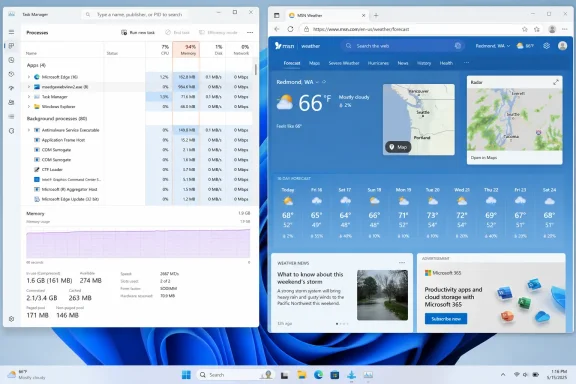 MSN Weather is running a browser-style process group
The reason is visible in Task Manager. Weather is built around Microsoft Edge WebView2, Microsoft’s embedded web-content runtime, rather than being a small, self-contained native client rendering forecast data directly through Windows controls.
Microsoft’s own WebView2 documentation says the runtime uses the same multi-process model as Edge. A WebView2 application can have a browser process, one or more renderer processes, and supporting GPU, network, audio, and utility processes. The count changes with the content an app loads and the features it uses.
That process structure is normal. Seeing a cluster of msedgewebview2.exe processes below a parent app is not itself a malware indicator, nor does it prove that something has gone wrong. Microsoft explicitly notes that Weather is among the applications that use WebView2 and that Task Manager normally groups those runtime processes under the parent app.
But “normal” is not the same as “appropriately sized.” A Chromium-style process group buys isolation, compatibility with web code, and the ability to change a service-driven interface without shipping a conventional application update. It also carries a baseline cost before the forecast, maps, images, animations, sponsored material, and embedded web components have done useful work for the user.
Microsoft’s WebView2 performance guidance acknowledges the trade-off directly: each control launches browser-engine processes that add memory and startup overhead, and resource use scales with the complexity of the rendered content. The company recommends that developers share environments where possible and avoid unnecessary separate browser-process groups.
For MSN Weather, the question is not whether WebView2 can legitimately run several processes. It can. The question is why a single forecast client needs enough web content and active renderer state to approach the memory footprint of a modest desktop browser session.
The most alarming numbers need careful interpretation
The 1GB headline is real in the sense that several outlets have reported or reproduced it. It should not be read as a fixed system requirement for every Windows 11 PC, every Weather app build, or every city forecast.
How-To Geek found a more nuanced range than the first reports: around 800MB to 900MB when sitting on the Home tab, roughly 700MB to 800MB during ordinary active use, and peaks up to approximately 1.2GB while moving between sections. Wccftech saw lower idle numbers but higher interaction spikes. TechRadar did not reach the 1.2GB level in its own testing, reporting a peak near 1GB.
Those differences are unsurprising for a WebView2 app. The data set visible on screen can vary by location and weather conditions; radar or map components can load different assets; advertisements and third-party content are dynamic; and Windows, the Weather package, Edge WebView2 Runtime, graphics drivers, and system RAM pressure all affect how much memory stays resident.
There is also a reporting trap in Task Manager. The Weather parent entry represents a group of processes, while the Details tab lists separate WebView2 processes. Comparing a parent group’s aggregate memory number with an individual child process—or mixing working set, private working set, and committed memory—can produce dramatic but misleading comparisons. Microsoft warns that Task Manager grouping can be confusing when processes are sorted outside the default name-based view.
For administrators investigating a complaint, the useful test is repeatability rather than one screenshot. Open MSN Weather, expand its parent process group, wait several minutes on the Home page, switch through tabs, and observe whether the group falls back after idling or closing the app. A footprint that repeatedly returns to a few hundred megabytes is poor optimization; one that climbs without recovering across repeated navigation would be stronger evidence of an actual leak.
Ads make the trade-off harder to defend
The app’s design is drawing attention not only because of RAM usage but because users are spending that memory to load advertising-supported content inside a Windows app. How-To Geek reported seeing up to two ads per tab, while Windows Latest also documented sponsored placements.
Microsoft has not publicly explained the Weather app’s current memory profile or said whether it plans to replace its WebView2-heavy implementation. It also has not published a target memory budget for MSN Weather, a breakdown of which components consume the largest share, or a statement on whether ads and other externally delivered content are part of the peaks documented by testers.
That silence leaves users and IT staff with a simple practical fact: the cost is paid locally, on the user’s RAM. On a 32GB desktop, even a 1GB Weather session is more irritating than consequential. On an 8GB Windows 11 laptop, it can represent one-eighth of physical memory before Edge, Teams, Outlook, a line-of-business app, or a few browser tabs enter the picture.
Windows will not instantly fail when available memory drops. It can compress memory and page less-active data to the SSD. But the consequence is more storage I/O, slower app switching, and the kind of intermittent sluggishness users often blame on “Windows being slow” without identifying the app responsible.
The comparison with macOS Weather should be treated cautiously because it crosses operating systems, hardware, memory-accounting methods, and application architectures. Still, the reports all point in the same direction: Microsoft’s app is unusually expensive for its category. The relevant comparison is not whether macOS happens to use 240MB or 250MB in another outlet’s test; it is whether the Windows client’s current web workload is proportionate to its own purpose. It plainly is not.
What Windows 11 users can do now
Users do not need to remove Edge WebView2 to address this. Removing the runtime is neither necessary nor a sound fix: Microsoft says it is used by many Windows applications, including Widgets, Teams, Office, Outlook, and Weather, and applications may reinstall it when needed.
The targeted options are simpler:
- Check Task Manager’s Processes tab and expand the Weather entry before blaming a generic collection of WebView2 processes on the forecast app.
- Close MSN Weather when it is not in use and verify that its parent process group has exited, particularly on machines with 8GB of RAM.
- Use Settings > Apps > Installed apps to uninstall MSN Weather if the app is not needed; Windows supports removing unneeded applications from that interface.
- Prefer a lightweight weather website in an existing browser session if it avoids launching a separate WebView2 browser group, or evaluate a third-party client after checking its own resource use and privacy practices.
Enterprise administrators should resist turning this into a blanket WebView2 remediation project. The Weather package is a small issue compared with browser tabs, collaboration clients, endpoint agents, or unstable drivers on most managed PCs. But it is a useful diagnostic example: Windows 11 devices with constrained RAM need process-level baselines, not assumptions that every inbox-looking app is lightweight.
MSN Weather’s behavior is especially awkward because Microsoft’s own WebView2 documentation frames high resource use as a result of how an application uses the runtime. The Weather app is therefore not evidence that WebView2 is inherently broken. It is evidence that Microsoft has shipped a simple utility whose current content and architecture can consume a desktop-class amount of memory.
Until Microsoft changes that implementation, uninstalling the app—or simply avoiding it on low-memory Windows 11 systems—is the most direct way to reclaim the RAM.