
The useful part is not the new menu entries alone. New Outlook’s current maximum local mail window remains 180 days, or roughly six months, in Microsoft’s own support documentation. The planned options would double that ceiling for one setting and quadruple it for the other, making the Windows client considerably more useful on unreliable connections, long trips, and networks where accessing older mail through the service is slow or restricted.
But the date now matters as much as the feature. Archived copies of Roadmap ID 560535 recorded a June 2026 general-availability target when Microsoft created the item in late April. The current entry is still marked In development and now lists November 2026. That makes this a schedule change, not an already-delivered Outlook update. Administrators and users looking for the setting today should not assume it is missing because of a configuration problem.
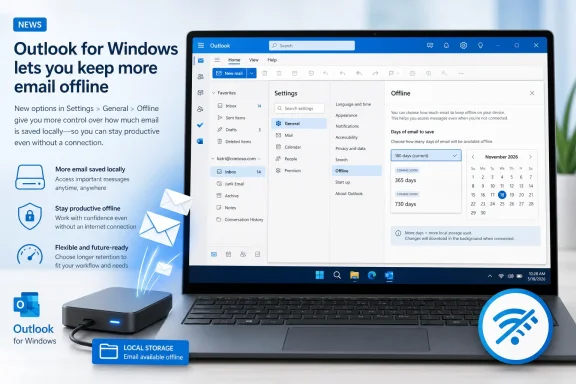 The current limit is still 180 days
Microsoft Support’s current offline-access guide for the new Outlook for Windows lists four choices under Days of email to save: 7, 30, 90, and 180 days. The 30-day option is the default. The same documentation says offline access is enabled by default and that Outlook stores a local copy of email, calendar events, and people data so those items can be used without an active connection.
The upcoming 1-year and 2-year choices therefore extend an existing local cache rather than introducing an alternative to Exchange Online or Outlook.com storage. Older messages remain in the mailbox server-side today; the change determines how much of that history Outlook downloads to the Windows device for offline reading and search.
Microsoft’s public “What’s new in new Outlook for Windows” page also records the earlier expansion from a seven-day default to 30 days in June 2025. The 2026 roadmap item is a continuation of that work, but with a more consequential implication for devices carrying large mailboxes: a longer history will be available without network access, while the local Outlook data footprint will grow accordingly.
This is for new Outlook on Windows, despite the roadmap platform label
The wording of Roadmap ID 560535 explicitly identifies the new Outlook for Windows. Yet its metadata labels the platform as “Web,” a classification that can easily confuse IT staff who are trying to determine whether the browser version of Outlook will gain the same controls.
Microsoft’s support material resolves the practical question: offline access and the Days of email to save setting are described for the Windows application. Microsoft separately states in its new-Outlook release notes that its offline capabilities are not available in Outlook on the web. The roadmap platform tag should not be read as an announcement that Outlook in a browser will begin keeping one or two years of mail on a PC.
This distinction is important for support desks. A user signed in to Outlook on the web will not get a local cache merely by changing an Outlook setting elsewhere. The planned setting belongs to the installed new Outlook client, which maintains local data on the Windows device.
Microsoft also has not said whether every account type supported by new Outlook will receive the new durations at the same time. The roadmap item names worldwide standard multi-tenant general availability, but it does not specify Exchange Online versus Outlook.com behavior, whether third-party IMAP accounts are included, or whether government and sovereign Microsoft 365 clouds will follow on a different schedule.
Longer sync windows are a storage and endpoint-management decision
Microsoft’s own support guidance contains the warning administrators should put at the center of this rollout: if a device does not have sufficient local storage for the selected offline setting, fewer items may be saved or offline access may be disabled. A two-year selection is therefore a user-facing convenience control with an endpoint consequence.
How large that consequence becomes depends far more on mailbox behavior than on the calendar window. A mailbox dominated by brief text correspondence might add modestly to the local cache. A mailbox full of inline images, repeated conversation history, rich HTML newsletters, and attachments can make two years of synchronization substantial. Microsoft has not published projected storage usage for either new option, so there is no defensible universal disk-space threshold to apply.
The practical issue is especially sharp for organizations that issue low-capacity laptops, shared workstations, or virtual desktop sessions. Microsoft recommends only one month of synchronized mail for virtual desktop environments in its classic Outlook guidance, specifically because synchronization affects local storage and startup time. That advice is written for Cached Exchange Mode in classic Outlook, not the new client’s offline system, but the underlying operational constraint has not disappeared: storing more mail locally consumes more disk and adds more data that must be initially populated and maintained.
Before users begin choosing the longest window, IT teams should establish whether the setting is governed by an existing Outlook policy, by a future control Microsoft has not yet documented, or solely by the individual user. The roadmap entry does not mention an administrative policy, tenant control, Intune setting, or configuration-service provider. Until Microsoft supplies that documentation, enterprises should not promise central enforcement.
New Outlook still differs from classic Outlook
The new 1-year choice may look familiar to users of classic Outlook, where Cached Exchange Mode already offers a slider with options including one year, six months, three months, one month, and—in some configurations—more. Microsoft says classic Outlook normally configures Microsoft 365 and Exchange accounts to synchronize 12 months by default.
That does not mean the two Outlook clients are interchangeable. Classic Outlook’s cache is built around an Offline Outlook Data File, or OST, and its control lives in File > Account Settings. New Outlook exposes its separate offline controls under Settings > General > Offline, where users choose both the folders to retain locally and the age of mail to save.
The feature also does not make new Outlook’s offline mode complete. Microsoft still lists several capabilities as unavailable while offline, including access to shared folders, email and calendar groups, the entire global address list, and Outlook add-ins. Some other actions remain on Microsoft’s future-work list. Two years of local messages will make historic mail more reachable, but it will not turn the client into a fully independent Exchange environment.
For now, the actionable advice is simple: do not troubleshoot a missing 1-year or 2-year option. As of August 26, 2026, Microsoft’s support page still documents 180 days as the maximum in new Outlook for Windows, and Roadmap ID 560535 remains in development with a November 2026 target.
When Microsoft begins rollout, the setting will be most valuable for users who genuinely need older correspondence during travel or intermittent connectivity. For managed fleets, the first task will be measuring available disk capacity and validating how the longer cache behaves on representative mailboxes—not treating a two-year local copy as a harmless preference toggle.
