
NordVPN documented the 8.10 changes in its Windows release notes dated August 27, 2026. The company says users can set a preferred pause length once from the three-dot menu, after which that duration becomes the default. It also says the standalone Disconnect control has returned next to Pause “by popular demand.”
The update appears to be a direct response to an interface decision in NordVPN’s 8.0 redesign, released in April. That revision put connection controls at the center of a newly simplified Home screen, while later releases shifted the workflow toward Pause and duration choices. Tom’s Guide reported in April that users of NordVPN’s redesigned Windows and Mac applications had complained that Disconnect was hidden beneath the Pause control, turning a formerly one-click action into a two-step operation.
For Windows users, the practical value of 8.10 is less about a new capability than about making the existing choices visible again. NordVPN’s own support documentation confirms that selecting a pause duration temporarily stops the VPN and resumes it once the timer expires; selecting Disconnect ends the VPN session instead. Those are different operational states, particularly when a user is troubleshooting a network, changing locations, or needs a system to remain off the tunnel rather than reconnect itself minutes later.
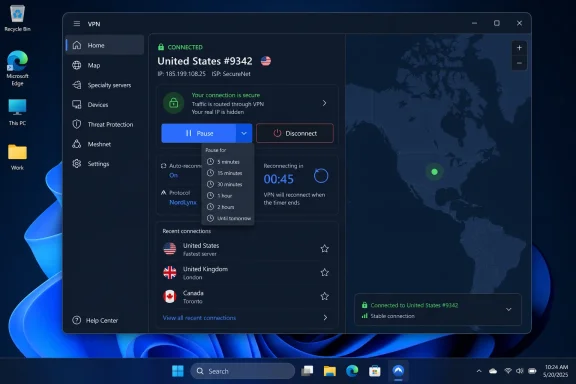 Pause and Disconnect have different consequences
A VPN client’s UI can make a temporary break look deceptively similar to a full disconnect. In NordVPN’s implementation, Pause is a timed state: the client is expected to restore the connection when the chosen interval expires. Disconnect closes the active VPN session, leaving traffic outside the NordVPN tunnel unless another setting reconnects it.
That separation deserves attention from administrators because “disconnect” does not necessarily mean “stay disconnected forever.” NordVPN’s Windows support guidance says Auto-connect can establish a connection again when the machine joins a network. A help-desk technician testing a local DNS, proxy, captive portal, or authentication issue could therefore see a tunnel return after a network transition even after using the restored Disconnect control.
The safe interpretation is straightforward: use the new Disconnect button to terminate the current session, then check Auto-connect and launch-at-startup settings if the system must remain outside the VPN. Conversely, use Pause when the objective is a temporary exception and an automatic return to the protected connection is desired.
That distinction also applies to systems using NordVPN’s Internet Kill Switch. NordVPN describes Kill Switch as a mechanism that blocks traffic if the VPN drops, intended to prevent traffic from escaping outside the tunnel. Administrators should validate the combination of Kill Switch, Auto-connect, and a user-initiated disconnect in their own deployment rather than assuming the new button changes those policy behaviors.
A convenience setting with a policy implication
The remembered pause duration is the more subtle part of version 8.10. NordVPN had already expanded VPN pause choices in version 7.49, offering 5, 15, 30, and 60 minutes as well as 24 hours. Version 8.10 turns one of those choices into a persistent preference selected through the three-dot menu.
That will reduce repetitive clicks for users who consistently need the same short exception, such as temporarily accessing a service that rejects VPN exit addresses. It can also create the opposite result when a shared PC inherits the last duration chosen by another user. NordVPN’s current Windows app is a device-wide VPN connection: its support documentation says a connection covers the whole device and only one Windows user account can use NordVPN at a time on that machine.
For that reason, a saved 24-hour pause is materially different from an occasional five-minute exception on a workstation used by more than one person. The release notes do not state whether the stored duration is tied to the Windows account, the NordVPN account, or the local installation. They also do not say whether an enterprise-managed configuration can lock, reset, or suppress the saved preference.
Those omissions do not make the feature unsafe, but they limit its appeal in environments where an administrator needs predictable connectivity behavior. Organizations that require full-time tunneling should not treat a remembered pause setting as harmless personalization. They should test the client’s behavior with their Auto-connect, Kill Switch, DNS, endpoint-security, and network-access policies before broadly approving the update.
The restored control fixes a usability problem, not a VPN limitation
NordVPN’s support pages had continued to document Disconnect as an option inside the Pause menu even after users objected to its placement. The 8.10 release note confirms that the company is changing the visual arrangement rather than introducing a new disconnect mechanism.
That is still useful. A control used during troubleshooting needs to be discoverable when the application is in a connected state, especially for users who are not expected to remember that a temporary-pause menu contains a permanent-session action. The separate button should also make support instructions less error-prone: “disconnect” can once again mean clicking a control labeled Disconnect instead of opening a control labeled Pause and selecting Disconnect from the resulting menu.
NordVPN has not published a Windows build number, a rollout schedule, or a list of bug fixes alongside the 8.10 note. It also has not identified whether all Windows 10 and Windows 11 installations receive the controls simultaneously. Its current support requirements list Windows 10 64-bit and Windows 11 for the current client; Windows 7, Windows 8.1, and 32-bit Windows 10 remain on a legacy client that NordVPN says no longer receives feature updates.
The company’s release-note metadata adds a small timing ambiguity: it lists version 8.10 for August 27, 2026, while the supplied page metadata also marks the item as published at 23:59 UTC that day. That is later than the current time on August 27, so the practical availability of the build may vary until NordVPN’s in-app updater begins offering it.
What Windows users should check after updating
The 8.10 changes are worth a quick configuration review rather than a major deployment project. Users who want the VPN to return after a predictable short exception can set the preferred Pause duration and confirm that the timer reconnects as expected. Users who need an open, non-VPN connection for longer should use Disconnect and then verify that Auto-connect will not immediately recreate the tunnel.
For administrators, the relevant test is the complete state transition: connected, paused, timer-expired, manually disconnected, application restarted, and network changed. Testing only the visible button is insufficient because the client’s reconnection settings may determine the actual state the user sees a few seconds or minutes later.
Version 8.10 does not alter NordVPN’s protocols, server network, encryption options, or Threat Protection features. It makes two connection actions easier to distinguish. On a Windows VPN client, that is a modest improvement with a concrete outcome: users can again terminate a session deliberately, while temporary pauses can become faster and more predictable for those who choose to use them.