

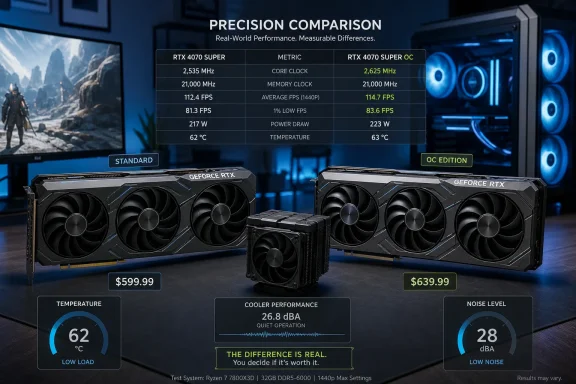
The practical rule is simpler than the branding makes it look. Buy an OC model only when it costs about the same as the lowest-priced reputable card using the same GPU and its cooler, dimensions, ports, noise profile, or warranty support suit the build. Do not pay extra merely for the letters “OC.”
The clock-speed gain is smaller than the badge suggests
Factory overclocking means an add-in-board partner such as Asus, Gigabyte, MSI, PNY, or Zotac ships a card with a higher programmed boost target than Nvidia’s reference specification. The card has been validated to operate that way out of the box, which provides a degree of convenience and avoids a buyer having to tune and stability-test it themselves.
The gain is often tiny. MSI’s standard GeForce RTX 3060 Ventus 2X 12G carries a 1,777 MHz boost specification, while the Ventus 2X 12G OC is rated for 1,807 MHz. That is a 30 MHz increase, or roughly 1.7% on paper, with the same 12GB GDDR6 memory, 192-bit memory bus, 170W board-power rating, physical dimensions, and single 8-pin power connector.
A current RTX 5070 example makes the point even more sharply. Asus lists its standard Prime GeForce RTX 5070 with a 2,512 MHz default boost clock and a 2,542 MHz software OC mode. The Prime RTX 5070 OC Edition lists 2,557 MHz as its default and 2,587 MHz in OC mode. The difference between the two cards’ normal operating profiles is 45 MHz — less than 2% of the clock rate — while both retain the same 6,144 CUDA cores, 12GB of GDDR7, 192-bit bus, 750W recommended power supply, and 2.5-slot form factor.
Clock speed alone does not translate one-for-one into frame rate, either. Games can be limited by CPU performance, memory bandwidth, ray-tracing workloads, VRAM capacity, engine behavior, or a frame-rate cap. A 1% to 3% clock advantage may be invisible in a title already running at 120 fps; at 59 fps, it may not move the result beyond 60 fps. PCWorld’s assessment of factory-overclocked cards similarly found that the real-world gains are generally in the single digits, even on much more expensive GPUs.
The important distinction is between buying a faster graphics card and buying a slightly faster version of the same graphics card. An RTX 5070 Ti rather than an RTX 5070, or a GPU with more VRAM where the workload needs it, can change the experience. A 30 MHz or 45 MHz SKU split usually cannot.
GPU Boost makes the printed number only part of the story
Nvidia’s GPU Boost technology has made the advertised boost clock less definitive than it appears on a retail box. Modern GeForce cards continuously adjust clocks and voltage according to available power and thermal headroom. Nvidia describes the process as making real-time adjustments several times per second until the card reaches its defined power target.
That means two nominally different cards can converge more than their specifications imply. A well-cooled standard model may sustain higher clocks than a hotter factory-OC model once each card is under a long gaming load. Conversely, an OC model with a higher power limit and a genuinely better heatsink may sustain a performance edge — but the cooler and firmware limits, rather than the OC suffix itself, are doing much of the work.
TechSpot’s RTX 5070 testing illustrates why buyers should look beyond the boost number. It found Asus Prime and Gigabyte Eagle cards operating substantially cooler and quieter than Nvidia’s Founders Edition RTX 5070 under full load: the partner cards recorded roughly 62–63°C GPU temperatures versus 72°C for the Founders Edition, and 34–35 dBA versus 39 dBA. Yet the Gigabyte Eagle OC used less power and recorded a lower average clock than the reference card in that test.
That is the consequence manufacturers rarely state clearly on product pages: “OC” does not guarantee the card will be the fastest implementation in sustained workloads, and it says almost nothing about acoustics, case fit, power draw, or component quality. Those properties are often more noticeable in day-to-day use than an extra two or three frames per second.
The BGR RTX 3060 price example is a warning, not a benchmark
BGR compares a $377 MSI RTX 3060 Ventus card with a $388 OC version and frames the $11 difference as the extra charge for factory overclocking. On those figures, an $11 premium for a tested 30 MHz bump is not outrageous; it is only about 3% of the listed price. The wider conclusion that OC cards are commonly poor value still holds, but this particular comparison should not guide a new-PC purchase.
The GeForce RTX 3060 launched in January 2021 at a $329 MSRP. By August 2026, it is an older Ampere product appearing in a market distorted by limited inventory, resellers, and renewed demand for 12GB cards. Tom’s Hardware recently reported that new RTX 3060 12GB models were commonly listed around $350 to $400 on Amazon while used cards could sell for roughly $150 to $200. That gap has much more to do with channel inventory and marketplace conditions than with 30 MHz of factory tuning.
In other words, the $377 versus $388 figures compare two aging retail listings, not two current equivalents with stable availability. The mistake is not BGR’s arithmetic; it is treating the price spread as evidence that OC cards have a standard markup. They do not.
This matters especially in the current GeForce market. Tom’s Hardware reported on August 10 that median US RTX 5070 prices at Newegg had risen well above launch pricing amid broader RTX 50-series price pressure. When core GPU pricing is volatile, a board partner can label nearly every available SKU “OC,” and buyers can easily confuse a supply premium with an overclocking premium.
A buyer looking at an RTX 5070, RTX 5070 Ti, RTX 5080, or RTX 5090 should therefore compare the exact full model names across multiple retailers, verify the seller, and separate these costs:
- The difference between Nvidia’s GPU class and the next GPU class up is the first performance decision.
- The difference caused by a premium cooler, quieter fans, dual-BIOS support, build quality, or a longer warranty may be worth paying for.
- The difference attributable only to a modest factory boost clock normally is not.
Self-tuning is available, but it is not a free warranty substitute
BGR is also correct that a standard card can often be overclocked with tools such as MSI Afterburner. MSI’s utility supports core-clock, memory-clock, voltage, power-limit, temperature-limit, fan-curve, monitoring, and one-click OC Scanner controls across many brands of graphics card, not just MSI products. That makes a manual overclock a practical option for enthusiasts willing to test it.
“Free performance” needs one qualification: it is free in money, not in time or risk. MSI advises users to test for artifacts, flickering, application crashes, and shutdowns after applying an overclock, and says damage caused by overclocking is not covered by warranty. A manual curve that passes a short benchmark can still fail in a specific game, during a hot summer afternoon, or after a driver update changes behavior.
Factory OC cards retain their value for buyers who want a validated out-of-box configuration and do not want to touch voltage curves or stress-test software. The board partner assumes responsibility for that shipped profile, within the card’s warranty terms. There is also the unavoidable silicon lottery: two otherwise identical GPUs may not have equal overclocking headroom, so a standard card is not guaranteed to reach the OC SKU’s advertised setting with equal stability.
For experienced users, undervolting may be the more useful tuning direction. A carefully tuned voltage-frequency curve can sometimes preserve nearly all stock performance while reducing temperatures, fan noise, and power consumption. That is especially relevant in small-form-factor Windows PCs, where a large triple-fan OC card can create clearance problems and dump more heat into an already constrained case.
Shop the board, not the suffix
The OC label has become a retail shorthand for far more than a clock setting. It can appear on a genuinely premium board with a larger vapor chamber, stronger power delivery, better fans, a dual-BIOS switch, and room for additional tuning. It can also appear on an otherwise ordinary model whose only measurable change is a minor factory offset.
Before paying more, check the card’s actual boost clock against the non-OC sibling, its board-power limit, cooler thickness and length, connector placement, fan-stop behavior, warranty conditions, and independent noise-and-temperature testing. If the card is $10 or $20 more and is quieter, cooler, or easier to service, the purchase can make sense even if the OC itself does not. If it is $80, $150, or more expensive solely because it is branded Gaming OC, AMP Extreme, ROG Strix OC, or similar, the performance case usually collapses.
The letters on the box do not make an Nvidia GPU meaningfully faster. The full card design might make it quieter or cooler, and the market might make it the only sensibly priced option in stock. Those are the reasons to buy it; the factory overclock is usually just the line item manufacturers can print largest.