
BGR’s August 10 report correctly advises caution with a rediscovered iPad, particularly one sitting on an operating system Apple no longer patches. Unsupported software creates a permanent remediation problem: when a browser, WebKit component, Wi‑Fi stack, media parser, or operating-system service is found vulnerable, the owner has no vendor fix to install. CISA’s general guidance for internet-connected devices is equally direct: keep them patched or replace products that no longer receive security support.
The practical issue is that iPad support is not a simple newest iPadOS or nothing proposition. Apple continues to issue security-only updates for selected older iPadOS branches, sometimes years after those devices lost access to the newest feature release. A device’s age, its chip, and the highest iPadOS version displayed in Settings are all imperfect shortcuts. The only useful question is whether Apple still lists that exact iPad model and installed iPadOS branch in a current security release.
That distinction changes the answer from “never put an old iPad online” to “identify the exact device before deciding what it is safe to do with it.”
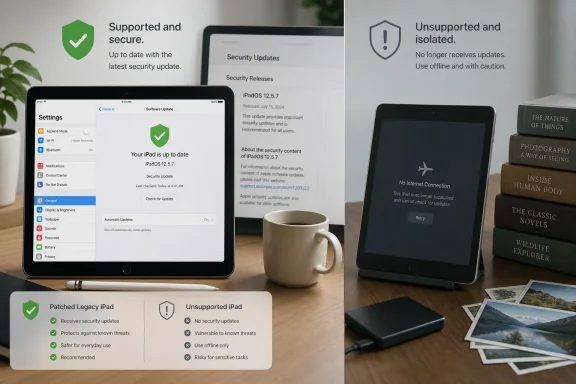 “Up to Date” Does Not Mean Secure Forever
On an older iPad, opening Settings > General > Software Update may show “Your iPad is up to date.” That message only means Apple has no newer compatible build available at that moment. It does not promise that the installed operating system will receive another security patch.
Apple does not publish a universal end-of-security-support calendar for each iPad. Instead, the record is visible in its security-release notes, which specify the devices eligible for each update. That makes model identification essential.
As of Apple’s 2026 security-release record, the company has maintained several older branches alongside iPadOS 26. iPadOS 18.7.9, released May 11, 2026, still covered the seventh-generation iPad. iPadOS 17.7.11 covered the sixth-generation iPad, the 10.5-inch iPad Pro, and the second-generation 12.9-inch iPad Pro. Apple also released iPadOS 16.7.15 in March for devices including the fifth-generation iPad, the 9.7-inch iPad Pro, and the first-generation 12.9-inch iPad Pro.
Those are older operating systems, and they miss current features and many new apps. They are nevertheless materially safer than an iPad frozen on an unpatched version because they still receive at least some fixes for publicly documented vulnerabilities.
This is the gap in BGR’s broad framing. Its example points to the A9 chip as a sign that hardware flaws may be impossible to patch. The fifth-generation iPad does indeed use Apple’s A9 processor, according to Apple’s technical specifications. Yet Apple’s March 2026 iPadOS 16.7.15 release included that model and fixed WebKit issues, including a memory-corruption vulnerability triggered by malicious web content. The presence of an older A9 chip did not make the tablet unpatchable in the way the article suggests.
Hardware vulnerabilities do exist, and some classes of flaw can require a hardware redesign. But no evidence in Apple’s security record supports treating every A9-based iPad as inherently unsafe solely because of its processor. Software-support status is the operational line that matters most, and Apple has shown that it can backport fixes to hardware long excluded from the current iPadOS generation.
Identify the iPad Before Assigning It a Job
Start by determining the exact model, rather than estimating by screen size or year. Open Settings > General > About and note the Model Name, model number, installed iPadOS version, available storage, and battery behavior. If the tablet cannot boot or unlock, Apple’s model number markings and serial-number lookup can help identify it.
Then install every available update. This is worthwhile even if the device cannot move beyond an old major version. Apple’s March release brought security fixes to iPadOS 16; its security pages also show sustained updates to iPadOS 15. An old iPad may have been left on a version years behind the final update its hardware can run.
The more useful classification is:
- An iPad that receives current iPadOS releases is suitable for normal personal use, assuming it is updated and protected with a passcode.
- An iPad receiving security-only updates on iPadOS 15, 16, 17, or 18 can remain useful online, but it should be treated as a reduced-trust device with narrower duties.
- An iPad for which Apple no longer publishes any security updates should be removed from accounts and repurposed offline, sold responsibly after erasure, or recycled.
The middle category deserves more caution than a current device. Apple’s backports are valuable, but they are selective. The company does not necessarily bring every newer security mitigation, browser capability, privacy control, or platform protection to an old branch. Older browsers can also become incompatible with modern websites, and third-party app developers eventually stop shipping updates for legacy versions of iPadOS.
For home use, the dividing line should be the data at risk. Reading news, following a recipe, streaming from a limited account, or using a device as a remote-control screen are lower-risk activities than signing into a bank, receiving account-recovery email, storing family documents, or using a password manager containing every credential in the household.
The Browser and Email Are the Biggest Exposure Points
An unsupported iPad becomes risky online because its exposure is continuous and varied. WebKit, Apple’s browser engine, is used not only by Safari but by many apps that show web content inside their own windows. A malicious page, compromised advertisement, phishing prompt, booby-trapped attachment, or hostile public Wi‑Fi environment can target software layers that the vendor will no longer repair.
The likelihood of an ordinary household iPad being singled out by a sophisticated spyware operator is low. The more common concern is that unsupported software misses fixes after vulnerabilities become public, automated, and easier for criminals to incorporate into phishing pages or malicious sites. A successful compromise does not need to begin with a dramatic “hacker” moment; it can begin with a stolen session cookie, reused password, fraudulent payment prompt, or account-recovery message opened from a stale device.
Email deserves special attention. Logging into a primary mailbox on an unsupported tablet gives that device access to password resets, multifactor-authentication prompts, receipts, personal correspondence, and often cloud-storage links. The same logic applies to a primary Apple Account, Google account, Microsoft account, financial institution, healthcare portal, and employer account.
For an unsupported iPad that must occasionally connect, use a separate, low-privilege account where possible. Do not save passwords in the browser, do not approve sign-in prompts from it, and do not use it as a trusted recovery device. A long passcode, automatic lock, and current router security help reduce risk, but they do not replace missing patches.
Organizations should be stricter. An iPad with no vendor security maintenance should not retain access to Microsoft 365, Google Workspace, VPN, device-management portals, internal web apps, or corporate email. The device may be physically small, but it is still a managed endpoint with credentials, browsers, network connectivity, and potentially company data. “It only belongs to the conference room” is not an acceptable exception if it can authenticate to the business.
Offline Repurposing Works Only If It Is Actually Offline
BGR’s recommendation to turn an unsupported iPad into an e-reader, clock, photo frame, or single-purpose display is sound, with a necessary qualification: calling something “offline” while it remains signed into iCloud and connected to Wi‑Fi is not offline.
A proper offline repurpose should begin with a backup of anything worth keeping, followed by removal of the iPad from sensitive accounts. Sign out of Apple services if the new role does not require them, erase stored mail and passwords, remove payment cards, and turn off Wi‑Fi, Bluetooth, and cellular service. If the iPad will never need online functions again, erase it and configure it as a new device without connecting a personal account.
Local files can keep an old tablet useful. Downloaded music, films, PDFs, DRM-free ebooks, presentation slides, recipes, manuals, and family photos can all serve a purpose without routine internet access. A tablet set up as a kitchen display or wall-mounted calendar should use local content instead of a continuously synchronized cloud account.
The offline role also avoids a second problem that has nothing to do with malware: app abandonment. A device that depends on a particular streaming app, cloud-photo client, home-automation service, or web dashboard can lose its purpose overnight when the service raises its minimum supported iPadOS version. A local photo album or PDF library will continue working as long as the hardware does.
There is still a physical safety check. Old iPads can develop degraded batteries after years in drawers, heat, or constant charging. If the display is lifting, the enclosure is bulging, the tablet becomes unusually hot, or the battery drains rapidly, stop charging and using it. Apple’s vintage and obsolete classifications concern repair availability, not operating-system security, but an obsolete product may also be difficult or impossible to obtain official battery service for.
Apple’s Backports Buy Time, Not a Permanent Lifecycle
Apple deserves credit for doing more than the minimum on some legacy iPads. The iPadOS 16.7.15 WebKit patch is particularly telling: it delivered a fix to older hardware for a vulnerability that had already been addressed in a newer iOS release. That is far better than equating loss of major-version upgrades with immediate abandonment.
But the company’s patching practice is discretionary, model-specific, and not a substitute for a stated support lifecycle. An iPad receiving a security patch in March or May 2026 has evidence of present support; it does not have a guarantee of another patch in September. Apple can end updates for an old branch without the kind of advance end-of-support deadline that Windows administrators expect from Microsoft.
The sensible policy is therefore simple: check for updates, confirm the model against Apple’s current security-release list, and match the iPad’s role to its remaining maintenance status. Keep a still-patched legacy iPad updated and away from high-value accounts where feasible. Treat an unpatched one as an offline appliance, not a casual banking or email device.
An old iPad does not become e-waste when it stops getting the newest iPadOS. Once Apple stops shipping security fixes for its exact model, however, it should also stop being trusted with the keys to the rest of your digital life.