
A new Towards Data Science walkthrough shows how little code is needed to turn Ollama and Python into a local command-line agent: define a tool, let the model request it, run the command with
The missing part is the boundary between demonstrating an agent and granting an agent control of a machine. In the submitted code, there is no such boundary.
The critical function in the example is only a few lines long:
Every command proposed by the model is passed straight to the operating system’s command interpreter. There is no command allowlist, no working-directory restriction, no file-path policy, no elevation check, no approval prompt, and no distinction between read-only inventory queries and destructive actions. The
That difference changes the risk category of the project. A model asked to “clean up” files, repair a development environment, remove old containers, or make disk space can choose commands that alter or delete data. A model can also be influenced by text it encounters in tool output. If the agent inspects a repository, log file, issue export, or script containing hostile instructions, that text becomes part of the next prompt context alongside the user’s request and the system prompt.
The tutorial does warn that an ambiguous cleanup request can cause damage. That warning understates the implementation issue: ambiguity is not the only problem. The user could make a benign request such as “summarize this project and tell me how to run it,” and a file inside the project could attempt to steer the model toward executing a command. Once the tool accepts arbitrary strings, the model is no longer merely advising the user; it is operating an unrestricted command interface.
Python’s documentation explicitly warns developers to review the security implications of
A 10-second timeout does not make that safe. It can stop a long-running foreground process, but it does not undo a command that has already changed files, stopped a service, altered a setting, transmitted data, or launched work in the background.
On Windows,
A Windows-native agent should not expose a generic “run anything” tool for routine status tasks. It should publish narrowly scoped capabilities whose parameters are typed and validated. For example, these are distinct operations with clear intent:
The practical rule is simple: use the model to select from an inventory of safe operations, not to author the operating-system command line.
There is a smaller discrepancy in the tutorial’s explanation of its final lines. It says the model is asked to double-check conversation history and action parameters before its final answer. The code does not add a verification pass, a second system instruction, or a human approval state. It simply prints the content of the last Ollama response after the tool loop. The model may reason over the returned output, but it has not been made to independently validate a command before it runs because the command has already run.
Ollama tool calling is a request mechanism, not a sandbox. The model returns a function name and JSON-shaped arguments. The caller decides whether to execute them. The safest point in the entire design is therefore the dispatcher:
In the supplied implementation, the map has one function,
For an agent that must make changes, execution should pause at a confirmation gate. Show the exact action, target paths, intended side effect, and privilege level; require the human to approve it; then log both the request and the result. High-impact categories — deletion, package installation, registry changes, service control, scheduled tasks, network access, credential files, and commands requiring elevation — should be rejected or separately designed rather than treated as ordinary shell work.
But local inference does not make an agent harmless. The agent still runs with the permissions of the account that launches Python. On a corporate endpoint, that may mean access to source trees, browser downloads, mapped drives, SSH configuration, cloud-development credentials, local databases, and the user profile. If it runs from an elevated terminal, its operating-system reach grows with it.
There is another deployment detail the tutorial leaves implicit: the
For developers who want the educational value of this project, the right first milestone is a read-only Windows diagnostic agent. Give it tools that report disk space, OS build, installed updates, service state, event-log summaries, and top processes. Run it in a standard-user account, constrain it to a chosen directory where appropriate, cap output sizes, preserve a tool-call audit log, and require explicit approval before any state-changing operation.
The code in the tutorial successfully illustrates why CLI agents feel powerful: one structured model response can turn a natural-language request into local action. On Windows, that is precisely why the unrestricted
subprocess, return the output, and repeat until the model answers. The tutorial is useful as a compact explanation of the tool-calling loop, but its example should not be run unchanged on a Windows workstation or an administrator’s daily-use machine. The code gives a language model unrestricted shell execution under the user’s account while describing that capability as “safe” only in the text supplied to the model.
Published August 3, the tutorial uses the Ollama Python SDK, version 0.6.2, with Alibaba’s qwen2.5 model. It correctly demonstrates the core mechanism behind a CLI agent: Ollama returns a structured tool-call request, Python dispatches the named function with the proposed arguments, and the tool output is appended to the conversation for the next model response. Ollama’s own tool-calling documentation confirms that this is the intended pattern, and the current Python SDK can even infer a tool schema directly from a Python function.The missing part is the boundary between demonstrating an agent and granting an agent control of a machine. In the submitted code, there is no such boundary.
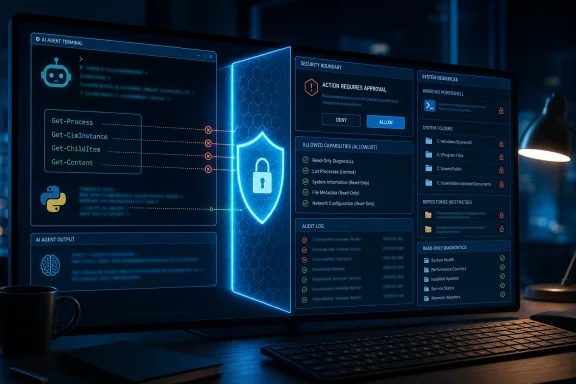 The tutorial’s agent is a general remote-control primitive
The critical function in the example is only a few lines long:subprocess.run(command, shell=True, capture_output=True, text=True, timeout=10)Every command proposed by the model is passed straight to the operating system’s command interpreter. There is no command allowlist, no working-directory restriction, no file-path policy, no elevation check, no approval prompt, and no distinction between read-only inventory queries and destructive actions. The
TOOLS_SCHEMA describes the function as one that executes “safe terminal shell commands,” but schema descriptions are instructions to the model, not controls enforced by Python.That difference changes the risk category of the project. A model asked to “clean up” files, repair a development environment, remove old containers, or make disk space can choose commands that alter or delete data. A model can also be influenced by text it encounters in tool output. If the agent inspects a repository, log file, issue export, or script containing hostile instructions, that text becomes part of the next prompt context alongside the user’s request and the system prompt.
The tutorial does warn that an ambiguous cleanup request can cause damage. That warning understates the implementation issue: ambiguity is not the only problem. The user could make a benign request such as “summarize this project and tell me how to run it,” and a file inside the project could attempt to steer the model toward executing a command. Once the tool accepts arbitrary strings, the model is no longer merely advising the user; it is operating an unrestricted command interface.
Python’s documentation explicitly warns developers to review the security implications of
shell=True. When a shell is invoked, handling whitespace and shell metacharacters safely becomes the application’s responsibility. In this example, the application is intentionally accepting the command string from a probabilistic model, which is the opposite of a controlled input path.A 10-second timeout does not make that safe. It can stop a long-running foreground process, but it does not undo a command that has already changed files, stopped a service, altered a setting, transmitted data, or launched work in the background.
The sample commands are Unix examples, not Windows administration
The tutorial is also framed as a generic CLI agent while its run examples are largely Unix-specific.df -h, sw_vers, top, and ps are normal commands on macOS or Linux, but they are not a native Windows management interface. sw_vers, in particular, is a macOS command and will fail in Command Prompt or standard Windows PowerShell.On Windows,
shell=True means Python invokes the command processor specified by the COMSPEC environment variable, normally cmd.exe. Python’s own guidance says that Windows programs generally do not need shell=True unless the target is a shell built-in such as dir or copy. PowerShell commands are a separate case: a script should launch powershell.exe or pwsh.exe deliberately with a fixed argument list, rather than assume that a free-form Unix shell command will translate.A Windows-native agent should not expose a generic “run anything” tool for routine status tasks. It should publish narrowly scoped capabilities whose parameters are typed and validated. For example, these are distinct operations with clear intent:
- A disk-status tool can return
Get-Volumedata without allowing the model to construct a pipeline that deletes volumes or formats disks. - An operating-system inventory tool can read
Win32_OperatingSystemthroughGet-CimInstanceand return build, version, and memory details. - A process-summary tool can call
Get-Process, sort the results in Python, and return a limited table rather than hand the model an unrestricted PowerShell session. - A project-inspection tool can be restricted to a chosen repository root, allow only file reads, and reject junction traversal or paths outside that root.
Get-CimInstance as a standard way to query WMI/CIM data such as Win32_OperatingSystem, while Get-Process provides process objects with working-set memory, CPU time, process IDs, and names. Those commands are better building blocks for a Windows support assistant because their scope can be expressed as an API contract rather than embedded in a model-generated shell string.The practical rule is simple: use the model to select from an inventory of safe operations, not to author the operating-system command line.
Tool calling works; the security decision remains in Python
The article gets the orchestration sequence right. It starts with a system message, appends user input, callsollama.chat(), detects tool_calls, runs each requested function, sends the results back as role: "tool" messages, and asks the model for a final response. That loop is the essential agent pattern, and it is a good foundation for experimentation.There is a smaller discrepancy in the tutorial’s explanation of its final lines. It says the model is asked to double-check conversation history and action parameters before its final answer. The code does not add a verification pass, a second system instruction, or a human approval state. It simply prints the content of the last Ollama response after the tool loop. The model may reason over the returned output, but it has not been made to independently validate a command before it runs because the command has already run.
Ollama tool calling is a request mechanism, not a sandbox. The model returns a function name and JSON-shaped arguments. The caller decides whether to execute them. The safest point in the entire design is therefore the dispatcher:
Code:
if tool_name in TOOL_MAP:
tool_result = TOOL_MAP[tool_name](**arguments)execute_shell_command, and that function can do almost anything the user can do. Replacing it with specialized, policy-enforcing functions is the meaningful upgrade. Merely changing models, adding stronger prose to the system prompt, or telling the model to be cautious does not reduce the privileges available to the process.For an agent that must make changes, execution should pause at a confirmation gate. Show the exact action, target paths, intended side effect, and privilege level; require the human to approve it; then log both the request and the result. High-impact categories — deletion, package installation, registry changes, service control, scheduled tasks, network access, credential files, and commands requiring elevation — should be rejected or separately designed rather than treated as ordinary shell work.
“Fully local” describes inference, not the entire threat model
The walkthrough calls the design fully local because the model and orchestration run on the user’s machine. That can be valuable: prompts and tool results can stay on-device, no API key is needed for local model inference, and a developer can inspect the Python source end to end. Ollama’s model registry shows thatqwen2.5 is available in multiple sizes, with the default qwen2.5:latest download listed at roughly 4.7 GB, so hardware capacity and model choice will affect the experience.But local inference does not make an agent harmless. The agent still runs with the permissions of the account that launches Python. On a corporate endpoint, that may mean access to source trees, browser downloads, mapped drives, SSH configuration, cloud-development credentials, local databases, and the user profile. If it runs from an elevated terminal, its operating-system reach grows with it.
There is another deployment detail the tutorial leaves implicit: the
ollama Python package is a client library, not the local inference engine by itself. Ollama must be installed, a compatible model must be pulled, and the Ollama service must be available before the Python loop can receive responses. Pinning ollama==0.6.2 can make a tutorial reproducible, but it also means users should consciously revisit that pin for fixes and API changes rather than leave a proof-of-concept dependency frozen indefinitely.For developers who want the educational value of this project, the right first milestone is a read-only Windows diagnostic agent. Give it tools that report disk space, OS build, installed updates, service state, event-log summaries, and top processes. Run it in a standard-user account, constrain it to a chosen directory where appropriate, cap output sizes, preserve a tool-call audit log, and require explicit approval before any state-changing operation.
The code in the tutorial successfully illustrates why CLI agents feel powerful: one structured model response can turn a natural-language request into local action. On Windows, that is precisely why the unrestricted
execute_shell_command function must be removed before the example becomes anything more than a disposable lab exercise.
References
- Primary source: towardsdatascience.com
Published: 2026-08-03T15:00:00+00:00
Loading…
towardsdatascience.com - Related coverage: github.com
Loading…
github.com - Related coverage: docs.ollama.com
Loading…
docs.ollama.com - Related coverage: docs.ollama.com
Loading…
docs.ollama.com - Related coverage: github.com
Loading…
github.com - Related coverage: owaspla.owasp.org
Loading…
owaspla.owasp.org - Related coverage: doccompiler.ai
Loading…
doccompiler.ai - Related coverage: registry.ollama.com
Loading…
registry.ollama.com - Related coverage: docs.python.org
Loading…
docs.python.org - Related coverage: docs.python.org
Loading…
docs.python.org - Related coverage: learn.microsoft.com
Loading…
learn.microsoft.com - Related coverage: learn.microsoft.com
Loading…
learn.microsoft.com - Related coverage: registry.ollama.com
Loading…
registry.ollama.com - Related coverage: ollama.com
Loading…
www.ollama.com