
The change is one of the most consequential security adjustments in Samsung’s recent Android software work because it turns an often-overlooked protective layer into a meaningful defense against physical attacks. For a thief, stalker, opportunistic colleague, or anyone with temporary access to a misplaced Galaxy device, repeatedly guessing the screen lock will now become increasingly impractical—and ultimately destructive to the data they are trying to access.
For legitimate owners, however, the policy creates a sharper edge. Forgetting a PIN has always been inconvenient; under One UI 9.0, careless repeated guesses can escalate from a short timeout into a full device wipe. That makes backups, account recovery readiness, and a memorable lock-screen credential more important than ever.
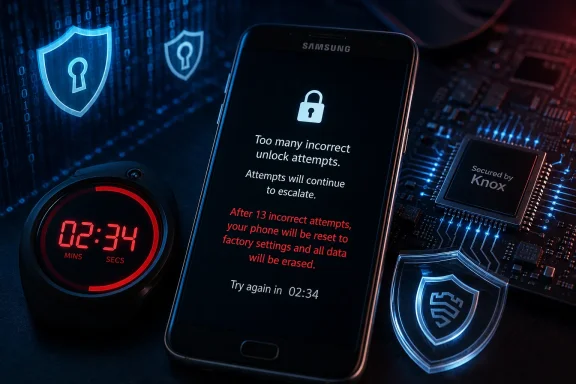 A Major Shift in Samsung Lock Screen Security
Samsung’s revised policy is built around progressive lockout delays. Rather than allowing an extended run of attempts with only modest friction, One UI 9.0 imposes longer and longer waiting periods as incorrect entries accumulate.
The schedule is designed to slow down password guessing dramatically:
| Consecutive failed attempts | Input restriction |
|---|---|
| 5 | 1 minute |
| 6 | 5 minutes |
| 7 | 15 minutes |
| 8 | 30 minutes |
| 9 | 90 minutes |
| 10 | 4 hours |
| 11 | 12 hours |
| 12 | 24 hours |
| 13 | Permanent lock requiring factory reset |
The key point is not merely the number 13. It is the compounding time penalty leading up to that final failure. Someone reaching 10 unsuccessful attempts is already facing a four-hour delay before another guess. By 12 failed attempts, the next try is delayed for a full day.
This makes rapid PIN guessing—a threat that is especially relevant for short numeric codes—substantially less viable. A malicious actor cannot simply sit with a stolen Galaxy phone and cycle through possibilities at speed. The device itself forces the attacker into a prolonged, increasingly unproductive process.
Why the factory-reset outcome matters
A permanent lock is materially different from a conventional temporary lockout. Temporary restrictions preserve the possibility of eventually trying again. A permanent lock ends that path.
Once the 13th failure is reached, the owner’s remaining route is a factory reset. That restores the device to a setup state and removes its local content, applications, settings, downloaded files, and credential-protected data.
The phone is not transformed into an unlocked treasure chest after the reset. Samsung’s implementation is aligned with Android’s broader anti-theft protections, meaning the person setting up the reset device will generally need to authenticate with the previously associated Samsung Account and Google Account where Factory Reset Protection applies.
That distinction is critical. The goal is not merely to punish failed attempts. It is to preserve the confidentiality of the original owner’s information while making a stolen handset less useful to an unauthorized user.
The Android 17 Foundation Behind One UI 9.0
Although Samsung is applying the policy through One UI 9.0, the underlying direction comes from Android’s strengthening lock-screen protections. Android has long used rate limiting for PINs, passwords, and patterns, but newer platform behavior puts greater emphasis on slowing offline and physical-device attacks.
Modern Android devices are designed to keep credential-encrypted data unavailable until the correct lock-screen secret is supplied. The PIN, password, or pattern is not simply a cosmetic gate in front of the home screen. It helps unlock access to protected user data and security-sensitive cryptographic material.
That design is particularly important because many people still choose credentials with limited complexity:
- Four-digit or six-digit PINs
- Reused numeric patterns
- Easily guessed birthdays or years
- Familiar swipe patterns
- Short passwords that are memorable but weak
A device with no meaningful attempt throttling would make these choices far more dangerous. Even a six-digit PIN has one million possible combinations, but an attacker does not always need to search the entire range. They can start with common choices, observed habits, personal dates, and the combinations most likely to be selected by a human being.
Rate limiting changes the economics of that attack. A few seconds between guesses can be devastating for an attacker’s success rate. Hours or days between guesses make the attack largely impractical, especially when a reset threshold threatens to erase the data that motivated the attack in the first place.
Hardware-backed protections remain central
Samsung has heavily emphasized hardware-backed security across recent Galaxy generations, including technologies such as Knox Vault on supported devices. These security components are meant to isolate sensitive information, including screen-lock-related secrets and biometric data, from the normal Android operating environment.
The new One UI 9.0 policy should be viewed as part of that larger security model rather than as an isolated user-interface tweak. The Galaxy lock screen, secure hardware, encryption, account protection, and reset safeguards work together.
A strong lock-screen policy is especially valuable if a handset falls into the hands of someone who is willing to use physical access as part of an attack. Software updates can address remote vulnerabilities, but physical possession changes the threat model. The attacker can try to observe, coerce, guess, or manipulate local authentication.
Samsung’s tougher failed-attempt limits directly address the guessing portion of that threat.
The Most Important Usability Safeguard: Duplicate Guesses
The harshness of a 13-failure threshold naturally raises concerns about accidental lockouts. Samsung has included a notable mitigation: identical consecutive incorrect entries are not counted as separate failures.
In practical terms, entering the same wrong PIN twice in immediate succession does not necessarily consume two attempts. The system recognizes that a user may have repeated an incorrect entry because they were distracted, uncertain, or attempting to verify what they had just typed.
That is a thoughtful compromise. It does not help an attacker making a meaningful sequence of new guesses, but it reduces the chance that a legitimate owner burns through the failure count through a simple reflex.
Clearer lock-screen warnings are equally important
One UI 9.0 will also make the state of the lockout process more visible. Instead of leaving users to infer what is happening after several failed entries, the lock screen can communicate:
- That an input restriction is active
- How long the restriction will last
- How many attempts remain before the severe consequence
- Why repeated incorrect credentials are becoming risky
This is not just a visual refinement. Security systems fail users when the consequences are invisible. If a person sees only a generic “Try again later” warning, they may repeatedly resume guessing without understanding that they are approaching a permanent lockout.
Explicit warnings give users a chance to stop, think, locate backup credentials, contact an authorized administrator, or use another trusted device to confirm the correct PIN before making the situation worse.
For a Galaxy phone used in a business environment, that information could prevent unnecessary data loss. Employees may have a personal PIN alongside a complex work profile, multiple managed accounts, and security requirements that demand periodic credential entry. A visible warning provides valuable context when someone is under pressure.
Biometrics Do Not Eliminate the Need for a Strong Backup Credential
Fingerprint and face unlock make Galaxy devices feel nearly frictionless on a day-to-day basis. That convenience can lead people to forget that biometric authentication is not a complete replacement for the primary PIN, pattern, or password.
Android periodically requires strong authentication using the primary credential. This can occur after a restart, after a prolonged period, after certain security events, or when the system determines that biometric convenience should no longer be sufficient.
In other words, even someone who unlocks a Galaxy phone with a fingerprint dozens of times a day must still remember the backup credential.
This is where One UI 9.0’s policy may surprise users. A forgotten PIN can become a problem precisely because biometrics have worked so reliably that the user rarely has to type it. When the phone eventually requests the primary credential, a rushed sequence of guesses could trigger escalating delays.
Choose a credential you can actually retain
The new policy does not mean everyone should switch to an impossibly complicated password. A security secret that cannot be remembered creates its own risk. The practical answer is to use a credential that is both reasonably resistant to guessing and personally memorable.
A stronger approach includes:
- Avoiding birthdays, addresses, and obvious years
- Avoiding repeated digits such as
1111or000000 - Avoiding simple sequences such as
1234or2580 - Using a six-digit PIN instead of a four-digit PIN where practical
- Considering an alphanumeric password for especially sensitive devices
- Keeping the credential private even from friends, family members, and coworkers
- Avoiding written notes stored in an unprotected location
For many users, a six-digit PIN chosen without personal patterns offers a sensible balance between usability and security. A longer password can provide stronger protection, but it is only worthwhile if it will not cause frequent mistypes and lockout anxiety.
Factory Reset Is a Recovery Path, Not a Rescue of Local Data
The phrase “factory reset” can sound reassuring because it suggests that a device can always be restored. That is true in the narrow sense that the hardware can be put back into service. It is not true in the sense of preserving everything on it.
A factory reset following a permanent lock should be treated as a data-loss event.
Locally stored photographs, downloads, files, application data, notes, message history, device-specific settings, and offline authentication tokens may be gone unless they were synchronized or backed up elsewhere. Some cloud services will restore much of the user experience after sign-in, but not every app backs up every category of information.
The result may range from minor inconvenience to serious disruption, depending on how the Galaxy device is used.
What may survive—and what may not
Data synchronized to cloud services may be recoverable after the device is reset and signed back in. This can include some contacts, calendars, photos, documents, browser data, and app settings, depending on the apps and backup options in use.
But there are important caveats:
- A cloud photo library may not include recent pictures that had not yet uploaded.
- A messaging app may require a separate backup configuration.
- Files saved only to local storage may be lost.
- Authenticator apps may require recovery codes, transfer procedures, or separate cloud backup.
- Financial, enterprise, and health apps may require fresh enrollment.
- Secure folders and encrypted containers can have their own recovery limitations.
- eSIM activation may need to be re-provisioned through a carrier.
For Galaxy owners, Samsung Cloud, Smart Switch backups, Google’s device backup features, and app-specific cloud syncing should be evaluated before an update or a potential lockout event creates urgency.
Backups are not merely a routine maintenance task under this model. They are the difference between resetting a device and rebuilding a digital life from scratch.
What Galaxy Owners Should Do Before One UI 9.0 Arrives
The most effective preparation is simple: verify that the primary credential is known, verify that important data exists somewhere beyond the handset, and verify that account recovery details are current.
This should be done before a user is stressed, traveling, locked out of an app, or attempting to access a phone after a restart.
A practical preparation checklist
- Confirm the current screen-lock credential.
Unlock the phone with the PIN, pattern, or password intentionally rather than relying only on biometrics. - Update backups.
Check that photos, contacts, documents, messages, and application data are being synchronized or backed up according to personal needs. - Review account access.
Confirm the passwords and recovery methods for both the Samsung Account and Google Account associated with the device. - Store recovery codes securely.
If two-factor authentication recovery codes exist for critical accounts, preserve them in a safe location that is not locked inside the same phone. - Check authenticator migration options.
Some authenticator applications have backup, export, or transfer tools; others do not. Know the difference before a reset occurs. - Consider Smart Switch as an additional layer.
A local backup to a computer or supported storage path can add protection beyond cloud synchronization. - Teach family members what not to do.
Children or relatives repeatedly trying to unlock a phone could unintentionally trigger long delays. They should understand that guessing is no longer harmless. - Review enterprise support procedures.
Employees using managed Galaxy devices should know whether their organization has an approved recovery and re-enrollment process after a reset.
This is straightforward advice, but it is particularly relevant because the new policy makes repeated guessing a poor recovery strategy. Once the owner genuinely cannot remember the credential, the safest action is often to stop entering variations rather than keep experimenting.
A Stronger Defense Against Theft and Coercive Access
The security upside is easy to understand. A locked smartphone often contains more sensitive information than a laptop left at home. It may hold banking alerts, work email, personal photos, health information, location history, authentication codes, private conversations, and access to other online services.
The phone can also act as a gateway. A malicious person who unlocks it may be able to reset passwords through email, approve sign-ins, intercept verification codes, or access password managers.
By reducing the number of meaningful guesses and increasing the waiting period after each failure, Samsung raises the cost of a brute-force attempt. The attacker is forced into a choice:
- Stop and abandon the attempt
- Continue through delays that grow from minutes to hours and days
- Risk permanently destroying access to the very data they seek
That is a meaningful security deterrent, particularly for opportunistic attacks. It also makes the lock screen more aligned with the importance of the data behind it.
The policy cannot solve every physical security problem
It is equally important not to overstate what this feature protects against. A rate-limited lock screen is powerful against repeated guessing, but it is not a universal answer to all device threats.
It cannot fully protect users if:
- An attacker observes the correct PIN being entered
- The owner is coerced into unlocking the phone
- A device is already unlocked when taken
- Sensitive notifications reveal too much on the lock screen
- Weak account recovery practices undermine the phone’s protections
- Malware or phishing compromises credentials outside the device itself
Users concerned about high-risk scenarios should combine a stronger screen credential with privacy-conscious lock-screen notification settings, account-level two-factor authentication, secure password practices, and features that help locate or remotely erase a lost device.
The One UI 9.0 lockout policy is an important layer, but effective security remains a layered discipline.
Why This Could Be Controversial
The security rationale is sound, yet the policy will not be universally popular. A hard cutoff that ends in a factory reset can feel unforgiving, especially for users who do not understand the consequences until they are already close to the threshold.
There is also a tension between data confidentiality and data availability. Security professionals often prioritize preventing unauthorized access, while users may prioritize preserving irreplaceable photos, messages, or work files. A factory reset strongly protects confidentiality, but it can be devastating when backup practices are incomplete.
Samsung’s duplicate-entry handling and clearer warnings soften that tension, but they do not eliminate it. A user who has genuinely forgotten a PIN can still be locked into a long wait and, eventually, a wipe.
Older expectations may cause confusion
Many Galaxy users will be familiar with prior settings that offered an optional automatic factory reset after a considerably higher number of failed unlock attempts. One UI 9.0 represents a more aggressive default posture for devices introduced with the newer platform.
That makes it especially important to distinguish between a device’s existing behavior and the policy applied to eligible One UI 9.0 hardware. Exact availability can depend on model, region, software build, and whether a product launched with the new version rather than merely receiving it later.
Users should therefore avoid assuming that every currently owned Galaxy phone will behave identically after an update. The revised policy is associated with the new One UI 9.0 security model, but implementation details may vary across the broad Galaxy device portfolio.
The Windows Connection: Endpoint Security Is Becoming More Personal
For Windows users who rely on Android phones alongside PCs, this policy reflects a familiar security principle: the device login is not a trivial convenience feature. It is a boundary around encrypted data, account tokens, cloud services, and business resources.
Windows has increasingly emphasized hardware-backed sign-in through PINs, Windows Hello, TPM protection, BitLocker, recovery keys, and account security. Samsung’s approach on Galaxy devices follows the same broader philosophy: a local authentication secret should be protected against unlimited attempts, especially when a device is physically compromised.
The difference is that a smartphone is often more exposed. It travels everywhere, is unlocked frequently, receives sensitive notifications constantly, and may be used as a second-factor device for a Windows PC, Microsoft account, workplace apps, or password manager.
That makes Galaxy lock-screen security relevant beyond Android alone. A compromised phone can have consequences across an entire personal or professional device ecosystem.
A Tougher Policy That Rewards Good Preparation
Samsung’s One UI 9.0 lock-screen security change is a substantial step toward making brute-force attacks on Galaxy phones slower, riskier, and less rewarding. The escalating delays are deliberately severe, and the 13th-failure factory-reset requirement establishes a firm endpoint rather than an endless guessing loop.
The feature’s strongest qualities are clear:
- Better resistance to repeated PIN, password, and pattern guesses
- Progressive delays that make automated or manual attacks impractical
- A permanent-lock outcome that prioritizes data confidentiality
- Clearer warnings about remaining attempts
- Duplicate incorrect-entry handling that reduces accidental penalties
- Stronger alignment with modern Android security architecture
Its primary risk is equally clear: legitimate users who forget their primary credential and lack reliable backups may lose local data. That is not a flaw in the security objective, but it is a real-world consequence that owners must take seriously.
The new policy makes one lesson unavoidable: biometric convenience is not a substitute for knowing the backup PIN, pattern, or password. In the One UI 9.0 era, a Galaxy phone’s lock-screen credential is no longer something users can safely treat as an occasional nuisance. It is a critical security key—and repeated guessing may now cost far more than a few minutes of inconvenience.
