
The change sounds modest, but it closes a practical gap in Microsoft 365 document review. PDFs stored in OneDrive or SharePoint can already receive general file-level comments and can be marked up with annotation tools, yet those mechanisms do not reliably identify which sentence, diagram label, or page area a discussion concerns. Microsoft’s new viewer comments are intended to behave more like the comment threads users already know from Word, Excel, and PowerPoint: a reviewer selects content or targets a point, starts a thread, and brings in colleagues through replies and @mentions.
For organizations using SharePoint document libraries as the working location for contracts, design proofs, policies, engineering drawings, or scanned records, the practical payoff is fewer detached “see page 18” discussions. It also removes one reason teams export files to Adobe Acrobat or send feedback through email, Teams chats, and parallel Word documents.
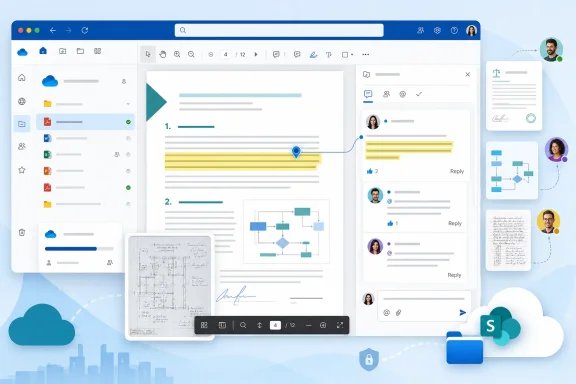 PDF comments move from file-level discussion to page-level review
Microsoft already supports comments on non-Office files in OneDrive, including PDFs. Those comments live in the file’s details or activity pane, where users can start a thread and, in supported scenarios, notify another person with an @mention. That is useful for a broad instruction such as “Please review the latest version,” but it is a poor substitute for review feedback tied to an exact clause or visual element.
Roadmap item 569020 changes the unit of discussion. A comment can be attached either to selected text or to a point on a PDF page. In effect, the comment thread gains an anchor within the web viewer rather than sitting beside the file as generic activity.
Microsoft’s wording also matters here. It promises attachment to “a specific spot on a page” as well as selected text. Text anchoring helps on text-based PDFs such as exported reports, manuals, contracts, and policy documents. Page-coordinate anchoring is the more consequential part for image-heavy files, scans, diagrams, architectural plans, forms, and PDFs whose text layer is missing or unreliable.
The feature therefore covers two distinct review problems that ordinary file comments cannot solve:
- A reviewer can identify a particular phrase, sentence, or paragraph without quoting it into a separate message.
- A reviewer can call out a specific non-text region, such as a signature block, figure, table cell, callout, or part of a scanned page.
Microsoft says the threads will support replies and @mentions. That puts the workflow closer to Office document review, but the company has not yet published screenshots, detailed user instructions, or a technical description of how anchors react when a PDF is replaced with a revised copy.
October rollout includes sovereign Microsoft 365 tenants
The roadmap lists OneDrive and SharePoint as the products, web as the sole platform, and both Targeted Release and General Availability as release rings. It gives October 2026 as the general-availability date, rather than a more granular deployment week.
That timeline covers Worldwide standard multi-tenant Microsoft 365, GCC, GCC High, and DoD. Inclusion of the three U.S. government cloud environments at announcement is notable because collaboration features commonly arrive there later than in the commercial service. It does not mean every tenant will see the feature on October 1; Microsoft 365’s published month generally denotes the start of availability, and service rollouts can extend through the month.
There is no client update to stage. Microsoft identifies the web viewer as the platform, so the feature is expected when users open an eligible PDF in OneDrive or SharePoint in a browser. The roadmap does not list OneDrive for Windows, OneDrive for macOS, iOS, Android, Teams, or the standalone SharePoint mobile applications.
That leaves an important operational boundary: a comment thread created in the browser may be available only where Microsoft’s OneDrive/SharePoint viewer is available. IT departments should not tell users that a PDF will carry the same review experience into every native PDF reader, mobile app, browser PDF engine, or downstream workflow.
The comments may not travel with the PDF
Microsoft’s announcement does not say whether anchored comment threads will be written into the PDF itself, exported with a download, or preserved when the document is copied outside OneDrive and SharePoint. That omission is the central caveat for records management and external review workflows.
Existing Microsoft guidance establishes that OneDrive comments on PDFs are service-side collaboration data, not necessarily standard PDF annotations embedded in the file. A Microsoft support response addressing PDF comments created through OneDrive’s online editing experience says those comments are not visible after downloading the PDF and opening it in Adobe Acrobat or another local tool; the same response says the comments can be viewed in the web experience or supported apps with appropriate access.
Microsoft has not explicitly said the October 2026 anchored-comment implementation will follow the same model. Still, administrators should treat the threads as Microsoft 365 metadata until Microsoft documents export behavior, rather than assuming a downloaded PDF will be a complete review artifact.
That distinction has real consequences. A legal team sending a reviewed contract to an outside counterparty, or an engineering group archiving approved redlines into a project record, may need to preserve the original PDF and the online comment history separately. A downloaded copy could retain ink annotations or other content saved into the PDF while omitting the conversational context that led to a requested change.
It also means a PDF’s visible content and its review discussion can become separated by ordinary actions: downloading a local copy, emailing an attachment, transferring it to another repository, or generating a new PDF from a source document. Microsoft has not announced a comment export, a flattened-review option, or an interoperability path for Acrobat annotations.
“On by default” removes the tenant control decision
Microsoft says anchored PDF comments will be enabled by default and require no administrator action. For end users, that means less friction: the capability should simply appear once rollout reaches their tenant. For Microsoft 365 administrators, the language signals that no separate switch, policy, or setup experience has been announced.
That does not make existing permissions irrelevant. SharePoint and OneDrive file access is still governed by the underlying sharing and library permissions. Microsoft’s existing OneDrive guidance says users need edit permission on a shared non-Office file to add or reply to comments, while people with access can see the discussion according to the service’s permissions model. The roadmap entry does not specify whether anchored PDF comments will use precisely that same permission requirement, whether a review-only role will be introduced, or how external guests will be handled.
Those unanswered details are more significant than the absence of a setup wizard. A project team may want external users to view a PDF, make focused review comments, and be prevented from downloading the file. SharePoint and OneDrive already have separate sharing and download-blocking controls, but Microsoft has not yet documented how anchored PDF comments will interact with view-only links, blocked-download links, sensitivity labels, encrypted PDFs, retention controls, or guest sharing policies.
The default-on status also creates a communications task. Users who are accustomed to leaving comments in a file details pane may see a second, more visible commenting surface inside the viewer. Organizations with formal document-review procedures should decide whether anchored threads are acceptable working feedback, whether they must be resolved before a document is finalized, and what record needs to be retained when the PDF leaves Microsoft 365.
The missing implementation details will determine whether this replaces Acrobat review
Microsoft’s roadmap entry establishes the feature and its planned scope, but it does not yet establish several details that determine whether the web viewer can replace a dedicated PDF-review workflow:
- Microsoft has not said whether comments remain correctly anchored after a revised PDF replaces the original file.
- Microsoft has not said whether reviewers can resolve, reopen, edit, or delete anchored threads, or whether file owners can disable this form of commenting.
- Microsoft has not documented notification behavior for @mentions, including external guests and government-cloud users.
- Microsoft has not stated whether the threads can be exported, included in eDiscovery workflows, or retained independently of the file.
- Microsoft has not announced support outside OneDrive and SharePoint on the web.
For many everyday review jobs, those limits will not prevent adoption. A team reviewing a proposal, onboarding guide, change-control PDF, or monthly report inside a SharePoint library will gain an immediate improvement over generic comments. The reviewer points to the issue; the owner replies in context; the next person can see the exchange without reconstructing it from email.
But the feature should not yet be sold internally as an Acrobat-equivalent review system. Acrobat-style workflows often depend on portable annotations, formal review packages, offline access, signatures, and predictable behavior when a document changes hands. Microsoft has announced none of those mechanics for roadmap item 569020.
The October 2026 rollout will make browser-based PDF review substantially more usable inside Microsoft 365. Until Microsoft explains what survives a download and how anchored threads behave when the underlying file changes, the safe operating assumption is simple: the authoritative review conversation remains in the OneDrive or SharePoint web copy, alongside the PDF rather than inside it.
References
- Primary source: Microsoft 365 Roadmap
Published: 2026-08-07T21:45:15.0624842Z
Loading…
www.microsoft.com - Related coverage: learn.microsoft.com
Features available for PDFs in OneDrive in Web and mobiles/iPads - SharePoint in Microsoft 365 | Microsoft Learn
Learn how to bookmark PDF pages in OneDrive.learn.microsoft.com - Related coverage: learn.microsoft.com
Loading…
learn.microsoft.com - Related coverage: support.microsoft.com
Loading…
support.microsoft.com - Related coverage: support.microsoft.com
Loading…
support.microsoft.com - Related coverage: techcommunity.microsoft.com
Loading…
techcommunity.microsoft.com - Related coverage: techcommunity.microsoft.com
Loading…
techcommunity.microsoft.com