

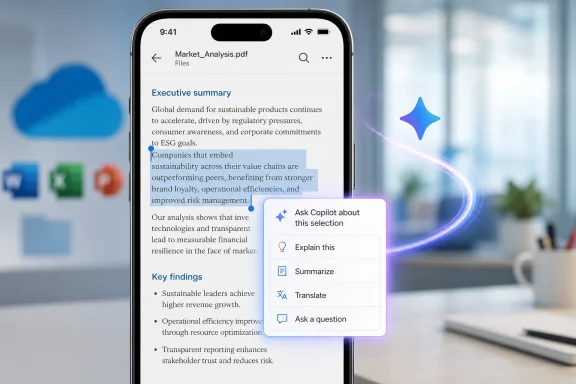
The practical change is narrower—and more useful—than a generic “Copilot can read PDFs” announcement suggests. A user reviewing a contract clause, a paragraph in a policy document, or a technical passage will be able to select the relevant text, tap Ask Copilot, and request an explanation, summary, translation, or a custom response grounded in that selection. It is a mobile extension of a context-menu workflow already available on OneDrive for the web, not a new general-purpose PDF reader or a promise that Copilot will reliably interpret every element in every PDF.
Microsoft’s roadmap says the rollout is planned for worldwide commercial tenants as well as GCC, GCC High, and Department of Defense environments. It names OneDrive, SharePoint, and Microsoft Copilot as affected products, but the client platform is specifically iOS. There is no Android equivalent in the entry.
The key distinction: selected text, not a whole-document review
Microsoft’s existing support documentation describes the web version of the feature as a PDF context menu that appears after a user selects text. Its default action is “Explain this,” with a separate option to enter a custom prompt. The support page describes the feature as available with a work account on OneDrive for the web.
The October roadmap entry expands both the device surface and the menu’s stated set of actions. In addition to custom questions and explanation, Microsoft explicitly calls out summarization and translation from the iOS context menu. That is meaningful because the interaction begins with a text selection, which limits the scope of the prompt to the passage the user is actually scrutinizing.
That is a different workflow from OneDrive’s existing file-level Copilot functions. Microsoft already lets eligible users ask questions of selected files, summarize files, and compare documents through OneDrive. Those actions can be useful before a meeting or during document triage, but they start at the file level and invoke a Copilot panel. The new iOS capability is designed for point-of-reading work: identify a difficult sentence, select it, and ask for help in place.
For IT staff, legal teams, and users who regularly review long PDFs from an iPhone, that distinction may matter more than the addition of another Copilot entry point. A whole-document summary can conceal the location and wording that produced an answer. A selection-based prompt keeps the original source passage visible, making it easier to check whether Copilot’s explanation or translation tracks the actual text.
Microsoft has not said whether the iOS control will show a fixed menu of suggested actions, mirror the web’s “Explain this” and custom-prompt pattern, or open a fuller Copilot chat interface. It has also not published screenshots, interaction details, or an app-version requirement.
The desktop precedent shows what iPhone users should expect
Microsoft’s support documentation and earlier reporting from Super Simple 365 establish that the PDF context-menu experience first appeared in OneDrive for the web in January 2026. On the web, users open a PDF, highlight text, and invoke an explanation or submit their own prompt. The published support instructions do not describe an automatic document review, citations to page locations, tracked annotations based on Copilot’s answer, or an ability to rewrite the PDF itself.
Nothing in Roadmap ID 568790 says those capabilities are coming to OneDrive iOS. The feature is an ask-about-this-selection control. Users should not read the roadmap language as a commitment that Copilot will edit a PDF, extract tables, analyze diagrams, understand handwritten notes, or translate an entire scanned report.
That limitation has a practical technical consequence: text selection is the gatekeeper. A PDF with a proper text layer should fit this workflow cleanly. A scan that is merely an image may not expose selectable text at all, while a poorly OCR’d scan may expose inaccurate or fragmented text. Microsoft’s current OneDrive Copilot documentation says Copilot supports text-based document types including PDFs, but does not claim general support for image-only content. The new iOS feature therefore looks best suited to digitally generated PDFs and scans that have already been OCR processed well enough for standard iOS text selection.
The selection model also keeps the mobile experience from becoming an unwieldy replica of desktop Copilot. On an iPhone, reviewing a 60-page PDF through a conversation panel is more cumbersome than on a desktop display. Sending a short highlighted section to Copilot is a more realistic mobile interaction—particularly for translating a paragraph, decoding technical language, or checking what a clause says before responding to an email.
Licensing and administration remain the unresolved part
Microsoft’s roadmap entry does not state which licenses will unlock the new iOS PDF menu. That omission matters. Microsoft’s current Copilot in OneDrive FAQ says OneDrive Copilot is available to Microsoft 365 Personal and Family subscribers and to work or school users with a Copilot license, while also warning that not every feature is available to every user in every market.
The iOS roadmap entry is framed around Microsoft 365 Copilot and enterprise cloud environments, including government clouds. That makes it reasonable to expect commercial Copilot licensing to be central to the rollout, but Microsoft has not confirmed whether Personal or Family subscribers will receive this exact context-menu feature, whether it will consume consumer AI credits, or whether any lower-cost commercial Copilot tier will qualify.
Administrators do have one relevant control today: Microsoft says Copilot in OneDrive can be disabled through the Microsoft 365 Copilot for SharePoint service-plan setting. Because the roadmap lists both OneDrive and SharePoint, organizations should not assume that a new iOS surface bypasses the existing tenant-level service control. But Microsoft has not published specific management guidance for the PDF context menu, such as whether it can be disabled independently, covered by Conditional Access behavior on managed iPhones, or governed by a distinct Intune app-protection policy.
The inclusion of GCC, GCC High, and DoD is notable, but it should not be mistaken for proof of simultaneous availability. The roadmap gives only “October 2026” as the general-availability target. It does not specify whether every cloud will receive the feature on the same day, whether rollout will be phased by tenant, or whether the government-cloud availability will trail the worldwide commercial release.
Security controls still follow the file’s existing permissions
The feature does not appear to introduce a new permission model for PDFs. Microsoft’s OneDrive Copilot FAQ says Copilot can use files a user already has permission to access, including OneDrive files and organizational files shared with that user. Microsoft’s broader Copilot data-protection documentation likewise says SharePoint and OneDrive controls continue to influence what Copilot can discover or reference rather than granting new access rights.
In a selected-text workflow, that means the user initiates Copilot on an already open PDF and passes a chosen excerpt into the request. Existing controls around sharing, sensitivity labels, encryption, data-loss prevention, audit, retention, and eDiscovery remain more important than the addition of a mobile menu item. If a tenant has excessive sharing permissions on sensitive documents, a polished iOS context menu will not create that exposure—but it can make the consequences of that existing exposure more immediate and easier to surface.
Microsoft says Copilot interactions can be subject to Microsoft 365 audit, retention, and compliance capabilities. Organizations planning to enable the iOS feature should verify their own Purview retention and audit configuration rather than assuming that a prompt sent from the OneDrive app is invisible because it originated on a phone.
October is a target, not a deployment deadline
Roadmap ID 568790 was created on August 10, 2026, and still carries an In development status. Microsoft can alter the target date, scope, licensing, or cloud availability before rollout; the roadmap has not supplied an app build number, a Message Center post identifier, or release notes that administrators can use to verify deployment.
The immediate preparation work is modest. Organizations that want the feature should ensure that the OneDrive app is managed and current on iOS, confirm which users have the required Copilot entitlement, review whether Copilot in OneDrive remains enabled in the SharePoint service plan, and test PDF text selection on representative documents—especially scans, protected PDFs, and files with sensitivity labels.
For users, the October change should reduce the friction of reviewing specific passages from a PDF on an iPhone. For administrators, it is another reason to treat OneDrive permissions and document protection as the real control plane: once the feature arrives, the question will no longer be whether users can ask Copilot about a clause on mobile, but whether the underlying file was appropriately available to them in the first place.