
For Windows users running Home Assistant, a media server, network-attached storage, or a PC used for router administration, the practical payoff is straightforward. A compromised camera, TV, speaker, or cheap Wi-Fi appliance should not be able to browse to the Windows laptop that manages the network, probe a NAS, or load the router’s LuCI administration page. CISA’s segmentation guidance reaches the same broad conclusion: isolating device classes with VLANs and firewall controls limits the impact when one device becomes hostile or simply behaves badly.
The three policies MakeUseOf presents are a useful baseline, but the testing also exposes a boundary readers should understand before copying it: the article proves an IPv4 configuration, not a complete dual-stack home-network policy. On a modern connection offering IPv6, a device may have routes and resolver choices that never touch the IPv4 addresses used in the demonstration.
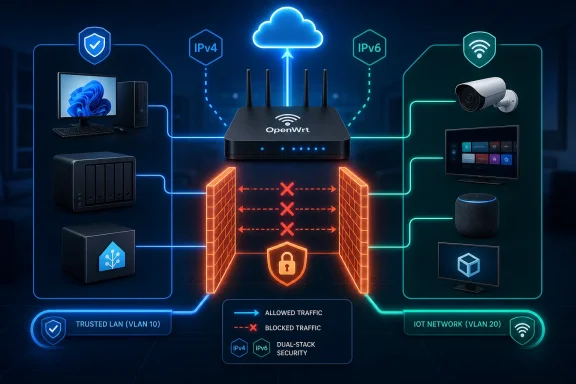 A separate subnet is only the beginning
The first policy is the most valuable one: create a dedicated IoT network, set its default input and forward behavior to reject, then create an explicit IoT-to-WAN forwarding path. OpenWrt’s own firewall documentation defines the distinction clearly. Input governs traffic aimed at the router itself, while forwarding governs traffic moving through the router between interfaces and zones.
That distinction explains why MakeUseOf’s Windows 11 VM could initially reach LuCI on the router and connect to a listener on the physical laptop despite receiving an address from a separate 192.168.30.0/24 subnet. The IoT interface was still inside a trusted LAN zone, so the router retained a policy path to management services and other local networks.
Moving that interface into an IoT zone changes the security model. The VM can still make an outbound connection to a public website through the WAN, but it cannot initiate a session to the router management plane or to a trusted PC. Return traffic for sessions initiated by the IoT client is handled by the stateful firewall; this is not a proposal to break ordinary web browsing.
The required exceptions are where home configurations often go wrong. An isolated client still needs DHCP to obtain an address and DNS to resolve names if the router provides those services. MakeUseOf allows UDP port 67 for DHCP and TCP and UDP port 53 for DNS directed at the router. That is a reasonable OpenWrt pattern, but administrators should verify it against their actual services rather than treat those ports as a universal recipe.
A network using IPv6 needs additional care. DHCPv6, router advertisements, neighbor discovery, and other ICMPv6 functions are part of normal IPv6 operation. A blanket “reject everything, then add DHCP and DNS” approach that works for an IPv4-only test can leave dual-stack clients partly connected, intermittently connected, or unable to obtain usable IPv6 configuration. OpenWrt supports IPv6-aware zones and rules, but the family selection must be checked rather than assumed.
For a Windows client, testing should include more than ipconfig /renew and a web request. Confirm that the device cannot connect to the router’s HTTPS or SSH service, cannot reach a Windows SMB share or Remote Desktop host on the trusted LAN, and cannot open a connection to another private VLAN. Then confirm that normal DNS, software updates, and the specific cloud service the device needs still operate.
Blocking RFC 1918 addresses on the WAN closes a real but conditional path
MakeUseOf’s second rule rejects IoT traffic headed toward the WAN when the destination is in 10.0.0.0/8, 172.16.0.0/12, 192.168.0.0/16, or 100.64.0.0/10. The reported test found that the isolated Windows VM could reach a hypervisor NAT DNS service at 192.168.91.2 and a USB cellular modem management page at 192.168.0.1 because both targets sat beyond interfaces labeled as WAN.
That is a useful correction to a common assumption. “WAN” identifies the side of the router used for upstream connectivity; it does not guarantee that every destination on that side is publicly addressed or untrusted. Double-NAT setups, ISP gateways left in routing mode, cable-modem diagnostic interfaces, virtualized routers, and cellular modems can all place private-addressed equipment upstream of the main firewall.
The resulting rule makes sense when the goal is to prevent low-trust devices from exploring upstream administration interfaces. It is especially relevant for enthusiasts who run OpenWrt as a VM, place it behind an ISP gateway, or use a second modem as failover. In those setups, an “IoT to WAN” allowance can be broader than it first appears.
There are two qualifications worth making explicit. First, the three RFC 1918 ranges are private-use address space; 100.64.0.0/10 is different. RFC 6598 reserves that block as shared address space for carrier-grade NAT, and IANA lists it separately from RFC 1918 private-use ranges. Blocking it is still defensible as an upstream-management containment measure, but calling all four ranges “private IPv4 addresses” is technically inaccurate.
Second, this is a targeted hardening rule, not a universal default that can be deployed without testing. An ISP or upstream network may place a service a household actually relies on behind one of those ranges. The MakeUseOf test showed ordinary browsing still worked in its Starlink-and-virtualization setup, but it did not establish that every provider’s arrangement will behave the same way. Check the router’s DHCP lease, routing table, and upstream gateway behavior before declaring those destinations permanently off-limits.
DNS interception controls ordinary port 53, not every resolver
The third policy redirects TCP and UDP port 53 requests from the IoT zone back to the OpenWrt resolver. OpenWrt documents this configuration as DNS hijacking: a NAT redirect captures conventional DNS traffic even when a client tries to query an outside resolver directly.
MakeUseOf demonstrated the idea by creating a private local hostname and then asking the Windows VM to resolve it through Google’s 8.8.8.8 address. When the VM received the private answer that only the router knew, it showed that the router had intercepted the request. The detail is useful because Windows tools may continue to display the resolver address the client attempted to contact; the returned answer, rather than that display field, establishes where the query was handled.
The benefit is operational as much as security-related. A router can apply local names, DNS logs, caching, parental controls, and an administrator-selected upstream resolver only when the client actually uses it. Devices with hard-coded conventional DNS endpoints otherwise sidestep all of those controls.
But port 53 interception is not a general encrypted-DNS control. DNS over HTTPS typically travels over TCP 443 alongside regular HTTPS traffic, while DNS over TLS normally uses TCP 853. Redirecting port 53 neither identifies nor transparently captures those protocols. MakeUseOf acknowledges the DNS-over-HTTPS limitation, and it is the point that should stop readers from treating the test as proof that an IoT device cannot use a separate resolver.
Blocking known encrypted-DNS endpoints can be brittle, can disrupt legitimate applications, and may become an endless list-maintenance exercise. A more durable home-network objective is narrower: force ordinary DNS through the router, monitor what the router can see, and recognize that a device using encrypted DNS requires a different enforcement design. That may involve managed-device controls, a proxying product designed for the task, or simply deciding that the device belongs on a more restricted guest network.
There is also a small but telling inconsistency in the MakeUseOf test text. It says the router hostname was created as firewall-test.proof, while the commands query firewall-proof.test. The intended proof remains valid if the latter hostname was the real configured record, but anyone recreating the procedure should use one exact name in the router and both test commands. DNS testing fails often enough without introducing a typo into the control case.
The missing IPv6 test changes the deployment checklist
The article’s zone isolation rule can protect both IPv4 and IPv6 if configured with the appropriate OpenWrt address-family settings. Its upstream private-address block, however, lists IPv4 networks only. Its DNS test uses IPv4 resolver addresses only. A dual-stack IoT device could therefore still be able to reach an upstream IPv6 target or choose an IPv6 resolver unless equivalent policies are present and verified.
This does not invalidate the design. It means the design should be tested per protocol family. Administrators should verify whether the IoT zone receives IPv6 addresses, whether it has a delegated prefix and default route, and whether its firewall rules are configured for IPv4, IPv6, or both. They should also confirm that essential ICMPv6 and DHCPv6 behavior remains available while router administration and trusted-LAN access remain blocked.
The safest implementation sequence remains the one MakeUseOf recommends: export the router configuration first, keep a trusted wired management session open, make one policy change at a time, and test from both sides of the boundary. A guest SSID with “block access to local network” enabled is a worthwhile fallback on consumer routers that cannot define zones or traffic rules, but it does not offer the same visibility or control.
For homes with an OpenWrt, OPNsense, pfSense, UniFi, Firewalla, or IPFire gateway, the durable lesson is to define which devices may initiate traffic to which destinations. Start with an IoT zone that reaches the internet and only the router services it requires. Then inspect the upstream path for private or shared-address management surfaces, and test DNS enforcement over both IPv4 and IPv6.
