
Microsoft is planning to let Outlook Calendar users reschedule events by dragging them to a different time slot in Day and multi-day views, a small interface change that could remove a persistent point of friction for people managing packed work calendars.
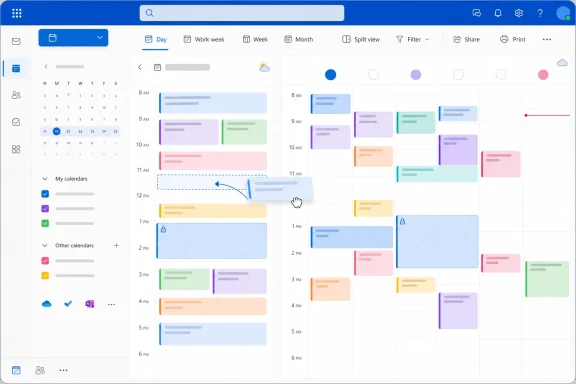
As reported by Neowin, the capability has appeared on the Microsoft 365 Roadmap with a planned August 2026 rollout. The roadmap description says users will be able to drag and drop events across daily calendar views to reschedule them, rather than opening an event and manually changing its date or start and end time.
For Outlook users who spend much of the day moving meetings to accommodate overruns, customer calls, and focused work, that is a more meaningful improvement than it may first appear. Drag-and-drop scheduling is a basic interaction in many calendar products, but its absence in the relevant Outlook experience has made routine changes unnecessarily slow.
The practical benefit is straightforward: a calendar owner should be able to move a block from 10:00 a.m. to 11:00 a.m. directly on the grid, see the revised layout immediately, and continue working. Today, that often requires opening the appointment details, selecting a new time through controls, then saving the change.
The feature should be particularly helpful in Day view, where users can spot open space, overlaps, and back-to-back meetings at a glance. It may also reduce accidental scheduling errors caused by manually editing time fields.
It is also not yet clear whether the feature is limited to the new Outlook client, will reach Outlook on the web, or will arrive in classic Outlook for Windows. Administrators should avoid treating the roadmap listing as a deployment commitment: Microsoft notes that roadmap dates and features can change before release.
Still, if Microsoft delivers the interaction as described, Outlook Calendar users could soon spend less time in appointment dialogs and more time simply arranging their day on the calendar itself.
As reported by Neowin, the capability has appeared on the Microsoft 365 Roadmap with a planned August 2026 rollout. The roadmap description says users will be able to drag and drop events across daily calendar views to reschedule them, rather than opening an event and manually changing its date or start and end time.
For Outlook users who spend much of the day moving meetings to accommodate overruns, customer calls, and focused work, that is a more meaningful improvement than it may first appear. Drag-and-drop scheduling is a basic interaction in many calendar products, but its absence in the relevant Outlook experience has made routine changes unnecessarily slow.
 A Faster Route Through a Crowded Calendar
The practical benefit is straightforward: a calendar owner should be able to move a block from 10:00 a.m. to 11:00 a.m. directly on the grid, see the revised layout immediately, and continue working. Today, that often requires opening the appointment details, selecting a new time through controls, then saving the change.The feature should be particularly helpful in Day view, where users can spot open space, overlaps, and back-to-back meetings at a glance. It may also reduce accidental scheduling errors caused by manually editing time fields.
Important Details Are Still Missing
Microsoft’s roadmap entry does not specify how Outlook will handle scheduling conflicts, attendee availability, recurring meetings, or events organized by someone else. Those details matter in enterprise environments, where moving a meeting may require an updated invitation, a conflict warning, or a proposed-new-time workflow rather than an immediate change.It is also not yet clear whether the feature is limited to the new Outlook client, will reach Outlook on the web, or will arrive in classic Outlook for Windows. Administrators should avoid treating the roadmap listing as a deployment commitment: Microsoft notes that roadmap dates and features can change before release.
Still, if Microsoft delivers the interaction as described, Outlook Calendar users could soon spend less time in appointment dialogs and more time simply arranging their day on the calendar itself.
References
- Primary source: Neowin
Published: 2026-07-29T14:36:01+00:00
Loading…
www.neowin.net - Related coverage: microsoft.com
Microsoft 365 Roadmap | Microsoft 365
The Microsoft 365 Roadmap lists updates that are currently planned for applicable subscribers. Check here for more information on the status of new features and updates.www.microsoft.com