
Outlook for iOS and Android is scheduled to gain a OneDrive picker for images used in email signatures, a small mobile feature that removes one of the more awkward parts of maintaining a logo, headshot, or scanned sign-off across devices. Neowin first highlighted Microsoft 365 Roadmap item 568079, which says users will be able to insert signature images directly from OneDrive as well as from the device photo library, with rollout planned to begin in August 2026.
The important limitation is in what Microsoft actually announced: this is an image-source option inside the mobile signature editor, not a system for centrally deploying, synchronizing, or enforcing complete corporate signatures. It should help an individual find the right asset without first downloading it into the phone’s photo library. It does not, based on the roadmap description, resolve the much larger problem of keeping a formatted signature identical in Outlook on Windows, Outlook on the web, Outlook for Mac, iOS, and Android.
Microsoft’s wording is unusually narrow: “Users can now insert images into their email signature directly from OneDrive, in addition to the device photo library.” The entry is tagged for Outlook on Android and iOS and remains marked in development as of August 5, 2026.
That means the feature is aimed at a familiar mobile scenario. A user has a company logo, a small headshot, or another approved image stored in OneDrive but not saved to the handset. Previously, the straightforward route was often to download or save the asset locally, then locate it through Android’s gallery or iOS Photos picker before inserting it into the signature.
Direct OneDrive selection should eliminate that local-copy step. For employees who change phones, use a managed device with limited local storage, or keep work assets out of their personal camera roll, that is a worthwhile improvement. It also lowers the risk that a user chooses a months-old logo from a gallery simply because it is easier to find than the current version in cloud storage.
Microsoft’s roadmap does not say that Outlook will store a live OneDrive reference in the signature, however. Nothing in the listing establishes whether Outlook copies the selected image into the signature when it is chosen, uploads it as an inline message attachment at send time, or references an online resource. Those are materially different implementations for image persistence, message size, offline composing, and what recipients see.
Microsoft also has not published a screenshot or documented the exact selection flow. The eventual feature could be a basic OneDrive tab alongside the phone’s photo library, or it could expose a fuller file browser with support for shared folders, work accounts, and recent files. For now, the public record supports only the former conclusion: OneDrive will become an available source for selecting a signature image.
For IT departments, the practical benefit is narrower. A OneDrive picker still leaves the end user responsible for selecting the correct image, inserting it at the right dimensions, preserving required text, and updating the signature if branding or contact details change. It is a convenience feature, not an administrative control.
That distinction is especially relevant for organizations that depend on email signatures for legal notices, campaign banners, role-based contact information, or consistent brand presentation. Mobile users can still have a different signature from their desktop and web counterparts, and a locally edited signature can still drift from whatever template communications or IT intended them to use.
Outlook’s client-specific behavior has long complicated this area. Microsoft’s support material confirms that Outlook mobile supports accessing and sharing OneDrive content, while its mobile release notes describe a weekly update cadence and phased feature rollout. But availability of a OneDrive file picker does not establish equivalence between signature composition and rendering on every Outlook client.
The image itself is only one component. The parts that commonly break or diverge are HTML tables, spacing, fonts, hyperlinks, legal text, image scaling, dark-mode treatment, and the way a recipient’s mail client handles inline content. Microsoft has not claimed that Roadmap 568079 addresses any of those problems.
A direct OneDrive path can make it easier to use the original file. That is the immediate operational value of the change.
Yet the feature should not be confused with an assurance that the logo will render correctly after the email leaves Outlook. The roadmap announcement describes insertion, not recipient compatibility. An image can look proper in a mobile compose window but arrive resized, blocked, stripped, displayed as an attachment, or treated differently by an external mail client.
The file format and dimensions will still matter. A small, optimized PNG or JPEG is less likely to create an oversized signature than a high-resolution source image, but Outlook has not published any new limits, recommended dimensions, supported image formats, or image-hosting behavior alongside this roadmap item. Users should resist treating the feature as a reason to paste large marketing graphics into every message sent from a phone.
There is a second boundary that will matter in managed environments: OneDrive access policies. If an organization restricts OneDrive, blocks personal storage accounts, requires mobile app protection policies, or separates work and personal identities inside Outlook, the picker can only surface files the signed-in account is permitted to reach. Microsoft has not stated which account-selection rules will apply when multiple OneDrive accounts are connected to a mobile device.
That omission matters because it keeps the update in perspective. Outlook on desktop and the web already offer their own image-insertion paths and signature editors, but Microsoft is not announcing a unified signature workflow across Outlook clients. There is no promise here that a logo selected through Outlook Mobile will sync into a Windows signature, or that a signature created on a Windows PC will gain a mobile OneDrive-backed image automatically.
No other outlet has independently reported a broader platform plan or a specific build number for the capability. Microsoft’s public listing also gives no target tenant, licensing requirement, government-cloud availability, or staged-release schedule beyond an August 2026 rollout start. As with other Microsoft 365 roadmap entries, “rollout start” is when the feature may begin appearing, not a guarantee that every eligible user will see it immediately.
Users who need the feature should therefore update Outlook from Google Play or Apple’s App Store during August and watch the mobile signature settings for an added OneDrive option. Organizations should test it with their approved branding assets before telling staff to rebuild signatures on phones.
But Roadmap 568079 does not deliver centralized templates, client-to-client signature parity, administrative enforcement, or a guarantee that images will display consistently for every recipient. For most Windows-focused organizations, it should be treated as a mobile usability update—not as an answer to enterprise signature management.
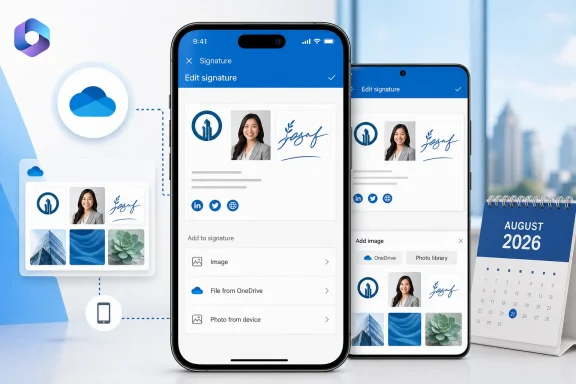 Roadmap item 568079 changes where mobile users choose an image
Microsoft’s wording is unusually narrow: “Users can now insert images into their email signature directly from OneDrive, in addition to the device photo library.” The entry is tagged for Outlook on Android and iOS and remains marked in development as of August 5, 2026.That means the feature is aimed at a familiar mobile scenario. A user has a company logo, a small headshot, or another approved image stored in OneDrive but not saved to the handset. Previously, the straightforward route was often to download or save the asset locally, then locate it through Android’s gallery or iOS Photos picker before inserting it into the signature.
Direct OneDrive selection should eliminate that local-copy step. For employees who change phones, use a managed device with limited local storage, or keep work assets out of their personal camera roll, that is a worthwhile improvement. It also lowers the risk that a user chooses a months-old logo from a gallery simply because it is easier to find than the current version in cloud storage.
Microsoft’s roadmap does not say that Outlook will store a live OneDrive reference in the signature, however. Nothing in the listing establishes whether Outlook copies the selected image into the signature when it is chosen, uploads it as an inline message attachment at send time, or references an online resource. Those are materially different implementations for image persistence, message size, offline composing, and what recipients see.
Microsoft also has not published a screenshot or documented the exact selection flow. The eventual feature could be a basic OneDrive tab alongside the phone’s photo library, or it could expose a fuller file browser with support for shared folders, work accounts, and recent files. For now, the public record supports only the former conclusion: OneDrive will become an available source for selecting a signature image.
This does not turn Outlook Mobile into a signature-management platform
For a home user, the change is almost entirely positive: store one approved graphic in OneDrive, select it when building a signature, and avoid shuffling the same file through Photos, Files, chat apps, or email attachments.For IT departments, the practical benefit is narrower. A OneDrive picker still leaves the end user responsible for selecting the correct image, inserting it at the right dimensions, preserving required text, and updating the signature if branding or contact details change. It is a convenience feature, not an administrative control.
That distinction is especially relevant for organizations that depend on email signatures for legal notices, campaign banners, role-based contact information, or consistent brand presentation. Mobile users can still have a different signature from their desktop and web counterparts, and a locally edited signature can still drift from whatever template communications or IT intended them to use.
Outlook’s client-specific behavior has long complicated this area. Microsoft’s support material confirms that Outlook mobile supports accessing and sharing OneDrive content, while its mobile release notes describe a weekly update cadence and phased feature rollout. But availability of a OneDrive file picker does not establish equivalence between signature composition and rendering on every Outlook client.
The image itself is only one component. The parts that commonly break or diverge are HTML tables, spacing, fonts, hyperlinks, legal text, image scaling, dark-mode treatment, and the way a recipient’s mail client handles inline content. Microsoft has not claimed that Roadmap 568079 addresses any of those problems.
The feature may reduce bad workarounds, but it cannot guarantee recipient-side rendering
Before this addition, users commonly treated a signature image as a local photo-management task: save it from an email, download it from a company portal, take a screenshot, or ask someone to send the file again. Those workarounds can introduce degraded copies, transparent PNGs converted into JPEGs, oversized images, and duplicate assets with no obvious indication of which version is approved.A direct OneDrive path can make it easier to use the original file. That is the immediate operational value of the change.
Yet the feature should not be confused with an assurance that the logo will render correctly after the email leaves Outlook. The roadmap announcement describes insertion, not recipient compatibility. An image can look proper in a mobile compose window but arrive resized, blocked, stripped, displayed as an attachment, or treated differently by an external mail client.
The file format and dimensions will still matter. A small, optimized PNG or JPEG is less likely to create an oversized signature than a high-resolution source image, but Outlook has not published any new limits, recommended dimensions, supported image formats, or image-hosting behavior alongside this roadmap item. Users should resist treating the feature as a reason to paste large marketing graphics into every message sent from a phone.
There is a second boundary that will matter in managed environments: OneDrive access policies. If an organization restricts OneDrive, blocks personal storage accounts, requires mobile app protection policies, or separates work and personal identities inside Outlook, the picker can only surface files the signed-in account is permitted to reach. Microsoft has not stated which account-selection rules will apply when multiple OneDrive accounts are connected to a mobile device.
Windows, web, and Mac users are not part of this announcement
The platform listing is explicit: Android and iOS. Microsoft did not list Outlook on the web, new Outlook for Windows, classic Outlook for Windows, or Outlook for Mac in Roadmap item 568079.That omission matters because it keeps the update in perspective. Outlook on desktop and the web already offer their own image-insertion paths and signature editors, but Microsoft is not announcing a unified signature workflow across Outlook clients. There is no promise here that a logo selected through Outlook Mobile will sync into a Windows signature, or that a signature created on a Windows PC will gain a mobile OneDrive-backed image automatically.
No other outlet has independently reported a broader platform plan or a specific build number for the capability. Microsoft’s public listing also gives no target tenant, licensing requirement, government-cloud availability, or staged-release schedule beyond an August 2026 rollout start. As with other Microsoft 365 roadmap entries, “rollout start” is when the feature may begin appearing, not a guarantee that every eligible user will see it immediately.
Users who need the feature should therefore update Outlook from Google Play or Apple’s App Store during August and watch the mobile signature settings for an added OneDrive option. Organizations should test it with their approved branding assets before telling staff to rebuild signatures on phones.
A useful mobile fix, with a clearly limited scope
Microsoft is fixing the file-selection friction around signature images, and that is a real improvement for people who work primarily from Outlook on iOS or Android. The ability to retrieve the approved asset directly from OneDrive should make new-device setup and occasional signature repairs less annoying.But Roadmap 568079 does not deliver centralized templates, client-to-client signature parity, administrative enforcement, or a guarantee that images will display consistently for every recipient. For most Windows-focused organizations, it should be treated as a mobile usability update—not as an answer to enterprise signature management.
References
- Primary source: Neowin
Published: 2026-08-05T05:52:01+00:00
Microsoft is making it easier to add signatures to Outlook emails | Neowin
If you use unreliable third-party services to create digital signatures for your emails, Microsoft may be working on a solution for you. www.neowin.net
- Related coverage: support.microsoft.com
Fixes or workarounds for Outlook mobile apps | Microsoft Support
Fixes or workarounds for Outlook mobile appssupport.microsoft.com - Related coverage: support.microsoft.com
Share files and photos in Outlook mobile | Microsoft Support
Training: Share files with your team easily on Outlook mobile. Quickly attach files, photos and images to your emails. Watch this video to learn how.support.microsoft.com - Related coverage: devblogs.microsoft.com
Changes to attachment IDs for inline images in Outlook add-ins - Microsoft 365 Developer Blog
Read how inline image attachments are handled when they’re programmatically added to a mail item's signature or body in Outlook on the web and the new Outlook for Windows devblogs.microsoft.com
- Related coverage: techcommunity.microsoft.com
- Related coverage: microsoft.com
Microsoft 365 Roadmap | Microsoft 365
The Microsoft 365 Roadmap lists updates that are currently planned for applicable subscribers. Check here for more information on the status of new features and updates.www.microsoft.com
- Related coverage: learn.microsoft.com
If Office 365 outlook signature contains image, we cannot see, which format need to be used? - Microsoft Q&A
Dear all, If Office 365 outlook signature contains image, we cannot see at mobile device, could you please support me, which format need to be used? Thank you very much in advance, Rada example: Moravacem / Western Balkanslearn.microsoft.com - Related coverage: supersimple365.com
What’s new in Microsoft 365 and Copilot? March 2026 - Super Simple 365
Welcome to our third roundup of 2026. We review what was announced, released, and delayed across Microsoft 365 and Copilot in March. Check out the February blog for lots of content still rolling out this month. If you are an Update Insiders member, take a sneak peek at the latest blog, which is... supersimple365.com
- Related coverage: microsoft.com
Microsoft 365 Roadmap | Microsoft 365
The Microsoft 365 Roadmap lists updates that are currently planned for applicable subscribers. Check here for more information on the status of new features and updates. - Related coverage: techcommunity.microsoft.com
- Related coverage: learn.microsoft.com
- Related coverage: techyorker.com
Insert Image in Email Body Outlook: A Step-by-Step Guide - TechYorker
Inserting an image directly into the body of an Outlook email seems simple, but the experience changes depending on how Outlook is… techyorker.com
- Related coverage: scloud.work
Synchronize Outlook signatures (Outlook + Web)
Synchronize Outlook signatures between Outlook for Web and local Outlook? That is now possible - per default! scloud.work
- Related coverage: simplebusinessit.com
Outlook signature keeps breaking across devices: fix it
If your Outlook signature keeps changing, disappearing, or not matching across devices, it’s usually because different Outlook apps store and sync signatures differently. Here’s how to standardise it and stop the churn. simplebusinessit.com
- Related coverage: signnow.com
Add Image to Email Signature Outlook | airSlate SignNow
Empower your business with airSlate SignNow's easy-to-use solution for sending and eSigning documents. Get great ROI, transparent pricing, and superior 24/7 support. Try now!www.signnow.com - Related coverage: redmondmag.com
Microsoft Releases Outlook for iOS and Android -- Redmondmag.com
The popular e-mail, calendaring and contact client is now available as an app for iPhone, iPad and Android users.redmondmag.com - Related coverage: softip.sk
- Related coverage: its.weill.cornell.edu
