

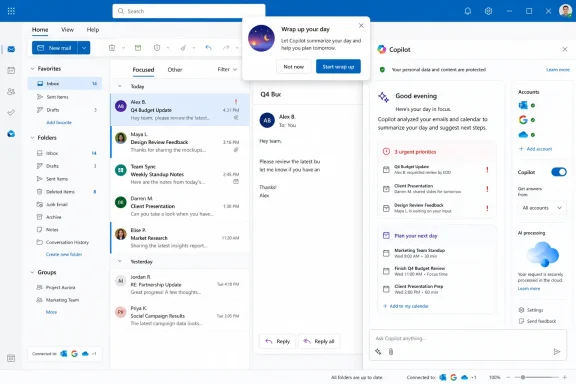
The report, published August 7, says the bubble appeared in both a personal account and another account with a Microsoft 365 Copilot subscription. Selecting it opened Copilot’s right-hand pane with a prewritten request to summarize email activity from the preceding eight hours, identify three urgent priorities, plan the next day’s three priorities, and end with a motivational line.
That observation is currently single-source reporting. Microsoft’s public Outlook for Windows release notes through July 31 do not mention “Wrap up your day,” and its Microsoft 365 Copilot release notes describe wider inbox, calendar, meeting, and organizational-data reasoning but do not announce an end-of-day inbox briefing prompt. No independent outlet appears to have corroborated the WindowsLatest sighting or established a rollout scope as of August 7.
That absence does not mean the feature is imaginary. It does mean administrators and users should treat this as a quiet, potentially staged interface experiment rather than a documented new Outlook capability with known eligibility, geography, build requirements, or support status.
The prompt’s stated scope is narrower than the privacy claim
The strongest claim in the WindowsLatest account is that Copilot “scanned everything it could” without permission. The evidence described in that same report does not establish that.
According to WindowsLatest, the visible prompt tells Copilot to use messages in Focused Inbox, Other Inbox, and Sent Items from the last eight hours. If that text is accurate, it defines a bounded request across three mail folders, not an unrestricted scan of every folder or of the entire mailbox. It also matters that the review happened after the reporter pressed the “Wrap up your day” bubble and Copilot opened the prompt in the sidebar.
There is still a legitimate design objection. A notification that prepackages a broad request across received and sent mail reduces the friction that normally makes people pause before submitting personal correspondence to an AI system. An inbox prompt framed as a simple end-of-day reminder can feel meaningfully different from manually opening Copilot and deliberately asking it to analyze recent mail.
But “Copilot did not ask permission before reading my inbox” conflates two separate steps: exposing an invitation to use the feature, and running the prompt. The reporting supports the first. It does not demonstrate that Outlook transmitted or summarized email before the button was selected.
Microsoft’s documentation makes clear that Copilot in Outlook is designed to reason over mailbox content in supported scenarios. Its current Copilot Chat documentation says work and school users without the paid Microsoft 365 Copilot add-on can ask questions about their inbox, calendar, and meetings, while licensed users can also draw on chats and wider enterprise data. The company’s July release notes describe an expansion from individual email-thread context to inbox, calendar, meetings, and other data already available to the user through Microsoft 365.
In other words, the underlying capability is documented. The news here is the apparent change in how Outlook proposes that capability — a persistent end-of-day prompt in the inbox rather than a tool the user must seek out.
“Wrap up your day” is also an older Viva Insights term
Microsoft already uses nearly the same language for a different, older feature in Viva Insights. In Microsoft’s Viva support documentation, the Virtual commute setting lets users choose whether they receive a reminder to “wrap up your day” and when it appears.
That creates a naming problem that Microsoft has not addressed publicly. The established Viva feature is a workday-boundary reminder with a user setting. The WindowsLatest item, by contrast, is described as a Copilot-generated email summary and next-day planner. They may share a label, but they are not necessarily the same feature.
The report says the reminder appeared in personal accounts, which is a reason to doubt that it is merely the old Viva Insights virtual-commute experience. Yet there is no Microsoft announcement connecting the two, and no published documentation explaining whether the new Copilot prompt replaces, borrows from, or is independently triggered alongside Viva’s reminder.
For IT teams, that distinction is more than taxonomy. A user searching internal help for “Wrap up your day” could find instructions for configuring Viva Insights and assume they can suppress the Copilot prompt there. Microsoft’s own documents currently do not establish that link.
Until Microsoft publishes a feature page, organizations should avoid telling users that changing Viva’s Virtual commute setting will remove the Copilot inbox bubble. There is no evidence it will.
The documented Outlook control contradicts the claim that there is no off switch
WindowsLatest says it could not find a direct toggle for the alerts and that turning off Copilot in Outlook did not prevent the reminder from returning the next day. The first half is plausible: Microsoft does not document a standalone “Wrap up your day” setting.
The broader conclusion — that users cannot turn it off — conflicts with Microsoft’s published instructions. Microsoft says new Outlook for Windows includes a Turn on Copilot toggle under Settings > Copilot. The company says this setting applies to Outlook on every device where the same account is signed in; equivalent controls are available in Outlook for Android, iOS, Mac, and the web.
Microsoft also says the feature is not yet controllable in classic Outlook for Windows. So classic Outlook may avoid this particular interface, as WindowsLatest observed, but it is not a supported way to manage Copilot settings in the legacy client. It is simply outside the current scope of the cross-device Outlook toggle.
There are several possible explanations for the apparent mismatch:
- WindowsLatest may have encountered an early rollout defect in which the prompt was not honoring the main Copilot setting.
- The setting may have been changed on one account while Outlook presented a feature available because another eligible account was signed in on the same device.
- The bubble could be served by a separate service experiment that has not yet been wired correctly to the documented preference.
Only the first explanation was tested in the report, and only on one PC. There is no independent confirmation that the setting routinely fails. The responsible conclusion is narrower: Microsoft documents a general way to turn off Copilot in new Outlook, but it has not documented whether that control reliably suppresses this newly observed end-of-day prompt.
Users who want the most comprehensive supported shutdown should start with Settings > Copilot in new Outlook and disable Turn on Copilot. If the item remains, Microsoft’s fallback is more disruptive: turn off connected experiences that analyze content in Microsoft 365 privacy settings. Microsoft warns that doing so also disables other cloud-assisted features, including Outlook suggested replies, along with capabilities elsewhere in Office such as text predictions, PowerPoint Designer, and automatic image alt text.
That is an unusually blunt trade-off for someone who only wants to remove one inbox reminder.
A licensed account can expose Copilot to other accounts on the same device
The personal-account angle has another explanation that WindowsLatest did not fully address. Microsoft says that when a user signs into Outlook with an account that has Copilot Pro or AI credits through an eligible Microsoft 365 Personal or Family subscription, Copilot features can be available across all connected email accounts on that device. Microsoft lists Outlook.com, Hotmail, Live, work and school accounts, and third-party providers including Gmail, Yahoo, and iCloud.
The same sharing behavior applies when any signed-in work or school account has a Copilot license, subject to account and privacy restrictions.
This means seeing Copilot in an otherwise ordinary personal account does not, by itself, prove that Microsoft separately enabled the feature for that account or that it is now available to all Outlook users. A Copilot-entitled account signed into the same Outlook installation can be enough to expose the feature more widely.
That implementation is convenient for households and multi-account users, but it also makes the experience harder to reason about. The person viewing a Gmail or Outlook.com mailbox may not understand why Copilot is present, which identity supplied the entitlement, or whether the right sidebar is operating under personal, work, or cross-account access rules.
Microsoft’s July Outlook release notes also say Copilot Chat became available for third-party accounts with a Copilot license on June 5. The observed end-of-day bubble fits a broader push to move Copilot from a distinct assistant surface into the daily mail workflow, including accounts that users may regard as separate from their Microsoft subscription.
Microsoft needs to publish eligibility, data scope, and control behavior for “Wrap up your day” before treating it as a normal Outlook feature. Until then, users should regard the bubble as an undocumented Copilot entry point, use the main Outlook Copilot toggle first, and verify which signed-in account is extending Copilot access across the mailboxes on their device.