
Parallels announced the release on August 25, positioning it as a major compatibility and AI-performance update for Windows-on-Mac users. Its release material claims up to 160% faster OpenGL performance on M3-and-later Macs and up to 35% faster selected ArcGIS Pro rendering tasks. Those figures are vendor benchmarks, not independently reproduced results, but the version’s OpenGL 4.3 floor is a concrete capability change that matters more than the headline percentage.
For Windows professionals using a Mac as their primary machine, this is a targeted upgrade. It can make a virtualized Windows 11 on Arm installation more useful for GIS, CAD-adjacent, 3D, and engineering workflows. It does not turn an Apple silicon Mac into a universally compatible Windows workstation, and it does not remove the operating-system and virtualization limitations Microsoft still lists for Windows 11 running through Parallels.
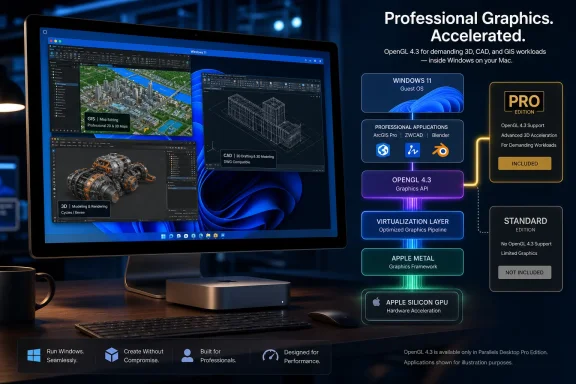 OpenGL 4.3 raises the application-compatibility ceiling
Parallels Desktop translates guest graphics calls to Apple’s Metal API rather than exposing a physical Windows GPU directly to the VM. Version 27 replaces the prior graphics path with a Metal-based driver supporting OpenGL 4.3, a significant step from the compatibility perspective because professional desktop software often uses OpenGL feature levels as a hard installation or launch requirement.
Parallels specifically names ArcGIS Pro, ZWCAD, and Blender 4.3 as applications newly within reach. 9to5Mac and Petri both reported the same core change: Windows VMs on Apple silicon can now expose hardware-accelerated OpenGL 4.3 rather than relying on a lower graphics level that blocked some demanding applications outright.
Compatibility, however, is not the same thing as certification or feature parity. ArcGIS Pro, for example, has a broad set of workflows ranging from ordinary mapping and geoprocessing to more demanding 3D scenes and extensions. Meeting a minimum OpenGL requirement is an important prerequisite, but it does not establish that every plugin, device-dependent workflow, spatial-analysis pipeline, or GPU-heavy feature performs identically inside Windows 11 on Arm within a VM.
Parallels’ benchmark disclosure is appropriately narrow: the company measured up to 35% faster performance in selected ArcGIS Pro tasks and up to a 24% reduction in the overall time of a tested workflow. The release does not identify every task, dataset, VM configuration, memory allocation, resolution, or baseline system used. Readers should therefore treat the figures as an indication that the graphics stack has materially changed, rather than as a planning number for a specific production deployment.
The more useful operational conclusion is simpler: technical users who were blocked by an OpenGL 4.3 prerequisite now have a reason to test their actual Windows application in Parallels Desktop 27 Pro. Users who already ran their workloads adequately on version 26 should not infer a uniform 160% increase; Parallels says that maximum applies to OpenGL workloads on M3-class Macs and newer, under its own controlled testing.
The Pro edition boundary is easy to miss
The announcement distributes the release’s benefits broadly across Standard, Pro, Business, and Enterprise editions. But Parallels’ August 21 product post draws a sharper line. Its edition table says Standard can run Windows 11 and Linux VMs, but marks the Metal-based OpenGL 4.3 driver, ArcGIS Pro gains, and M4 AI and machine-learning acceleration as unavailable in Standard. Those features are attached to Pro and, by extension, the business-oriented editions built on that technical tier.
That distinction changes the purchase decision. A user upgrading Standard solely to gain OpenGL 4.3 support for Blender 4.3 or ArcGIS Pro will not get the announced driver simply by moving to version 27; they need the appropriate edition. Thurrott reports a perpetual Standard license at $219.99 and a $99.99 annual subscription option, but Parallels’ release announcement does not set out a comparable public price table for the Pro, Business, and Enterprise paths that unlock the flagship technical features.
This also helps explain Parallels’ market framing. Standard remains the edition for ordinary productivity applications, general Windows software, and education use. Pro is the product intended for engineers, developers, designers, GIS specialists, and users that need higher virtual hardware limits, automation, command-line management, advanced networking, or multiple working VMs. Desktop 27’s most consequential improvements reinforce that separation rather than eliminating it.
IT departments should examine license assignments before assuming the upgrade will resolve a compatibility ticket. A fleet with Standard licenses may receive macOS support and general version updates, while users who need the graphics driver require a Pro, Business, or Enterprise entitlement. That is a licensing and deployment issue, not a driver troubleshooting issue.
SME acceleration is narrower than the announcement suggests
Parallels also promotes new AI acceleration through support for Apple’s Scalable Matrix Extension, or SME, instructions on M4-and-newer Macs. The company’s news release says SME2 support is available in Linux and Windows VMs and advertises up to seven times faster matrix operations and up to 1.75 times faster neural-network inference, with Ollama and llama.cpp cited as examples.
Its own feature breakdown is more constrained. The detailed Parallels Desktop 27 post describes the new accelerated AI and machine-learning operations specifically in Linux virtual machines, and its disclosed benchmark was performed in an Ubuntu VM on an M4 Pro Mac. It does not publish a corresponding Windows VM benchmark, model configuration, inference engine version, or test result.
That does not mean the Windows-VM claim is false. It means Windows developers should not read an Ubuntu result as evidence that their Windows-native AI stack will receive the same gain. Whether a workload benefits will depend on the application’s Arm build, the libraries it invokes, whether those libraries can actually use the relevant instructions under virtualization, and the CPU, memory, and model size assigned to the VM.
For developers, the best immediate application is local validation: compare a known inference or matrix-heavy workload before and after the upgrade on the same Mac, VM image, model, context size, and memory allocation. The claimed “up to” results are too environment-dependent to justify a capacity forecast. M1, M2, and M3 owners are excluded from this acceleration entirely; Parallels says M4 hardware or later is required.
Windows 11 on Arm remains the limiting platform
Parallels’ claim that it is Microsoft-authorized is substantially true, but needs the same specificity as its feature claims. Microsoft’s Windows support documentation identifies Parallels Desktop versions 18, 19, and 20 as authorized solutions for running Windows 11 Pro and Enterprise on Arm in a VM on M-series Macs. Microsoft’s public page has not yet been updated to name Desktop 27, even though Parallels says the current release is authorized.
The practical implication is that this remains a Windows 11 on Arm environment, not an x64 Windows installation transplanted onto a Mac. Windows can emulate many x86 and x64 applications, but application and driver behavior remains a separate test. Organizations using custom kernel drivers, specialized USB hardware, older 32-bit dependencies, anti-cheat systems, or software tied closely to a discrete Windows GPU should continue treating Parallels as a compatibility target to validate, rather than a drop-in equivalent to a physical x64 PC.
Microsoft also continues to warn that some Windows features and security capabilities may be unavailable or only partially functional under Parallels. Its documentation lists nested-virtualization-dependent features including Windows Subsystem for Linux, Windows Sandbox, Windows Subsystem for Android, and virtualization-based security as unsupported in this scenario. OpenGL 4.3 does nothing to change those boundaries.
That point is particularly relevant for development teams. Parallels Desktop 27 may improve Linux VM AI work on M4 Macs, but a Windows VM on the same machine is still not the right place to expect Windows-native nested virtualization workflows. Teams that require a fully compatible Windows development environment may still need a physical Windows PC or a Windows 365 Cloud PC for those workloads.
Enterprise changes are useful, but mostly administrative
The Enterprise update focuses on identification, provisioning, and automation rather than a new Windows runtime capability. Parallels says administrators can now use its command-line interface to determine whether an installation was activated with a license key or through single sign-on, which can feed Jamf extension attributes for inventory and reporting.
It also cites Secure Golden Images Provisioning through enterprise storage such as Azure Blob Storage and SharePoint, declarative deployment for zero-touch Windows VMs, a graphical interface for Parallels DevOps Service, and Jenkins dynamic provisioning of Mac-hosted VMs. These are meaningful additions for managed Mac fleets that already use Parallels, especially where a tested Windows VM image must be distributed consistently.
Parallels has renewed its SOC 2 compliance, but that attestation should not be mistaken for a security guarantee for every Windows VM deployed through the product. The security outcome still depends on image maintenance, Windows patching, identity configuration, VM access controls, storage permissions, and whether the organization accepts the Windows-on-Arm limitations Microsoft documents.
For most Windows users on Macs, Desktop 27’s upgrade decision comes down to one test: whether a required professional application was blocked by, or materially constrained by, the older OpenGL implementation. If the answer is yes, Parallels Desktop 27 Pro creates a credible new option. If the requirement is DirectX 12, nested virtualization, specialized drivers, or broad Windows hardware compatibility, the new graphics driver does not change the underlying boundary.