
SecurityBrief reported on August 18 that Portnox had added controls to block, quarantine, or revoke access for risky AI agents and other non-human identities, with Microsoft Defender joining existing CrowdStrike and SentinelOne integrations. Portnox’s own August release notes establish the underlying product change, but date it to August 3 and describe it more narrowly: risk policies can consume Intune Mobile Threat Defense status so assessments from supported endpoint detection and response products, including Microsoft Defender, become risk scores used to determine network access.
That is still a meaningful addition for Windows and Microsoft 365 administrators. It creates a route from a Defender or Intune posture signal to Portnox network access control without waiting for a human to manually disable an account, remove a device from a group, or chase an active session. But organizations evaluating it as “AI agent access control” need to distinguish between an agent’s identity and the Windows endpoint, server, or managed device on which that agent runs.
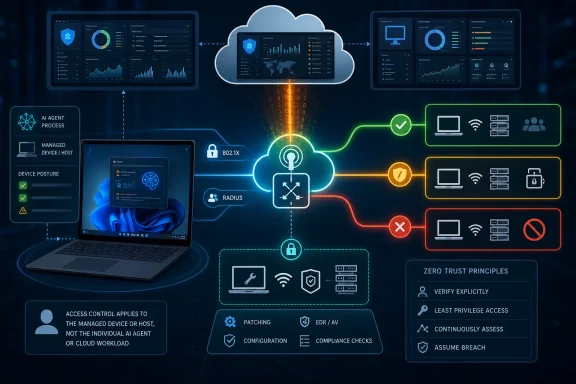 The Defender connection is an enforcement bridge
Portnox positions itself as the enforcement point after another security product detects a problem. Its AI-security material says it reads Microsoft Defender’s device Risk Rating through an API, then applies policy actions such as blocking or quarantining the affected device. Its published technical description also identifies 802.1X, RADIUS, pre-connect authorization, and ongoing posture checks as the mechanics behind that enforcement.
In a conventional corporate network, that can be a faster and more useful response than leaving a high-risk endpoint connected while separate security, identity, and network teams coordinate. If Defender raises a device’s risk because of malware, suspicious activity, or a failed security control, Portnox can change that endpoint’s access state at the network layer. Depending on the policy and network gear, the result can be a hard denial, an isolation segment, or revoked access to resources delivered through Portnox’s access controls.
Portnox’s August release notes are also clear that the new capability is tied to Microsoft Intune Mobile Threat Defense status. That wording matters. It indicates a managed-device integration in the Intune and Defender security stack, rather than evidence that Portnox has introduced an independent method to interrogate every cloud-hosted agent, SaaS automation, service principal, or API token in an enterprise.
The company’s CrowdStrike and SentinelOne integrations follow the same general model. Portnox introduced its CrowdStrike integration in June 2025 for device enrollment, dormancy, and Zero Trust Assessment score policies; SentinelOne integration followed in August 2025 for missing enrollment, dormant reporting, or an active threat. The Defender work completes the set of three endpoint-security feeds Portnox now markets as inputs to a unified access-policy engine.
“AI agent” is broader than the control Portnox has documented
Portnox says it can enroll AI identities with credentials and apply scoped policies that can be revoked. That vision aligns with a genuine operational problem: agent software can execute tasks continuously, call tools, reach internal applications, and use credentials that may be broader or longer-lived than the task requires.
But an AI agent is not automatically a network-attached endpoint. An agent might run as a process on a Windows PC, inside a Windows Server workload, in a container platform, through a cloud service, or as a SaaS product acting through an API. Network access control is strongest in the first two cases, where a device or host actually authenticates to a network or reaches protected resources through an access gateway.
Portnox’s public material makes the connection between its Defender integration and a device explicit. Its documentation does not spell out how Defender’s device risk score is mapped to an individual agent identity, how multiple agents on one host are separated, or how policy enforcement distinguishes one agent’s activity from another agent or the user account running the host.
That does not make the technology ineffective. It establishes where it belongs in a layered design. A Defender risk event associated with a Windows endpoint hosting an agent can lead Portnox to contain that endpoint. The same action can cut off the agent’s path to protected network resources. But it is not equivalent to terminating a specific cloud agent’s OAuth grant, revoking its application permission, disabling a service principal, or invalidating a leaked API key.
Those controls remain identity, application, and cloud-governance work. Portnox can reduce the immediate blast radius where it controls the connection path; it cannot, based on the product details published so far, replace Microsoft Entra, application authorization controls, secrets management, or the platform-specific administration layer where a cloud agent lives.
Microsoft is building its own agent inventory and runtime controls
Microsoft’s Agent 365 and Defender announcements show why the difference between agent context and endpoint containment is becoming more consequential. Microsoft said in May that Agent 365, Defender, and Intune would provide discovery and management for local AI agents on Windows devices, initially including OpenClaw and later other tools such as GitHub Copilot CLI and Claude Code.
Microsoft also said Defender would provide context mapping for agents, including the devices they run on, configured Model Context Protocol servers, associated identities, and reachable cloud resources. For managed local agents that show malicious behavior, Microsoft described planned Defender runtime blocking and alerting, with Intune policy controls used to restrict common ways unmanaged agents run.
Portnox sits downstream from much of that activity. Microsoft’s tools can supply visibility into the process, endpoint, identity, and potentially the risky behavior; Portnox can enforce a connection decision when its policies receive an applicable risk signal. For a Windows organization with existing Portnox NAC or ZTNA deployment, that creates a useful containment option beyond an alert in the Defender portal.
It also means the integration should be judged by its correlation quality. An administrator needs confidence that the Defender risk signal, Intune device record, Portnox device identity, authentication certificate, and network session all refer to the same asset. Without that mapping, a policy may fail open because Portnox cannot match the signal to a session, or fail closed by isolating a shared host that runs unrelated workloads.
What administrators need to test before automating a block
The advertised “detect, evaluate, enforce” loop is straightforward. The deployment work is not. Teams should treat the first policies as controlled containment tests, particularly if a Windows workstation or server hosts more than one agent, automation account, or business-critical service.
- Confirm that a Defender or Intune risk-state change is reflected in Portnox for the correct Windows device, rather than merely appearing in separate consoles.
- Verify which access paths Portnox can actually stop in the organization, including wired and wireless 802.1X access, remote connections, and applications behind Portnox ZTNA.
- Define whether a failed policy should block access, move the device to a remediation VLAN, or allow only a limited set of security and management services.
- Identify the recovery path before enabling automatic quarantine, including how Defender risk remediation, Intune compliance, Portnox policy reevaluation, and session reauthentication return a legitimate device to service.
- Keep separate controls for the agent’s own credentials, delegated permissions, MCP connections, API tokens, and service principals; cutting off the host network does not automatically revoke those privileges elsewhere.
The most consequential unaddressed detail is timing. Portnox promises automated, machine-speed response, but its public material does not provide a service-level figure for how quickly a Defender or Intune change is ingested, policy is reevaluated, and an already connected endpoint is removed or segmented. It also does not publish a compatibility matrix identifying which Defender products, Intune licensing tiers, operating systems, or network access devices are required for the full workflow.
A useful layer, not an agent-security replacement
The defensible reading of this release is that Portnox has expanded a device-posture enforcement chain to include the Microsoft stack at a time when Windows endpoints increasingly host autonomous tools. That can be valuable: a compromised local coding agent or unmanaged automation running on a corporate Windows device is less dangerous if a Defender-driven risk event can rapidly remove the host from sensitive network paths.
Portnox’s “AI identity” framing goes further than the release notes’ implementation detail. The company has documented a way to translate Defender-related managed-device risk into access policy. It has not publicly documented a universal, per-agent revocation mechanism spanning cloud agents and every form of non-human identity.
For security teams, the immediate result is practical but bounded: use Portnox to contain the Windows device or network session tied to a risky agent, while using Defender, Intune, Entra, and the agent platform itself to discover the agent, investigate its behavior, and revoke the permissions that may persist after the network connection is gone.
