

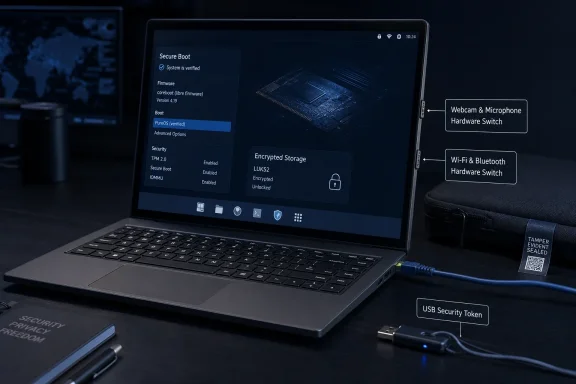
Notebookcheck’s August 9 report accurately describes the core hardware, but Purism’s own launch record shows the Librem 16 was announced on June 23, 2026, not newly introduced this week. The Register independently reported the July availability and initial $2,899 price. Purism’s store has since listed the configurable model from $2,870, a small reduction that is more meaningful than it looks in a product category where the machine is being sold on its security integration rather than price-performance.
For Windows users considering it as an unusually private dual-boot or replacement notebook, the Librem 16 is less a conventional premium laptop than a pre-integrated threat-model appliance. Its value rests on controls below the operating system—physical radio and sensor disconnection, coreboot-based firmware, a disabled Intel Management Engine, and an optional tamper-evident boot chain. Those features survive an OS reinstall. The trade-off is a 2023-era Intel platform, integrated graphics only, a modest battery, and no published Windows 11 support commitment from Purism.
The switches isolate components, not every data path
Purism’s hardware documentation is more precise than the broad “disconnects all wireless connections” description. The wireless switch covers the Intel AX200 Wi‑Fi 6 adapter and Bluetooth; the other switch covers the camera and microphone. The company says these are hardware kill switches, not software toggles, which means malware running in PureOS—or another installed operating system—should not be able to reactivate the specifically disconnected devices through a driver setting or firmware command.
That is a real distinction. Most laptop privacy keys simply send an instruction to the operating system, disable a camera in firmware, or slide over the lens while leaving its microphone and electrical connection available. A physical disconnect changes the equation: malicious code cannot capture video from a camera that has no active hardware connection, and it cannot connect to a Wi‑Fi network through a disconnected wireless adapter.
But the security claim has boundaries that matter in business use. Flipping the radio switch does not disable the wired Ethernet adapter, USB-connected networking, or a USB tethered phone. It also does not prevent data exfiltration through storage media, an already-open wired VPN tunnel, or a compromised peripheral. The webcam-and-microphone switch is similarly useful for reducing remote-surveillance risk, but it does nothing for applications that already have access to documents, browser sessions, or cloud storage.
The point is not that the switches are weak; they are a stronger control than an OS checkbox. The point is that they solve a sharply defined problem. IT teams should treat the wireless switch as a dependable radio isolation control, not as a general network quarantine button.
PureBoot and Librem Key are the bigger security story
The privacy sliders will be the visible feature, but Purism’s more consequential differentiator is its optional PureBoot and Librem Key arrangement. The Librem 16 uses coreboot rather than a conventional proprietary laptop BIOS/UEFI stack, and Purism says Intel Management Engine functionality has been disabled. A TPM, PureBoot’s tamper-evident boot tooling, and the USB-based Librem Key can be combined to detect changes to firmware or the boot path.
The supplied report calls the Librem Key an encrypted USB dongle that unlocks the laptop “rather than a password.” That is incomplete. Purism describes it as a USB security token with an OpenPGP smart card that stores cryptographic keys and can participate in unlocking an encrypted drive. Users still enter the key’s PIN, and Purism says the ordinary disk-encryption passphrase remains a fallback if the token is unavailable. Removing the key can also lock the desktop automatically.
In practice, this is closer to a hardware-backed second factor for local boot than to passwordless computing. It can make offline theft and unauthorized physical access more difficult, and its status LED is meant to signal if PureBoot detects unexpected firmware or kernel changes. It is most useful where a user can establish and maintain a known-good boot state—such as an administrator, journalist, developer handling sensitive source code, or employee traveling with confidential material.
There is also a constraint buried in Purism’s own framing. The Librem Key and PureBoot are not simply synonymous with “the laptop.” The company presents PureBoot as a configurable bundle and offers factory setup. Buyers should confirm exactly which firmware, key, disk-encryption, and anti-tamper options are included in their chosen configuration before assuming the base price covers the full chain.
Purism further markets an “anti-interdiction” service involving tamper-evident packaging, photographed secure setup, and encrypted communication. That is a niche service for customers concerned about a device being altered between fulfillment and delivery. It is not a substitute for endpoint management, routine firmware maintenance, or an incident-response plan once the laptop is in service.
The specifications favor repairability and ports over modern performance
The Librem 16 pairs a 16-inch, 1,920 × 1,200 IPS display with Intel’s Core i7-13620H, a 10-core/16-thread mobile chip made up of six performance cores and four efficiency cores. Intel introduced that processor in the first quarter of 2023. It remains capable for office work, development, browser-heavy workflows, and many virtual-machine tasks, but it is old silicon in a laptop launched in June 2026.
Purism uses two DDR4 SO-DIMM slots, with a 64GB maximum, and two 2280 M.2 slots that support SATA or NVMe storage. The company advertises configurations up to 16TB, which means the platform can be configured for local encrypted data rather than leaning on cloud storage. That is one of the more practical appeals of the machine: memory and storage are not soldered into a thin chassis.
The port selection is refreshingly functional. There are two USB-C ports supporting USB 3.2 Gen 2x2, DisplayPort Alt Mode, and up to 100W USB Power Delivery; two USB-A ports; HDMI 2.1; Gigabit Ethernet; a 3.5mm audio jack; and microSD. For a sysadmin or field technician, full-size Ethernet and USB-A reduce the need for the dongles that complicate travel and recovery work.
The compromises are equally clear. Graphics come from Intel UHD integrated graphics, not a discrete GPU. The display is specified at 1,920 × 1,200 rather than 2.5K or 4K, although Purism claims 340-nit minimum brightness, 400-nit typical brightness, and up to full sRGB coverage. The 54.2Wh battery is relatively small for a 16-inch, 1.8kg notebook. Purism has not published a runtime estimate on the Librem 16 specification page, leaving buyers without an official battery-life number for comparison.
At the original $2,899 entry point—or $2,870 in the current store listing—this hardware would be difficult to justify as a raw-spec purchase. The premium buys the firmware work, the switch design, the security token option, and a vendor willing to sell a laptop designed around Free Software principles. The Register reached the same basic conclusion: this is aimed at buyers who value the security posture enough to accept a high price and uncompetitive performance-per-dollar.
PureOS is the default, while Windows remains outside the support story
The Librem 16 ships with PureOS, Purism’s Debian-based GNU/Linux distribution. Purism says PureOS is endorsed by the Free Software Foundation and includes security-oriented defaults such as AppArmor sandboxing for Debian packages and Flatpaks, HTTPS-focused browser behavior, tracking protection, and ad blocking. For users who want a Linux system that arrives encrypted and privacy-focused without assembling the stack themselves, that integration is part of the product.
However, “free software” at the operating-system layer should not be confused with a laptop containing no proprietary code whatsoever. Purism’s own hardware documentation says binary blobs remain at the firmware level on current Intel-based machines, even as the company uses coreboot and says it has disabled and neutralized Intel Management Engine functionality. That is not a contradiction; it is an important limitation of building a modern Intel laptop while pursuing a mostly auditable platform.
For WindowsForum readers, Purism’s stance on Windows is more relevant than the CPU’s compatibility. Purism says users can install another operating system on a Librem laptop, including Windows, but its documentation does not present Windows as a tested or supported Librem 16 configuration. The company also says installing proprietary software means it cannot guarantee the same security posture. No Windows driver package, Windows 11 certification statement, BitLocker guidance, or Windows-specific behavior for the kill switches and PureBoot workflow is listed in the Librem 16 materials.
That does not prove Windows 11 will fail to run; the Intel CPU, AX200 wireless hardware, Ethernet, and integrated graphics are familiar components. It does mean an organization buying the Librem 16 for Windows deployment would be assuming validation work that Purism has not advertised. A serious pilot should test sleep and resume, display brightness, dock behavior, USB-C charging, HDMI, Wi‑Fi and Bluetooth after switch cycling, BitLocker recovery, firmware update procedures, and interaction with endpoint security software before any purchase beyond a small evaluation batch.
The Librem 16’s strongest claim is therefore also its narrowest: it gives a Linux-first buyer a laptop where camera, microphone, Wi‑Fi, and Bluetooth can be physically taken out of service, while a separate boot-integrity stack can make tampering more visible. It is available now, but the buyer is paying for that controlled design—not for current-generation performance, long advertised battery life, or a ready-made Windows support contract.