
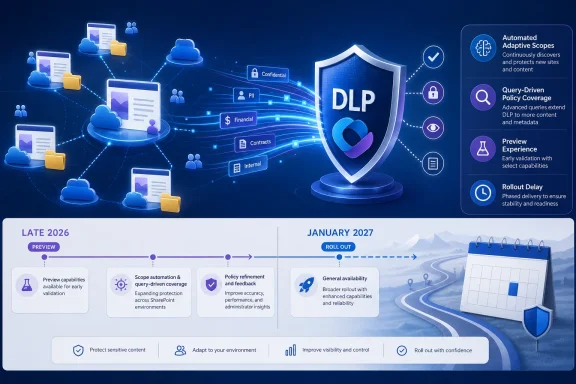
The change affects Microsoft 365 Roadmap ID 549288, “Microsoft Purview: Data Loss Prevention — Adaptive Scopes for DLP for SharePoint.” The capability is designed to let DLP policies follow SharePoint sites automatically as those sites are created or change their identifying properties, replacing a manually maintained list of individual site URLs. Microsoft’s current Purview documentation already describes DLP policy scoping with SharePoint adaptive scopes as a preview capability, so the schedule change appears to concern the production-ready rollout rather than the underlying adaptive-scope engine.
For IT teams, the immediate conclusion is straightforward: do not treat the September 2026 date as a GA commitment anymore. Keep preview deployments isolated, test the exact site-query logic, and plan policy migrations against the January 2027 roadmap target unless Microsoft issues a newer Message Center update.
 A roadmap change contradicts the previous rollout notice
Microsoft’s Message Center notice, identified as MC1234571 and published in February, said public preview would complete in late February 2026. It was subsequently updated on May 26, pushing general availability from June to a rollout starting in late August and completing in late September.
The August 27 roadmap update now gives the same feature a January 2027 general-availability date. It also continues to carry both Preview and General Availability release rings, with a status of “In development.” Microsoft has not publicly explained the reason for the revised GA timing in the roadmap entry, nor has it published a matching new Message Center notice that reconciles the January target with the earlier late-August-to-September deployment window.
That discrepancy is more than calendar housekeeping. The older Message Center timeline suggested that organizations could move DLP designs from pilot to broadly supported production use during the current quarter. The roadmap now indicates a several-month gap between the preview’s availability and formal GA. Administrators should base change-control plans on the newer official roadmap date, while recognizing that roadmaps are targets rather than contractual delivery dates.
Microsoft has also not said whether tenants that have already received the preview will lose access, whether the existing preview behavior will change before GA, or whether the delay is tied to service readiness, licensing, deployment scale, or a feature redesign. Those are the operational details missing from the current update.
What adaptive SharePoint scopes actually change
Today, a Purview DLP policy can be applied to all SharePoint sites or narrowed to a static set of sites. Microsoft’s DLP policy reference says static SharePoint scoping supports up to 100 sites per policy. That ceiling becomes awkward quickly for organizations separating policies by region, business unit, project, data classification, or external-collaboration rules.
Adaptive scopes replace the fixed list with a query. Microsoft Learn says SharePoint site scopes can use site URL, site name, and custom SharePoint managed properties exposed through RefinableString00 through RefinableString99. A site that begins to match the query is added to the scope; one that stops matching it is removed.
The important administrative benefit is not merely scale. It is the ability to attach protection to the site provisioning standard rather than to a snapshot of sites that happened to exist when a policy was created.
A company could, for example, establish a custom managed property that identifies regulated-project sites and point a DLP policy at that property. Newly provisioned sites receive DLP coverage once their metadata is indexed and matches the adaptive-scope query. The team no longer has to remember to amend every DLP policy whenever it creates a site.
Microsoft’s adaptive-scopes documentation also makes clear that SharePoint site scopes can encompass more than conventional SharePoint team sites. Unless queries narrow the result set, the scope can include Microsoft 365 group-connected sites and OneDrive sites. The advanced query builder uses Keyword Query Language, or KeyQL, and exposes site templates such as GROUP for Microsoft 365 group-connected sites, TEAMCHANNEL for Teams private-channel sites, STS for classic team sites, SITEPAGEPUBLISHING for modern communication sites, and SPSPERS for OneDrive.
That broad default means administrators should not create a URL- or metadata-based scope and assume it only reaches the SharePoint site class they had in mind. A query that matches a naming convention shared by Teams-connected sites, department collaboration sites, or OneDrive URLs can widen DLP enforcement far beyond the intended estate.
Dynamic does not mean immediate
Adaptive scoping eliminates recurring list maintenance, but it introduces a delay that matters for security operations and site-provisioning workflows. Microsoft Learn says adaptive-scope queries run daily and can take up to five days to fully populate. Changes are not immediate, and membership details can take up to five days to reflect additions or removals.
That means a site cannot be assumed to have its intended DLP policy the minute its metadata changes. If an organization’s risk model requires controls before users begin uploading sensitive material, the policy design must include a baseline protection layer for new sites. Adaptive scopes are better suited to continuously refining coverage than serving as the only gate between site creation and sensitive-data use.
The same operational caution applies when changing scope criteria. An administrator correcting a KeyQL query might expect a quick recovery from an overbroad or underinclusive policy. Microsoft documents a propagation window, so testing needs to account for it. The query should be validated in SharePoint search before being attached to a live DLP policy, then the resulting members should be reviewed in Purview’s Scope details view.
Microsoft says the adaptive scope can apply to more than one million members, although the membership-details interface can display up to one million combined added and removed entries. That capacity makes the feature attractive to large tenants, but it also makes narrow, explainable queries more important. A dynamic scope that unexpectedly expands is no longer a 101st manually added site; it can become an enterprise-wide policy event.
Administrative-unit boundaries remain a constraint
Adaptive scopes do not remove the distinction between unrestricted and administrative-unit-restricted Purview administration. Microsoft’s documentation says that SharePoint adaptive scopes cannot be created if an administrator selects an administrative unit, because administrative units do not yet support SharePoint sites for this adaptive-scope configuration.
This is an easy limitation to miss because Purview separately supports placing SharePoint sites into administrative units for certain DLP scenarios. But Microsoft’s DLP policy reference says an administrative-unit-scoped SharePoint DLP policy applies to all sites in that administrative unit, with no additional option to include or exclude specific sites. The adaptive-scope model is therefore not a drop-in substitute for delegated regional or subsidiary administration.
Organizations that use administrative units for least-privilege administration should map this boundary before redesigning DLP policies. An unrestricted compliance administrator may be able to build the desired dynamic SharePoint query, while a delegated administrator cannot create the same adaptive SharePoint scope within their administrative-unit boundary.
The feature also is not switched on automatically. Microsoft’s earlier Message Center guidance said administrators must create and assign the scopes themselves. That remains an advantage for cautious deployments: existing SharePoint DLP policies should not silently change behavior. But it also means the eventual GA date will not produce protection improvements unless compliance and SharePoint teams have prepared the metadata, query logic, permissions, and validation process.
The practical plan before January
The best use of the extended timeline is to treat adaptive SharePoint scopes as a controlled design project rather than a quick way around the 100-site limit. Start by identifying which policy groups are truly stable enough to be expressed through site metadata, site naming, URL patterns, or site templates. A department’s informal naming convention is a poor security control; a provisioning-enforced managed property is a much safer basis for DLP targeting.
Then validate the query independently in SharePoint search and compare the expected URLs with the actual result set. Test the adaptive scope in a limited DLP policy using simulation or audit-oriented settings before attaching blocking actions. Microsoft’s DLP deployment guidance recommends narrowing pilot scope before broader enforcement, which is particularly relevant when membership can change automatically after a site-owner update.
Finally, retain a baseline policy for sites that are newly created, misclassified, or waiting for scope evaluation. Adaptive scopes can reduce DLP administration substantially, but their documented evaluation delay means they should not become an excuse to leave a protection gap during provisioning.
Microsoft’s August 27 roadmap revision makes January 2027 the date to plan around. The preview offers an opportunity to prove that site metadata and KeyQL queries accurately model the organization’s SharePoint estate; GA will not fix a weak classification scheme or an overbroad query after the fact.
