
The practical change is narrow but important for compliance teams. These artifacts do not sit in the ordinary SharePoint sites or OneDrive folders that an investigator may expect. Microsoft’s own documentation says that a user’s Copilot Pages, Copilot Notebooks, and Loop My workspace content share a single user-owned SharePoint Embedded container. The same documentation also says those containers are identified as Loop in administrative and Purview data, even when the material being sought was created in Copilot Pages or Copilot Notebooks.
For eDiscovery teams, that naming and storage model has created an avoidable discovery problem: the evidence is in SharePoint-backed storage, but the connection between a custodian and the relevant container has not always been obvious in the collection workflow. The roadmap item points to a product-level fix for that gap, allowing an investigator to begin with the person under review rather than first locating a container URL or casting a much wider SharePoint search.
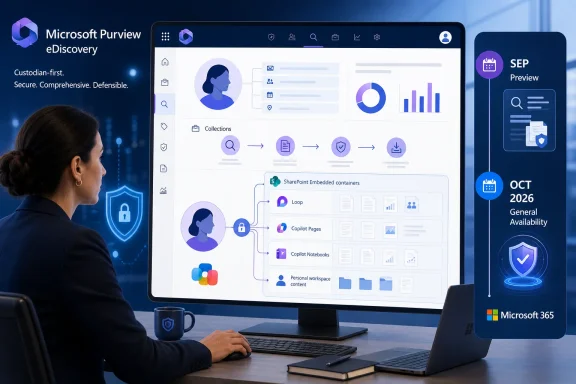 A custodian-first route to Copilot artifacts
Microsoft describes the new option as the ability to “view and select” SharePoint Embedded containers that a selected person owns or created. That wording matters. It does not announce a new content repository, a separate eDiscovery product, or a special Copilot-only case type. It changes how data sources can be chosen inside an existing Purview eDiscovery investigation.
The expected benefit is better custodian scoping. In a typical matter, legal or compliance staff start with a defined list of employees, contractors, or former workers. Under the planned model, choosing a custodian should reveal the relevant user-owned containers, allowing the investigator to add the appropriate ones to the collection without treating all SharePoint content as an undifferentiated source.
Microsoft’s Purview guidance currently explains that SharePoint Embedded containers can be targeted through an “All SharePoint Sites” scope, or individually after an administrator retrieves the container URL from the SharePoint admin center. Microsoft’s security team has separately written that searches can return Copilot Pages content when the embedded-container URL is included or when a tenant-wide all-SharePoint-sites search is used.
Those methods establish that the content was already within Purview’s reach. The roadmap item is therefore about making that reach more usable and defensible in a person-centered investigation, rather than suddenly adding eDiscovery support for Loop or Copilot content.
That distinction should temper expectations. Microsoft has not said the feature will automatically find every item related to a user across every type of collaborative workspace, nor has it said that it will replace the need to define collection sources, search criteria, review sets, holds, and exports. It should remove a source-selection step that currently depends on administrative knowledge of SharePoint Embedded.
Why “owned or created” deserves close reading
The roadmap wording covers containers “owned or created” by a selected person, which suggests Purview may surface more than a single personal workspace. Microsoft’s current governance documentation identifies several ownership models for SharePoint Embedded content: user-owned containers, tenant-owned containers such as shared Loop workspaces, and group-owned containers associated with a Microsoft 365 Group.
A user-owned container is comparatively straightforward. Microsoft says each user has one such container for Copilot Pages, Copilot Notebooks, and Loop My workspace. The container’s lifecycle is tied to the user account, with processes resembling the OneDrive lifecycle when that person leaves the organization.
The more consequential language is “created.” Shared Loop workspaces can have ownership that is not identical to the person who initially created them. A container connected to a Microsoft 365 Group may be a collaboration asset, while a tenant-owned workspace may be shared among multiple people. The roadmap does not yet explain how Purview will distinguish ownership from creation in the picker, whether it will expose shared containers to every relevant custodian, or how it will present a container whose creator has departed.
Those are not semantic details in an investigation. A search limited only to a former employee’s personal container can miss material that person produced in shared Loop spaces. Conversely, a workflow that automatically treats every workspace created by a custodian as personal evidence could draw shared material into a collection with a much wider relevance and privilege-review burden.
Microsoft needs to publish the exact selection logic before organizations treat this feature as a substitute for their existing custodian and collaboration-space procedures. The roadmap entry does not yet identify the supported container types, the user interface labels, prerequisite Purview licensing, required role assignments, or whether the feature will be present in both standard and premium eDiscovery experiences.
Loop remains the administrative identity behind Copilot Pages
The most useful context Microsoft has already provided is that Copilot Pages and Copilot Notebooks do not have their own distinct SharePoint Embedded identities for all governance purposes. Microsoft Learn states that the personal user-owned container shared by those apps and Loop My workspace is identified using Loop application IDs. Audit events for Copilot Pages and Copilot Notebooks also appear under Loop application IDs.
That architecture helps explain why a new eDiscovery selection method is useful. An investigator looking for “Copilot Notebook” material may not find an equally named data source, while a SharePoint administrator may see a Loop-branded container. The content remains related to the employee, but the product label used by the employee and the label seen by the administrator can differ.
Microsoft’s public guidance further says the container URL is not a shareable link and does not provide access to the underlying material. It is an administrative identifier for Purview targeting. That means a compliance team cannot solve this problem simply by passing a container link around internally; it needs the right Purview workflow, the right role permissions, and a reliable record of why a particular source was selected.
The planned picker should reduce the dependence on manual container-URL discovery. It will not eliminate the need for records management. Teams should still document how they connected a custodian to a source, especially where the collection includes containers the person created but does not own.
September preview is not an October deployment guarantee
The roadmap classifies the capability as “in development,” with Preview targeted for September 2026 and General Availability targeted for October 2026 in Microsoft’s worldwide standard multi-tenant cloud. Roadmap target dates are planning signals, not release commitments. Microsoft can revise, delay, alter, or remove features before they reach production.
There is also no indication in the entry that government clouds, sovereign clouds, or other specialized Microsoft 365 environments will receive the feature on the same timetable. The stated cloud scope is specifically Worldwide (Standard Multi-Tenant). Organizations operating outside that environment should not infer availability from the October target.
The absence of rollout mechanics is more notable than usual for an eDiscovery feature. Microsoft has not said whether existing cases will expose the new selection surface, whether it will be gated behind a preview opt-in, or whether organizations must update any retention, audit, or SharePoint Embedded configuration first. It also has not described behavior for containers belonging to deleted users, renamed accounts, cross-tenant collaboration, or matters involving preservation requirements.
Administrators should avoid redesigning collection playbooks around an entry that remains in development. But they should use the preview window to test the assumptions that matter in their tenant: whether the correct containers appear for a selected custodian, whether shared workspace results are complete, whether a search returns expected .page and Loop content, and whether the review team can accurately explain the scope of its collection.
What Purview teams should prepare now
The feature is worth treating as an operational improvement, not a reason to wait on compliance work already underway. Microsoft’s existing documentation makes clear that the data is stored in SharePoint Embedded and can be addressed through current Purview approaches. The new workflow should make future investigations easier; it does not change retention duties or excuse a failure to preserve relevant content today.
Before preview availability, eDiscovery and Microsoft 365 administrators should reconcile the terms employees use with the terms their tools use. In particular, they should ensure that investigation guidance recognizes that Copilot Pages and Copilot Notebooks may appear as Loop-associated SharePoint Embedded content.
They should also validate their current process for identifying user-owned containers and for handling shared workspaces. If the organization relies on manual container URLs, it should record where those URLs are obtained, who is authorized to retrieve them, and how the resulting source selection is reviewed. That baseline will make it possible to determine whether the new Purview interface actually improves completeness rather than simply changing the screen investigators click through.
The October target matters because Copilot-authored material is increasingly ordinary business material: editable pages, working notes, research collections, and collaborative workspace content can all become relevant in an employment dispute, regulatory inquiry, or internal investigation. Microsoft’s planned change should make the first step—finding the right container for the right person—less dependent on SharePoint Embedded expertise. What it does not yet answer is whether the resulting view will give investigators a complete, intelligible map of the shared workspaces surrounding that person.