

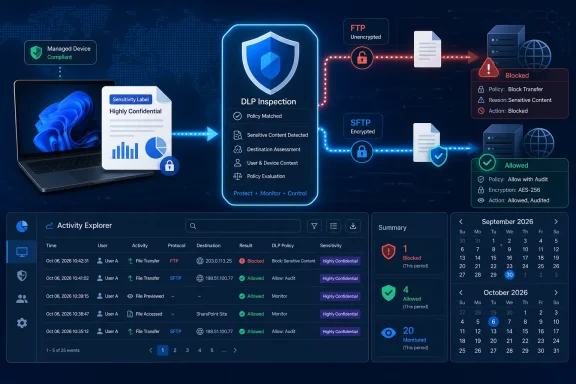
For Windows administrators, the delayed capability fills a specific policy gap rather than introducing a new DLP engine. Once it arrives, Purview Endpoint DLP is intended to inspect files transferred from managed Windows endpoints through FTP and SFTP, record those transfers in Activity Explorer, and apply existing DLP responses including audit, block, and block with override. Microsoft’s Roadmap entry describes the feature as in development across worldwide commercial tenants, GCC, GCC High, and DoD.
The August 11 Roadmap update conflicts directly with Microsoft’s June 25 Message Center announcement, archived by the Microsoft 365 Message Center Archive as MC1404319. That notice told customers public preview would begin in late July and finish in early August, followed by a mid-August general-availability rollout across commercial and government clouds. The Roadmap record is the newer statement, and its September/October dates should now be treated as Microsoft’s current plan. Microsoft has not explained the reason for the rescheduling.
The scope is managed Windows endpoints, not FTP servers
The feature is often easy to misread because the Roadmap’s platform field says “Web.” That field describes the Microsoft 365 administration experience, not a browser-only enforcement mechanism and not protection added to an FTP or SFTP server.
Microsoft’s June Message Center description is explicit: Endpoint DLP will monitor and protect files transferred over FTP and SFTP from managed Windows devices. The policy decision happens on the endpoint where Purview can inspect the file and associate it with a user, device, sensitive information type, or sensitivity label. It does not mean Purview will inspect every file passing through an organization’s FTP infrastructure, nor does it add governance to unmanaged third-party servers.
That distinction affects deployment design. A company operating an SFTP service cannot rely on this addition to police inbound uploads from partners, contractors, Linux hosts, macOS devices, or unmanaged Windows PCs. The control applies when an in-scope Windows endpoint running Purview Endpoint DLP initiates a covered file-transfer activity. Server-side controls, SFTP account permissions, network segmentation, malware scanning, logging, and retention requirements remain separate responsibilities.
Microsoft’s own Endpoint DLP documentation also makes clear that policy enforcement requires both the device and the signed-in user to be within the DLP policy’s scope. An onboarded Windows machine alone is not sufficient if the user is outside the applicable policy; likewise, a scoped user working on a device outside the policy’s device targeting does not receive enforcement.
Existing policies will not automatically start blocking transfers
The most consequential operational detail is buried in the earlier Message Center notice: FTP and SFTP protection will not be enabled by default. Administrators must add the FTP/SFTP transfer activity to Endpoint DLP policy settings before Purview will audit or block it.
That prevents a surprise outage when the feature reaches a tenant, but it also means the October general-availability date will not itself close an exfiltration path. Organizations using SFTP for vendor feeds, backups, software distribution, regulated-data exchange, or legacy line-of-business integrations will need to decide which activities should be observed, warned on, blocked, or permitted with a documented user override.
Microsoft says the new activity will honor the conditions, user and device scope, and enforcement actions already configured in Endpoint DLP policies. In practical terms, this should allow administrators to build rules around content classifications they already use elsewhere in Purview: credit-card numbers, government identifiers, healthcare data, source-code patterns, exact data match sets, trainable classifiers, and sensitivity labels. The transfer protocol becomes another controlled egress path for files Purview can recognize as sensitive.
The safe rollout sequence is therefore straightforward, even if the feature’s exact portal configuration is not yet public:
- Start with audit-only enforcement for a limited group of Windows devices that use approved FTP or SFTP workflows.
- Review the new Activity Explorer events to identify expected applications, destinations, users, file types, and business processes.
- Separate legitimate automated transfers from ad hoc client usage before assigning blocking actions.
- Use block with override only where a business justification and after-the-fact review are meaningful controls rather than a rubber stamp.
- Expand blocking in stages, particularly where service accounts, scheduled jobs, and third-party transfer clients are involved.
Microsoft made the same audit-first recommendation in MC1404319. It is sound advice because FTP and SFTP may sit underneath processes that users do not recognize as “file transfers”: a CAD export tool, medical imaging package, manufacturing workflow, backup utility, or legacy finance application can invoke an SFTP client without a user consciously launching one.
Activity Explorer gains visibility, but visibility has limits
Microsoft says FTP and SFTP will appear as a new Activity Explorer activity type. That supplies the security operations benefit of the release: a Purview administrator can see data movements that previously may have required network telemetry, local application logs, or a separate DLP vendor to investigate.
Purview’s existing Endpoint DLP documentation shows the breadth of metadata it can collect for endpoint file activities, including user, device name, application, file name, extension, file size, timestamps, source and destination location types, client IP address, sensitive-information findings, and file hashes. Microsoft has not yet published an FTP/SFTP-specific schema, so administrators should not assume every field available for USB or network-share events will appear identically for these transfers. The exact event attributes, supported client applications, and handling of command-line tools have not been documented in the Roadmap entry or the Message Center notice.
The broader DLP limitation also remains: Endpoint DLP can only make a content-aware decision if it can evaluate the file. Microsoft’s documentation says that when data is never saved locally, Endpoint DLP cannot scan or classify it. Microsoft gives the example of a document opened in Word and written directly to a USB device without first being stored on the device; the same underlying issue matters for file-transfer workflows that stream data from a remote source to a remote destination or generate content outside Purview’s local inspection path.
That does not negate the FTP/SFTP feature, but it defines its boundary. It is designed to prevent a user from taking a locally available sensitive file and sending it via a protocol that has historically survived in enterprise workflows precisely because it is old, scriptable, and easy to automate. It is not a universal network content-inspection appliance.
Windows support is confirmed; macOS support is not
Microsoft’s current endpoint documentation supports Windows 10 version 1809 and later, Windows 11, and Windows Server 2019 and later for Endpoint DLP in various configurations, alongside support for recent macOS releases. But the FTP/SFTP announcement itself refers only to managed Windows devices.
That omission matters. The Endpoint DLP activity matrix Microsoft published before this release covers browser uploads, clipboard use, USB copying, network-share copying, printing, Bluetooth, and RDP across different Windows and macOS configurations. FTP and SFTP do not yet appear in that matrix, and Microsoft has not said that the new protocol protections will reach macOS. Administrators should treat macOS coverage as unannounced rather than presume cross-platform parity from the fact that Endpoint DLP exists on both operating systems.
The same caution applies to Windows Server. Microsoft’s Endpoint DLP documentation says Windows Server 2019 and later can participate in Endpoint DLP, with important classification restrictions depending on installed updates and Defender versions. Yet the FTP/SFTP notice says “managed Windows devices,” not Windows Server. Until Microsoft publishes the supported operating-system and client matrix for this activity, teams should not build a compliance control around the assumption that file-transfer jobs running on Windows Server will be covered.
The delay gives administrators time to test the parts Microsoft has not specified
The revised Roadmap entry offers no minimum Microsoft Defender for Endpoint version, no Endpoint DLP agent build, no licensing clarification, no list of supported FTP or SFTP clients, and no explanation of how encrypted SSH-based SFTP sessions are identified and enforced at the endpoint. It also does not say whether transfers launched through PowerShell, curl, WinSCP, FileZilla, custom applications, mapped integrations, or background service accounts will behave consistently.
Those omissions are more important than the Roadmap’s generic claim of protecting sensitive data. Endpoint DLP features are only as dependable as their coverage of the applications and workflows an organization actually uses. A policy that blocks WinSCP while missing a custom command-line uploader does not eliminate the path; it changes which users and processes can use it.
The delayed September preview now gives Purview administrators an opportunity to inventory those workflows before enforcement becomes available. Identify which Windows endpoints use FTP or SFTP, which transfer clients they run, whether the jobs operate interactively or under service identities, what sensitive-data labels are attached to their payloads, and whether equivalent approved transfer channels already exist.
Microsoft’s October 2026 general-availability target should be treated as the date to begin controlled production deployment, not the date when FTP and SFTP exfiltration protection suddenly becomes active. The control will arrive disabled, its client coverage is still undocumented, and its effectiveness will depend on policy scope and local file inspection. For organizations that have kept SFTP alive for valid business reasons, that is a manageable rollout. For those that assumed Endpoint DLP already covered every endpoint egress route, Microsoft’s revised schedule is a reminder to check the policy boundary before relying on it.