
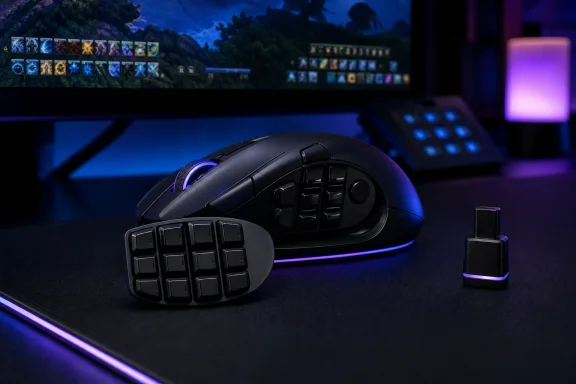
The basic hardware claims are not in dispute. Razer’s Naga V3 Pro has three magnetic thumb plates—two, six and 12 buttons—plus a returning, lockable ring-finger button. Golem and ThinkComputers both independently report the same core specification: up to 23 programmable inputs, Razer’s Focus Pro 50K Optical Sensor Gen-3, fourth-generation optical switches, and a $179.99 US price. The key practical change is not the headline 50,000 DPI figure; it is the restoration of an extra control that can serve as a Hypershift modifier or a conventional finger rest.
For a player using Final Fantasy XIV, World of Warcraft, Guild Wars 2, or a macro-heavy work application, that distinction has real value. The 12-button thumb grid provides a fixed physical map for skills or shortcuts, while the ring-finger button can double those bindings without requiring the player to reach for a keyboard modifier. This is a niche design, but it solves a physical-input problem that has not gone away just because PC games have adopted controller support and more configurable keybinds.
PC Gamer’s testing suggests that Razer has not compromised the mouse’s central job to chase a broader audience. The reviewer found the 12-button plate usable after a short adjustment period, praised its contours for finding thumb position by feel, and said the sensor remained accurate in both Final Fantasy XIV and Counter-Strike 2. The V3 Pro is still a palm-grip mouse first: at 112 g in its lightest configuration, it is substantially lighter than the 134 g Naga V2 Pro but remains far heavier than an esports-oriented FPS mouse.
 The V3 Pro is a refinement, not a new Naga concept
The Naga V3 Pro follows Razer’s established modular formula unusually closely. It retains the familiar chassis dimensions, wireless options, magnetic plates and multi-device role of the Naga V2 Pro. Buyers get Bluetooth, Razer HyperSpeed 2.4 GHz wireless, and USB-C wired use; they also get the same basic proposition of moving from a 12-key MMO layout to a two-button general-purpose or shooter layout without buying another mouse.
Razer did revise much of the machinery inside. The Focus Pro 50K Gen-3 sensor raises the maximum tracking specification from the V2 Pro’s Focus Pro 30K sensor to 50,000 DPI, 930 IPS and 90G acceleration. The left and right buttons move from third-generation to fourth-generation optical switches. Razer also lists up to 155 hours of battery life over HyperSpeed wireless and 280 hours over Bluetooth, figures that ThinkComputers and the product reporting in Golem corroborate.
Yet the differences most likely to affect daily use are simpler than the numbers. The V3 Pro sheds roughly 17 to 22 grams depending on which plate is installed, returns the ring-finger button that older Naga users had missed, and introduces Razer’s second-generation HyperScroll tilt wheel. PC Gamer calls the wheel one of the mouse’s strongest elements, particularly because users can switch between tactile scrolling and free-spin behavior and can tilt it side-to-side.
The V2 Pro owner should notice these revisions, but should also recognize their limits. Sensor specifications above 30,000 DPI have no conventional desktop or game-play use case; most users will operate several orders of magnitude below that ceiling. The new sensor may deliver better tracking characteristics on paper, but it does not turn an MMO mouse into a lightweight competitive-shooter mouse. Nor do optical switches erase the existing model’s usefulness.
PC Gamer’s most pointed complaint is also about those new switches: their sound. The reviewer describes a sharp, plastic-like high-pitched ping from the primary clicks, preferring the sound of Razer’s older third-generation switches. Sound preference is subjective, but it is a reminder that “newer” does not automatically mean better in every dimension—particularly when the $180 price remains unchanged.
The 8,000 Hz claim has an extra-cost catch
The Naga V3 Pro ships with a 1,000 Hz polling rate. Razer says it can reach 8,000 Hz through the separately sold HyperPolling Wireless Dongle or Mouse Dock Pro. That is the most consequential omission in a quick read of the specifications: the most aggressive responsiveness mode is not included in the box.
At this price, the decision is hard to ignore. PC Gamer notes that Razer’s Viper V4 Pro costs less while delivering 8,000 Hz polling out of the box, although it serves a very different audience. The Viper is built around low weight and competitive aiming; the Naga is built around command density and ergonomics for persistent online games. A buyer who needs 20-plus inputs should not buy the Viper instead. But Razer has still chosen to make its Naga customers pay extra for a capability that appears standard on a cheaper flagship sibling.
There is also a more basic reason not to overvalue 8,000 Hz here. Higher polling rates can reduce input-report intervals, but the benefit is most relevant with a very high-refresh display, a capable CPU, an appropriately configured game, and rapid mouse movement. The Naga’s 112–117 g design and side-button focus make it a less natural candidate for that use than a 50 g esports mouse. Higher polling can also reduce battery life, which works against one of the V3 Pro’s more useful upgrades.
The better reading of the specification is that 1,000 Hz is the intended default and adequate for nearly every Naga buyer. The extra accessory is a costly option for the small set of users who have already built a high-refresh desktop and want maximum report frequency across their devices. It should not be treated as a reason to choose the mouse.
Razer’s modular layout still gives the Naga an advantage
The strength of the Naga V3 Pro is not its DPI rating or RGB lighting. It is the fact that its three side plates address genuinely different input needs without forcing users into the compromises of a permanently dense mouse.
The 12-button plate is the conventional MMO option. It works best when a game presents a broad ability bar and when the player wants abilities under the thumb rather than reaching across a keyboard. The six-button panel uses a different arrangement for games needing more controls than a shooter but fewer than a full MMO hotbar. The two-button plate makes the Naga much less cumbersome for ordinary desktop use, editing applications, and games where accidental thumb presses would be a liability.
The restored ring-finger button makes the design more flexible than its immediate predecessor. It can be locked out for users who simply want a stable grip, or mapped for a frequently used in-game command, push-to-talk, a macro layer, or a Windows shortcut. The lock matters: an extra button placed where the hand rests is useful only if it does not create accidental input.
Razer Synapse remains essential to getting the value from all this hardware. PC Gamer reports one initial profile-saving failure that cleared after a reset, then stable operation afterward. The reviewer found Synapse straightforward for RGB controls, button assignments, profiles, DPI and scroll-wheel behavior, but noted that Razer’s web-based software did not yet support the Naga V3 Pro. For a product that depends on profiles, on-board storage and remapping, desktop software support is not a minor concern—it is the configuration layer that makes a 23-input mouse practical.
A premium price narrows the audience
The Naga V3 Pro costs the same $180 as the Naga V2 Pro at launch. That pricing makes sense only for a buyer who will consistently use its unique layout. For an MMO player who treats a 12-key thumb pad as a primary control surface, the combination of lighter weight, an extra lockable button, excellent wheel behavior, modular plates and current Razer sensor technology may justify buying the best available version.
For everyone else, Razer has left too much money on the table. PC Gamer points to Corsair’s Scimitar Elite Wireless SE as a less expensive MMO alternative, while Razer’s own Naga V2 HyperSpeed offers a lower-cost route into the series. Those mice lack the V3 Pro’s combination of swappable plates and latest-generation internals, but they handle the core task: putting many programmable commands under the right thumb.
Existing Naga V2 Pro owners have the clearest answer. Keep the mouse unless the ring-finger button, reduced weight or new wheel behavior fixes a specific frustration. The V3 Pro is a polished successor rather than a disruptive redesign, and its $180 price does not include the high-polling hardware Razer advertises as an option.
For a new buyer who spends hundreds of hours in MMOs and wants one mouse that can also manage shooters and desktop work, the Naga V3 Pro has a credible claim to the category lead. The purchase is easiest to defend when those extra buttons replace constant keyboard reaching—not when the 50K sensor or an accessory-dependent 8,000 Hz mode is doing the selling.