
For PC gamers who have already committed to Razer Synapse, Chroma-compatible peripherals, and a carefully coordinated desk setup, the idea has immediate appeal. A keyboard, mouse, headset stand, speakers, monitor lighting, and now a chair can respond together to in-game events. The more complicated question is whether this genuinely improves a gaming setup—or whether it adds cost, charging requirements, and software dependence to an object whose primary job remains providing reliable comfort.
The answer is not as simple as “RGB good” or “RGB gimmick.” The Soma Chroma is a thoughtful attempt to solve the practical problems that have historically made illuminated chairs awkward, especially permanent cables. Yet its appeal remains tightly linked to the Chroma ecosystem, while its adjustment options look modest beside ergonomics-first office seating and even some competing gaming chairs.
 Overview: Razer Turns the Chair Into a Peripheral
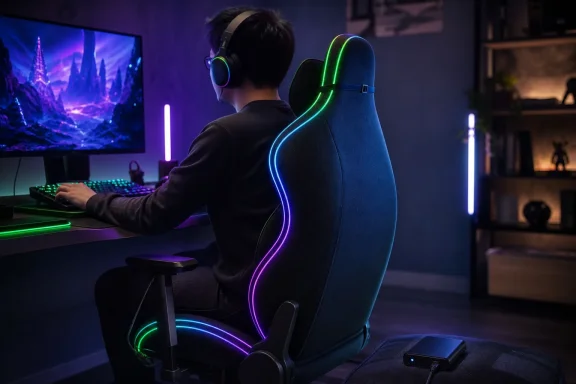
The Soma Chroma is Razer’s first RGB gaming chair and the first model in what the company calls a new immersive-chair line. Rather than putting a static LED strip around the seat base, Razer has integrated lighting intended to work with its broader Chroma software platform and react to supported games. Razer says the chair supports reactive effects across more than 300 integrated games, with configuration through Synapse.
That distinction matters. A conventional RGB chair is usually decorative furniture: it may glow, but it has no meaningful awareness of the rest of the desk. The Razer Soma Chroma is positioned as a visual endpoint in a Windows gaming setup. Its lighting can join patterns and event-based effects already running across Chroma-compatible keyboards, mice, displays, headsets, and other hardware.
This is an evolution of how premium gaming hardware is sold. Specifications still matter, but ecosystem compatibility increasingly shapes the perceived value of a product. Razer is effectively making the case that the modern PC battlestation extends beyond devices that sit on the desk; it also includes the furniture users occupy for work, streaming, gaming, and media consumption.
That argument will resonate most with enthusiasts who see their setup as a unified environment. For them, the chair can become the final physical link in a coordinated lighting system. For everyone else, the additional technology must be weighed against an unavoidable reality: RGB lighting does not make an improperly fitted chair more ergonomic.
Reactive Razer Chroma RGB Is the Centerpiece
Lighting that can respond to games
The Soma Chroma’s defining feature is Razer Chroma RGB Reactive Game Lighting. Razer states that its software can control the chair across more than 300 integrated PC games, using lighting effects that react in real time to activity on screen. The company also specifies access to 16.8 million colors and 10 lighting presets through Razer Synapse. Those capabilities are detailed on Razer’s Soma Chroma product page.
For a Windows gaming PC, this means the chair can behave less like ambient room lighting and more like a synchronized peripheral. The visual result is most compelling when the user already has multiple Chroma products installed: the chair becomes another large, highly visible lighting zone that can reinforce game states, color palettes, or media effects.
Razer’s execution is more sophisticated than merely attaching LEDs to upholstery. The lighting is tied to the company’s established software stack, which gives it a substantial advantage over generic RGB furniture that often relies on a basic remote control, a limited mobile app, or a disconnected controller.
The chair also retains a measure of independence from the desktop software. Razer says users can cycle effects and change brightness through the built-in control panel without opening Synapse, though full Chroma synchronization requires the company’s Windows software. Razer’s FAQ confirms that the onboard controls work with limited functionality without Synapse, while synchronized Chroma operation requires it.
The practical limit of reactive lighting
There is, however, a clear limit to RGB’s usefulness. Lighting can heighten atmosphere, especially in a dark room, during streaming, or within a carefully staged gaming space. It cannot improve frame rates, input latency, audio positioning, or gameplay skill. It is an experiential feature rather than a performance feature.
That does not make it trivial. PC gaming has always included an element of personalization, from custom cases and modded desktops to elaborate display arrangements. But buyers should be precise about what they are paying for: the Soma Chroma is a premium gaming chair with a distinctive integration feature, not a revolution in seating ergonomics simply because it can change color when a game changes state.
The lighting is also more relevant to the room than to the player. Unlike keyboard backlighting, which can help identify keys, the chair’s RGB is primarily seen by viewers, nearby people, or the player through peripheral vision and reflections. That makes it potentially valuable for streamers and content creators, but less essential for a solo player focused on a competitive match.
Wireless Integration Solves the Biggest RGB Chair Problem
Data without a desk tether
Razer deserves credit for recognizing that the fundamental flaw of an illuminated chair is not the lighting itself—it is the cable. A chair moves. It reclines, rolls, rotates, and shifts position throughout the day. Any setup that requires a permanent line running from the chair to a PC risks becoming tangled, strained, or simply annoying.
The Soma Chroma avoids permanent data cabling by using Razer HyperSpeed Wireless at 2.4 GHz for PC connectivity and Bluetooth LE for mobile-device use. The integrated control panel allows users to switch between PC and mobile modes directly on the chair. Razer’s support documentation outlines the 2.4 GHz PC connection, Bluetooth LE mobile pairing, and control-panel switching process.
This architecture makes sense for a Windows desktop. The included USB Type-A wireless dongle allows the chair to communicate with Synapse without adding a visible connection from the desk to the seat. A gamer can roll back, recline, or reposition the chair without dragging a wire across the floor.
The Bluetooth option is less central to the product’s identity, but it broadens the chair’s usefulness. Mobile users can pair it through Razer’s furniture-focused app, while the chair’s local controls avoid turning every lighting adjustment into a trip through a Windows control panel.
Power still has to come from somewhere
The wireless story has an important caveat: the chair does not contain a built-in battery that removes charging from the equation. It receives power through USB Type-C, either from a compatible external power bank or a wall outlet. Razer specifies that a 20,000 mAh-or-larger, 20 W-or-higher PD 2.0 power bank is required for portable power, while an appropriately rated power adapter can be used for wall power.
More importantly, Razer does not include the external power bank, wall adapter, or USB Type-C extension cable. That shifts part of the real-world purchase cost beyond the advertised $499.99 price. Razer explicitly notes that those power accessories are not included.
This is the Soma Chroma’s most obvious ownership compromise. A power bank preserves the clean, mobile appearance Razer is aiming for, but it adds another component to charge, monitor, conceal, and eventually replace. A wall connection eliminates battery management but reintroduces the cable that the design is otherwise trying to avoid.
Independent testing has also singled out this omission. Tom’s Hardware praised the RGB implementation but criticized the absence of a bundled battery pack or extension cable, noting that buyers need one of those solutions to use the lighting system. Its review also questioned the chair’s price premium relative to Razer’s less expensive Iskur V2 X.
That critique is fair. A $499.99 chair built around wireless illumination should ideally ship ready to deliver its marquee feature. Requiring a separately purchased, high-capacity USB-C PD power bank is not catastrophic, but it makes the product feel less complete than its premium positioning suggests.
Comfort Comes Before the Light Show
Built-in lumbar support rather than a loose pillow
Gaming-chair marketing often prioritizes visual drama over the mechanics of prolonged sitting. Razer’s Soma Chroma makes a more credible attempt to balance both, using a built-in ergonomic lumbar arch instead of a removable lumbar cushion.
The design is intended to support the lower back and encourage what Razer describes as a more neutral sitting position. Razer’s product materials pair that lumbar arch with the chair’s long-session comfort claims. An integrated shape is often cleaner and less intrusive than the loose pillows common on older racing-style gaming chairs, which can slide around or force an awkward fit.
The issue is adjustability. An integrated arch works well only if its contour happens to align with the user’s body. It cannot be repositioned or meaningfully tuned in the way that an adjustable lumbar system can. This will not affect every buyer equally, but it makes a test sit particularly important for users with particular back-support preferences.
Tom’s Hardware identified this as a limitation in its hands-on review, reporting that the chair lacks lumbar adjustment and that the reviewer experienced some lower-back discomfort during extended use in a preferred seating position. That review described the overall build and lighting favorably while warning that personal comfort may vary substantially.
That does not mean the Soma Chroma is inherently uncomfortable. It means that lumbar shape is highly personal, and a fixed contour is a more significant buying risk at this price than a static RGB layout ever will be.
Dual-density foam and fabric upholstery
The seat uses dual-density cold-cured foam, combining a softer upper layer with a firmer base intended to distribute pressure over longer sessions. Razer also says the cushion’s perforated design improves airflow and heat dissipation. The company describes the foam construction and airflow design in its Soma Chroma FAQ.
This is a sensible approach. Extremely soft foam can feel immediately luxurious but lose support or create pressure points after hours of use. A firmer structure may initially feel less plush, yet can be more appropriate for users who spend a full workday at a Windows PC before starting an evening gaming session.
The fabric cover is another meaningful choice. Fabric is often preferable to synthetic leather in warmer environments because it tends to feel less sticky and does not produce the same direct skin-to-surface heat buildup. At the same time, fabric can be more vulnerable to visible dust, spills, and stains, making routine cleaning more important.
Razer’s support documentation confirms fabric upholstery, a steel frame, a five-star powder-coated steel base, and dual-density cold-cured foam as core materials and components. Those specifications are published in the company’s technical support guide.
Adjustability Is Good, But Not Class-Leading
The Soma Chroma reclines up to 155 degrees and includes a butterfly tilt mechanism, allowing it to move from a more upright gaming posture to a relaxed viewing position. Razer’s support documentation specifies the 155-degree backrest range and butterfly tilt system.
A 155-degree recline is a useful range for a chair expected to serve multiple roles. Competitive games generally favor a relatively upright posture, while casual controller gaming, movie viewing, or simply taking a break can benefit from a more relaxed angle. It is not a substitute for a recliner, but it provides more flexibility than a fixed office chair.
The armrests are less impressive. They are 2D armrests, adjustable for height and swivel rather than the 3D or 4D adjustments available on some chairs in the same broad price tier. Razer identifies height and swivel as the armrests’ adjustment options.
This is a notable omission for a chair marketed toward dedicated PC users. Armrest depth and lateral positioning can matter when matching a chair to a desk, keyboard tray, mouse position, or different body widths. Greater adjustment can help users keep shoulders more relaxed and avoid forcing wrists or elbows into compromised angles during long keyboard-and-mouse sessions.
Tom’s Hardware likewise listed the absence of 3D armrests among the chair’s disadvantages. Its review concluded that the Soma Chroma is lighter on adjustability than its price and visual ambition might suggest.
Size, Construction, and Warranty
Razer recommends the Soma Chroma for users from 160 cm to 200 cm tall—approximately 5 feet 3 inches to 6 feet 6 inches—with a maximum supported load of 150 kg, or 331 pounds. Those recommended user ranges are published on Razer’s product page.
The physical foundation is reassuringly conventional: a reinforced steel frame, five-star steel wheelbase, Class 4 gas lift, and PU caster wheels. These are the unglamorous elements that matter far more than lighting after the novelty wears off. Razer’s official technical information lists the steel frame, five-star base, Class 4 gas lift, and 6 cm PU casters.
It is also a sizeable piece of furniture. Razer lists an overall width of 67 cm, a depth of 71.5 cm, and an adjustable overall height of 125 cm to 135 cm. The seat height ranges from 41 cm to 51 cm. The company’s support page provides the full chair and seat measurements.
Those figures are worth checking against the clearance under a desk, especially in compact gaming rooms. The Soma Chroma’s wide footprint and armrest geometry can be a greater concern than its RGB system for buyers with narrow desk openings or tightly positioned drawers.
Razer includes a three-year limited warranty and offers an optional extension to five years through its Razer.com warranty program. The standard three-year coverage and extension offer appear on Razer’s product page. A three-year warranty is a positive baseline for a gaming chair, although it does not eliminate the importance of considering long-term upholstery wear, power-bank replacement, and personal fit.
The Real Value Is Ecosystem Participation
The Soma Chroma is not the obvious purchase for someone shopping strictly for the best ergonomic chair at $500. At that price, buyers can find alternatives that focus more aggressively on lumbar adjustment, armrest travel, seat-depth control, or office-oriented posture support.
Razer is selling a different proposition. The chair’s value increases when it sits at the center of a broader Chroma-equipped Windows setup. In that environment, the lighting is not isolated; it becomes a coordinated part of the system. Its 2.4 GHz connection, Synapse compatibility, built-in brightness controls, and reactive effects all make more sense when the user already values a unified Razer desktop experience.
Independent reviewers have reached a similar conclusion from different directions. Windows Central praised the chair’s cable-conscious wireless implementation and comfort, describing it as more than an RGB stunt. Its review highlighted the benefit of using a USB-C power bank and HyperSpeed wireless to avoid a tethered chair. Tom’s Hardware, meanwhile, found the lighting excellent but questioned whether the cost premium and reduced adjustment options were justified for buyers who do not specifically want Chroma integration. Its final assessment frames the chair as most suitable for users already invested in Razer’s lighting ecosystem.
Both observations can be true. The RGB system appears unusually well integrated, but it is not universally valuable.
The strongest reasons to consider it
- Deep Chroma integration for Windows gaming desks already built around Razer Synapse.
- Wireless data connectivity that avoids routing a permanent cable from chair to PC.
- Reactive lighting support across more than 300 supported games.
- Fabric upholstery and dual-density foam that aim for better long-session comfort than all-style, low-support gaming chairs.
- Steel-frame construction, a five-star steel base, and a three-year limited warranty.
- Built-in controls that provide basic lighting adjustments without immediately opening software.
The reasons to hesitate
- The $499.99 price does not include the needed external power bank, wall adapter, or USB-C extension cable.
- The lumbar arch is built in but not adjustable, increasing the importance of individual body fit.
- The chair uses 2D armrests, where greater adjustment would be expected at this level.
- RGB lighting is primarily an immersion and presentation feature, not an ergonomic or competitive advantage.
- The full effect depends on a Windows PC, Razer Synapse, and broader Chroma participation.
A More Mature Take on RGB Gaming Furniture
The Razer Soma Chroma succeeds because it approaches RGB furniture as an engineering problem rather than an LED-strip problem. The company has accounted for chair movement, cable clutter, local controls, wireless PC connectivity, and the need for seating fundamentals such as a steel base, reclining backrest, fabric upholstery, and supportive foam.
Its greatest weakness is that the chair’s most innovative feature increases the product’s dependence on accessories and ecosystem commitments. The buyer must supply portable power or accept a wall cable. Full synchronization requires Razer Synapse. And while the comfort design is more credible than typical gaming-chair theatrics, it does not offer the level of adjustment that ergonomics-focused shoppers may reasonably expect at $499.99.
For a Razer Chroma enthusiast building a polished Windows gaming setup, the Soma Chroma is a legitimately distinctive product. It makes the desk environment feel more cohesive without forcing the chair into a permanent cable connection, and it treats visual integration as a software-and-hardware experience rather than a novelty.
For everyone else, the correct priority remains straightforward: fit, lumbar compatibility, armrest adjustment, desk geometry, and long-session comfort should come before lighting. The Soma Chroma proves that a gaming chair can participate intelligently in an RGB ecosystem. It does not change the fact that the best chair is still the one that supports the person sitting in it.
