

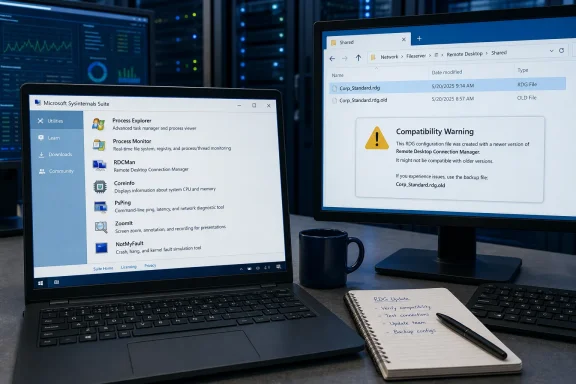
The update is also more opaque than the initial coverage suggests. Microsoft has posted new download pages and version numbers, but it has not published per-tool change logs explaining which bugs, compatibility issues, or security defects were addressed in these August 12 builds. A new version is worth inventorying and testing; it is not, on the available record, evidence of a particular new feature or a security fix.
That distinction is especially important for the tools that teams use against production systems. Sysinternals executables are portable, frequently copied into technician folders, jump boxes, deployment shares, and incident-response kits. Many organizations will therefore have several older copies in circulation even if the current Sysinternals Suite download has been refreshed.
The seven confirmed releases
Microsoft’s Sysinternals catalog lists the following August 12 releases:
- Process Explorer 17.13 provides process ownership, loaded DLL, and open-handle visibility beyond what Task Manager exposes.
- Process Monitor 4.05 captures real-time file system, Registry, process, thread, and DLL activity.
- Remote Desktop Connection Manager, or RDCMan, reaches version 3.20 for grouped Remote Desktop administration.
- Coreinfo 4.02 reports processor topology, cache, NUMA, socket, and logical-processor information.
- PsPing 2.13 measures latency and network performance from the command line.
- ZoomIt 12.2 provides screen zooming, drawing, and presentation controls.
- NotMyFault 4.6 deliberately triggers crashes, hangs, and kernel memory-leak conditions for controlled testing.
Microsoft also lists the consolidated Sysinternals Suite as the way to obtain the collection in one package, alongside separate downloads and Sysinternals Live execution links for individual tools. WinCentral’s description of these utilities is broadly accurate, but it presents the update as if the version bumps themselves disclose substantial feature work. Microsoft’s published material does not establish that.
No other outlet located in a search for these exact August 12 version numbers has independently reported what changed inside the seven binaries. Until Microsoft publishes release notes or source-level detail, admins should treat this as a maintenance release set with unknown internal deltas.
RDCMan 3.20 needs a file-compatibility check
RDCMan is the release that deserves the most care in a managed environment. Microsoft’s current RDCMan 3.20 documentation carries an upgrade warning absent from the WinCentral report: RDG files saved by this version are not compatible with older RDCMan releases. When RDCMan opens and saves a legacy RDG file, Microsoft says it creates a backup using the original filename with an .old extension.
That is a manageable migration behavior, but it creates a real operational trap. A technician who opens a shared RDG configuration in 3.20 and saves it can leave colleagues using an older RDCMan build unable to consume the updated file. Organizations that store RDG files in shared locations, source-control repositories, or administrative shares should test the new client against a copied configuration before adopting it across the team.
RDCMan remains useful precisely because it can organize machines into groups, connect or disconnect a group at once, display session thumbnails, and inherit connection settings. Microsoft also says stored credentials can be protected either with Windows Data Protection API encryption tied to the local user or with an X.509 certificate. Those capabilities make the tool convenient for server-lab and data-center workflows, but they also make configuration-file handling and access control consequential.
The practical upgrade sequence is straightforward: preserve an untouched copy of every shared RDG file, validate 3.20 with a non-production account or lab group, and standardize the RDCMan version before permitting people to edit shared configuration files. This is not a reason to avoid the update; it is a reason not to discover its compatibility boundary during an incident.
Process Explorer and Process Monitor remain the operational core
Process Explorer 17.13 and Process Monitor 4.05 will matter to the largest number of Windows troubleshooters. Microsoft lists Process Explorer as supported on Windows 11 and later client systems and Windows Server 2016 and later. It can identify a process owner, show handles opened by a process, list DLLs and mapped files, and search for a specific handle or loaded DLL.
Those are the functions that solve familiar but time-consuming cases: a file that cannot be deleted because another process holds it open, an application loading an unexpected DLL, a service running under the wrong identity, or a suspected handle leak. The current documentation still describes it as a standalone executable, so administrators can keep it in controlled diagnostic kits rather than deploy it as an installed agent.
Process Monitor has a broader support range—Windows 10 and later on the client side, and Windows Server 2012 and later on the server side. Its trace data can include command lines, image paths, users, session identifiers, thread stacks, boot-time activity, process trees, and extensive filterable event fields. Microsoft says its capture architecture can handle tens of millions of events and gigabytes of logs, which is powerful but should shape how it is used.
A Process Monitor trace left unfiltered on a busy endpoint or server can become unwieldy quickly. Before reproducing a problem, define the process name, path, operation, result code, or Registry location that matters; configure backing-file logging if a long capture is unavoidable; and ensure the trace itself is handled as potentially sensitive data. File paths, account names, command lines, and software behavior routinely appear in captures.
Neither Microsoft nor WinCentral has identified a user-visible fix specific to Process Explorer 17.13 or Process Monitor 4.05. Their value in this batch is availability of the current builds, not an announced new diagnostic workflow.
Coreinfo’s documentation shows more than a command-line inventory
Coreinfo is the quiet release with the largest mismatch between the simple description and Microsoft’s present documentation. WinCentral describes version 4.02 chiefly as a command-line way to inspect processor topology. Microsoft still documents command-line output, but its current Coreinfo page also describes a graphical CoreInfoEx interface with views for logical and physical cores, NUMA nodes, processor sockets, CPU features, NUMA access costs, and core-to-core distance.
That matters on systems with hybrid processors, multiple CPU groups, NUMA configurations, or performance-sensitive workloads. The visual views can help an administrator understand which logical processors share caches, how cores map to sockets and NUMA nodes, and where cross-node memory access may impose a penalty. Microsoft says some Coreinfo features require elevation for complete data collection.
There is a critical limitation: Microsoft’s page does not say whether that graphical interface was introduced in 4.02 or existed in an earlier 4.x release. Readers should not infer that the August 12 update alone added it. Still, its presence in the current documentation makes Coreinfo more useful than the traditional “run a command and parse the asterisks” reputation suggests.
Virtualization checks also need care. Microsoft warns that some virtualization capabilities can be reported as unavailable when a hypervisor is active or when Coreinfo is run inside a virtual machine. An absent VMX, SVM, or related feature in that context is therefore not proof that the underlying hardware lacks support.
PsPing, ZoomIt, and NotMyFault have sharply different risk profiles
PsPing 2.13 is the least controversial operational update. It remains a small command-line utility for measuring network performance and is useful when comparing latency or throughput between systems without installing a larger monitoring stack. It should complement, rather than replace, normal packet-loss, DNS, routing, firewall, and application-level checks.
ZoomIt 12.2 is a presentation utility, not an administrative diagnostic tool, but it has a legitimate place in support training, incident reviews, demonstrations, and remote walkthroughs. Microsoft describes it simply as software for zooming and drawing on the screen. Its update belongs in the Suite, though it is unlikely to warrant enterprise rollout work on its own.
NotMyFault 4.6 belongs in a separate category. Microsoft explicitly describes it as software that can crash or hang Windows and cause kernel memory leaks. It is appropriate for validating dump capture, reproducing controlled failure states, or demonstrating crash behavior in a disposable lab. It should not be included in broadly accessible help-desk folders or run on a workstation with unsaved data, and it has no place on a production machine except under a defined and authorized test plan.
For most Windows shops, the August 12 Sysinternals refresh calls for a small but useful housekeeping task: update the controlled diagnostic toolkit, record the versions, verify hashes and download provenance through Microsoft’s official distribution channels, and test RDCMan 3.20 before shared RDG files are edited. The one change that can immediately affect colleagues is not a flashy new feature—it is RDCMan’s revised RDG-file compatibility.