
.docx, let GPT, Claude, Gemini, or Grok propose edits as reviewable changes, and export the result back to Word with redlines intact. WindowsReport’s hands-on review found that the workflow preserves much of the familiar document-editing experience rather than forcing users to paste text into a chatbot and reconstruct formatting afterward.The important qualification is that “DOCX-compatible” does not mean “a drop-in Microsoft Word replacement” for every document. Revise’s own compatibility record is unusually candid about the areas it does not yet handle, and those limits matter far more than a list of supported AI models to anyone working with templates, contracts, reports, or documents passed among Windows PCs.
For ordinary reports, proposals, essays, meeting notes, and policy drafts, Revise’s review-first AI workflow is the feature worth watching. For a complex Word file full of SmartArt, floating objects, custom fields, charts, or right-to-left text, the sensible approach remains to treat Revise as a controlled editing stop—not the system of record.
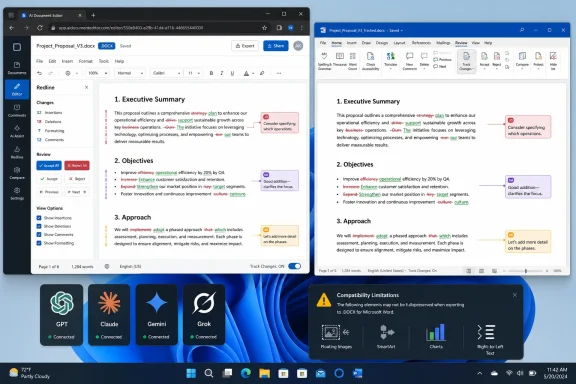 AI edits arrive as changes, not replacements
The core design separates Revise from the usual AI-writing workflow. Instead of returning a rewritten block in a chat window, its AI agent makes proposed insertions and deletions in the document itself. Users can accept or reject individual edits, process a batch in Review mode, or discard all suggestions.
That should be the baseline for AI-assisted editing, especially where wording has consequences. A broad prompt such as “make this clearer” can result in large stylistic changes, omitted qualifications, or a polished rewrite that subtly alters meaning. Revise’s approach keeps the human reviewer at the point where those errors can be caught: in the redline.
WindowsReport highlighted the product’s ability to brainstorm, rewrite, proofread, research, and restructure content without leaving the editor. Revise also says that accepted and rejected changes are recorded in its document history, while the editor offers real-time collaboration. The company’s documentation says AI changes are never applied automatically; additions and removals are displayed separately, and users can step through each proposal one at a time.
The practical advantage is not that AI can write a first draft—Word, Copilot, ChatGPT, Claude, Gemini, and plenty of smaller tools already cover that ground. The advantage is that the output enters a workflow people already understand: review the markup, decide what survives, and retain a record of what changed.
That makes Revise potentially useful to small teams that need AI assistance but cannot treat generated text as final. It is also a better fit for Windows users who already live in .docx files and need to send documents back to colleagues who have no intention of moving away from Word.
The DOCX round trip is strong, but it has boundaries
Revise’s documentation says it can preserve a substantial set of Word features in both directions. That includes conventional text formatting, page breaks, tables, tracked changes, comments and threaded replies, headers, footers, footnotes, endnotes, page-number fields, tables of contents, clause numbering, cross-references, watermark text, and section-level page layout.
The standout claim is support for Word tracked changes. According to Revise, existing Word redlines import as editable suggestions, while Revise edits export as native Word tracked changes with author and timestamp information. If that works reliably on real documents, it removes the most obvious obstacle to using an outside editor in a Word-centered workflow: colleagues can continue reviewing changes inside Word’s own Review pane.
But the company’s compatibility page also spells out what can be lost or altered. That is the material detail missing from many enthusiastic AI-editor reviews.
Revise currently simplifies text boxes and shapes by bringing their text in as ordinary paragraphs, dropping the original box geometry. Floating images survive but become inline images, losing their placement and text-wrapping behavior. Named Word styles survive as identities and definitions, but Revise does not yet let users edit the style definitions themselves. Other Word fields may freeze to their last displayed value rather than remain live.
Several features are explicitly unsupported:
- SmartArt and chart text can be dropped during import.
- SVG images are not rendered.
- Right-to-left and bidirectional text layouts are not handled.
- Revisions limited to paragraph or table properties import as final-state formatting rather than reviewable suggestions.
Those are not minor edge cases for every Windows user. A simple business report may never touch them. A corporate template, technical report, legal filing, marketing document, or document with embedded dashboards often will.
The conclusion is straightforward: export a copy, then open that exported .docx in desktop Word and inspect it before distributing it. Check page count, headers and footers, section breaks, tables, cross-references, floating figures, comments, and every remaining tracked change. Revise itself recommends testing a user’s own document through an import-and-export round trip, which is sensible advice because compatibility depends on the actual structure of the file, not merely the .docx extension.
Multiple AI models are useful, but usage is the real cost
WindowsReport describes model choice as one of Revise’s primary strengths. The service currently offers models from OpenAI, Anthropic, Google, and xAI, so users can move among GPT, Claude, Gemini, and Grok within one document rather than maintaining a copy-and-paste routine across several AI services.
That flexibility has real value. A fast, lower-cost model can handle typo cleanup, short rewrites, summaries, or formatting instructions. A more capable model may be a better choice for a long rewrite, document-wide consistency pass, research task, or a difficult structural edit. The model selector is therefore more than a feature-box exercise when every request is reviewed as a tracked change.
It also creates an important limitation: paid usage is metered by the cost of the model and the complexity of the task, not by a simple unlimited-prompt promise. Revise says that long documents, large attachments, web searches, broad instructions, and autonomous multi-step requests use more of the monthly allowance. Its own guidance recommends selecting the relevant passage rather than sending an entire document for review and asking for a specific result rather than a vague instruction to “make this better.”
That is a better budgeting model than hiding expensive AI work behind an opaque “fair use” ceiling, but it means plan comparisons need care. WindowsReport lists Plus at $8 per month, Pro at $20 per month, and Max at $100 per month. Revise’s public help pages confirm Plus, Pro, and Max tiers and explain that Pro includes four times Plus-level monthly usage while Max includes 20 times as much. However, the current public pricing page does not clearly expose the plan prices cited in the review, so prospective buyers should verify the price and included allowance in the account flow before subscribing.
The free tier is best understood as a product trial, not a daily writing environment. Revise says free AI access is limited by a rolling 24-hour allowance, while paid plans remove daily caps but retain monthly usage budgets. Users who routinely feed long PDFs, detailed Word files, or web research tasks into premium models should expect the allowance to disappear far faster than it would for sentence-level proofreading.
PDF conversion is valuable, but not evidence-grade OCR
Revise imports PDFs, HTML, Markdown, plain text, and Word files, and can export documents in those formats. Its PDF process uses multimodal AI to visually reconstruct pages rather than relying solely on an embedded text layer. WindowsReport tested that feature with an image-based PDF and reported successful text extraction, while Revise says the approach can preserve formatting, tables, links, and images more effectively than conventional plain-text extraction.
That can turn a static report, scanned document, or old PDF into an editable working draft remarkably quickly. It is a useful workflow for summarizing a report, reorganizing source material, extracting sections from a document, or rebuilding content that was never supplied in editable form.
It is not a reason to trust the conversion blindly. A visually reconstructed document can misread numbers, legal names, footnotes, column order, tables, punctuation, or formatting that carries meaning. The risk rises with scans, low-resolution pages, dense tables, multi-column layouts, handwriting, and documents where a single altered character changes a result.
The right use is to regard a converted PDF as a draft requiring comparison against the original. If the file will be used for compliance, legal review, finance, medicine, or engineering, preserve the source PDF and verify every critical passage manually before relying on the editable version.
Revise also places monthly page limits on PDF import: anonymous users can import 10 pages per month, free accounts 100 pages, and paid accounts 3,000 pages. That makes its “free converter” more limited in practice than the review’s description suggests, though it can still be useful for occasional short files.
Where Revise fits in a Windows document workflow
Revise is best seen as an AI-assisted redlining environment that interoperates with Word, not as a reason to retire Word wholesale. It is particularly promising for users who write and revise heavily, need visible AI suggestions, exchange ordinary .docx documents with other people, and want a choice of AI providers without running separate subscriptions.
It is a weaker fit for organizations that require an offline editor, centralized Microsoft 365 administration, established Word templates with advanced layout objects, or formal validation of document fidelity. Revise runs in the browser, and although the company says documents and conversations are private by default and encrypted, teams handling sensitive material should still complete their own vendor, retention, access-control, and AI-data-flow review before uploading business documents.
The company deserves credit for publishing a feature-by-feature DOCX compatibility map instead of implying that every Word file will emerge untouched. That transparency leads to the correct recommendation: use Revise for draft improvement and controlled AI redlines, then make Microsoft Word the final inspection point for any document whose layout, metadata, or revision history must survive without surprises.
