
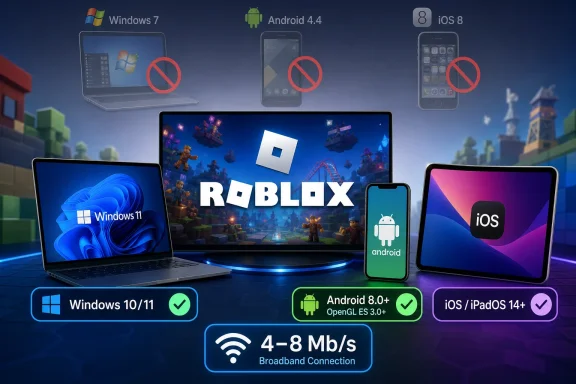
The difference is not cosmetic. Someone following the August 9 guide could spend time troubleshooting a Windows 7 laptop, an iPhone 5s-class handset, or an Android 5 tablet that Roblox no longer classifies as supported. The guide also inflates Roblox’s broadband recommendation from 4–8 Mb/s to “48 Mbps,” turning a modest connection requirement into a misleading one.
Roblox’s own support pages, checked on August 9, 2026, are clear on the supported operating systems and device baseline. Apple’s App Store listing independently matches the iOS 14 minimum. The published compatibility list appears to combine several generations of retired Roblox requirements with a few details that remain relevant, particularly Linux’s lack of official support and the continued caveat around Tegra 2 hardware.
 Windows 7, Windows 8.1, and XP are not current Roblox targets
Vandal says Roblox runs on Windows 7, Windows 8/8.1, and Windows 10, and adds that Windows XP remains compatible even if newer Windows versions are preferable. Roblox’s current PC requirements say the client installs on 64-bit editions of Windows 10 and Windows 11. Windows 7, Windows 8, Windows 8.1, and Windows XP are not named as supported desktop platforms.
That has two practical consequences for old PCs. First, an older Roblox installer or an outdated browser-based workflow is not proof that the current client is supported, receives fixes, or will join current experiences reliably. Second, the guide’s advice about Windows 8 “Desktop Mode” and Internet Explorer 10 on Windows 7 belongs to an earlier period when Roblox’s installation and browser requirements worked differently.
Roblox’s official hardware requirements also put the Windows graphics threshold at DirectX 10 feature-level support or higher. The published guide’s DirectX 9 and Shader Model 2.0 baseline is therefore below the current requirement. Its named “minimum laptop” parts — a 2.6 GHz Pentium Dual-Core or Phenom CPU alongside a Radeon R7 240 or GeForce GT 719 — do not appear in Roblox’s current support document.
Instead, Roblox provides broad guidance: a processor from 2005 or later running at 1.6 GHz or better, at least 1 GB of RAM, and a PC with a dedicated graphics card if possible. It recommends a desktop less than five years old or an integrated-graphics laptop less than three years old for better performance. Those are recommendations, though, not a promise that every game built on Roblox will run acceptably.
That distinction matters more than it once did. Roblox is a platform hosting experiences made by different developers, with radically different visual complexity, scripting loads, player counts, and asset sizes. Meeting the client’s installation floor means the Roblox application can run; it does not establish that a specific experience will deliver a smooth frame rate on a decade-old machine.
The storage number is also out of date. Vandal lists 20 MB of free storage, while Roblox now recommends at least 300 MB of available system storage for installation. On a tightly provisioned Windows device, especially one with a small eMMC drive, the larger requirement is the figure to plan around.
Windows 10 still runs Roblox, but Microsoft support ended in 2025
Roblox still lists 64-bit Windows 10 as supported, alongside Windows 11. That is a Roblox compatibility statement, not an endorsement of Windows 10 as a secure long-term operating system.
Microsoft ended regular Windows 10 support on October 14, 2025. PCs can continue running the OS and Roblox after that date, but they no longer receive free security updates unless they are covered by an Extended Security Updates program. For a household device used to sign into a Roblox account, make purchases, or handle a child’s account and parent controls, that is a meaningful separation between “the game launches” and “the system is properly maintained.”
For Windows users buying or repurposing hardware specifically for Roblox, Windows 11 is the sensible baseline. Windows 10 remains relevant for existing 64-bit installations where Roblox works and the device is covered by an appropriate security-update plan. Windows 7 and Windows 8.1 should not be treated as viable alternatives merely because old Roblox support text once referenced them.
Roblox still does not officially support Linux. The company’s current support page retains that position, so users relying on Wine, compatibility layers, Android containers, or unofficial launchers are outside the supported configuration. Those methods may work for some players, but they should not be presented as equivalent to a native, supported Windows client.
ChromeOS remains supported through the Android route: Roblox says ChromeOS 53 or later is required and that the Google Play Store must be enabled. That is one of the few legacy-looking entries in the published guide that remains substantially aligned with Roblox’s current support documentation.
Android 4.4 is five major releases below Roblox’s stated minimum
The published Android guidance says “most devices” on Android 4.4 or later can run Roblox if they have ARMv7 processors and avoid Nvidia’s Tegra 2 chipset. Roblox’s current mobile requirement is Android 8.0 or later with OpenGL ES 3.0 support.
Android 4.4, released in 2013, is not a safe compatibility reference in 2026. The old ARMv7 test also fails to capture the current graphics API requirement. A device can meet the age-old processor condition and still lack the OpenGL ES 3.0 support needed by the current Roblox app.
The Tegra 2 warning has not vanished entirely, but its meaning has changed. Roblox still says devices with Tegra 2 graphics or processors older than ARMv7 can receive an unskippable message because they cannot run Roblox experiences. It also distinguishes these from skippable warnings, where an Android device may load an experience but is likely to perform poorly.
That is a compatibility warning system, not a substitute for the baseline requirements. Android 8.0 plus OpenGL ES 3.0 is the first screen; Roblox may still warn that a qualifying device is too weak for a particular experience.
There is another restriction worth knowing before recommending a workaround: Roblox says modified mobile apps are prohibited, and its anti-cheat guidance says rooted Android devices are unsupported. The company also warns that accounts using modified versions may face enforcement action. An old tablet that cannot install the legitimate current app should not be “fixed” with a sideloaded modified build.
Apple’s practical floor starts with iPhone 6s-class hardware
The iOS portion of the published guide is similarly obsolete. It says iOS 8 is enough and lists the iPhone 4s, iPad 2, and fifth-generation iPod touch as compatible. Roblox now requires iOS 14 or iPadOS 14 or later.
Roblox’s current minimum Apple hardware list starts at the iPhone 6s, iPhone 6s Plus, first-generation iPhone SE, seventh-generation iPod touch, iPad Air 2, iPad mini 4, fifth-generation iPad, and iPad Pro. Apple’s current App Store listing for Roblox also states that iOS 14.0 or later is required.
That makes the distinction unusually easy to apply. An iPhone 4s cannot run iOS 14 and is out. An iPad 2 cannot run iPadOS 14 and is out. The iPhone 6s family and later devices may meet the official floor, but users should still expect some variation in performance between lighter and more demanding Roblox experiences.
Amazon Fire tablet compatibility has moved forward as well. Roblox currently identifies Fire 7 ninth generation, Fire HD 8 eighth generation, Fire HD 10 ninth generation, and Fire Max 11 thirteenth generation as its minimum supported Fire devices. The much older Kindle Fire HDX and fourth- and fifth-generation Fire tablets in the published article are no longer the list Roblox gives users.
The bandwidth figure is a likely transcription error with real consequences
The published guide repeatedly says Roblox needs a minimum “48 Mbps” connection. Roblox’s current PC and mobile support pages instead recommend 4–8 Mb/s for a single-user household, with more bandwidth advisable where multiple people share the connection.
The missing dash changes the advice by an order of magnitude. A household with a stable 10 Mb/s connection meets Roblox’s stated recommendation for one player; it does not need 48 Mb/s to be considered viable. Conversely, bandwidth alone does not eliminate connection problems. Wi-Fi congestion, high latency, packet loss, VPNs, firewalls, and a busy home network can all cause trouble even on a fast plan.
For mobile players, Roblox specifically suggests Wi-Fi when a 3G or 4G connection is unstable. That is practical advice, but it should not be misread as a rule that cellular service is inherently unsupported. The relevant test is whether the connection can remain stable enough for the experience being played.
Roblox’s current compatibility floor is modest by modern gaming standards, but it is substantially higher than the Windows 7, Android 4.4, and iOS 8-era list republished on August 9. For a dependable installation today, use 64-bit Windows 11 where possible, or a supported 64-bit Windows 10 setup with a security-update plan; use Android 8.0 with OpenGL ES 3.0; and treat iOS/iPadOS 14 with iPhone 6s-, iPad Air 2-, or equivalent-era hardware as the Apple starting point.
References
- Primary source: Vandal
Published: August 9, 2026 at 2:42 PM UTC
Loading…
vandal.elespanol.com - Related coverage: en.help.roblox.com
Loading…
en.help.roblox.com - Related coverage: en.help.roblox.com
Loading…
en.help.roblox.com - Related coverage: create.roblox.com
Loading…
create.roblox.com - Related coverage: apps.apple.com
Loading…
apps.apple.com - Related coverage: support.microsoft.com
Windows 10 Extended Security Updates (ESU) program | Microsoft Support
Windows 10 Extended Security Updates (ESU) programsupport.microsoft.com - Related coverage: support.microsoft.com
Loading…
support.microsoft.com