
The enclosure supports 2242, 2260, and 2280 M.2 drives, connects over USB-C, and is rated for up to 20Gbps transfers when attached to a host with a USB 3.2 Gen 2x2 port. ASUS positions it as storage for games and media, while providing the ROG SSD Dashboard for drive-status monitoring.
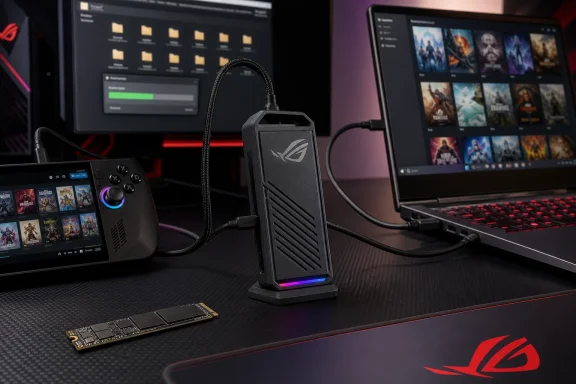 A portable game library, not just another aluminum enclosure
According to G Style Magazine, the Aiolos stood out in day-to-day use because it reduced duplicate downloads between systems. The reviewer moved the same drive between a desktop gaming PC, a laptop, and an ASUS ROG Ally X, using it for games, captures, screenshots, and review assets.
That is the practical appeal for Windows users with several PCs: install a compatible SSD once, keep a portable Steam, Xbox, or media library on it, and connect it where needed. Game launch behavior and platform DRM will still vary by title and launcher, but the enclosure itself is designed to make the storage move painless.
ASUS says its 20Gbps connection can transfer large game libraries quickly, but the host port remains the limiting factor. A USB-C connector alone does not guarantee 20Gbps throughput; the Windows PC, laptop, dock, or handheld needs USB 3.2 Gen 2x2 support to reach the enclosure’s headline ceiling. On a 10Gbps USB port, performance will be capped accordingly.
Tool-free access and cooling carry the premium pitch
The Aiolos uses a push-to-open chassis and tool-free retention system, a welcome change for enthusiasts who rotate SSDs between machines or reuse a drive after an internal upgrade. ASUS’s compatibility guidance confirms support for M-key and B+M-key NVMe PCIe and SATA M.2 SSDs in the listed lengths.
G Style Magazine also praised the enclosure’s dense construction, braided USB-C cable, silicone exterior, and understated Aura Sync RGB strip. The silicone shell is intended to improve grip and protect the case, while an internal thermal pad helps manage SSD heat during sustained transfers.
Thermals matter more than RGB in this category. Fast NVMe drives can throttle when an enclosure cannot move heat effectively, especially during large file copies or video work. The review reported no instability or noticeable performance degradation during extended use, though it did not publish controlled temperature or throughput benchmarks.
The caveat is value, not capability
Less expensive enclosures can perform the same basic job, particularly for users with a 10Gbps port or a modest SATA SSD. The Aiolos is built for buyers who value easy drive swaps, dual NVMe/SATA compatibility, active health monitoring, and a design intended to stay comfortable in hand under load.
For Windows gamers who frequently move between a main PC and a handheld or laptop, the ROG Strix Aiolos appears to justify its premium through convenience rather than novelty. The key buying check is simple: pair it with a quality M.2 SSD and verify that the systems it will serve actually expose USB 3.2 Gen 2x2, or accept that the enclosure will run at the speed of the slowest link.
