
The distinction is more than semantics. A normal Ryzen 7 5800 can boost to 4.70 GHz and has an unlocked multiplier, while the 5800X3D’s stacked cache design imposes a lower voltage tolerance. AMD lists the 5800X3D with 96 MB of L3 cache and a 4.5 GHz max boost, but it has never presented the part as an enthusiast frequency-overclocking CPU. At its 2022 release, AMD confirmed the chip’s overclocking restrictions, and Tom’s Hardware reported that the voltage limit was tied to the sensitivity of its 3D V-Cache package.
TechPowerUp’s current testing shows that constraint has not softened with age. Light workloads reach the advertised boost frequency rapidly, while the processor maintains a nearly flat frequency curve as thread count rises. The result is predictable performance behavior, but little headroom for anyone expecting a late-life BIOS update to turn the 5800X3D into a 5800X with more cache.
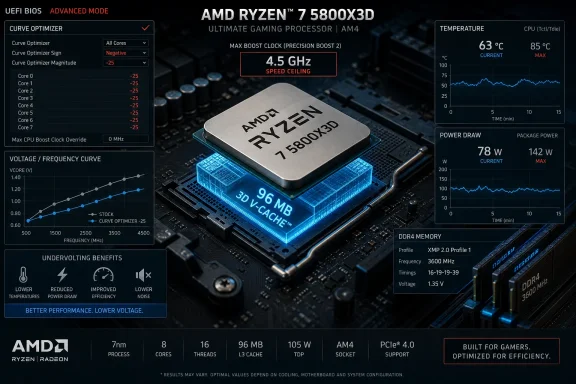 The 4.5 GHz ceiling still means 4.5 GHz
The most useful finding in TechPowerUp’s frequency testing is also the least surprising: the 5800X3D can reach its rated maximum boost in low-thread-count workloads, but it does not exceed it. Floating-point, SSE, and AVX tests all point to the same practical limit, even though those instruction sets create different electrical and thermal loads.
That is important because a boost clock is often misunderstood as a rare best-case number. On this processor, the 4.5 GHz figure is a real, observable light-load peak. But it is not a target that Precision Boost Overdrive, a positive frequency offset, or looser power limits can materially raise.
TechPowerUp reports that changing the CPU multiplier in firmware had no effect on its sample, including attempts to lower the ratio. A small base-clock increase from 100 MHz to 103 MHz also prevented the system from posting. This is a useful reminder for AM4 users working through a motherboard BIOS packed with familiar Ryzen controls: the presence of a setting does not mean the 5800X3D honors it.
That can create a particularly misleading experience on boards that expose ratio controls, PBO menus, scalar values, and boost-override fields without tailoring their interface to the installed processor. The 5800X3D’s firmware restrictions remain the final authority. A setting can appear selectable yet be ignored, restricted, or destabilize the platform before Windows loads.
Curve Optimizer is the surviving tuning tool
The meaningful change since the 5800X3D launched is not a newly unlocked multiplier. It is the wider availability of Curve Optimizer controls in later motherboard firmware. TechPowerUp found that per-core Curve Optimizer configuration now works on its test platform and that a negative offset improved sustained multithreaded behavior while reducing power consumption.
AMD’s own Ryzen Master documentation describes Curve Optimizer as a way to shift the processor’s voltage/frequency curve, with negative values requesting lower voltage for a given operating point. In plain terms, it asks the CPU to achieve a given clock state with less voltage, provided the individual silicon can remain stable.
On a processor whose top boost frequency cannot be raised, that can still be valuable. If a sustained workload is constrained by temperature, current, or the voltage curve at a given moment, a stable negative Curve Optimizer setting can reduce the electrical cost of holding its existing boost behavior. TechPowerUp consequently saw a small multithreaded gain on its sample, alongside lower load and idle power use in much of its testing.
Single-threaded applications should not be expected to benefit in the same way. If one preferred core already reaches the 4.5 GHz cap without hitting a meaningful thermal or electrical limit, reduced voltage does not create another 100 MHz of headroom. It may lower temperature or fan activity, but the frequency limit remains in place.
This is why owners should stop calling a negative Curve Optimizer value a 5800X3D overclock. It can improve efficiency and occasionally preserve clocks better under sustained all-core work, but it does not change AMD’s maximum approved boost behavior. The chip remains frequency-locked; it has merely become more tunable below that ceiling.
BIOS support is not universal across AM4 boards
The important caveat omitted by any broad “Curve Optimizer now works” conclusion is that support is still motherboard- and BIOS-dependent. AMD supplies the processor firmware foundation through AGESA, but each board vendor decides how its firmware interface exposes controls, and how reliably it implements them.
Reports from owners of boards using AGESA 1.2.0.8-era firmware showed a split result: some received usable native Curve Optimizer menus, while others found no such option even after installing a newer BIOS. That variation is especially relevant on older B350, X370, B450, and X470 boards, where vendors have had to balance expanded CPU support against limited firmware space and aging product validation.
In other words, a 5800X3D owner should not assume that updating to the newest available BIOS automatically produces the same menus shown in a review. The practical first step is to check the vendor’s release notes for the exact board model, then inspect the PBO or AMD Overclocking section after loading optimized defaults.
A missing Curve Optimizer control is not evidence that the processor is malfunctioning. It can simply reflect a vendor implementation choice. Conversely, an available control does not mean every setting is safe or useful. Some users have reported that boost-override options appeared on firmware versions that exposed PBO controls, despite the 5800X3D having no legitimate frequency headroom for such overrides.
For this particular CPU, conservative configuration beats menu exploration. Leave CPU ratio, boost override, scalar, and manual voltage controls at their defaults unless a board vendor explicitly documents behavior for the 5800X3D. A negative Curve Optimizer adjustment is the setting with a credible efficiency rationale; attempting to force the CPU beyond AMD’s voltage and frequency guardrails is not.
A stable negative offset is specific to each CPU
TechPowerUp’s sample was stable at an all-core negative 25 setting but not at negative 30, the largest adjustment normally exposed in the Curve Optimizer range for Ryzen 5000. That outcome is more useful than another screenshot of a processor running “-30”: it demonstrates why copying a value from a review, forum post, or video is poor tuning practice.
Each core has different voltage tolerance. An all-core negative offset uses the least tolerant core as the limiting factor, so a setting that looks stable under a short multicore benchmark can later fail during low-load desktop use, application launches, gaming, sleep-resume cycles, or an AVX-heavy workload that exercises a different part of the voltage curve.
AMD’s Curve Optimizer guidance also warns that an automatically derived or apparently successful value requires validation against the owner’s actual workloads. Stability is not established by completing one benchmark run. Windows Event Viewer should be checked for hardware error reports, including WHEA entries, and any unexplained restart, application crash, or game instability after tuning should be treated as a reason to reduce the negative offset.
A sensible approach is to begin with a modest all-core negative value, validate it over several days of normal use and repeatable workloads, then either stop or tune individual cores. The latter can recover more efficiency, but it requires more testing and better record-keeping. For most 5800X3D systems, the worthwhile goal is quieter cooling and reduced sustained power draw, not chasing a benchmark score that disappears once stability margins are restored.
DDR4-3600 remains the practical AM4 baseline
TechPowerUp also points owners toward memory rather than CPU frequency as the remaining conventional tuning lever. DDR4-3600 with an 1800 MHz Infinity Fabric clock remains the familiar practical target for many Zen 3 systems because it preserves a 1:1 relationship between memory clock and fabric clock without requiring an aggressive fabric overclock.
That should not be misread as a mandate to replace a stable DDR4-3200 kit. The 5800X3D’s extra cache reduces how dependent many games are on memory latency compared with conventional Zen 3 parts. The return from expensive low-latency memory tuning is therefore usually smaller than the return from the original CPU upgrade itself.
For a new AM4 build or a system already being rebuilt, DDR4-3600 with proven timings is a reasonable target. For an established 5800X3D machine, stability, capacity, and dual-channel operation deserve priority over squeezing a few more megahertz from fabric clock. A memory overclock that introduces intermittent errors can erase more real-world value than it adds.
The enduring appeal of the Ryzen 7 5800X3D is that it does not demand constant tuning to deliver its main advantage. TechPowerUp’s retest shows its boost behavior remains tightly controlled, and the practical owner takeaway is equally controlled: update the board BIOS if it offers well-supported Curve Optimizer access, validate a conservative negative setting, and leave the 4.5 GHz ceiling alone.