
IGN reported on August 13 that the charger is available through Satechi and Amazon. A B&H listing identifies the Space Black model as ST-C6CV240C-US, corroborating that this is a distinct six-port ChargeView model rather than Satechi’s earlier four-port, 140W ChargeView desktop charger.
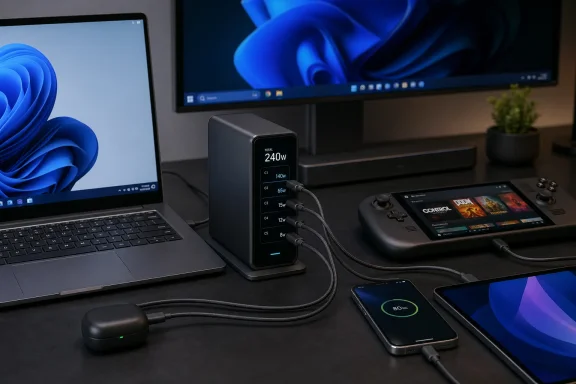
The important qualifier is in the product’s name: 240W is the charger’s combined output, not what any one laptop can claim on demand. Its two highest-rated ports can each reach 140W, the next two are rated up to 100W, and the final pair up to 30W. Those port ratings add up to far more than 240W, which means they describe maximum capabilities in different connection scenarios—not simultaneous guaranteed delivery.
For Windows users, that makes the screen more than a decorative feature. It exposes the trade-off that is normally hidden behind a battery icon.
 The six-port headline has a 240W ceiling
The ChargeView is aimed at a permanent desk setup, with an AC input cable and a stand that lets the charger sit vertically or horizontally. That is a more practical arrangement than a large wall charger when six short USB-C cables need to reach laptops, handhelds, phones, controllers, and audio gear without loading down a power strip.
But buyers should not read the two 140W ports as permission to run two 140W laptops at full speed while also charging four other devices. Two systems requesting 140W alone would require 280W. Add even a 100W device and the arithmetic has already exceeded the charger’s entire rating before a phone or Steam Deck enters the equation.
Satechi says the charger detects connected devices and dynamically balances power across active ports. That is normal behavior for a multiport USB Power Delivery charger, but the practical experience depends on the allocation rules that apply after each device is attached. If a laptop’s requested power falls when another device joins the charger, Windows will still show it as charging; it may simply charge more slowly, hold its battery level under load, or supplement the lower adapter output with battery power during gaming or rendering.
The ChargeView display should make that visible. It can show whether a connected laptop is drawing near its expected 65W, 100W, or 140W—and whether that number drops after another device is plugged in. That is a materially better diagnostic tool than treating every USB-C cable and port as interchangeable.
Satechi has not publicly detailed a full six-device power-allocation table in the material reviewed for this report. That omission matters more than the peak ratings. A table showing the guaranteed distribution for combinations such as two laptops, a handheld, and three low-power devices would tell buyers whether the charger fits their desk before they spend $150.
A 140W port does not make every Windows laptop a 140W laptop
The first two ports’ 140W capability is intended for USB Power Delivery Extended Power Range charging. At that level, the charger, cable, and laptop must all negotiate a compatible profile. A standard USB-C cable that is adequate for a phone may still be unsuitable for 140W charging; the cable needs to be rated for the required 5A current and the higher-voltage EPR mode.
That distinction is particularly relevant for gaming laptops. Many Windows gaming systems ship with 180W, 230W, 280W, or higher proprietary AC adapters, and their USB-C ports may accept only a lower USB-PD input—or may support USB-C data and video without accepting charging at all. Connecting such a machine to a 140W USB-C source can be useful for travel, office work, or charging while asleep, but it should not be assumed to replace the bundled brick during CPU- and GPU-heavy gaming.
The same rule applies in the other direction. A laptop that accepts USB-C charging may request substantially less than the port maximum. Many ultrabooks top out at 45W, 65W, or 100W. A 140W-capable port does not force 140W into the device; USB Power Delivery negotiation is intended to select a mutually supported level.
The charger is consequently a stronger fit for a mixed desk than for a single high-wattage gaming notebook. A typical arrangement might be:
- A Windows ultrabook that normally uses a 65W or 100W USB-C adapter.
- A Steam Deck, ASUS ROG Ally, Lenovo Legion Go, or similar handheld that needs far less power than a large gaming laptop.
- A USB-C phone, tablet, wireless-headset case, controller, or power bank.
- A second laptop that is charging between meetings rather than running a sustained workstation load.
That kind of setup has ample headroom within 240W. A desk with two power-hungry laptops, an external USB-C monitor powered by the same brick, and several peripherals may not.
The display addresses a real support problem
USB-C charging failures are often not failures at all. They are mismatches between a device’s requested profile, a cable’s rating, a port’s capability, and the power left after other devices have negotiated their own contracts. Windows then reduces the story to a charging indicator, a “slow charger” warning, or a battery percentage that refuses to rise during a demanding workload.
The ChargeView’s per-port display can shorten that troubleshooting process. If a laptop is connected to one of the top ports and the screen shows roughly 20W while the battery charges slowly, the likely explanation is not that the 140W charger is broken. The laptop may be nearly full, may have reduced its intake for battery protection, may be using a cable that cannot support the intended profile, or may be receiving less because other ports are active.
Conversely, a high draw close to the charger’s expected output suggests the charger is doing its job and that the system’s battery drain is workload-related. That can be especially helpful with handheld gaming PCs, where a device may charge normally at the desktop but struggle to gain battery percentage when its display, processor, and graphics hardware are consuming most of the incoming power.
The display cannot diagnose every issue. It does not reveal a laptop’s internal battery-health policy, a firmware limit, or whether Windows is throttling a workload. It also does not transform a 240W shared source into six independent chargers. But it gives administrators and enthusiasts an observable number where conventional multiport chargers provide none.
The older 140W ChargeView remains the comparison that matters
Satechi’s four-port ChargeView 140W Desktop Charger already established the basic formula: GaN-based desktop power, USB-C-only ports, dynamic allocation, and a live display. The 240W model expands the capacity by 100W and adds two ports, but it does not eliminate shared-budget compromises.
That comparison helps clarify who should upgrade. Someone charging one Windows laptop, a phone, and occasional accessories is unlikely to gain enough from the new model to justify replacing a working 100W or 140W charger. The new device becomes compelling when the desk regularly has multiple USB-C hosts—two laptops, a handheld PC, and several smaller devices—and outlet space or cable clutter has become a recurring problem.
It is also a USB-C-only proposition. That is increasingly sensible for modern PCs and phones, but IT teams with legacy USB-A accessories, proprietary barrel-power laptops, or devices that rely on a bundled charger will still need separate power hardware. The ChargeView consolidates compatible USB-C charging; it does not replace every adapter on a mixed fleet.
At $149.99, Satechi is charging a premium for capacity and visibility rather than merely raw wattage. The purchase decision should rest on whether the screen prevents enough power-allocation confusion to be useful day to day. For a shared workstation, help desk bench, or enthusiast desk full of USB-C devices, it probably can. For a single laptop, the 240W headline is far more power—and money—than the job requires.
