
Microsoft’s roadmap entry, updated August 13, describes the release as a cleaner SharePoint built around discovering knowledge, publishing content, and building solutions. Microsoft’s associated Message Center notice adds the operational details absent from that summary: the rollout covers Worldwide, GCC, GCC High, and DoD tenants; affects all SharePoint users; and introduced a new app bar organized around Discover, Publish, and Build. General Availability deployment was scheduled to begin June 15 and continue through mid-July.
The important discrepancy is timing. The roadmap still lists May 2026 as the general-availability date, while Microsoft’s Message Center update moved the GA start to June 15. For organizations tracing change windows from the public roadmap, the Message Center schedule is the more specific record of when the compulsory rollout was meant to reach production tenants. Microsoft has not published a tenant-by-tenant completion report, so a “Launched” label should not be read as evidence that every environment received the change on the same day.
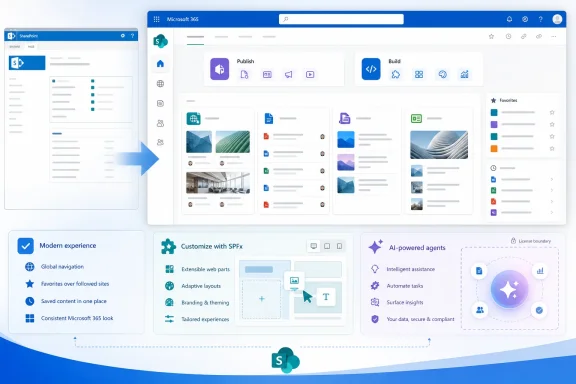 The SharePoint home page is now Discover
The most visible change is the retirement of the familiar SharePoint start page in favor of Discover, a surface intended to surface relevant sites, documents, pages, and news. Microsoft positions it as a knowledge-discovery hub rather than simply a list of recently visited SharePoint locations.
This affects more than the landing page. The new design reshapes the visual hierarchy in SharePoint’s core surfaces, including pages, news, libraries, and lists. Microsoft says it is applying neutral app theming to reduce visual noise while leaving site-level branding intact. In other words, an organization’s logo, colors, and configured site styling should remain, but the surrounding Microsoft-controlled interface changes.
That distinction matters for support teams. A site owner may report that a SharePoint site “looks different” even though no one altered its theme or page design. The cause may be the product-wide shell update rather than a change to the site itself. Helpdesk documentation, screenshots, and onboarding materials that refer to the old start page or app-bar locations are now potential sources of confusion.
Microsoft’s current SharePoint documentation also says the updated visual treatment extends to SharePoint Framework, or SPFx, placeholders. Developers who use application customizers or other custom front-end components should validate placement, contrast, and behavior against the new neutral surfaces rather than assuming a solution tested against the previous shell will retain the same visual prominence.
Publish and Build move common work into the app bar
The refreshed SharePoint app bar adds two destinations beside Discover: Publish and Build. Publish groups pages, news, and campaign-style communications associated with Microsoft Amplify. Build is intended as a central place to create and manage SharePoint sites, lists, libraries, and AI-powered agents.
This is a meaningful information-architecture change, not a cosmetic navigation rename. Publishing and solution-building work that users previously reached through site-level controls, Microsoft 365 launchers, direct URLs, or administrative guidance is being presented as a product-level workflow. For mature SharePoint deployments, that may make common actions easier to find. It also risks sending users into tools their organization has deliberately restricted through governance, licensing, training, or support policy.
The new app bar can also display a tenant’s global navigation—logo and name included—when that navigation is enabled and configured on the SharePoint home site. Organizations that have not configured a home site or global navigation will not receive that same navigation outcome. The redesign therefore does not eliminate the difference between a carefully governed intranet and a minimally configured SharePoint tenant; it makes that difference more noticeable.
Admins should treat this as a prompt to review whether the home site still reflects the organization’s intended entry point. A stale global navigation menu becomes more prominent when it occupies the top of the refreshed SharePoint experience.
Preview opt-outs did not survive the production rollout
Microsoft initially provided a preview control in the SharePoint admin center under Settings > SharePoint > New SharePoint Experience. Enabling it applied the preview to the entire tenant, though individual users could switch themselves back to the former experience during that evaluation period.
That flexibility ended when the rollout reached Targeted Release. Microsoft’s Message Center notice states that the new experience automatically applies to all users and tenants from that phase onward, overriding tenant-level preview choices and individual user opt-outs. The company explicitly said no controls would remain.
This is the detail the roadmap’s high-level “Launched” status leaves out. The deployment is not an optional layout experiment that admins can indefinitely defer while they rebuild training guides. It is a service-interface replacement in SharePoint Online.
Organizations that skipped preview should now assume that their frontline support staff need to recognize the new destinations and terminology. The immediate tasks are ordinary but worthwhile:
- Review internal instructions that tell users to begin from the SharePoint start page, follow sites, save articles for later, or use legacy app-bar labels.
- Test custom SPFx extensions and home-site navigation on the refreshed desktop and mobile experiences.
- Confirm that site owners understand where publishing, site creation, list creation, and library creation now appear.
- Revisit governance rules for who may create sites, lists, libraries, and agents, because Build makes those capabilities more visible.
Microsoft said there were no specific compliance considerations tied to the rollout. That does not remove an organization’s own records, retention, permission, and publishing obligations; it means the company did not identify a new compliance control or data-handling change as part of this interface release.
Favorites replaces two older SharePoint concepts
Microsoft used the GA rollout to simplify another piece of SharePoint’s vocabulary. Followed Sites became Favorite Sites, while Saved for Later for pages and news posts became Favorites. Existing followed sites and saved content were supposed to transition automatically.
The consolidation is logical from a user-interface perspective: Microsoft is standardizing on the same “favorite” gesture used elsewhere in Microsoft 365. But it combines two concepts that some organizations had taught differently—following a site for ongoing relevance versus bookmarking a specific post to revisit.
The rollout also retires Featured Links, according to Microsoft’s Message Center update. Microsoft points customers toward modern alternatives, particularly Global Navigation, for directing staff to important resources and destinations. Site owners relying on Featured Links should verify that their intranet landing pages still expose those destinations through supported navigation patterns rather than discovering the removal through a user complaint.
AI readiness does not mean Copilot access for everyone
Microsoft’s roadmap description frames the new SharePoint foundation around AI-assisted creation, and the Build destination includes AI-powered agents. But the interface rollout does not grant organization-wide access to AI features. Microsoft’s Message Center notice says that capabilities requiring AI are available to users with a Microsoft 365 Copilot license.
That licensing boundary is easy to miss when users see new AI-oriented entry points in the same product shell as familiar SharePoint tools. A user may be able to open the new Build destination without being licensed to use every AI-assisted function presented there. Administrators should make their support and communications teams precise: the SharePoint redesign is broadly deployed, while Copilot-powered capabilities remain license-dependent.
For most tenants, the immediate consequence is not a new SharePoint migration project. It is a change-management job: update guidance, test customizations, review home-site navigation, and explain that the old interface is no longer a supported destination.