

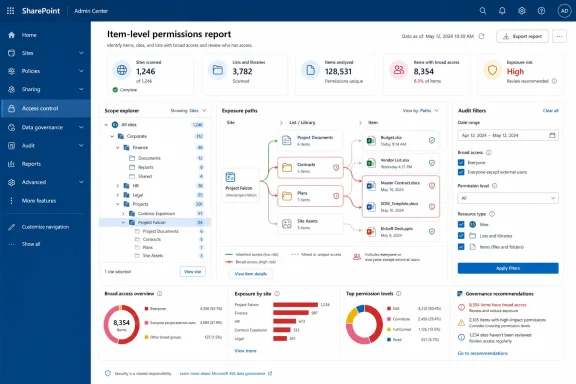
The August rollout date matters because Microsoft’s existing SharePoint Advanced Management reports already identify sites with Everyone except external users, or EEEU, exposure, but their usefulness has been split between a broad inventory and a recent-activity view. Roadmap item 561038 describes the missing middle: details at the item permission level for both EEEU and Everyone. Microsoft Learn documentation confirms that the company’s data-access-governance tooling is built around detecting oversharing, though the public documentation does not yet spell out the exact columns, export format, or OneDrive coverage for this newly rolling report.
For SharePoint administrators preparing for Microsoft 365 Copilot, this is a governance feature rather than an access-control change. It does not remove permissions, alter sharing defaults, or stop content from surfacing automatically. It gives administrators a more credible basis for deciding where broad access is intentional and where it is an inherited mistake that has survived unnoticed.
The report addresses a blind spot between site counts and file permissions
Microsoft’s current Site permissions for your organization snapshot report can count Everyone and EEEU permissions across a tenant. It can also flag broken permission inheritance, sharing-link totals, guest access, external participants, Microsoft Entra group permissions, and the total number of users with access. That is useful for triage, but it leaves an administrator with a familiar follow-up problem: a site can show dozens or thousands of broadly available permissions without identifying the actual document library, folder, list item, or file that needs review.
Roadmap item 561038 says the new report will provide “complete item level details” for permissions granted to Everyone except external users and Everyone special SharePoint groups. If delivered as described, that changes the workflow from finding a suspicious site and manually traversing its libraries to filtering the broad-access grants directly.
That distinction is important in sites that have accumulated unique permissions over years. A private team site may have a single folder shared with EEEU for a legitimate departmental purpose, while another may contain an inherited file-level grant left behind after a project handoff. A site-level count treats both as equivalent. Item-level reporting is what permits a reviewer to separate a deliberate publishing decision from a permission that no one still owns.
Microsoft’s own documentation explains why the count alone can mislead. Granting access to EEEU creates potential exposure, but it does not necessarily increase the “total permissioned users” figure used in the snapshot report. The permission is broad by design: anyone in the tenant can use it, including future employees, without appearing as an individually expanded user in the same way as a Microsoft Entra group membership does. A low user count is therefore not proof that a site is narrowly shared.
Everyone and EEEU remain different risks
The roadmap language names two special SharePoint groups that are often discussed together but should not be treated as interchangeable during a permissions review.
EEEU includes internal users and excludes external guests. Microsoft describes it as a built-in SharePoint group that effectively exposes content to the entire organization. It can be assigned through public-site membership or directly to individual files and folders. In a large tenant, a single EEEU permission can therefore grant access far more broadly than a site owner intended, particularly when the original audience was a department rather than every employee.
Everyone is more complicated. Microsoft changed Microsoft 365’s default external-user behavior in 2018 so that external users do not automatically receive the Everyone claim. Administrators can elect to enable that behavior in tenant settings, however. The broad group should consequently be reviewed against the tenant’s actual configuration and external-sharing policy rather than assumed to mean guests always have access or never do.
Microsoft also warns administrators not to treat every Everyone or EEEU hit as a security incident. Its current site-permissions documentation excludes hidden system files and hidden system groups from the reported counts because some built-in grants are intentional. In classic publishing sites, for example, Everyone can appear in the Style Resources Reader system group so users can load page styling and shared resources. Removing that access without checking its purpose can break pages while accomplishing little from a data-protection perspective.
The new report’s value will depend on whether it preserves that context. A list of item-level assignments without the role granted, inheritance status, site template, sensitivity label, external-sharing setting, and owning administrator would create a large queue without making remediation safer. Microsoft’s roadmap entry promises the item details but does not describe those fields.
Existing EEEU reporting is useful, but it is not the same feature
Microsoft Learn already documents an EEEU activity report in the SharePoint admin center under Reports, Data access governance. It lets administrators create reports based on site template, Team site privacy, sensitivity label, and whether they are looking for broad access through site membership or through individual files, folders, and lists.
That report is activity-oriented. It identifies the top 100 sites by EEEU sharing activity over the previous 28 days and is intended to be rerun manually. Its CSV download can cover up to one million sites and includes site-level metadata such as the primary administrator, template, privacy setting, and sensitivity label. It covers SharePoint sites; Microsoft directs administrators who need comparable OneDrive visibility to a separate OneDrive report.
The report now rolling under Roadmap ID 561038 should not be confused with that 28-day activity report. The roadmap specifically calls out permissions granted to both EEEU and Everyone, and calls for complete item-level details. The current public activity-report documentation is centered on EEEU, recent sharing activity, and site-level ranking. The newer site-permissions snapshot, meanwhile, can report counts for both groups but does not publicly document a per-item export in the way the roadmap announcement describes.
Microsoft has not published a separate support article that maps Roadmap ID 561038 to a named page in the SharePoint admin center. That leaves several operational questions unanswered as rollout begins:
- Microsoft has not stated whether the report will cover SharePoint Online only or extend to OneDrive items.
- Microsoft has not published the report’s fields, retention window, refresh cadence, maximum result count, or whether it can be automated through SharePoint Online PowerShell.
- Microsoft has not said whether the report will be available to all data-access-governance customers or whether licensing limits will reduce its scope.
Those omissions matter for larger tenants. Existing snapshot reports can take up to five days on their first run and then up to 24 hours for subsequent runs; their underlying data can lag changes by up to 48 hours. The existing EEEU activity reports can run every 24 hours and can also take up to 24 hours to complete. Administrators should not expect a new reporting surface to function as a real-time permission audit unless Microsoft documents otherwise.
The rollout date already slipped once
Microsoft’s current roadmap entry lists general availability as August 2026 and was updated on August 3 with a rolling-out status. An archived copy of the same Roadmap ID, captured when the item was published on April 27, listed a June 2026 general-availability target and still showed the feature as in development.
That is a modest but meaningful schedule change. The feature is now arriving after Microsoft’s data-access-governance documentation had already expanded to describe broader permission-state snapshots, including Both Everyone and EEEU counts. The revised timing suggests the detailed permission view is being layered onto an administrative reporting framework that has been evolving through the summer rather than appearing as a standalone permissions tool.
For organizations with Copilot deployments, the delay has a direct consequence. Microsoft says Copilot respects existing SharePoint permissions, which means an overbroad permission does not become a Copilot authorization flaw—it remains an overbroad SharePoint authorization that Copilot can honor. A tenant that has only site-level counts can identify where risk may be concentrated; item-level evidence is what lets it remediate the particular content that should not be broadly discoverable.
What administrators should do during rollout
SharePoint Advanced Management administrators should establish a baseline before the detailed report appears in their tenant. Run the site-permissions snapshot, identify sites with EEEU and Everyone permissions, record sites with high unique-permission counts, and prioritize confidential sites, public Microsoft 365 group-connected sites, and libraries whose ownership is unclear.
Then use the upcoming detailed report to validate each broad grant before removing it. Check whether the permission is at the site, library, folder, list, or file level; determine whether it inherits from a parent scope; verify the role granted; identify the site owner; and assess whether a Microsoft Entra security group or Microsoft 365 group would express the intended audience more safely. Microsoft itself recommends customer-defined Entra groups and role-based access management rather than relying on the legacy broad claims.
Access also depends on licensing. Microsoft says data-access-governance reporting requires an eligible Microsoft 365 or Office 365 base license plus either SharePoint Advanced Management or at least one assigned Microsoft 365 Copilot license in the tenant. Microsoft 365 E5 administrators can access data-access-governance reporting, but Microsoft documents important limitations for that route: no snapshot reports, no remedial actions, and activity reports capped at 10,000 sites.
The immediate milestone is not a tenant-wide cleanup. It is getting a verified inventory of which specific items carry Everyone or EEEU permissions, then removing only the grants that fail an ownership and business-use review. Microsoft’s rollout creates the evidence trail administrators have lacked; the permission decisions will still belong to the people responsible for the content.