

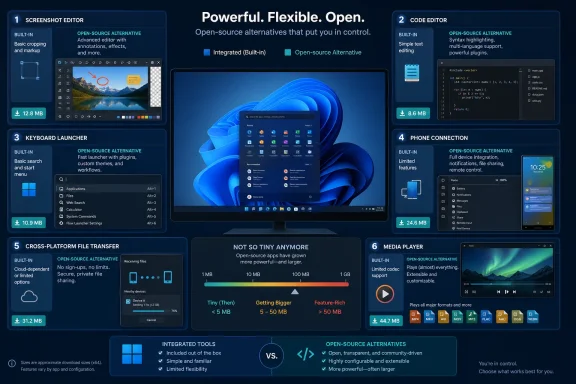
The useful takeaway is not that Windows’ bundled Snipping Tool, Notepad, Search, Phone Link, Nearby sharing, and Media Player are all “bloatware.” They are not. They are integrated components with different design goals and, in some cases, features the replacements simply do not offer. The real value in the six alternatives is control: more configurable capture workflows, code-aware editing, keyboard-first launching, local-device file transfer, and broader codec support.
XDA’s August 3 roundup names ShareX, Notepad++, Flow Launcher, KDE Connect, LocalSend, and VLC. Every one is a legitimate open-source project. But the article uses download-size figures as a selling point without accounting for current releases, optional dependencies, or what each program gives up in exchange for avoiding Microsoft’s services.
ShareX and Flow Launcher no longer fit the “tiny” label
The clearest discrepancy is ShareX. XDA calls ShareX 17.1.0, a roughly 50MB installer, the latest release. ShareX’s own download archive lists version 17.1.0 as a May 2025 release; it is no longer current. ShareX 21.0.0, released July 3, 2026, is listed with a 132.7MB x64 installer and a 199.18MB portable package.
That does not make ShareX a bad replacement for Snipping Tool. ShareX remains one of the most feature-complete Windows capture utilities: separate hotkeys for full-screen, region, window, scrolling capture, screen recording, GIF capture, OCR, annotation, upload targets, and scripted post-capture actions. Its onboard FFmpeg components and extensive capture, upload, and editing options explain why it has grown. But it should be recommended as a power-user screen-capture suite, not as a minimalist utility.
Microsoft’s Snipping Tool has also moved beyond the basic screenshot tool XDA frames it as. Microsoft documents screenshot capture and screen recording, with recorded clips able to hand off to Clipchamp for captions or audio work. ShareX’s advantage is not that Windows lacks a capture tool; it is that ShareX exposes far more of the workflow to the user and can keep that workflow local or send output to a user-chosen destination.
Flow Launcher has the same size problem. XDA cites an 81.1MB download and about 200MB installed footprint. Flow Launcher’s own website currently advertises version 2.0.3 as a 92.37MB installer and 186.89MB portable package, while its GitHub project lists version 2.1.2 as the latest release from May 2026. The mismatch between the website and GitHub release records is itself a reason administrators should source the app from the project’s official GitHub releases or a trusted package manager rather than treating the marketing download page as the definitive release record.
Flow Launcher is still worthwhile for users who want an Alfred- or Spotlight-style launcher on Windows. It can launch applications, search files and file contents, invoke system commands, and add plugins for services and tools. It supports both the Windows index and Voidtools Everything, but that distinction needs to be understood: Flow Launcher does not independently make file discovery fast. When configured to use Everything, its search speed relies on a separate application, and Everything is proprietary freeware rather than open source.
Windows Search is not merely a slow search box, either. Microsoft’s indexing system supports a Classic mode that focuses on common user folders and an Enhanced mode that indexes the PC more broadly, at a potential resource cost. Flow Launcher changes the interaction model — a global hotkey and extensible command palette — while Everything changes the indexing approach. Users should pick Flow because they want that workflow, not because a 90MB-plus launcher is somehow lighter than a built-in Windows feature.
Notepad++ is the cleanest replacement — for the right job
Notepad++ is the strongest fit in the list if “small” means a small, focused desktop program that adds practical capability. Its installer remains only a few megabytes, its interface is mature, and its value is immediately apparent to anyone who edits scripts, configuration files, logs, Markdown, HTML, JSON, PowerShell, or source code.
Tabs, syntax highlighting, regular-expression search and replace, macros, themes, plug-ins, and line-oriented editing make Notepad++ a different class of tool from Notepad. For a help-desk worker parsing logs, a sysadmin editing a batch file, or a developer opening an unfamiliar config file, those are operational benefits rather than decorative features.
XDA is also right that Microsoft has been changing Notepad’s character. Microsoft began rolling out lightweight Markdown-style formatting controls to Windows Insiders in 2025, and the modern app has gained AI-adjacent features in some channels. That may be unwelcome to people who want a plain-text editor that stays out of the way.
Still, Notepad++ should not be treated as a drop-in policy replacement for Notepad across an organization. Notepad is an inbox component maintained through Microsoft’s servicing channels, while Notepad++ has its own release and update cycle. Notepad++ has also deliberately delayed or withheld automatic update promotion after regressions in past releases. That is responsible release management, but it means IT teams should inventory the deployed version, validate releases, and update deliberately rather than assuming every endpoint will immediately move to the newest build.
KDE Connect and LocalSend solve different device problems
KDE Connect is presented as a Phone Link alternative, and that comparison is only partly accurate. KDE Connect can pair a Windows PC with Android or iOS devices for notifications, clipboard sharing, file transfer, remote input, presentation control, and other local-network functions. KDE’s current Windows package is listed at 92.31MB, higher than the roughly 81MB cited by XDA but still reasonable for a cross-device service.
The important difference is architectural. Phone Link is Microsoft’s account-linked integration layer. Microsoft’s setup documentation says Android pairing uses the same Microsoft account on the PC and Link to Windows mobile app; Phone Link can expose messages, recent photos, calls, notifications, and, for supported devices, app-related experiences. It also connects to newer Windows 11 Start menu phone features.
KDE Connect’s appeal is that it can handle several local functions without putting a Microsoft account at the center of the arrangement. But it does not replicate Phone Link feature-for-feature, particularly the deeper Android app integration and some phone-management functions. Its feature set also varies materially by mobile platform and permission model. For a user who chiefly wants clipboard sync, file push, a presentation remote, and notification mirroring, KDE Connect is a sensible alternative. For someone who needs SMS handling, calls, and tight Android app access from Windows, Phone Link remains the fuller product.
LocalSend is the more focused recommendation. It transfers files and messages between Windows, macOS, Linux, Android, iOS, and Fire OS devices over the local network, using HTTPS encryption and without an external server or internet connection. That fills a gap Microsoft’s Nearby sharing does not address: Microsoft’s feature shares between Windows PCs using Bluetooth or Wi-Fi, while LocalSend is built for mixed-device households and teams.
There is, however, a maintenance trade-off omitted from the “it just works” framing. LocalSend’s project explicitly says its app does not auto-update and recommends obtaining it through an app store or package manager. That makes winget, Scoop, Chocolatey, or a managed software deployment system the practical choice on Windows — especially when LocalSend is installed across several machines. A tool designed to avoid cloud dependence should not become an unmanaged executable forgotten on endpoints.
VLC remains a codec insurance policy, not a Media Player substitute
VLC is the least controversial entry and the least revealing. VideoLAN’s player remains the dependable answer when a media file has an uncommon container, an unusual codec, multiple audio tracks, embedded subtitles, or a stream that Windows Media Player declines to open.
Windows 11’s Media Player handles common formats well enough for most personal libraries. VLC earns its place because “most” is not the same as “all,” and codec support is where an otherwise modern built-in player can fail at the worst moment — when a user needs to inspect a surveillance export, a legacy training clip, a customer-supplied video, or a file from an unfamiliar device.
Its practical cost is modest, but it should be deployed with the same source discipline as any other popular utility. VLC’s brand recognition has long made it a target for deceptive download pages. The right answer is the official VideoLAN release or a managed package source, not a search-ad download promising a “codec pack.”
The better rule is to replace workflows, not bundled apps
The list becomes more useful when each tool is judged against a specific Windows workflow:
- ShareX is for repeatable documentation, annotated captures, recording, OCR, and controlled upload workflows.
- Notepad++ is for editing structured text and code where syntax awareness and bulk editing matter.
- Flow Launcher is for users who prefer a global keyboard launcher and are prepared to manage plug-ins and, optionally, Everything.
- KDE Connect is for local, account-light phone-to-PC convenience rather than full Phone Link parity.
- LocalSend is for cross-platform LAN transfers, provided its updates are managed.
- VLC is for files that ordinary media players cannot reliably decode.
Calling the Windows apps “bloatware” obscures this practical division. Snipping Tool, Notepad, Nearby sharing, and Media Player cost nothing extra to keep, do not need separate patching plans, and are already integrated into Windows. The open-source replacements are worth installing when their additional capabilities solve a demonstrated problem.
The submitted article’s most valuable recommendation is therefore LocalSend, because Windows Nearby sharing remains confined to Windows-to-Windows transfers while LocalSend spans the operating systems people actually carry. Its most misleading recommendation is ShareX as a tiny utility: the current package is larger than twice the size XDA reported, but it also delivers far more than Snipping Tool.