
Neowin’s software listing first flagged the new build on August 16. The project’s GitHub release confirms that 2.23.0 was published earlier that day and is the current release, adding six entries to the app installer while changing how the program checks for updates. Sparkle supports Windows 10 and Windows 11, and its own documentation says it remains in beta.
This is a maintenance release, not a new debloating engine. But it addresses a cluster of problems around the parts of Sparkle that users are most likely to leave running: its App Installer page, its notification and tray behavior, and the privileged tweak workflow.
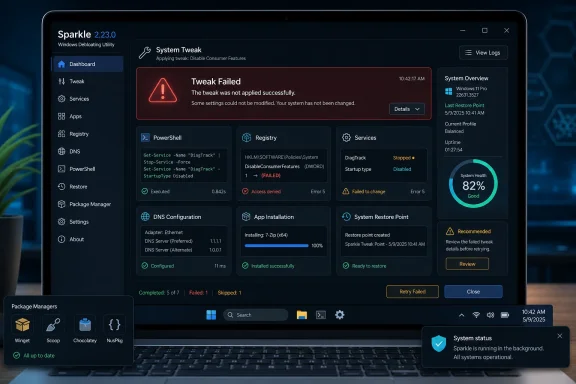 Failed tweaks should no longer look successful
The release notes say Sparkle 2.23.0 fixes errors being swallowed during tweak application and reversal. The project does not identify the affected tweaks, explain whether the failures involved PowerShell, its Electron front end, or the app’s inter-process communication layer, or say how long the defect existed. That missing detail limits any claim that this release repairs a particular broken Windows configuration.
Still, the practical consequence is clear. Sparkle’s documentation says the program runs PowerShell scripts behind the scenes and supplies more than 39 system optimizations, including privacy, performance, gaming, and Windows-cleanup changes. It needs administrator rights to make those changes. If a privileged action failed but the interface did not surface the error, a user could reasonably believe a tweak had been applied—or reversed—when Windows was actually left in its previous state or only partially changed.
That is particularly relevant after Sparkle 2.21.1, released July 18, corrected several incorrect tweak behaviors. The developer said users who had applied the disable-location-tracking or detailed-bsod tweaks should reapply them, and also fixed incorrect unapply behavior for set-services-to-manual and disable-telemetry. It additionally added input sanitization to DNS handling and restore-point names.
Those earlier fixes are a useful warning against treating a one-click optimizer as a collection of harmless preference switches. Sparkle can be convenient precisely because it packages registry edits and system commands behind a graphical interface; that convenience also makes visibility into failure states essential. Version 2.23.0 improves that visibility, but it does not independently establish that all historical changes made by earlier versions were correct.
Users updating from an older Sparkle build should create a fresh Windows restore point before applying, reapplying, or reversing a tweak. They should also make one change at a time where possible, then verify the result in Windows rather than relying only on a success notification. For a DNS change, verify the configured resolver; for a service tweak, inspect the service startup state; for an app removal, confirm that the application and its associated functionality are actually gone.
The App Installer gets faster, and broader
Sparkle’s Apps page gains entries for Itch.io, Cursor, Claude Desktop, Claude Code, VSCodium, and UniGetUI. The additions reflect the project’s shift from a narrowly consumer-focused installer catalog toward one that includes developer tools, AI clients, alternative code editors, a software-update manager, and a game storefront.
The useful change is not merely that these names appear in a catalog. Sparkle’s app installation feature is built around Winget and Chocolatey, according to its documentation, so the page acts as a front end for package-manager installs rather than a separate proprietary distribution channel. Sparkle 2.21.0 added an App Install terminal specifically so users could see package-manager logs, a necessary diagnostic tool when installations fail, encounter package-ID problems, or require elevation.
Version 2.23.0 adds caching and lazy loading with a fade-in effect to the Apps page, while fixing lag in the page’s welcome modal. That should make browsing and searching a growing catalog feel less sluggish, particularly because the app page has already accumulated icon handling, package-manager selection, and installed-app detection work in prior releases.
There is a caveat for administrators and power users: a friendlier catalog does not remove package-source governance concerns. Winget and Chocolatey can expose different package versions, metadata, and installation behavior. Sparkle users who need repeatable deployments should record the underlying package identifiers and review the displayed installation output, rather than treating a catalog tile as evidence of an approved, stable application package.
Sparkle’s developer documentation says the tool can install more than 100 apps. That breadth is useful for a fresh Windows setup, but it also makes the release’s caching changes more meaningful than a cosmetic animation update. It suggests the app page has become substantial enough that repeated package and icon lookup activity was affecting responsiveness.
Update checks move to startup only
Sparkle has changed its update behavior to check only when the program starts. The change closes GitHub issue 114, filed on August 13, where a user reported receiving repeated “up to date” notifications after minimizing and returning to the app and raised the prospect of GitHub rate limits.
This is a targeted usability fix. Sparkle 2.16.1, released in March, had introduced periodic checks every five minutes while addressing an auto-updater problem. The project’s public site also says Sparkle checks for updates on launch and may require updating before use because Windows changes can make outdated tweaks unreliable. The 2.23.0 change removes the repeated in-session polling rather than abandoning version enforcement.
For end users, that means less background notification churn while Sparkle remains open. For the project, it reduces needless requests to the release source. For IT staff who keep tools open during a cleanup or setup session, it means a new Sparkle release may not be detected until the next launch. That is an acceptable tradeoff for a system-tweaking utility, but it puts more weight on checking the installed version before starting a large batch of changes.
The release also says Sparkle has updated its online-status check method, though it does not document the technical change or the offline behavior it fixes. Sparkle’s website says most of its functions should work without an internet connection, while auto-updates require one. No independent testing or rollout notes accompanied the 2.23.0 release, so the precise offline impact remains unconfirmed.
Tray repair and release verification
Sparkle 2.23.0 also fixes a broken tray icon. On its own, that is minor; combined with the startup-only update check, it is part of a clearer design direction. The tool is stepping back from repeatedly interrupting the user in the background and concentrating its update behavior at launch, while restoring expected notification-area behavior for those who keep it accessible there.
The project’s GitHub release provides separate SHA-256 checksums for the installer and portable ZIP archive. That is the authoritative record for this build, and it is worth using. The supplied Neowin listing describes a roughly 120 MB portable download, but the project’s own release page is the place to confirm that a downloaded installer or archive matches the developer-published hash.
There is one inconsistency in Sparkle’s public messaging that users should take seriously. The main website says all changes are reversible, while the newer project documentation says most tweaks can be reversed and explicitly warns that some cannot be automatically reversed. The latter is the more credible operational guidance, especially given the fixes to reverse and unapply behavior in recent releases.
Sparkle 2.23.0 makes the tool more usable and, with its error-reporting repair, potentially safer to operate. It does not turn Windows debloating into a risk-free task. The immediate consequence for existing users is simple: update before making more changes, create a restore point, and verify each high-impact tweak instead of assuming that a clean interface means Windows accepted the command.
