
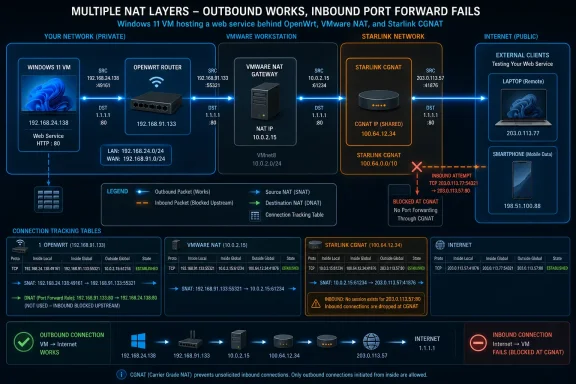
The article’s useful contribution is its four-address example: the Windows VM at 192.168.24.138, the OpenWrt WAN address at 192.168.91.133, an intermediate VMware NAT gateway, and an externally observed Starlink address. But the more important finding is not the number of addresses. It is that each NAT boundary owns only its own translation state and its own forwarding rules.
OpenWrt’s own firewall documentation supports the mechanics described in the lab: WAN masquerading is source NAT, port forwarding is destination NAT, and NAT reflection is a separate option attached to a destination-NAT redirect. Starlink’s support documentation separately confirms that its default IPv4 service uses carrier-grade NAT, or CGNAT, which puts another address-sharing boundary outside the customer’s router.
 The “public IP” may not be your router’s address
The most misleading networking question remains, “What is my IP address?” It sounds singular, but it depends entirely on where the observer sits. Windows reports the address assigned to its active interface; OpenWrt sees both its LAN and WAN addresses; a site on the internet reports whichever source address survived the last upstream translation.
In the MakeUseOf test, 192.168.24.138 belongs to the Windows 11 guest and 192.168.91.133 is OpenWrt’s WAN-side address inside another private network. Neither is publicly routable on the internet. When the VM sends traffic outward, OpenWrt can replace the VM’s source address with 192.168.91.133; VMware can then perform another translation; Starlink can translate again before the traffic reaches a website.
Starlink’s published support material makes the last part especially consequential. Its default IPv4 service assigns customer equipment an address from the shared-address range 100.64.0.0/10 and performs CGNAT upstream. A website may therefore see a public Starlink address that is neither assigned to the Windows PC nor configurable on the customer’s OpenWrt router.
That is why checking a “what is my IP” site is a poor way to validate a local port forward. It proves only that an outside service observed a particular source address. It does not prove that the address is routed to your WAN interface, that it is dedicated to your connection, or that unsolicited inbound traffic can reach your router.
For administrators, the practical diagnostic is straightforward: compare the WAN IPv4 address shown by the router with the IPv4 address seen by an external service. If the router reports an RFC 1918 address such as 192.168.x.x, 10.x.x.x, or 172.16.x.x through 172.31.x.x—or an address in the CGNAT block 100.64.0.0/10—while the external site reports something else, there is another NAT device upstream. A local port-forward rule cannot control that upstream device.
NAT and firewall rules are separate, but router interfaces matter
MakeUseOf correctly separates translation from filtering, though its lab test needs one important qualification. A TCP test to the OpenWrt WAN address on port 80 tests access to the router itself—its management web service, if one is listening—not a forwarded service behind the router. In OpenWrt terminology, that is WAN-zone input traffic.
OpenWrt documents input, output, and forwarding policies as distinct controls. Input governs traffic addressed to the router; forwarding governs traffic passing through it from one zone to another; output governs traffic generated by the router. Masquerading is separate again: it changes the source address of outbound IPv4 traffic, normally on the WAN zone.
This distinction prevents a common and potentially dangerous mistake. Opening TCP port 80 to the OpenWrt router’s management interface is not the same as forwarding TCP port 80 to a web server on a LAN host. The former expands access to the router’s administration plane. The latter performs destination NAT to an internal address and relies on forwarding policy.
OpenWrt’s firewall configuration describes port forwards as redirect rules with a DNAT target. A typical rule matches traffic arriving on the WAN zone at a selected external port, rewrites its destination to a specified internal address and port, and allows it through to the LAN host. The generated forwarding rules are stateful, using connection tracking to recognize return traffic.
The safe operational rule is simple: do not treat “the port is open” as a complete result. Identify which device answered it. If a scan of the WAN address reaches LuCI, SSH, or another router service, review the router’s input rules immediately. If it reaches the intended internal application, verify that the application is patched, authenticated, bound to the expected interface, and protected by host-level firewall rules as well.
Connection tracking is the return path NAT alone cannot explain
The article’s look at OpenWrt’s connection-tracking table is the part many home-network explanations skip. Source NAT changes an outbound packet’s address, but it is connection tracking that preserves the association needed to reverse that change when a reply arrives.
A client might send a TCP session from 192.168.24.138:60129 to a remote HTTPS server. OpenWrt can create a state record tying that internal five-tuple to a WAN-side representation such as 192.168.91.133:60129. When the remote server replies to the WAN-side address and port, the router consults that record, reverses the relevant translation, and sends the packet back to the originating client.
This is why ordinary web browsing generally survives double NAT and CGNAT. Each NAT device sees the outbound connection, creates a temporary mapping, and can recognize packets that belong to that established flow on the return trip. No device needs a permanent inbound rule for a browser tab, a Windows Update download, or most outbound VPN connections.
It is also why “NAT is a firewall” is an incomplete explanation. NAT mapping behavior may make unsolicited inbound connections difficult or impossible, but the actual security decision belongs to the firewall policy and the state table. OpenWrt’s documentation explicitly builds its forwarding behavior around state matching; the router allows replies associated with an established connection while still applying policy to new inbound traffic.
Connection state has another operational implication: packet captures and socket tables are snapshots. A mapping can persist briefly after an application closes, then expire on a timer. Seeing a port or mapping in TIME_WAIT does not establish that a service is still reachable from outside, and seeing a connection in an established state does not mean a new connection would be permitted.
A port forward ends at the router where it was created
The MakeUseOf experiment forwarded 192.168.91.133:18080 to 192.168.24.138:8080, then confirmed that a machine on the VMware-side network could load the Windows-hosted test server. That proves the OpenWrt destination-NAT rule worked at the OpenWrt boundary.
It does not prove the service was published to the internet, and the failed phone test demonstrates why. VMware still had a NAT boundary ahead of OpenWrt, and Starlink’s CGNAT sat farther upstream. Neither device had a matching forwarding rule, and the customer cannot add one to Starlink’s carrier equipment.
The conclusion applies well beyond Starlink. A consumer router may show a perfectly configured forward for a media server, Remote Desktop gateway, game server, NAS, or development web app, yet external tests will fail if the WAN address is private or shared. In that situation, repeatedly changing the local forward, toggling UPnP, or disabling Windows Defender Firewall will not solve the actual problem.
The practical alternatives depend on the service:
- Use IPv6 with carefully scoped stateful firewall rules if the provider delegates usable IPv6 addressing and the application supports it.
- Obtain a genuine public IPv4 service where the provider offers one, recognizing that it still requires a properly restricted firewall and a maintained exposed service.
- Use a VPN or overlay network that supports inbound reachability through a relay, exit node, or hosted endpoint.
- Put the public-facing component on a VPS or managed reverse proxy, then connect it back to the home or lab network over an authenticated tunnel.
The last two approaches are usually safer than exposing Windows management services directly. Publishing Remote Desktop or an administrative web interface to the public internet merely because a router can forward a port is a poor tradeoff for most home labs and small offices.
NAT reflection solves an internal naming problem
NAT loopback—also called hairpin NAT or NAT reflection—is the most practical feature in the article because it explains why an internal user can sometimes reach a local service through its public hostname. OpenWrt’s current firewall documentation lists reflection as an option for DNAT redirects and enables it by default for applicable rules.
Without reflection, a Windows client on the LAN that tries to reach the router’s external address may send a connection toward the WAN path and fail to return to the intended internal service. With reflection enabled, OpenWrt can translate and redirect that LAN-originated connection back toward the server behind the same router.
This is convenient for a single hostname serving both internal and external users. A self-hosted service can be called through the same DNS name from a phone on mobile data and from a Windows desktop on the LAN. But reflection is still a detour through the router’s NAT rules, and it does not repair a broken public path through CGNAT.
For networks with their own DNS resolver, split-horizon DNS is often cleaner. The internal resolver returns the private LAN address for internal clients, while public DNS returns the external address for everyone else. The service stays under one name, but local traffic goes directly to the local server instead of leaving the LAN address space and being reflected back.
The durable lesson from the lab is that NAT should be debugged as a chain of separate functions: routing chooses the next hop, NAT rewrites addresses or ports, connection tracking associates replies with prior flows, and firewall policy decides whether a new flow is allowed. Once those jobs are separated, a failed port forward stops looking mysterious: the missing rule, the wrong interface, or the upstream NAT boundary is usually visible.