
That distinction is more than a nostalgic technicality. Decky Links is a configurable physical-token launcher, not a revival of removable game media. The project’s public GitHub repository shows it can write a Steam URI such as steam://run/... to a small JSON file on a FAT-formatted floppy, then watch for the disk in a USB floppy drive and ask SteamOS to start the associated title. In its current design, removing the same physical item can also close the game it launched.
The demo’s appeal is obvious: a shelf of labeled disks or cards gives a Steam library a tactile, visible form that Big Picture mode cannot. But anyone expecting an off-the-shelf Steam Deck add-on should temper that excitement. Decky Links is publicly available source code, not a finished Decky Store plugin release.
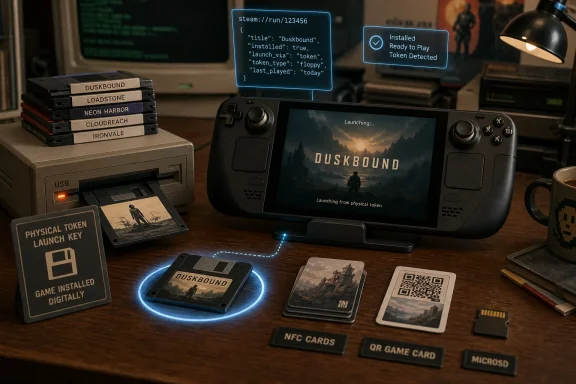 The floppy is a game key, not game media
BlackIceLA’s Reddit post describes a deliberately low-tech arrangement: the game’s Steam link is stored on the chosen medium; Decky Links detects the medium and launches the corresponding installed Steam or non-Steam title. The repository linked from that post, maintained under the kmturley account, confirms the implementation uses a decky-links.json payload for disks and permits Steam’s run and rungameid URI formats.
A standard high-density 3.5-inch floppy offers 1.44 MB of capacity. That is enough room for an icon, label artwork, and an enormous number of launch records; it is nowhere near enough for modern game data. The project therefore avoids the obvious cost and capacity problem of assigning a separate SD card or USB SSD to each game, but it also means the media is useless without a Steam Deck—or another compatible SteamOS system—where the game is installed and licensed.
The author has been candid about that limitation in the Reddit thread. The disks are “dummy” media that recreate the ritual of selecting and inserting a game rather than preserving the game itself. That makes the project closer in spirit to a programmable NFC figurine or a game-library jukebox than to a cartridge-based console.
There is a practical upside to that narrow model. If a game receives a 50 GB patch, users do not need to update the floppy, card, or tag; Steam updates the installed game normally, while the token continues to point at the same Steam application ID. A physical collection can also move between compatible devices, provided the receiving system has Decky Links, access to the user’s Steam library, and the target game installed.
Decky Links supports much more than disks
The floppy has taken center stage because it makes for a good video, complete with period-appropriate mechanical noise. The project’s documentation lists a wider set of triggers:
- NFC tags and cards are enabled by default and support several common tag families and reader hardware.
- USB-attached 3.5-inch floppy drives are also enabled by default, with the disk acting as the container for the JSON launch file.
- CD/DVD drives, removable USB storage, SD or microSD cards, USB webcams scanning QR codes, MQTT messages, serial devices, and watched folders are present as trigger types but are disabled by default.
- The project can create printable 4-by-6-inch cards using Steam box art on one side and a QR code on the other.
This points to a more useful future than a pile of floppy disks tethered to a portable handheld. NFC cards or stickers could be placed inside 3D-printed cartridge shells, behind custom game cases, or on a living-room display. A QR card can provide the same interaction without requiring a USB floppy drive or NFC reader. The repository specifically identifies NFC as the faster route, while the original Reddit demo admits that floppies are slow to detect.
The design also accounts for a detail the viral clip leaves out: storage devices are risky triggers because they may contain ordinary files. Decky Links leaves most storage categories disabled unless the owner turns them on, specifically to avoid mounting a random USB drive merely because it was connected. A floppy drive is treated differently because attaching one to a Steam Deck is usually intentional.
The project is early-stage despite its polished demo
The original report says Decky Links requires manual setup and is not in the main Decky Plugin Store. The public record backs up the larger point, although the current state is more restrictive than “some manual setup” suggests. At the time of publication, the GitHub repository has no packaged release listed, while its setup documentation is aimed at developers: it calls for Node.js, pnpm, Python virtual environments, Docker, a full plugin build, and deployment to a Steam Deck running Decky Loader.
That is a significant divide between a video proof-of-concept and a consumer-ready plugin. Decky Loader itself is a community plugin framework that extends SteamOS’s Game Mode interface; it is not a Valve-supported SteamOS feature. The Decky Plugin Database’s own contribution instructions state that developers must submit a pull request for their plugin to appear in the built-in store. Decky Links is not presently listed in the public plugin database repository.
The Decky Links repository also documents deployment quirks that ordinary users should not have to solve. After installing a build, the developer may need to restart the plugin loader so it runs under a user identity capable of mounting disks. Its author notes that building against the wrong Python runtime can make extensions fail to load, affecting camera functionality and NFC-key handling. Those are normal development problems, but they underline why this should be viewed as an experiment for tinkerers rather than a recommended modification for every Steam Deck owner.
The good news is that the project is not merely a mock-up. Its public repository contains a defined architecture, hardware-test documentation, and more than 650 Python tests, alongside code for the Decky interface, media watchers, NFC support, card generation, launch behavior, and cleanup when media is removed. That is more substantial than the novelty framing suggests.
Zaparoo already covers much of this ground
The strongest correction to the viral framing comes from the Decky Links author’s own Reddit discussion. The initial post presented the project as a way around limitations in Zaparoo, another open-source physical-media launcher that supports SteamOS. A Zaparoo contributor responded that its tokens can already carry Steam links directly, including text files on floppy disks and data written to NFC cards, without relying on a central service for portability.
BlackIceLA acknowledged the correction. Zaparoo’s SteamOS documentation confirms it can launch Steam games and non-Steam shortcuts through Steam URIs, supports NFC readers, QR scanning, optical drives, external media, serial devices, and MQTT, and runs as a user-local service on SteamOS.
The meaningful difference is integration, not the basic idea. According to the Decky Links documentation, its target is a lightweight, SteamOS-specific experience inside Decky Loader: pairing a token from a game’s page, showing connected triggers in the Quick Access interface, and using Steam’s native launch and quit behavior. Zaparoo is the broader, established alternative for people who want the same physical tokens to work across Windows, Linux, SteamOS, retro-gaming distributions, and other hardware.
That leaves Decky Links with a coherent reason to exist: it is trying to make the physical-token workflow feel native to Steam Deck Game Mode. But its original claim that Zaparoo required centrally stored pairing data does not hold up. The author corrected the record before the project became widely reported, and readers should treat Decky Links as a more integrated new implementation of an existing concept—not the invention of floppy-launched digital games.
Physical game keys create a new failure mode
The project’s most interesting behavior may be the one that feels most authentic to old media: the item that starts a game can act as the item that ends it. Decky Links is designed so that removing the token used to launch a game automatically closes that game; inserting or ejecting an unrelated disk should have no effect.
For a curated family setup, that could be a feature. A child can choose a physical card, tag, or disk from a small collection without browsing a large digital catalog, and the physical item reinforces the boundary between games. For a handheld user, though, it introduces friction. A loose USB connector, an unreliable floppy, or an accidental bump to an NFC reader can become an unexpected exit command rather than a harmless hardware disconnect.
There is also a basic trust rule: do not insert or scan someone else’s Decky Links media blindly. The project says it restricts launch payloads to Steam game URIs and HTTPS addresses rather than arbitrary commands, which is an important safeguard. Still, a token remains an instruction supplied by a physical object, and Steam Deck owners should inspect how a community plugin handles mounting, device detection, and URLs before enabling automatic actions.
The floppy disks are the showpiece, but NFC cards and printed QR cards are the realistic endpoint. They preserve the same tactile game-selection ritual with faster detection, less hardware, and none of the fragile, slow-loading mechanics that made floppy disks obsolete in the first place.
