
Suno announced Studio 2.0 on August 13, and MusicRadar detailed the release the following day. The company’s own release notes confirm the broad feature set, but they also add two practical details easily lost in the product pitch: Studio Chat is explicitly a beta feature, and “custom plugins” are described as Studio-built devices, not as exportable VST3 or Audio Unit plug-ins for use in Cubase, Ableton Live, REAPER, FL Studio or other established DAWs.
That distinction should temper expectations. Studio 2.0 offers a potentially useful AI-assisted sound-design and arrangement environment, but Suno has not announced third-party plug-in hosting, VST/AU export, or a Windows desktop application. It remains a browser-based DAW, and the company has not published a supported-browser list, Windows version requirements, offline mode, project-file specification, or interoperability commitments for the custom effects created through its chat interface.
 MIDI is the substantive production upgrade
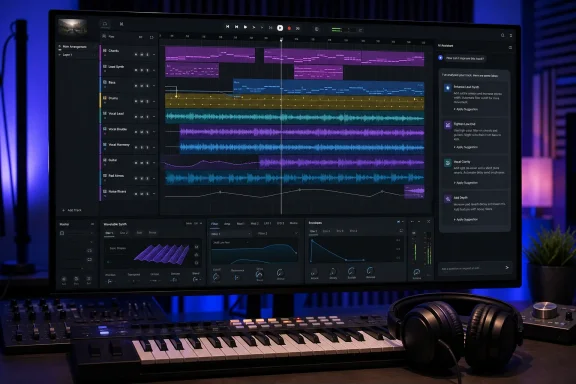
Suno Studio already let users work with multitrack audio and export assets to another DAW. Studio 2.0 moves further into standard music-production workflow by allowing MIDI to be imported, recorded and edited directly on its timeline. Suno also says users can play notes from a typing keyboard and use external MIDI controllers, including MIDI learn for controlling plug-in parameters.
For producers, that makes Studio more than a place to prompt for a finished song and separate it into stems. A user can now supply a deliberate chord progression, bass line, drum pattern or melody, then use Suno’s generation system to turn that musical information into an audio performance. The company describes MIDI clips as prompts for fresh audio generation; MusicRadar reports that Studio can preserve a MIDI part’s pitch, rhythm and dynamics while changing the instrument, timbre or style through a chat request.
This is the clearest practical use case for a Windows DAW user: compose the notes in familiar MIDI form, then use Suno for rapid audio interpretation rather than asking a model to invent the composition from scratch. It also creates a sensible route back to a conventional DAW, where the producer can retain editing control, choose established instrument libraries and complete mixing or mastering with known tools.
The limitation is equally clear. Suno has not said that generated performances are deterministic, editable at the note-to-audio mapping level, or exportable as a reusable sampler instrument. MIDI may set the structure, but the generated audio remains an AI interpretation of that structure. Musicians who need repeatable articulation, exact orchestration, reliable session recall and detailed mix routing will still want their primary project in a desktop DAW.
Studio Chat can alter a session, but it is still a beta agent
The headline feature is Studio Chat, which Suno frames as a collaborator that understands music-production language. Users can ask it to create instruments or vocals, organize a session, edit audio and MIDI, create new MIDI patterns, or design a sound and effect. MusicRadar characterizes it as an agentic chatbot because it can act on the project rather than simply answer questions.
That is a meaningful interface shift. In a normal DAW, “make a warmer tremolo for this guitar part, automate it across the chorus, and reduce the low end” would require selecting tracks, inserting processors, setting parameters and drawing automation manually. Suno’s pitch is that a producer can describe the result and let Chat perform some of that setup.
However, Suno itself labels the chat bar beta, which matters when the tool can modify an active project. The release announcement does not detail whether every Chat action is undoable, whether the system records a readable action history, how it handles ambiguous instructions, or whether it can make non-destructive alternates rather than replacing a selected clip. Those are basic safeguards in professional sessions, especially when a command can change arrangement, MIDI or audio.
The company also says it has introduced automation curves for track and plug-in parameters. That offers a more conventional escape hatch: if the Chat result is close but wrong, users should be able to adjust an effect or level over time without re-prompting. But Suno has not specified which parameters are automatable, whether automation can be copied between clips, or whether it survives every export path.
For now, Studio Chat is best treated as an accelerated drafting tool, not an autonomous mixing engineer. Keep important source recordings, MIDI files and project exports outside Suno before using commands that regenerate or transform material.
“Custom plugins” are Studio devices, not a new plug-in standard
Suno’s most eye-catching claim is that Studio Chat can create “new plugins unique to you.” The company says users can design effects from scratch through the chat bar, alongside built-in devices including sidechain compression and convolution reverb. At launch, creating these devices does not consume credits, though Suno says it may add a credit structure later.
This is a real feature, but the word plugin carries baggage in PC music production. A VST3 plug-in can generally be loaded in many Windows DAWs, saved with a project, managed through a local plug-in folder and inspected as a distinct executable component. Suno’s announcement does not say its generated devices can be exported to VST3, installed outside Suno, audited as code, or shared with collaborators who do not have the same subscription.
In other words, Studio 2.0 appears to offer custom effects inside Suno’s own browser environment. That can be useful for producing a quick rotary-speaker tremolo, unusual filter, modulation effect or synth preset without learning a conventional development environment. It does not yet replace a plug-in development workflow or a carefully curated Windows VST collection.
The omission also has security and reliability implications. Suno has not explained how it validates code or DSP logic generated from a natural-language prompt, what processing limits apply in the browser, how it handles malicious or unstable requests, or whether generated devices are portable between projects and accounts. Those questions do not make the feature unsafe by default, but they are unanswered product questions rather than implementation details a professional user can ignore.
The Premier plan changes the cost calculation
Studio 2.0 is restricted to Suno’s Premier tier. MusicRadar calls that plan “Premium,” but Suno’s own pricing and product pages use the name Premier. The reported price is otherwise correct: $30 per month, or $24 per month when paid annually.
The release is also tied to a policy change that arrives on September 3. Suno says Free users will receive seven lifetime trial downloads, Pro subscribers will receive 20 downloads per month and Premier subscribers will receive 60. Yet Suno’s August 10 policy announcement creates a significant carve-out: Premier subscribers who use Suno Studio have no download limits, while the Studio 2.0 announcement specifies unlimited exports of 32-bit/48 kHz multitracks and stems.
That makes Studio 2.0 more than a feature upgrade. It is also the company’s route around its own upcoming download caps for its highest-paying users. A Premier customer who builds material in Studio can keep exporting stems and multitracks, while a Premier customer who only generates songs through the standard workflow faces the 60-download monthly limit starting September 3.
Suno says existing songs will remain playable and shareable after the new policy takes effect, but download limits will apply to old songs as well as new ones. For anyone considering a subscription mainly to archive prior generations, that date matters more than the new chat bar.
A production companion, not a desktop-DAW replacement
Suno Studio 2.0 brings the company closer to the workflow that Windows music creators already know: MIDI input, tracks, instruments, effects, automation and exports. Its more unusual proposition is using AI generation as an instrument that responds to a deliberate MIDI arrangement rather than a one-line song prompt.
The release does not establish Suno as a replacement for a mature desktop DAW. The most novel capabilities remain cloud- and browser-bound, Studio Chat is beta, and the company has not answered the interoperability questions around its custom plug-ins. But the addition of MIDI gives producers a clearer division of labor: write and retain the musical structure, let Suno generate or reshape sounds, then move the results into the tools where the final session can be controlled and preserved.
For Premier subscribers, there is one immediate operational consequence: using Studio before September 3 is now the only announced way to retain unlimited exports after Suno’s broader download limits begin.
