
Windows Latest reports that two PhoneBuff laptop comparisons produced the same awkward result for Microsoft: a 500-page document in Microsoft Word opened in about 7 seconds on Apple laptops and 12 seconds on their Windows rivals. The MacBook Air with M5 reportedly beat a Snapdragon X2 Plus Surface Laptop, while Apple’s low-cost MacBook Neo reportedly matched that seven-second result against Dell’s new XPS 13 with Intel’s Core 5 320.
Those are conspicuous numbers because Word is not a third-party cross-platform workload. It is Microsoft’s own flagship productivity application, on Windows 11, running on hardware Microsoft itself is now selling as the premium Surface Laptop experience. But the available reporting establishes a performance symptom, not yet the culprit. PhoneBuff’s robot-driven input may make the timing repeatable; without a published configuration record for Word, Windows, the document, storage, add-ins, and test state, it does not prove that “Windows opens Word twice as slowly.”
That distinction changes the story from a broad indictment of Windows to a reproducible-looking but insufficiently isolated Office test—and that is a problem Microsoft should be able to resolve quickly with proper telemetry and public benchmarking.
Windows Latest says PhoneBuff used the same 500-page Word document in both comparisons. That is a reasonable starting point: document opening is a task people actually notice, particularly in legal, publishing, education, and enterprise environments where reports and contracts can become unwieldy.
Yet opening a document is much more than loading text into a window. Word has to start its process, load its application components, initialize graphics and fonts, query or load extensions, access the file system, parse the document package, load images and embedded objects, apply styles, perform compatibility checks, and render the first visible page. Any one of those stages can be affected by storage latency, endpoint protection, OneDrive Files On-Demand, document location, third-party add-ins, Office update channel, cached data, and whether this was a true cold start or a repeat run.
The missing details are unusually important because the two Windows systems were not merely different laptops. One was an Arm-based Surface Laptop using Qualcomm’s Snapdragon X2 Plus; the other was an x86 Dell XPS 13 based on Intel’s low-power Core 5 320. Their shared 12-second result hints that the result may not be exclusive to Windows-on-Arm translation overhead. But it still does not establish a Windows-wide defect, because PhoneBuff’s reported timing has not been accompanied by the material needed to reproduce it independently.
Microsoft’s own Windows-on-Arm documentation makes clear that native Arm64 applications deliver the best performance and battery life, while x86 and x64 software can run through emulation with an overhead. The Office build therefore matters. Microsoft supplies Word for macOS as a Universal binary that natively supports Apple silicon, but the reporting does not identify the exact Microsoft 365 build on the Surface, whether every component Word loaded was Arm-native, or whether add-ins changed the process architecture.
If PhoneBuff used the latest Microsoft 365 Apps build, no add-ins, identical local copies of the file, recent Windows and macOS releases, and controlled cold-start conditions, the result would be far more serious. As presented, the benchmark is a valuable trigger for investigation—not a clean allocation of blame among Word, Windows 11, the file path, the SSDs, or the laptop configurations.
Microsoft’s U.S. Store lists the 13.8-inch Surface Laptop, 8th Edition with Snapdragon X2 Plus, 16GB of memory, and a 512GB SSD from $1,599.99. Apple introduced the 13-inch M5 MacBook Air in March at $1,099 with 16GB of unified memory and 512GB of storage. On those baseline public configurations, the Surface premium is $500, not $300.
There may be a sale, education price, retailer-specific SKU, or different Surface model behind the lower number. Windows Latest did not identify one. But the retail price matters more than usual here because the test is being used to make a buying recommendation. A $300 gap is one calculation; a $500 gap materially changes what a Windows buyer should expect in display, ports, serviceability, software compatibility, and device management before accepting any performance deficit.
The MacBook Air is not automatically the better IT purchase. Windows remains the necessary platform for many line-of-business applications, management tooling, drivers, and Windows-only workflows. MacBook buyers also must account for their own platform constraints. But for an individual choosing between a current $1,599 Surface Laptop and a $1,099 M5 MacBook Air, Microsoft cannot lean on a vague “Surface experience” premium while its own Office app appears slower in the one test receiving attention.
Microsoft’s published Surface claims also require careful reading. Its advertised active-web battery testing is a controlled vendor measurement, not a mixed Word-and-Excel productivity workload. It says little about a specific document opening slower than expected, and it does not settle how the Surface behaves with an enterprise image, endpoint security agent, redirected folders, or a full suite of Office plug-ins.
That result is plausible, particularly for light productivity use. Windows-on-Arm was designed around the efficiency advantages of Arm systems, while Intel’s latest low-power designs are competing much more directly with Apple on idle power and modest office workloads than older laptop chips did.
It is also directionally supported, though not duplicated, by Tom’s Guide. Its separate continuous web-browsing test found Dell’s 2026 XPS 13 running for 14 hours and 29 minutes, versus 13 hours and 26 minutes for the MacBook Neo. That is not the same workload or methodology as PhoneBuff’s automated productivity sequence, so it cannot validate the percentage-drain figures. It does show that the Dell’s battery result is not inherently implausible.
The important practical point is that battery life and Word document-open latency are different measurements. A system can consume less power during a scripted office session while still taking longer to launch an application or parse a particular document. Treating PhoneBuff’s battery chart as proof that the XPS is the better machine in every productivity task would be as misleading as treating one Word file as proof that every Windows 11 PC runs Office poorly.
That work is worthwhile, especially when the Dell tested by PhoneBuff reportedly had 8GB of memory. But memory footprint is not synonymous with Word’s document-open path. A leaner Start menu, fewer UI allocations, and less pressure from web-based system surfaces may improve the overall feel of an entry-level PC. They will not necessarily fix a delay caused by Word’s document parser, a cloud-file hydration request, a font enumeration bottleneck, an extension, or an SSD configuration.
The WebView2 angle is even less relevant to this specific result than the article suggests. WebView2 embeds the Edge browser engine in applications; Word’s core desktop document loading path is not simply a WebView2 page. Replacing web-backed Windows interfaces with more native code may make Windows 11 feel lighter, but it should not be offered as an explanation for a Word benchmark without evidence that those components were involved.
Microsoft has the instrumentation to identify the delay precisely. A proper response would break the operation into Word process launch, file acquisition, document parsing, image and object load, layout, and first-paint timing. It should then be tested across current Microsoft 365 builds on Arm and x86, with 8GB and 16GB configurations, local and OneDrive-hosted copies, and a clean profile versus a typical enterprise setup.
IT administrators with Word-heavy users can test the claim internally with a representative document set. Use identical locally stored files first, record the Microsoft 365 version and Windows build, run cold and warm starts separately, and repeat with add-ins disabled. Then compare a managed device against a clean build. That will identify whether the delay comes from Office itself or from the environment organizations actually deploy.
Microsoft’s immediate problem is perception, but its larger problem is value. A Surface Laptop that costs hundreds more than an M5 MacBook Air cannot afford to look slower at opening Word, even if the gap later proves to be specific to one test file or setup. The company needs to publish a reproducible explanation—or deliver the Office fix that makes the question disappear.
That distinction changes the story from a broad indictment of Windows to a reproducible-looking but insufficiently isolated Office test—and that is a problem Microsoft should be able to resolve quickly with proper telemetry and public benchmarking.
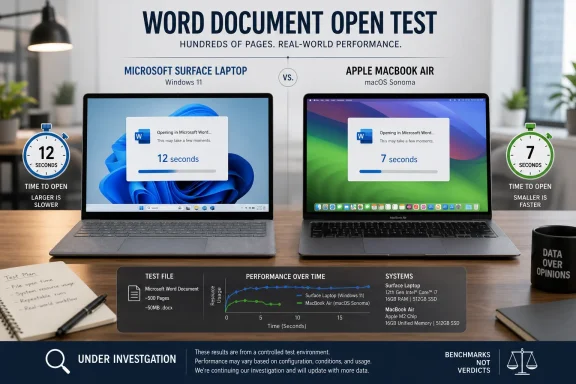 The Word result is real enough to investigate, but not enough to diagnose
Windows Latest says PhoneBuff used the same 500-page Word document in both comparisons. That is a reasonable starting point: document opening is a task people actually notice, particularly in legal, publishing, education, and enterprise environments where reports and contracts can become unwieldy.Yet opening a document is much more than loading text into a window. Word has to start its process, load its application components, initialize graphics and fonts, query or load extensions, access the file system, parse the document package, load images and embedded objects, apply styles, perform compatibility checks, and render the first visible page. Any one of those stages can be affected by storage latency, endpoint protection, OneDrive Files On-Demand, document location, third-party add-ins, Office update channel, cached data, and whether this was a true cold start or a repeat run.
The missing details are unusually important because the two Windows systems were not merely different laptops. One was an Arm-based Surface Laptop using Qualcomm’s Snapdragon X2 Plus; the other was an x86 Dell XPS 13 based on Intel’s low-power Core 5 320. Their shared 12-second result hints that the result may not be exclusive to Windows-on-Arm translation overhead. But it still does not establish a Windows-wide defect, because PhoneBuff’s reported timing has not been accompanied by the material needed to reproduce it independently.
Microsoft’s own Windows-on-Arm documentation makes clear that native Arm64 applications deliver the best performance and battery life, while x86 and x64 software can run through emulation with an overhead. The Office build therefore matters. Microsoft supplies Word for macOS as a Universal binary that natively supports Apple silicon, but the reporting does not identify the exact Microsoft 365 build on the Surface, whether every component Word loaded was Arm-native, or whether add-ins changed the process architecture.
If PhoneBuff used the latest Microsoft 365 Apps build, no add-ins, identical local copies of the file, recent Windows and macOS releases, and controlled cold-start conditions, the result would be far more serious. As presented, the benchmark is a valuable trigger for investigation—not a clean allocation of blame among Word, Windows 11, the file path, the SSDs, or the laptop configurations.
The comparison exposes a pricing problem for Surface
The Surface comparison has a second issue that is easier to verify than the Word timing: the current official U.S. price does not support the “$300 more” framing quoted by Windows Latest for the Snapdragon X2 Plus Surface Laptop versus the M5 MacBook Air.Microsoft’s U.S. Store lists the 13.8-inch Surface Laptop, 8th Edition with Snapdragon X2 Plus, 16GB of memory, and a 512GB SSD from $1,599.99. Apple introduced the 13-inch M5 MacBook Air in March at $1,099 with 16GB of unified memory and 512GB of storage. On those baseline public configurations, the Surface premium is $500, not $300.
There may be a sale, education price, retailer-specific SKU, or different Surface model behind the lower number. Windows Latest did not identify one. But the retail price matters more than usual here because the test is being used to make a buying recommendation. A $300 gap is one calculation; a $500 gap materially changes what a Windows buyer should expect in display, ports, serviceability, software compatibility, and device management before accepting any performance deficit.
The MacBook Air is not automatically the better IT purchase. Windows remains the necessary platform for many line-of-business applications, management tooling, drivers, and Windows-only workflows. MacBook buyers also must account for their own platform constraints. But for an individual choosing between a current $1,599 Surface Laptop and a $1,099 M5 MacBook Air, Microsoft cannot lean on a vague “Surface experience” premium while its own Office app appears slower in the one test receiving attention.
Microsoft’s published Surface claims also require careful reading. Its advertised active-web battery testing is a controlled vendor measurement, not a mixed Word-and-Excel productivity workload. It says little about a specific document opening slower than expected, and it does not settle how the Surface behaves with an enterprise image, endpoint security agent, redirected folders, or a full suite of Office plug-ins.
The battery finding is encouraging, but it is a different claim
The better news for Windows is that Windows Latest says the same PhoneBuff runs found lower battery drain on the XPS 13 than on the MacBook Neo during a two-hour productivity segment, and lower drain on the Surface Laptop than the M5 MacBook Air in its comparable sequence. The test reportedly rotated through Word and Excel activity with typing, copy-and-paste work, Spotify playback, and other scripted actions.That result is plausible, particularly for light productivity use. Windows-on-Arm was designed around the efficiency advantages of Arm systems, while Intel’s latest low-power designs are competing much more directly with Apple on idle power and modest office workloads than older laptop chips did.
It is also directionally supported, though not duplicated, by Tom’s Guide. Its separate continuous web-browsing test found Dell’s 2026 XPS 13 running for 14 hours and 29 minutes, versus 13 hours and 26 minutes for the MacBook Neo. That is not the same workload or methodology as PhoneBuff’s automated productivity sequence, so it cannot validate the percentage-drain figures. It does show that the Dell’s battery result is not inherently implausible.
The important practical point is that battery life and Word document-open latency are different measurements. A system can consume less power during a scripted office session while still taking longer to launch an application or parse a particular document. Treating PhoneBuff’s battery chart as proof that the XPS is the better machine in every productivity task would be as misleading as treating one Word file as proof that every Windows 11 PC runs Office poorly.
Microsoft’s Windows optimization program does not answer the Word question
Windows Latest ties the Word result to Microsoft’s recently stated effort to reduce Windows 11’s memory footprint and improve responsiveness on PCs with 8GB of RAM. Microsoft has publicly emphasized native Windows development and performance work in WinUI, and reporting from Windows Central says the company intends to improve Windows 11’s behavior on 8GB systems before the end of 2026.That work is worthwhile, especially when the Dell tested by PhoneBuff reportedly had 8GB of memory. But memory footprint is not synonymous with Word’s document-open path. A leaner Start menu, fewer UI allocations, and less pressure from web-based system surfaces may improve the overall feel of an entry-level PC. They will not necessarily fix a delay caused by Word’s document parser, a cloud-file hydration request, a font enumeration bottleneck, an extension, or an SSD configuration.
The WebView2 angle is even less relevant to this specific result than the article suggests. WebView2 embeds the Edge browser engine in applications; Word’s core desktop document loading path is not simply a WebView2 page. Replacing web-backed Windows interfaces with more native code may make Windows 11 feel lighter, but it should not be offered as an explanation for a Word benchmark without evidence that those components were involved.
Microsoft has the instrumentation to identify the delay precisely. A proper response would break the operation into Word process launch, file acquisition, document parsing, image and object load, layout, and first-paint timing. It should then be tested across current Microsoft 365 builds on Arm and x86, with 8GB and 16GB configurations, local and OneDrive-hosted copies, and a clean profile versus a typical enterprise setup.
What Windows buyers should do with this result
For now, buyers should not conclude that a MacBook will open every large Word file twice as fast as a Windows laptop. The test does not show that. Nor should they dismiss it because a single document can be unusual: two separate Windows-versus-Mac comparisons reaching the same 7-second and 12-second pattern is enough to warrant scrutiny.IT administrators with Word-heavy users can test the claim internally with a representative document set. Use identical locally stored files first, record the Microsoft 365 version and Windows build, run cold and warm starts separately, and repeat with add-ins disabled. Then compare a managed device against a clean build. That will identify whether the delay comes from Office itself or from the environment organizations actually deploy.
Microsoft’s immediate problem is perception, but its larger problem is value. A Surface Laptop that costs hundreds more than an M5 MacBook Air cannot afford to look slower at opening Word, even if the gap later proves to be specific to one test file or setup. The company needs to publish a reproducible explanation—or deliver the Office fix that makes the question disappear.
References
- Related coverage: windowscentral.com
Microsoft confirms it will make Windows 11 run better on PCs with 8GB RAM: Promises continued focus on fixing Windows' biggest issues this year | Windows Central
Microsoft's Windows chief Pavan Davuluri has provided an update on the work it's been doing to fix Windows 11's biggest problems.www.windowscentral.com - Related coverage: support.microsoft.com
April 30, 2026—KB5083631 (OS Builds 26200.8328 and 26100.8328) Preview | Microsoft Support
April 30, 2026—KB5083631 (OS Builds 26200.8328 and 26100.8328) Previewsupport.microsoft.com - Related coverage: techcommunity.microsoft.com
- Related coverage: techspot.com
Microsoft admits Windows 11 lost its way, Nadella pledges to "win back fans" | TechSpot
During Microsoft's fiscal Q3 2026 earnings call, Nadella put consumer Windows front and center. As part of Microsoft's broader push to reconnect with users across its platforms,...www.techspot.com - Related coverage: learn.microsoft.com
Introduction to Microsoft Edge WebView2 - Microsoft Edge Developer documentation | Microsoft Learn
Host web content in your Win32, .NET, UWP apps with the Microsoft Edge WebView2 control.learn.microsoft.com - Related coverage: notebookcheck.com
Microsoft und Dell sticheln gegen Apple MacBook Neo - Notebookcheck News
Nachdem AMD das Apple MacBook Neo mit einer irreführenden Werbekampagne diskreditieren wollte, sticheln nun auch Microsoft und Dell gegen das günstige MacBook. Dabei schießt Microsoft nicht ganz so weit am Ziel vorbei wie AMD, das Dell XPS 13 ist in einigen Regionen aber wesentlich teurer als... www.notebookcheck.com
- Related coverage: download.microsoft.com
- Related coverage: docs.oracle.com
- Related coverage: techcommunity.microsoft.com
- Related coverage: help.syspro.com
- Related coverage: pcgamer.com
Microsoft is building new '100% native' Windows programs to replace memory-hogging web apps | PC Gamer
Microsoft shows Windows 11 yet more love.www.pcgamer.com - Related coverage: techradar.com
Microsoft reveals another way it's making Windows 11 faster, with more performance boosts promised for the likes of File Explorer | TechRadar
Microsoft is falling over itself to make Windows 11 more performantwww.techradar.com - Related coverage: tomshardware.com
Apple MacBook Air (13-inch, M5) review: Steady as it goes | Tom's Hardware
The MacBook Air with M5 is still the best Mac laptop for most.www.tomshardware.com - Related coverage: digitaltrends.com
MacBook Air 13 (M4) vs. Surface Laptop 7: Apple's perfect little laptop wins out - Digital Trends
The Apple MacBook Air 13 (M4) and Microsoft Surface Laptop 7 are excellent 13-inch (or 14-inch) laptops. Which is better for you?www.digitaltrends.com - Related coverage: techradar.com
Apple MacBook Air 13 (M5) review: small changes add up to the best MacBook yet | TechRadar
Pro power in the ultraportable framewww.techradar.com - Related coverage: signal65.com
- Related coverage: principledtechnologies.com
graphs
Beautiful mixed race woman sitting in an armchair, relaxing at home, using a laptop computer and having a phone conversationwww.principledtechnologies.com
- Related coverage: principledtechnologies.com
graphs
Beautiful mixed race woman sitting in an armchair, relaxing at home, using a laptop computer and having a phone conversation - Related coverage: tomsguide.com
Microsoft Surface Laptop 8 review: Fast Panther Lake power, shocking price | Tom's Guide
The Microsoft Surface Laptop 8 offers strong performance and long battery life. However, its high $1,949 asking price is a lot to ask for the average consumer.www.tomsguide.com - Related coverage: learn.microsoft.com
Frequently asked questions about support for Windows on Arm. | Microsoft Learn
Frequently asked questions about support for Arm-based devices on Windows.learn.microsoft.com - Related coverage: support.microsoft.com
Use Office for Mac powered by Apple silicon | Microsoft Support
If you're using a Mac that has the Apple silicon processor instead of the Intel processor, some Office features may not be available yet. To access these features, the Rosetta emulator on your Mac can be used to run Office apps.support.microsoft.com - Related coverage: microsoft.com
Buy Surface Laptop, 13.8-in (8th Ed) Price, Specs, Windows | Microsoft Store
Buy the 2026 Surface Laptop, 13.8-inch (8th Ed) — a Snapdragon X2 laptop with Windows 11, a 120Hz HDR touchscreen, built-in NPU, Wi-Fi 7, up to 64 GB memory, and removable SSD storage. View price and specifications in the Microsoft Store. For students, the lightweight 13.8-inch build, built-in...www.microsoft.com
- Related coverage: apple.com
Apple introduces the new MacBook Air with M5 - Apple
Apple today announced the new MacBook Air with M5, bringing exceptional performance and expanded AI capabilities to the world’s most popular laptop.www.apple.com - Related coverage: support.apple.com
MacBook Air (13-inch, M5) - Tech Specs - Apple Support
MacBook Air (13-inch, M5) - Tech Specssupport.apple.com - Related coverage: cdn-dynmedia-1.microsoft.com
- Related coverage: microsoft.com
- Related coverage: cdn-dynmedia-1.microsoft.com
