
The change is narrower than a delay to Teams Facilitator itself. Facilitator already provides collaborative notes, agenda support, time markers, and interactive meeting assistance for licensed Microsoft 365 Copilot users. What has slipped is its ability to listen for an unanswered factual question or expressed uncertainty, decide that the meeting has a knowledge gap, run a web search, and add an answer to the shared meeting chat without someone explicitly prompting it.
For Teams administrators, the practical consequence is less about waiting another few weeks for an AI feature and more about the rollout’s moving target. The proactive behavior has now been rescheduled three times inside Microsoft’s own Message Center history, while the product documentation exposes unresolved governance details around external meetings and data handling.
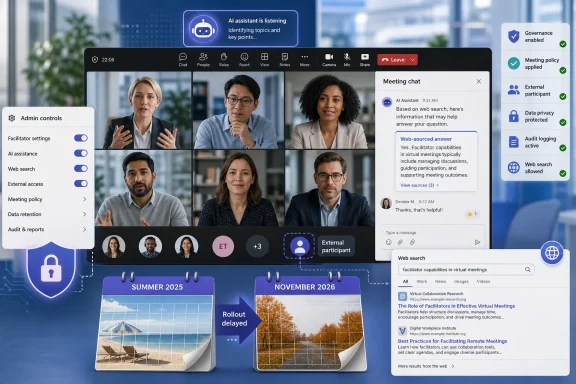 The November date is the fourth published rollout plan
The Register noted that Microsoft initially put the feature on its roadmap for June, then moved the expected release through July, August, and September before landing on November. The more useful record for IT departments is Microsoft’s Message Center item MC1409304, which shows the schedule changes after Microsoft began notifying tenants directly.
When the Message Center post appeared on June 29, 2026, Microsoft expected Targeted Release in early July and worldwide availability in early August. A July 28 revision moved those dates to early September and late September. The August 26 revision moved them again: Targeted Release is now due to start in early November and complete in mid-November, while worldwide deployment is slated to begin in mid-November and complete in mid-December.
There is one further scheduling detail that deserves attention. Microsoft’s revised Message Center metadata lists January 11, 2027 as the change’s end date, despite the body saying worldwide general availability should complete in mid-December 2026. That does not necessarily mean the launch will run into January; Message Center end dates can encompass post-rollout activity. But it means administrators should not treat mid-December as a universal availability guarantee for every tenant, client, or policy combination.
Microsoft has not publicly explained the cause of the delay. The company’s latest notice simply says the timeline was updated and thanks customers for their patience. There is no indication of a security incident or an announced technical defect. Still, repeated postponements on a feature whose core job is to infer conversational intent are meaningful: the hard part is not returning a web result, but deciding when unsolicited intervention is appropriate and when it will be wrong, disruptive, or out of context.
Facilitator will speak to the whole meeting, not a single user
Microsoft’s description makes clear that this is not equivalent to the ordinary Copilot panel in Teams. A user’s direct prompts to Copilot in Teams and Copilot’s replies are private to that user. Facilitator operates as a meeting participant: its prompts and responses appear in the meeting conversation where the attendees can see them.
The proactive capability is supposed to be deliberately restrained. Microsoft says it will identify implicit or explicit information needs, search the web, and post an answer in the chat if someone asks a factual question and nobody answers. The company says responses should be infrequent, typically occurring less than once per meeting, and constrained by the agenda signals and conversational context.
That design exposes the actual deployment risk. A web answer that is technically accurate can still be a poor response to a meeting discussion: it may use an outdated source, answer a question that was rhetorical, miss an organization-specific exception, or settle an issue that participants were deliberately considering. In a shared chat, it also becomes a visible artifact that attendees may treat as authoritative simply because it appeared under Microsoft’s agent identity.
Microsoft has not published a precision rate, false-positive rate, source-quality policy, or a list of search providers for this feature. It has also not said whether organizations can tune the sensitivity of the knowledge-gap detection rather than enabling or disabling the capability wholesale. Those omissions are more consequential than the consumer-style question of whether the agent will be annoying. They determine whether a meeting assistant is useful enough for broad deployment in legal, financial, healthcare, engineering, or executive discussions.
The feature is opt-in per meeting, but the tenant controls need review now
Microsoft’s Message Center notice says Facilitator must be manually added to the meeting and is not enabled by default. A person with a Microsoft 365 Copilot license must enable Facilitator; unlicensed attendees can still see the agent’s answers. Removing Facilitator stops the proactive behavior.
That provides an important containment mechanism. A tenant is not supposed to wake up in November with an autonomous agent joining every Teams meeting and searching the web. But it does not eliminate the need for admin preparation, because users who hold a Copilot license can initiate Facilitator once the app and its prerequisites are permitted.
Microsoft’s Teams documentation says Facilitator requires an eligible Microsoft 365 base license, a Teams license, a Microsoft 365 Copilot license, and Loop experiences enabled in Teams. Administrators can allow or block Facilitator for the organization or selected users through Teams app management and app policies. The proactive feature additionally depends on the Microsoft 365 Copilot web-search setting: if web search is disabled, the agent cannot generate these automatic answers.
The safest deployment decision for organizations that have not tested this workflow is to leave the tenant-level web-search posture unchanged and limit Facilitator availability to a pilot group rather than assume that manual meeting activation is sufficient governance. The initiating employee may understand that an assistant is being invited; the meeting’s other participants may not understand that the assistant can process speech in real time and publish search-derived material to the chat.
Administrators should also verify whether their help-desk documentation distinguishes Facilitator from ordinary Teams Copilot. The permissions, visibility, and stored output are different enough that users will otherwise describe both as “Copilot in a meeting,” obscuring what actually occurred.
- Teams administrators should confirm whether Facilitator is allowed for all users or only defined pilot groups in the Teams admin center.
- Copilot administrators should document the organization’s web-search setting, because disabling it prevents proactive responses even when Facilitator is present in a meeting.
- Compliance teams should test the behavior in a standard meeting before approving it for sensitive departments, including how answers appear in chat and how they are retained.
- Support teams should tell licensed users that removing Facilitator from a meeting is the immediate way to stop the proactive behavior.
Microsoft’s external-meeting documentation does not yet agree
The most notable documentation gap is whether this capability is available in meetings with people outside the tenant. Microsoft’s August 26 Message Center notice specifically says the proactive knowledge-gap experience supports meetings that include external or cross-tenant participants.
But Microsoft’s general Facilitator setup documentation, updated August 13, says Facilitator is currently unsupported in external chats and meetings. The two statements are difficult to reconcile. The dates offer a possible explanation: the feature-specific Message Center update is newer and may be describing an exception or a newer capability than the broader setup page. Yet Microsoft has not published a clarification establishing which documentation administrators should follow.
Until that conflict is resolved, organizations with strict external-collaboration controls should treat external and cross-tenant support as unconfirmed in their own configuration rather than assume the Message Center claim guarantees the experience will be available—or appropriately governed—in every federated meeting. This is exactly the kind of detail that changes a pilot from an internal productivity test into a data-sharing decision.
The documentation also identifies limits around Facilitator’s existing meeting notes that should factor into policy review. Facilitator data is treated as meeting transcript data, and Microsoft says it is stored in a OneDrive location associated with the user who initiated it. Microsoft further says AI-generated meeting notes do not automatically inherit the meeting’s sensitivity label, and that meeting controls such as watermarks and copy-and-paste prevention do not apply to Facilitator responses or AI-generated notes.
Those limitations do not prove that the delayed web-answer feature shares every same behavior. They do demonstrate, however, that the Facilitator workflow creates material outside the narrow mental model of a temporary meeting conversation. IT and compliance teams need to look at the resulting chat, notes, storage location, retention treatment, and sensitivity-label handling as a single workflow.
Standard meetings only, with a narrower launch than the product name suggests
The November rollout is intended for standard Teams meetings. Microsoft says it will not support Teams calls, webinars, or town halls. That distinction matters operationally because those excluded formats are often where organizations would most want a public-facing or large-audience question-answering assistant.
The feature also requires a licensed person to turn on Facilitator, while everyone else in the meeting can receive its posts. Microsoft has positioned this as a Microsoft 365 Copilot capability, not a broadly available Teams addition. The licensing boundary means a small Copilot pilot can still alter the meeting experience for colleagues, guests, and external attendees who do not have a Copilot entitlement.
The delay therefore buys administrators useful time. Before Targeted Release begins in early November, they should decide whether Facilitator belongs in their Teams app policies, verify the Copilot web-search control, test recordkeeping and sensitivity-label results, and get a written answer from Microsoft on external-meeting support. By mid-December, the decisive question will not be whether Teams can search the web during a pause in conversation; it will be whether the tenant has decided where that answer may appear, who may trigger it, and what happens to it afterward.