
For organizations that selected Android room hardware for simpler appliance-style deployments, the change closes a meaningful functional gap. Microsoft’s current Teams Rooms feature-comparison documentation lists “Coordinated meetings” as available on Windows and not available on Android. The roadmap entry is therefore a promise of platform parity, not an incremental enhancement to something Android rooms already do.
Microsoft has not published supported hardware models, a minimum Teams Rooms on Android app version, licensing requirements, configuration screens, or a public-preview date. Admins should treat the January date as a planning marker rather than a deployment commitment.
 What coordinated meetings actually change
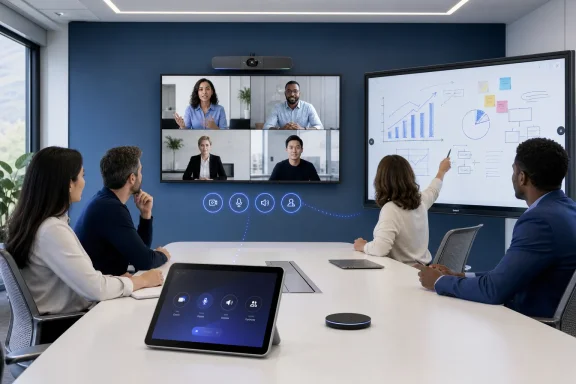
Coordinated meetings are designed for one physical meeting space with more than one Teams endpoint. A common setup has a standard front-of-room Teams Rooms system supplying the main camera, microphones, speakers, and display, while a secondary device—often a Surface Hub or touch board—handles interactive whiteboarding.
When a user joins a scheduled meeting from the primary room system, coordinated meetings send an instruction to the paired secondary device to join the same meeting. Leaving from the primary room similarly ends the session on the paired device. The room behaves less like a collection of independent endpoints and more like one meeting installation with distinct roles.
Microsoft’s existing Windows documentation makes clear that this is not merely synchronized button behavior. Each device needs its own Teams Rooms resource account and a defined trust relationship with the other device accounts. Administrators assign which device owns audio, video, and whiteboarding; they also decide whether participants can enable camera or microphone capabilities on a secondary endpoint after joining.
That configuration model is important because joining multiple room endpoints to one meeting without controls produces an obvious failure mode: duplicate microphones. Microsoft explicitly warns that more than one active microphone in a coordinated room can create echo and feedback. A secondary touch board can contribute a camera angle or an interactive canvas, but it should not become an unmanaged second conference-room audio system.
Android rooms gain a multi-device role
Teams Rooms on Android already supports the baseline meeting-room experience: one-touch join, meeting controls, content sharing, layouts, Whiteboard, device health reporting, and remote configuration through Microsoft’s management tools. Android also has strengths that can make it attractive in purpose-built spaces, including a broad lineup of certified appliances and all-in-one touch-board designs.
But the current Microsoft Learn comparison shows the difference between individual device capabilities and a coordinated multi-device room. Android can run a touch board and initiate or interact with Whiteboard in supported scenarios, yet it cannot presently coordinate that board with another Teams Rooms endpoint as one joined meeting system.
Roadmap ID 569420 suggests Microsoft intends to support paired Teams Rooms on Android devices and Android-based touch boards specifically. That wording matters. The announcement does not say that every Android display, every third-party collaboration board, or every mixed Windows-and-Android room combination will work.
The practical early use case is a larger conference room where a fixed Android Teams Rooms appliance handles room audio and video while an Android touch board provides whiteboarding or a second collaboration surface. It could also reduce the operational pressure to standardize these rooms on Windows solely to gain coordinated joining.
Microsoft’s roadmap language says the feature will support collaboration “across front-of-room displays and touch boards,” but it does not explain how the paired displays will divide meeting content, participant video, whiteboard content, or controls. Those details affect AV design decisions. A room that merely mirrors content to an additional screen has very different requirements from one where a secondary board is an independently interactive participant in the meeting.
Windows deployments show the configuration work ahead
Microsoft’s present setup guidance for coordinated meetings on Windows is a useful indication of what Android administrators should expect, even though Microsoft has not yet published Android-specific instructions. The documented process starts with a deployment plan that identifies the primary device, the secondary device, their room-resource accounts, and the capabilities that each endpoint may activate.
The primary endpoint should normally own the room’s microphone and camera. Microsoft recommends disabling default audio and video on other devices, while allowing a secondary camera where the organization genuinely needs another video perspective—for example, a whiteboard camera or an additional view of a large room.
The Windows configuration also requires administrators to populate each device’s trusted-account list with the user principal names of the other devices. The managed configuration can be applied locally from the device touchscreen or through the Teams Rooms Pro Management Portal. Once settings are applied, Microsoft says the devices restart before they are ready to participate.
This tells IT teams two things about the Android roadmap item. First, purchasing two certified Android endpoints will not automatically produce a coordinated room. Pairing will depend on account design, room configuration, and deliberate decisions around audio, video, and Whiteboard roles. Second, Teams Rooms management and AV management must be planned together. The IT administrator responsible for resource accounts and policies cannot safely treat the work as a display installer’s final step.
The roadmap leaves major purchasing questions unanswered
The January 2027 target is seven months away, and Microsoft’s entry is unusually sparse for a feature that may affect conference-room hardware purchases. The roadmap identifies general availability and worldwide standard multi-tenant availability, but does not specify support for Government Community Cloud, GCC High, Department of Defense, or other sovereign environments.
It also does not say whether the feature will require Teams Rooms Pro licenses. Microsoft’s Windows guidance describes configuration through the Teams Rooms Pro Management Portal, but the roadmap does not establish that Android coordinated meetings will be a Pro-only capability, will have a different licensing gate, or will be configurable from the Teams Admin Center.
Hardware support is another unresolved issue. Microsoft maintains a sizeable certification list for Teams Rooms on Android, covering systems from vendors such as Cisco, Logitech, Poly, Yealink, Neat, Barco, and others. Certification alone should not be read as a commitment that a device can serve in every future coordinated-meeting role. An all-in-one touch board may need different software and hardware support than a room bar, compute appliance, console, or conventional front-of-room display.
Admins evaluating a room refresh should therefore avoid treating this announcement as a reason to freeze a Windows design or buy Android hardware specifically for coordinated meetings today. The only confirmed status as of August 21, 2026 is in development. Microsoft can still change the target date, capability boundaries, or supported-device list before release.
Planning now means documenting the room, not enabling a feature
There is still useful work to do before Microsoft ships the Android implementation. Organizations with complex rooms can inventory their current endpoints and identify whether the desired experience actually calls for coordinated meetings rather than dual displays, a single touch display, or ordinary content sharing.
For rooms that do need two meeting endpoints, the preparation is operational:
- Each proposed endpoint should have a distinct room resource account and a documented purpose in the room.
- One device should be assigned as the default audio owner, with secondary microphones disabled unless a tested design requires them.
- Administrators should decide whether the secondary device needs an active camera, Whiteboard access, or only a shared display role.
- AV and collaboration teams should test touch-board workflows with remote participants, not only the in-room experience.
Microsoft’s January 2027 rollout target brings Android Teams Rooms closer to an established Windows multi-device scenario. But the key value is not synchronized joining by itself. It is the ability to build an Android-based room where the front-of-room system and interactive board have defined, manageable responsibilities without forcing users to manually join the same meeting twice.
Until Microsoft publishes Android deployment guidance and a supported-device matrix, that is the limit of what the roadmap establishes.